mirror of
https://github.com/jbranchaud/til
synced 2026-10-31 16:23:27 +00:00
Compare commits
206
Commits
| Author | SHA1 | Date | |
|---|---|---|---|
 jbranchaud jbranchaud
|
2b29a572bb | ||
|
jbranchaud
|
91a69640d8 | ||
|
jbranchaud
|
0f143e71ed | ||
|
jbranchaud
|
ae83a39fa8 | ||
|
jbranchaud
|
c301401663 | ||
|
jbranchaud
|
8129ad0eaa | ||
|
jbranchaud
|
29676e0d5a | ||
|
jbranchaud
|
dded5f6135 | ||
|
jbranchaud
|
7ac2855666 | ||
|
jbranchaud
|
861ef05330 | ||
|
jbranchaud
|
5cff306092 | ||
|
jbranchaud
|
d9f4daa41d | ||
|
jbranchaud
|
c185256034 | ||
|
jbranchaud
|
56ee385e96 | ||
|
jbranchaud
|
30e37f28aa | ||
|
jbranchaud
|
20ba238ffa | ||
|
jbranchaud
|
6218839e46 | ||
|
jbranchaud
|
44720168f0 | ||
|
jbranchaud
|
8ee23956d2 | ||
|
jbranchaud
|
7e4a02e66f | ||
|
jbranchaud
|
965bade9d4 | ||
|
jbranchaud
|
2a2a962864 | ||
|
jbranchaud
|
a1708116bb | ||
|
jbranchaud
|
85a6dd3644 | ||
|
jbranchaud
|
453e9edbdf | ||
|
jbranchaud
|
bcf957cabd | ||
|
jbranchaud
|
fe019c3338 | ||
|
jbranchaud
|
5773961c93 | ||
|
jbranchaud
|
8191e9303b | ||
|
jbranchaud
|
74e71cf1af | ||
|
jbranchaud
|
a16dcc7760 | ||
|
jbranchaud
|
c495194a0d | ||
|
jbranchaud
|
e3f8446980 | ||
|
jbranchaud
|
d4ebff5939 | ||
|
jbranchaud
|
565d6a4680 | ||
|
jbranchaud
|
3c1ec67965 | ||
|
jbranchaud
|
f83b5003de | ||
|
jbranchaud
|
78c9e92bae | ||
|
jbranchaud
|
2bb402ad40 | ||
|
jbranchaud
|
38b822fb5c | ||
|
jbranchaud
|
d0496bd8ce | ||
|
jbranchaud
|
47b83535b8 | ||
|
jbranchaud
|
a83030bb6d | ||
|
jbranchaud
|
eb419752c4 | ||
|
jbranchaud
|
b484204c2f | ||
|
jbranchaud
|
f2de2ce3f4 | ||
|
jbranchaud
|
4055ed7a7d | ||
|
jbranchaud
|
0866968be3 | ||
|
jbranchaud
|
2e34d6480b | ||
|
jbranchaud
|
64b464c931 | ||
|
jbranchaud
|
1a0b02168e | ||
|
jbranchaud
|
146274230e | ||
|
jbranchaud
|
300a22f18b | ||
|
jbranchaud
|
1225349978 | ||
|
jbranchaud
|
0fbf06a2ce | ||
|
jbranchaud
|
2c247f2e20 | ||
|
jbranchaud
|
6a67541aa4 | ||
|
jbranchaud
|
57188341a6 | ||
|
jbranchaud
|
ef29b716a7 | ||
|
jbranchaud
|
45abb66c0a | ||
|
jbranchaud
|
6e222acf41 | ||
|
jbranchaud
|
e72dfdd467 | ||
|
jbranchaud
|
8247e798ee | ||
|
jbranchaud
|
da556a3903 | ||
|
jbranchaud
|
348843186d | ||
|
jbranchaud
|
eb7b54b0cd | ||
|
jbranchaud
|
25f5029ad3 | ||
|
jbranchaud
|
7128f99da2 | ||
|
jbranchaud
|
8f47b3dae0 | ||
|
jbranchaud
|
51f83dcaf0 | ||
|
jbranchaud
|
4d0969ccad | ||
|
jbranchaud
|
8060163d70 | ||
|
jbranchaud
|
b9a402bb0f | ||
|
jbranchaud
|
8eaa193281 | ||
|
jbranchaud
|
e9e7ab1fc2 | ||
|
jbranchaud
|
21132e9640 | ||
|
jbranchaud
|
1a83ccb852 | ||
|
jbranchaud
|
aca5953a2e | ||
|
jbranchaud
|
5ce584f0b9 | ||
|
jbranchaud
|
8f4cefbbab | ||
|
jbranchaud
|
7e29050f68 | ||
|
jbranchaud
|
5bc87154d3 | ||
|
jbranchaud
|
096e5622d3 | ||
|
jbranchaud
|
a1ccfb0ac1 | ||
|
jbranchaud
|
895fefdc58 | ||
|
jbranchaud
|
b520d6525b | ||
|
jbranchaud
|
b7af4da998 | ||
|
jbranchaud
|
3dc51590bd | ||
|
jbranchaud
|
53c07d23f4 | ||
|
jbranchaud
|
f74c17bc1e | ||
|
jbranchaud
|
33c8838d56 | ||
|
jbranchaud
|
02ea96f15f | ||
|
jbranchaud
|
d39156d424 | ||
|
jbranchaud
|
f02337a5e7 | ||
|
jbranchaud
|
0c293de912 | ||
|
jbranchaud
|
d4766dad95 | ||
|
jbranchaud
|
5f4308c1af | ||
|
jbranchaud
|
8c463a90e3 | ||
|
jbranchaud
|
329267c7a2 | ||
|
jbranchaud
|
12180acb02 | ||
|
jbranchaud
|
8f722061b4 | ||
|
jbranchaud
|
a126b13d7c | ||
|
jbranchaud
|
0ae3f14c25 | ||
|
jbranchaud
|
b91527db30 | ||
|
jbranchaud
|
c8f8c2c1a3 | ||
|
jbranchaud
|
c397e35ffd | ||
|
jbranchaud
|
bbb28fd811 | ||
|
jbranchaud
|
950e2f861a | ||
|
jbranchaud
|
20bbdb6d55 | ||
|
jbranchaud
|
03c11f9042 | ||
|
jbranchaud
|
cea6c75e1c | ||
|
jbranchaud
|
539cbbefa6 | ||
|
jbranchaud
|
3eddb54053 | ||
|
jbranchaud
|
49628a7849 | ||
|
jbranchaud
|
3919b721cd | ||
|
jbranchaud
|
9c65e5c0b3 | ||
|
jbranchaud
|
e58ffffda0 | ||
|
jbranchaud
|
d87e125472 | ||
|
jbranchaud
|
facc606014 | ||
|
jbranchaud
|
be103b52dd | ||
|
jbranchaud
|
3402428aad | ||
|
jbranchaud
|
0c00e47141 | ||
|
jbranchaud
|
1c90fdd823 | ||
|
jbranchaud
|
bf3991ce04 | ||
|
jbranchaud
|
3db5af78c1 | ||
|
jbranchaud
|
a8c35e2458 | ||
|
jbranchaud
|
c0ad3cee4d | ||
|
jbranchaud
|
9bd1bb413a | ||
|
jbranchaud
|
ab8331000f | ||
|
jbranchaud
|
cd54360925 | ||
|
jbranchaud
|
75421685ea | ||
|
jbranchaud
|
0cb5890fc0 | ||
|
jbranchaud
|
7de0e70d78 | ||
|
jbranchaud
|
36934aa56f | ||
|
jbranchaud
|
2cd465bb08 | ||
|
jbranchaud
|
6ad376885b | ||
|
jbranchaud
|
0c4702be97 | ||
|
jbranchaud
|
b873f86f5b | ||
|
jbranchaud
|
1120bb2018 | ||
|
jbranchaud
|
906253b7dc | ||
|
jbranchaud
|
b4920c0397 | ||
|
jbranchaud
|
119cc15c9a | ||
|
jbranchaud
|
1a4589f8f7 | ||
|
jbranchaud
|
5f35404433 | ||
|
jbranchaud
|
1766e45134 | ||
|
jbranchaud
|
c875652725 | ||
|
jbranchaud
|
8af252f232 | ||
|
jbranchaud
|
eb0a7e1b3d | ||
|
jbranchaud
|
c1cd40311f | ||
|
jbranchaud
|
c744117eff | ||
|
jbranchaud
|
329ce1aa3e | ||
|
jbranchaud
|
16082177aa | ||
|
jbranchaud
|
2276a57445 | ||
|
jbranchaud
|
ceaab3da4f | ||
|
jbranchaud
|
c7711ca337 | ||
|
jbranchaud
|
11279ac362 | ||
|
jbranchaud
|
01f9d89e8e | ||
|
jbranchaud
|
e1c3f23975 | ||
|
jbranchaud
|
16ad6bd64d | ||
|
jbranchaud
|
f2a6fddba8 | ||
|
jbranchaud
|
e2603f1445 | ||
|
jbranchaud
|
c1f046d196 | ||
|
jbranchaud
|
55a6691681 | ||
|
jbranchaud
|
3632cfbe1b | ||
|
jbranchaud
|
e82bc873b9 | ||
|
jbranchaud
|
43ade88fab | ||
|
jbranchaud
|
8f99085e4b | ||
|
jbranchaud
|
f20428b06a | ||
|
jbranchaud
|
e41802653d | ||
|
jbranchaud
|
2cc52bf8bc | ||
|
jbranchaud
|
df418b5718 | ||
|
jbranchaud
|
d084e0ffe0 | ||
|
jbranchaud
|
72b466a8b3 | ||
|
jbranchaud
|
be18f387ed | ||
|
jbranchaud
|
efb83050ab | ||
|
jbranchaud
|
ec12f7ea80 | ||
|
jbranchaud
|
f186d5977d | ||
|
jbranchaud
|
f967520fa3 | ||
|
jbranchaud
|
1517e1fb7a | ||
|
jbranchaud
|
f56d93b49b | ||
|
jbranchaud
|
dd6350aa41 | ||
|
jbranchaud
|
bdd3adf577 | ||
|
jbranchaud
|
f48adc0f05 | ||
|
jbranchaud
|
9773f10b84 | ||
|
jbranchaud
|
bd58be8fda | ||
|
jbranchaud
|
35f1f0b807 | ||
|
jbranchaud
|
81afd44913 | ||
|
jbranchaud
|
6fdadfa1fb | ||
|
jbranchaud
|
aaf7da413c | ||
|
jbranchaud
|
6a2a0a8ac1 | ||
|
jbranchaud
|
712fc66aae | ||
|
jbranchaud
|
e95477607e | ||
|
jbranchaud
|
087766a792 | ||
|
jbranchaud
|
4801e730f9 | ||
|
jbranchaud
|
bd021f7eab | ||
|
jbranchaud
|
8d8cfd56ce | ||
|
jbranchaud
|
f4faa06258 | ||
|
jbranchaud
|
8ccbd82320 | ||
|
jbranchaud
|
5ea4165893 | ||
|
jbranchaud
|
73476a8d16 | ||
|
jbranchaud
|
c5ce81f918 | ||
|
jbranchaud
|
32be787998 | ||
|
jbranchaud
|
1d835d3553 | ||
  copilot-swe-agent[bot]andjbranchaud copilot-swe-agent[bot]andjbranchaud
|
0d4959046d | ||
|
copilot-swe-agent[bot]andjbranchaud
|
b1198d2488 | ||
|
copilot-swe-agent[bot]andjbranchaud
|
6c3805e7cd |
@@ -6,14 +6,15 @@ A collection of concise write-ups on small things I learn day to day across a
|
||||
variety of languages and technologies. These are things that don't really
|
||||
warrant a full blog post. These are things I've picked up by [Learning In
|
||||
Public™](https://dev.to/jbranchaud/how-i-built-a-learning-machine-45k9) and
|
||||
pairing with smart people at Hashrocket.
|
||||
working across different projects via [VisualMode](https://www.visualmode.dev/).
|
||||
|
||||
For a steady stream of TILs, [sign up for my newsletter](https://visualmode.kit.com/newsletter).
|
||||
|
||||
_1715 TILs and counting..._
|
||||
_1893 TILs and counting..._
|
||||
|
||||
See some of the other learning resources I work on:
|
||||
|
||||
- [The VisualMode Blog](https://visualmode.dev/blog)
|
||||
- [Get Started with Vimium](https://egghead.io/courses/get-started-with-vimium~3t5f7)
|
||||
- [Ruby Operator Lookup](https://www.visualmode.dev/ruby-operators)
|
||||
- [Vim Un-Alphabet](https://www.youtube.com/playlist?list=PL46-cKSxMYYCMpzXo6p0Cof8hJInYgohU)
|
||||
@@ -29,6 +30,7 @@ If you've learned something here, support my efforts writing daily TILs by
|
||||
* [Ansible](#ansible)
|
||||
* [Astro](#astro)
|
||||
* [AWS](#aws)
|
||||
* [Bash](#bash)
|
||||
* [Brew](#brew)
|
||||
* [Chrome](#chrome)
|
||||
* [Claude Code](#claude-code)
|
||||
@@ -58,6 +60,7 @@ If you've learned something here, support my efforts writing daily TILs by
|
||||
* [Linux](#linux)
|
||||
* [LLM](#llm)
|
||||
* [Mac](#mac)
|
||||
* [Math](#math)
|
||||
* [Mise](#mise)
|
||||
* [MongoDB](#mongodb)
|
||||
* [MySQL](#mysql)
|
||||
@@ -95,6 +98,7 @@ If you've learned something here, support my efforts writing daily TILs by
|
||||
* [Workflow](#workflow)
|
||||
* [XState](#xstate)
|
||||
* [YAML](#yaml)
|
||||
* [Zed](#zed)
|
||||
* [Zod](#zod)
|
||||
* [Zsh](#zsh)
|
||||
|
||||
@@ -126,11 +130,16 @@ If you've learned something here, support my efforts writing daily TILs by
|
||||
- [Turn Off Output Pager For A Command](aws/turn-off-output-pager-for-a-command.md)
|
||||
- [Use Specific AWS Profile With CLI](aws/use-specific-aws-profile-with-cli.md)
|
||||
|
||||
### Bash
|
||||
|
||||
- [Edit The Current Command Prompt](bash/edit-the-current-command-prompt.md)
|
||||
|
||||
### Brew
|
||||
|
||||
- [Clean Up Your Brew Installations](brew/clean-up-your-brew-installations.md)
|
||||
- [Configure Brew Environment Variables](brew/configure-brew-environment-variables.md)
|
||||
- [Export List Of Everything Installed By Brew](brew/export-list-of-everything-installed-by-brew.md)
|
||||
- [Install From Nonstandard Brewfile](brew/install-from-nonstandard-brewfile.md)
|
||||
- [Install Go Packages In Brewfile](brew/install-go-packages-in-brewfile.md)
|
||||
- [List All Services Managed By Brew](brew/list-all-services-managed-by-brew.md)
|
||||
|
||||
@@ -139,6 +148,7 @@ If you've learned something here, support my efforts writing daily TILs by
|
||||
- [Access A Value Logged To The Console](chrome/access-a-value-logged-to-the-console.md)
|
||||
- [Chrome Supports Many Unix Keyboard Shortcuts](chrome/chrome-supports-many-unix-keyboard-shortcuts.md)
|
||||
- [Copy Some Data From The Console](chrome/copy-some-data-from-the-console.md)
|
||||
- [Duplicate Current Browser Tab](chrome/duplicate-current-browser-tab.md)
|
||||
- [Duplicate The Current Tab](chrome/duplicate-the-current-tab.md)
|
||||
- [Easier Access To Network Throttling Controls](chrome/easier-access-to-network-throttling-controls.md)
|
||||
- [Keybinding To Focus The Address Bar](chrome/keybinding-to-focus-the-address-bar.md)
|
||||
@@ -157,8 +167,17 @@ If you've learned something here, support my efforts writing daily TILs by
|
||||
|
||||
### Claude Code
|
||||
|
||||
- [Allow Edits From The Start](claude-code/allow-edits-from-the-start.md)
|
||||
- [Ask An Agent To Fix Merge Conflicts](claude-code/ask-an-agent-to-fix-merge-conflicts.md)
|
||||
- [Build From My Phone In Cloud Environments](claude-code/build-from-my-phone-in-cloud-environments.md)
|
||||
- [Distinguish Sessions With Different Colors](claude-code/distinguish-sessions-with-different-colors.md)
|
||||
- [Monitor Usage Limits From CLI](claude-code/monitor-usage-limits-from-cli.md)
|
||||
- [Open Current Prompt In Default Editor](claude-code/open-current-prompt-in-default-editor.md)
|
||||
- [Pick Up Session Locally That Started In Cloud](claude-code/pick-up-session-locally-that-started-in-cloud.md)
|
||||
- [Resume Specific Session](claude-code/resume-specific-session.md)
|
||||
- [Set Permission Mode When Starting Session](claude-code/set-permission-mode-when-starting-session.md)
|
||||
- [Stash The Current Prompt To Send Another First](claude-code/stash-the-current-prompt-to-send-another-first.md)
|
||||
- [Use Claude Code From Multiple Accounts](claude-code/use-claude-code-from-multiple-accounts.md)
|
||||
|
||||
### Clojure
|
||||
|
||||
@@ -229,6 +248,7 @@ If you've learned something here, support my efforts writing daily TILs by
|
||||
- [Check For Cached Site Assocation File For iOS](devops/check-for-cached-site-association-file-for-ios.md)
|
||||
- [Check The Status of All Services](devops/check-the-status-of-all-services.md)
|
||||
- [Check The Syntax Of nginx Files](devops/check-the-syntax-of-nginx-files.md)
|
||||
- [Cloudflare Allows CNAME For Apex Domain](devops/cloudflare-allows-cname-for-apex-domain.md)
|
||||
- [Connect To An RDS PostgreSQL Database](devops/connect-to-an-rds-postgresql-database.md)
|
||||
- [Default Rails Deploy Script On Hatchbox](devops/default-rails-deploy-script-on-hatchbox.md)
|
||||
- [Determine The IP Address Of A Domain](devops/determine-the-ip-address-of-a-domain.md)
|
||||
@@ -238,6 +258,7 @@ If you've learned something here, support my efforts writing daily TILs by
|
||||
- [Reload The nginx Configuration](devops/reload-the-nginx-configuration.md)
|
||||
- [Resolve The Public IP Of A URL](devops/resolve-the-public-ip-of-a-url.md)
|
||||
- [Running Out Of inode Space](devops/running-out-of-inode-space.md)
|
||||
- [Set, Get, And Unset Env Vars With Dokku](devops/set-get-and-unset-env-vars-with-dokku.md)
|
||||
- [Set Up Domain For Hatchbox Rails App](devops/set-up-domain-for-hatchbox-rails-app.md)
|
||||
- [SSH Into A Docker Container](devops/ssh-into-a-docker-container.md)
|
||||
- [SSL Certificates Can Cover Multiple Domains](devops/ssl-certificates-can-cover-multiple-domains.md)
|
||||
@@ -330,6 +351,7 @@ If you've learned something here, support my efforts writing daily TILs by
|
||||
- [Check How A File Is Being Ignored](git/check-how-a-file-is-being-ignored.md)
|
||||
- [Check If A File Has Changed In A Script](git/check-if-a-file-has-changed-in-a-script.md)
|
||||
- [Check If A File Is Under Version Control](git/check-if-a-file-is-under-version-control.md)
|
||||
- [Check What Branches Contain A Specific Commit](git/check-what-branches-contain-a-specific-commit.md)
|
||||
- [Checking Commit Ancestry](git/checking-commit-ancestry.md)
|
||||
- [Checkout Old Version Of A File](git/checkout-old-version-of-a-file.md)
|
||||
- [Checkout Previous Branch](git/checkout-previous-branch.md)
|
||||
@@ -348,8 +370,10 @@ If you've learned something here, support my efforts writing daily TILs by
|
||||
- [Count Number Of Commits On A Branch](git/count-number-of-commits-on-a-branch.md)
|
||||
- [Create A New Branch With Git Switch](git/create-a-new-branch-with-git-switch.md)
|
||||
- [Delete All Untracked Files](git/delete-all-untracked-files.md)
|
||||
- [Determine Absolute Path Of Top-Level Project Directory](git/determine-absolute-path-of-top-level-project-directory.md)
|
||||
- [Determine The Hash Id For A Blob](git/determine-the-hash-id-for-a-blob.md)
|
||||
- [Diffing With Patience](git/diffing-with-patience.md)
|
||||
- [Display All Git Log Entries In My Local Timezone](git/display-all-git-log-entries-in-my-local-timezone.md)
|
||||
- [Dropping Commits With Git Rebase](git/dropping-commits-with-git-rebase.md)
|
||||
- [Dry Runs in Git](git/dry-runs-in-git.md)
|
||||
- [Exclude A File From A Diff Output](git/exclude-a-file-from-a-diff-output.md)
|
||||
@@ -379,9 +403,12 @@ If you've learned something here, support my efforts writing daily TILs by
|
||||
- [Interactively Unstage Changes](git/interactively-unstage-changes.md)
|
||||
- [Keep File Locally With `git rm`](git/keep-file-locally-with-git-rm.md)
|
||||
- [Last Commit A File Appeared In](git/last-commit-a-file-appeared-in.md)
|
||||
- [List All Authors On Git Repository](git/list-all-authors-on-git-repository.md)
|
||||
- [List All Commits Where File Was Added Or Deleted](git/list-all-commits-where-file-was-added-or-deleted.md)
|
||||
- [List All Files Added During Span Of Time](git/list-all-files-added-during-span-of-time.md)
|
||||
- [List All Files Changed Between Two Branches](git/list-all-files-changed-between-two-branches.md)
|
||||
- [List All Git Aliases From gitconfig](git/list-all-git-aliases-from-gitconfig.md)
|
||||
- [List And Count All Posts In TIL Repo](git/list-and-count-all-posts-in-til-repo.md)
|
||||
- [List Branches That Contain A Commit](git/list-branches-that-contain-a-commit.md)
|
||||
- [List Commits On A Branch](git/list-commits-on-a-branch.md)
|
||||
- [List Different Commits Between Two Branches](git/list-different-commits-between-two-branches.md)
|
||||
@@ -390,9 +417,11 @@ If you've learned something here, support my efforts writing daily TILs by
|
||||
- [List Most Git Commands](git/list-most-git-commands.md)
|
||||
- [List Untracked Files](git/list-untracked-files.md)
|
||||
- [List Untracked Files For Scripting](git/list-untracked-files-for-scripting.md)
|
||||
- [Mark A Release With An Annotated Tag](git/mark-a-release-with-an-annotated-tag.md)
|
||||
- [Move The Latest Commit To A New Branch](git/move-the-latest-commit-to-a-new-branch.md)
|
||||
- [Override The Global Git Ignore File](git/override-the-global-git-ignore-file.md)
|
||||
- [Pick Specific Changes To Stash](git/pick-specific-changes-to-stash.md)
|
||||
- [Programmatically Grab SHA For Head Commit](git/programmatically-grab-sha-for-head-commit.md)
|
||||
- [Pulling In Changes During An Interactive Rebase](git/pulling-in-changes-during-an-interactive-rebase.md)
|
||||
- [Push To A Branch On Another Remote](git/push-to-a-branch-on-another-remote.md)
|
||||
- [Quicker Commit Fixes With The Fixup Flag](git/quicker-commit-fixes-with-the-fixup-flag.md)
|
||||
@@ -423,6 +452,7 @@ If you've learned something here, support my efforts writing daily TILs by
|
||||
- [Show What Is In A Stash](git/show-what-is-in-a-stash.md)
|
||||
- [Single Key Presses in Interactive Mode](git/single-key-presses-in-interactive-mode.md)
|
||||
- [Skip A Bad Commit When Bisecting](git/skip-a-bad-commit-when-bisecting.md)
|
||||
- [Skip Git Hooks As Needed](git/skip-git-hooks-as-needed.md)
|
||||
- [Skip Pre-Commit Hooks](git/skip-pre-commit-hooks.md)
|
||||
- [Staging Changes Within Vim](git/staging-changes-within-vim.md)
|
||||
- [Staging Stashes Interactively](git/staging-stashes-interactively.md)
|
||||
@@ -430,10 +460,12 @@ If you've learned something here, support my efforts writing daily TILs by
|
||||
- [Stash Everything](git/stash-everything.md)
|
||||
- [Stashing Only Unstaged Changes](git/stashing-only-unstaged-changes.md)
|
||||
- [Stashing Untracked Files](git/stashing-untracked-files.md)
|
||||
- [Summarize Amount Of Change For Specific Commit](git/summarize-amount-of-change-for-specific-commit.md)
|
||||
- [Switch To A Recent Branch With FZF](git/switch-to-a-recent-branch-with-fzf.md)
|
||||
- [Transition A Branch From One Base To Another](git/transition-a-branch-from-one-base-to-another.md)
|
||||
- [Turn Off The Output Pager For One Command](git/turn-off-the-output-pager-for-one-command.md)
|
||||
- [Two Kinds Of Dotted Range Notation](git/two-kinds-of-dotted-range-notation.md)
|
||||
- [Undo Latest Changes Committed To Specific File](git/undo-latest-changes-committed-to-specific-file.md)
|
||||
- [Unstage Changes Wih Git Restore](git/unstage-changes-with-git-restore.md)
|
||||
- [Untrack A Directory Of Files Without Deleting](git/untrack-a-directory-of-files-without-deleting.md)
|
||||
- [Untrack A File Without Deleting It](git/untrack-a-file-without-deleting-it.md)
|
||||
@@ -449,7 +481,13 @@ If you've learned something here, support my efforts writing daily TILs by
|
||||
### GitHub
|
||||
|
||||
- [Access Your GitHub Profile Photo](github/access-your-github-profile-photo.md)
|
||||
- [Create A Private Repo From The CLI](github/create-a-private-repo-from-the-cli.md)
|
||||
- [Create And Push To New Repo From CLI](github/create-and-push-to-new-repo-from-cli.md)
|
||||
- [List PRs Awaiting Your Review](github/list-prs-awaiting-your-review.md)
|
||||
- [Open A PR To An Unforked Repo](github/open-a-pr-to-an-unforked-repo.md)
|
||||
- [Open File To Specific Line In Browser](github/open-file-to-specific-line-in-browser.md)
|
||||
- [Process JSON Output From gh With jq](github/process-json-output-from-gh-with-jq.md)
|
||||
- [Rerun Failed Jobs For Current Branch](github/rerun-failed-jobs-for-current-branch.md)
|
||||
- [Target Another Repo When Creating A PR](github/target-another-repo-when-creating-a-pr.md)
|
||||
- [Tell gh What The Default Repo Is](github/tell-gh-what-the-default-repo-is.md)
|
||||
|
||||
@@ -459,6 +497,8 @@ If you've learned something here, support my efforts writing daily TILs by
|
||||
- [Capture An Output Value For Use In A Later Step](github-actions/capture-an-output-value-for-use-in-a-later-step.md)
|
||||
- [Disable A Workflow With The gh CLI](github-actions/disable-a-workflow-with-the-gh-cli.md)
|
||||
- [Reference An Encrypted Secret In An Action](github-actions/reference-an-encrypted-secret-in-an-action.md)
|
||||
- [Run Schedule Action To Commit Regular Updates](github-actions/run-scheduled-action-to-commit-regular-updates.md)
|
||||
- [Set Repository Secret From CLI](github-actions/set-repository-secret-from-cli.md)
|
||||
- [Trigger A Workflow Via An API Call](github-actions/trigger-a-workflow-via-an-api-call.md)
|
||||
- [Use Labels To Block PR Merge](github-actions/use-labels-to-block-pr-merge.md)
|
||||
|
||||
@@ -500,6 +540,7 @@ If you've learned something here, support my efforts writing daily TILs by
|
||||
|
||||
### Heroku
|
||||
|
||||
- [Check Ruby Version For Production App](heroku/check-ruby-version-for-production-app.md)
|
||||
- [Connect To A Database By Color](heroku/connect-to-a-database-by-color.md)
|
||||
- [Deploy A Review App To A Different Stack](heroku/deploy-a-review-app-to-a-different-stack.md)
|
||||
- [Diagnose Problems In A Heroku Postgres Database](heroku/diagnose-problems-in-a-heroku-postgres-database.md)
|
||||
@@ -545,6 +586,7 @@ If you've learned something here, support my efforts writing daily TILs by
|
||||
- [Focus The URL Bar](internet/focus-the-url-bar.md)
|
||||
- [Get Random Images From Unsplash](internet/get-random-images-from-unsplash.md)
|
||||
- [Grab The RSS Feed For A Substack Blog](internet/grab-the-rss-feed-for-a-substack-blog.md)
|
||||
- [Hide Overflowing Text For Google Sheets Column](internet/hide-overflowing-text-for-google-sheets-column.md)
|
||||
- [Search Tweets By Author](internet/search-tweets-by-author.md)
|
||||
- [Show All Pivotal Stories With Blockers](internet/show-all-pivotal-stories-with-blockers.md)
|
||||
- [Verify Site Ownership With DNS Record](internet/verify-site-ownership-with-dns-record.md)
|
||||
@@ -587,6 +629,7 @@ If you've learned something here, support my efforts writing daily TILs by
|
||||
- [Easy Date Comparison With DayJS](javascript/easy-date-comparison-with-dayjs.md)
|
||||
- [Expand Emojis With The Spread Operator](javascript/expand-emojis-with-the-spread-operator.md)
|
||||
- [Fill An Input With A Ton Of Text](javascript/fill-an-input-with-a-ton-of-text.md)
|
||||
- [Filter By Truthy Values With Boolean Function](javascript/filter-by-truthy-values-with-boolean-function.md)
|
||||
- [Find The Version Of An Installed Dependency](javascript/find-the-version-of-an-installed-dependency.md)
|
||||
- [Find Where Yarn Is Installing Binaries](javascript/find-where-yarn-is-installing-binaries.md)
|
||||
- [for...in Iterates Over Object Properties](javascript/for-in-iterates-over-object-properties.md)
|
||||
@@ -601,6 +644,7 @@ If you've learned something here, support my efforts writing daily TILs by
|
||||
- [Get The Response Status From An Axios Error](javascript/get-the-response-status-from-an-axios-error.md)
|
||||
- [Get The Time Components Of A Date](javascript/get-the-time-components-of-a-date.md)
|
||||
- [Get The Time Zone Of The Client Computer](javascript/get-the-time-zone-of-the-client-computer.md)
|
||||
- [Get User's Preferred Language From Browser](javascript/get-users-preferred-language-from-browser.md)
|
||||
- [Globally Install A Package With Yarn](javascript/globally-install-a-package-with-yarn.md)
|
||||
- [Globally Install Specific Version Of PNPM](javascript/globally-install-specific-version-of-pnpm.md)
|
||||
- [Immutable Remove With The Spread Operator](javascript/immutable-remove-with-the-spread-operator.md)
|
||||
@@ -617,6 +661,7 @@ If you've learned something here, support my efforts writing daily TILs by
|
||||
- [Matching Multiple Values In A Switch Statement](javascript/matching-multiple-values-in-a-switch-statement.md)
|
||||
- [Mock A Function With Return Values Using Jest](javascript/mock-a-function-with-return-values-using-jest.md)
|
||||
- [New Dates Can Take Out Of Bounds Values](javascript/new-dates-can-take-out-of-bounds-values.md)
|
||||
- [`npm run` Has Some Typo Aliases](javascript/npm-run-has-some-typo-aliases.md)
|
||||
- [Numbers Are Empty](javascript/numbers-are-empty.md)
|
||||
- [Object Initialization With Shorthand Property Names](javascript/object-initialization-with-shorthand-property-names.md)
|
||||
- [Obtain Undefined Value With The Void Operator](javascript/obtain-undefined-value-with-the-void-operator.md)
|
||||
@@ -701,18 +746,25 @@ If you've learned something here, support my efforts writing daily TILs by
|
||||
|
||||
### LLM
|
||||
|
||||
- [Count Number Of Tokens In A File](llm/count-number-of-tokens-in-a-file.md)
|
||||
- [Generate Image Alt Text Across Claude Models](llm/generate-image-alt-text-across-claude-models.md)
|
||||
- [Include A File With Message To `ant`](llm/include-a-file-with-message-to-ant.md)
|
||||
- [Send cURL To Claude Text Completion API](llm/send-curl-to-claude-text-completion-api.md)
|
||||
- [Translate To Canonical Tags With Small Model](llm/translate-to-canonical-tags-with-small-model.md)
|
||||
- [Use The llm CLI With Claude Models](llm/use-the-llm-cli-with-claude-models.md)
|
||||
|
||||
### Mac
|
||||
|
||||
- [Access All Screen And Video Capture Options](mac/access-all-screen-and-video-capture-options.md)
|
||||
- [Access CoreUtils That Conflict With Unix Utilities](mac/access-coreutils-that-conflict-with-unix-utilities.md)
|
||||
- [Access System Information On OS X](mac/access-system-information-on-osx.md)
|
||||
- [Access Unsupported Screen Resolutions With RDM](mac/access-unsupported-screen-resolutions-with-rdm.md)
|
||||
- [Add A Bunch Of CLI Utilities With coreutils](mac/add-a-bunch-of-cli-utilities-with-coreutils.md)
|
||||
- [Capture Screenshot To Clipboard From CLI](mac/capture-screenshot-to-clipboard-from-cli.md)
|
||||
- [Check Network Quality Stats From The Command Line](mac/check-network-quality-stats-from-the-command-line.md)
|
||||
- [Clean Up Item Layout In Finder Window](mac/clean-up-item-layout-in-finder-window.md)
|
||||
- [Clean Up Old Homebrew Files](mac/clean-up-old-homebrew-files.md)
|
||||
- [Control Which Monitor App Switcher Appears On](mac/control-which-monitor-app-switcher-appears-on.md)
|
||||
- [Convert An HEIC Image File To JPG](mac/convert-an-heic-image-file-to-jpg.md)
|
||||
- [Default Screenshot Location](mac/default-screenshot-location.md)
|
||||
- [Detect How Long A User Has Been Idle](mac/detect-how-long-a-user-has-been-idle.md)
|
||||
@@ -728,12 +780,15 @@ If you've learned something here, support my efforts writing daily TILs by
|
||||
- [Open Finder.app To Specific Directory](mac/open-finder-app-to-specific-directory.md)
|
||||
- [Prevent Sleep With The Caffeinate Command](mac/prevent-sleep-with-the-caffeinate-command.md)
|
||||
- [Quickly Type En Dashes And Em Dashes](mac/quickly-type-en-dashes-and-em-dashes.md)
|
||||
- [Read The Lid Angle Sensor For A MacBook](mac/read-the-lid-angle-sensor-for-a-macbook.md)
|
||||
- [Require Additional JS Libraries In Postman](mac/require-additional-js-libraries-in-postman.md)
|
||||
- [Resize App Windows With AppleScript](mac/resize-app-windows-with-applescript.md)
|
||||
- [Resizing Both Corners Of A Window](mac/resizing-both-corners-of-a-window.md)
|
||||
- [Reveal Location Of File In Finder.app](mac/reveal-location-of-file-in-finder-app.md)
|
||||
- [Run A Hardware Check](mac/run-a-hardware-check.md)
|
||||
- [Run AppleScript Commands Inline In The Terminal](mac/run-applescript-commands-inline-in-the-terminal.md)
|
||||
- [Set A Window To Its Default Zoom Level](mac/set-a-window-to-its-default-zoom-level.md)
|
||||
- [Set Default Search Directory For Finder](mac/set-default-search-directory-for-finder.md)
|
||||
- [Specify App When Opening From Command Line](mac/specify-app-when-opening-from-command-line.md)
|
||||
- [Start Amphetamine Session With AppleScript](mac/start-amphetamine-session-with-applescript.md)
|
||||
- [Uninstall LogiTech G Hub From Mac](mac/uninstall-logitech-g-hub-from-mac.md)
|
||||
@@ -742,13 +797,22 @@ If you've learned something here, support my efforts writing daily TILs by
|
||||
- [View All Windows Of The Current App](mac/view-all-windows-of-the-current-app.md)
|
||||
- [Write System Clipboard To A File](mac/write-system-clipboard-to-a-file.md)
|
||||
|
||||
### Math
|
||||
|
||||
- [Convert Arbitrary Number To Probability With Sigmoid](math/convert-arbitrary-number-to-probability-with-sigmoid.md)
|
||||
- [Generate Permutations Of All Valid 9-ball Racks](math/generate-permutations-of-all-valid-9-ball-racks.md)
|
||||
|
||||
### Mise
|
||||
|
||||
- [Create Umbrella Task For All Test Tasks](mise/create-umbrella-task-for-all-test-tasks.md)
|
||||
- [List The Files Being Loaded By Mise](mise/list-the-files-being-loaded-by-mise.md)
|
||||
- [Look In Ruby Version Dotfile](mise/look-in-ruby-version-dotfile.md)
|
||||
- [Override Your Project Mise File](mise/override-your-project-mise-file.md)
|
||||
- [Pick From Tasks Using Interactive Picker](mise/pick-from-tasks-using-interactive-picker.md)
|
||||
- [Preserve Color Output For Task Command](mise/preserve-color-output-for-task-command.md)
|
||||
- [Read Existing Dot Env File Into Env Vars](mise/read-existing-dot-env-file-into-env-vars.md)
|
||||
- [Run A Command With Specific Tool Version](mise/run-a-command-with-specific-tool-version.md)
|
||||
- [Search Through Bin Paths For Tool Locations](mise/search-through-bin-paths-for-tool-locations.md)
|
||||
|
||||
### MongoDB
|
||||
|
||||
@@ -826,6 +890,7 @@ If you've learned something here, support my efforts writing daily TILs by
|
||||
|
||||
### pnpm
|
||||
|
||||
- [Avoid Vulnerabilities In New Package Versions](pnpm/avoid-vulnerabilities-in-new-package-versions.md)
|
||||
- [Execute A Command From The Workspace Root](pnpm/execute-a-command-from-the-workspace-root.md)
|
||||
- [Install Command Runs For Entire Workspace](pnpm/install-command-runs-for-entire-workspace.md)
|
||||
- [List The Installed Version Of A Specific Package](pnpm/list-the-installed-version-of-a-specific-package.md)
|
||||
@@ -854,6 +919,7 @@ If you've learned something here, support my efforts writing daily TILs by
|
||||
- [Clear The Screen In psql](postgres/clear-the-screen-in-psql.md)
|
||||
- [Clear The Screen In psql (2)](postgres/clear-the-screen-in-psql-2.md)
|
||||
- [Compute Hashes With pgcrypto](postgres/compute-hashes-with-pgcrypto.md)
|
||||
- [Compute Median Instead Of Average](postgres/compute-median-instead-of-average.md)
|
||||
- [Compute The Levenshtein Distance Of Two Strings](postgres/compute-the-levenshtein-distance-of-two-strings.md)
|
||||
- [Compute The md5 Hash Of A String](postgres/compute-the-md5-hash-of-a-string.md)
|
||||
- [Concatenate Strings With A Separator](postgres/concatenate-strings-with-a-separator.md)
|
||||
@@ -961,6 +1027,7 @@ If you've learned something here, support my efforts writing daily TILs by
|
||||
- [Restarting Sequences When Truncating Tables](postgres/restarting-sequences-when-truncating-tables.md)
|
||||
- [Salt And Hash A Password With pgcrypto](postgres/salt-and-hash-a-password-with-pgcrypto.md)
|
||||
- [Send A Command To psql](postgres/send-a-command-to-psql.md)
|
||||
- [Sequence Side-Effect When Rolling Back Inserts](postgres/sequence-side-effect-when-rolling-back-inserts.md)
|
||||
- [Set Inclusion With hstore](postgres/set-inclusion-with-hstore.md)
|
||||
- [Set A Seed For The Random Number Generator](postgres/set-a-seed-for-the-random-number-generator.md)
|
||||
- [Set A Statement Timeout Threshold For A Session](postgres/set-a-statement-timeout-threshold-for-a-session.md)
|
||||
@@ -1021,13 +1088,74 @@ If you've learned something here, support my efforts writing daily TILs by
|
||||
### Python
|
||||
|
||||
- [Access Instance Variables](python/access-instance-variables.md)
|
||||
- [Access Most Recent Return Value In REPL](python/access-most-recent-return-value-in-repl.md)
|
||||
- [Access SQLite Result Values By Name With Row Factory](python/access-sqlite-result-values-by-name-with-row-factory.md)
|
||||
- [Access Variables Outside Loop Scope](python/access-variables-outside-loop-scope.md)
|
||||
- [Annotate Return Type On Enum Function](python/annotate-return-type-on-enum-function.md)
|
||||
- [Another Way To Mark Keyword-Only Dataclass Fields](python/another-way-to-mark-keyword-only-dataclass-fields.md)
|
||||
- [Argument Defaults Are Evaluated When Function Is Defined](python/argument-defaults-are-evaluated-when-function-is-defined.md)
|
||||
- [Assert Is Only A Development Check](python/assert-is-only-a-development-check.md)
|
||||
- [Avoid Modification With Frozen Dataclass](python/avoid-modification-with-frozen-dataclass.md)
|
||||
- [BasedPyright Will Use Pyright Config](python/basedpyright-will-use-pyright-config.md)
|
||||
- [Break Debugger On First Line Of Program](python/break-debugger-on-first-line-of-program.md)
|
||||
- [Check If Package Is Installed With Pip](python/check-if-package-is-installed-with-pip.md)
|
||||
- [Check Precondition Before Click Arg Parsing](python/check-precondition-before-click-arg-parsing.md)
|
||||
- [Combine StrEnum With Pydantic For Union Type](python/combine-strenum-with-pydantic-for-union-type.md)
|
||||
- [Commit Writes From Executed SQLite Statements](python/commit-writes-from-executed-sqlite-statements.md)
|
||||
- [Configure Other Attributes Of Dataclass Field](python/configure-other-attributes-of-dataclass-field.md)
|
||||
- [Control Passing Of Time In Tests](python/control-passing-of-time-in-tests.md)
|
||||
- [Create A Dummy DataFrame In Pandas](python/create-a-dummy-dataframe-in-pandas.md)
|
||||
- [Create A Range Of Descending Values](python/create-a-range-of-descending-values.md)
|
||||
- [Dedent Common Whitespace From Multiline String](python/dedent-common-whitespace-from-multiline-string.md)
|
||||
- [Deduplicate A List Into A Tuple](python/deduplicate-a-list-into-a-tuple.md)
|
||||
- [Define Sequence Of Tests With Parametrize Decorator](python/define-sequence-of-tests-with-parametrize-decorator.md)
|
||||
- [Define Typed Class Interface With Protocol](python/define-typed-class-interface-with-protocol.md)
|
||||
- [Dunder Methods](python/dunder-methods.md)
|
||||
- [Easy Key-Value Aggregates With defaultdict](python/easy-key-value-aggregates-with-defaultdict.md)
|
||||
- [Enable Pyright Type Checking In Cursor](python/enable-pyright-type-checking-in-cursor.md)
|
||||
- [Escape Curly Braces Within Formatted String](python/escape-curly-braces-within-formatted-string.md)
|
||||
- [Experiment With SQLite Queries In Memory](python/experiment-with-sqlite-queries-in-memory.md)
|
||||
- [Force Remaining Arguments To Be Named](python/force-remaining-arguments-to-be-named.md)
|
||||
- [Generate Sample PDFs With ReportLab](python/generate-sample-pdfs-with-reportlab.md)
|
||||
- [Get Absolute Seconds From `timedelta` Object](python/get-absolute-seconds-from-timedelta-object.md)
|
||||
- [Get Quotient And Remainder In One Operation](python/get-quotient-and-remainder-in-one-operation.md)
|
||||
- [Globally Install CLI Tool With UV](python/globally-install-cli-tool-with-uv.md)
|
||||
- [Initialize A PyTorch Tensor](python/initialize-a-pytorch-tensor.md)
|
||||
- [Install With PIP For Specific Interpreter](python/install-with-pip-for-specific-interpreter.md)
|
||||
- [Iterate First N Items From Enumerable](python/iterate-first-n-items-from-enumerable.md)
|
||||
- [Iterate Over A Dictionary](python/iterate-over-a-dictionary.md)
|
||||
- [Join A List Of Strings](python/join-a-list-of-strings.md)
|
||||
- [Keep A Tally With collections.Counter](python/keep-a-tally-with-collections-counter.md)
|
||||
- [Lint And Format Project With Ruff](python/lint-and-format-project-with-ruff.md)
|
||||
- [Load A File Into The Python REPL](python/load-a-file-into-the-python-repl.md)
|
||||
- [Look Inside Pytest tmp_path](python/look-inside-pytest-tmp-path.md)
|
||||
- [Make Dataclass Sortable By Specific Field](python/make-dataclass-sortable-by-specific-field.md)
|
||||
- [Make Secure Temp File For Atomic Write](python/make-secure-temp-file-for-atomic-write.md)
|
||||
- [Override The Boolean Context Of A Class](python/override-the-boolean-context-of-a-class.md)
|
||||
- [Override Timezone That All Tests Run In](python/override-timezone-that-all-tests-run-in.md)
|
||||
- [Parse Relative Time To datetime Object](python/parse-relative-time-to-datetime-object.md)
|
||||
- [Publish A Package To A Test Env As A Dry Run](python/publish-a-package-to-a-test-env-as-a-dry-run.md)
|
||||
- [Reclassify Certain Packages As Dev Dependencies](python/reclassify-certain-packages-as-dev-dependencies.md)
|
||||
- [Register SQLite Adapter To Serialize Datetimes](python/register-sqlite-adapter-to-serialize-datetimes.md)
|
||||
- [Resurface Exceptions Swallowed By Click Under Test](python/resurface-exceptions-swallowed-by-click-under-test.md)
|
||||
- [Run Python Tools With `uvx`](python/run-python-tools-with-uvx.md)
|
||||
- [Select Implementation With Class Registry](python/select-implementation-with-class-registry.md)
|
||||
- [Set Up Pyright Type Checking In GitHub](python/set-up-pyright-type-checking-in-github.md)
|
||||
- [Skip Specific Pytest Test Cases](python/skip-specific-pytest-test-cases.md)
|
||||
- [Sort A List Of Dataclass Instances](python/sort-a-list-of-dataclass-instances.md)
|
||||
- [Sort Normalized Version Of Data](python/sort-normalized-version-of-data.md)
|
||||
- [Specify Parameter Name For Click Option](python/specify-parameter-name-for-click-option.md)
|
||||
- [Start Jupyter Notebook With Extra Packages](python/start-jupyter-notebook-with-extra-packages.md)
|
||||
- [Start The Debugger When A Test Errors](python/start-the-debugger-when-a-test-errors.md)
|
||||
- [Store And Access Immutable Data In A Tuple](python/store-and-access-immutable-data-in-a-tuple.md)
|
||||
- [Strictly Separate Positional And Keyword Arguments](python/strictly-separate-positional-and-keyword-arguments.md)
|
||||
- [Test A Function With Pytest](python/test-a-function-with-pytest.md)
|
||||
- [Try Out The Latest Version Of Ruff](python/try-out-the-latest-version-of-ruff.md)
|
||||
- [Turn Method Into Cached Property On Class Instance](python/turn-method-into-cached-property-on-class-instance.md)
|
||||
- [Use pipx To Install End User Apps](python/use-pipx-to-install-end-user-apps.md)
|
||||
- [Use `__post_init__` For `dataclass` Validations](python/use-post-init-for-dataclass-validations.md)
|
||||
- [Use Verbose Flag To Get More Diff](python/use-verbose-flag-to-get-more-diff.md)
|
||||
- [Validate Click Option With Callback](python/validate-click-option-with-callback.md)
|
||||
|
||||
### Rails
|
||||
|
||||
@@ -1062,9 +1190,12 @@ If you've learned something here, support my efforts writing daily TILs by
|
||||
- [Cast Common Boolean-Like Values To Booleans](rails/cast-common-boolean-like-values-to-booleans.md)
|
||||
- [Change The Nullability Of A Column](rails/change-the-nullability-of-a-column.md)
|
||||
- [Change The Time Zone Offset Of A DateTime Object](rails/change-the-time-zone-offset-of-a-datetime-object.md)
|
||||
- [Check How Database Is Configured](rails/check-how-database-is-configured.md)
|
||||
- [Check If ActiveRecord Update Fails](rails/check-if-activerecord-update-fails.md)
|
||||
- [Check If Any Records Have A Null Value](rails/check-if-any-records-have-a-null-value.md)
|
||||
- [Check Specific Attributes On ActiveRecord Array](rails/check-specific-attributes-on-activerecord-array.md)
|
||||
- [Check The Current Named Log Level](rails/check-the-current-named-log-level.md)
|
||||
- [Clean Up Memory Hungry Rails Console Processes](rails/clean-up-memory-hungry-rails-console-processes.md)
|
||||
- [Code Statistics For An Application](rails/code-statistics-for-an-application.md)
|
||||
- [Columns With Default Values Are Nil On Create](rails/columns-with-default-values-are-nil-on-create.md)
|
||||
- [Comparing DateTimes Down To Second Precision](rails/comparing-datetimes-down-to-second-precision.md)
|
||||
@@ -1080,6 +1211,7 @@ If you've learned something here, support my efforts writing daily TILs by
|
||||
- [Customize Paths And Helpers For Devise Routes](rails/customize-paths-and-helpers-for-devise-routes.md)
|
||||
- [Customize Template For New Schema Migration](rails/customize-template-for-new-schema-migration.md)
|
||||
- [Customize The Path Of A Resource Route](rails/customize-the-path-of-a-resource-route.md)
|
||||
- [Define Conditional Routing Logic In Routes File](rails/define-conditional-routing-logic-in-routes-file.md)
|
||||
- [Define The Root Path For The App](rails/define-the-root-path-for-the-app.md)
|
||||
- [Delete Paranoid Records](rails/delete-paranoid-records.md)
|
||||
- [Demodulize A Class Name](rails/demodulize-a-class-name.md)
|
||||
@@ -1095,7 +1227,9 @@ If you've learned something here, support my efforts writing daily TILs by
|
||||
- [Filter ActiveStorage Blobs To Only Images](rails/filter-active-storage-blobs-to-only-images.md)
|
||||
- [Find Or Create A Record With FactoryBot](rails/find-or-create-a-record-with-factory-bot.md)
|
||||
- [Find Records With Multiple Associated Records](rails/find-records-with-multiple-associated-records.md)
|
||||
- [Flipper Discards Actors When Feature Fully Enabled](rails/flipper-discards-actors-when-feature-fully-enabled.md)
|
||||
- [Force All Users To Sign Out](rails/force-all-users-to-sign-out.md)
|
||||
- [Format Amount As Currency](rails/format-amount-as-currency.md)
|
||||
- [Format DateTime With Builtin Formats](rails/format-datetime-with-builtin-formats.md)
|
||||
- [Format Specific html.erb Template Files](rails/format-specific-html-erb-template-files.md)
|
||||
- [Generate A Model](rails/generate-a-model.md)
|
||||
@@ -1110,6 +1244,8 @@ If you've learned something here, support my efforts writing daily TILs by
|
||||
- [Get The Column Names For A Model](rails/get-the-column-names-for-a-model.md)
|
||||
- [Get The Current Time](rails/get-the-current-time.md)
|
||||
- [Grab A Random Record From The Database](rails/grab-a-random-record-from-the-database.md)
|
||||
- [Halt ActionMailer Delivery With Callback](rails/halt-action-mailer-delivery-with-callback.md)
|
||||
- [Handle Bad Numerical Amounts With BigDecimal](rails/handle-bad-numerical-amounts-with-big-decimal.md)
|
||||
- [Handle Named Arguments In A Rake Task](rails/handle-named-arguments-in-a-rake-task.md)
|
||||
- [Hash Slicing](rails/hash-slicing.md)
|
||||
- [Ignore Poltergeist JavaScript Errors](rails/ignore-poltergeist-javascript-errors.md)
|
||||
@@ -1153,6 +1289,7 @@ If you've learned something here, support my efforts writing daily TILs by
|
||||
- [Read-Only Models](rails/read-only-models.md)
|
||||
- [Rebuild Tailwind Bundle For Dev Server](rails/rebuild-tailwind-bundle-for-dev-server.md)
|
||||
- [Remove A Database Column From A Table](rails/remove-a-database-column-from-a-table.md)
|
||||
- [Remove Blank Values From A Hash](rails/remove-blank-values-from-a-hash.md)
|
||||
- [Remove The Default Value On A Column](rails/remove-the-default-value-on-a-column.md)
|
||||
- [Render An Alternative ActionMailer Template](rails/render-an-alternative-action-mailer-template.md)
|
||||
- [Render The Response Body In Controller Specs](rails/render-the-response-body-in-controller-specs.md)
|
||||
@@ -1344,6 +1481,7 @@ If you've learned something here, support my efforts writing daily TILs by
|
||||
- [Assoc For Hashes](ruby/assoc-for-hashes.md)
|
||||
- [Audit Your Ruby Project For Any CVEs](ruby/audit-your-ruby-project-for-any-cves.md)
|
||||
- [Avoid Double Negation With Minitest Refute](ruby/avoid-double-negation-with-minitest-refute.md)
|
||||
- [Avoid Dynamically Dispatching Private Methods](ruby/avoid-dynamically-dispatching-private-methods.md)
|
||||
- [Block Comments](ruby/block-comments.md)
|
||||
- [Block Syntaxes Have Different Precedence](ruby/block-syntaxes-have-different-precedence.md)
|
||||
- [Build HTTP And HTTPS URLs](ruby/build-http-and-https-urls.md)
|
||||
@@ -1371,6 +1509,7 @@ If you've learned something here, support my efforts writing daily TILs by
|
||||
- [Defaulting To Frozen String Literals](ruby/defaulting-to-frozen-string-literals.md)
|
||||
- [Define A Custom RSpec Matcher](ruby/define-a-custom-rspec-matcher.md)
|
||||
- [Define A Method On A Struct](ruby/define-a-method-on-a-struct.md)
|
||||
- [Define A Set Of Class Methods](ruby/define-a-set-of-class-methods.md)
|
||||
- [Define Multiline Strings With Heredocs](ruby/define-multiline-strings-with-heredocs.md)
|
||||
- [Destructure The First Item From An Array](ruby/destructure-the-first-item-from-an-array.md)
|
||||
- [Destructuring Arrays In Blocks](ruby/destructuring-arrays-in-blocks.md)
|
||||
@@ -1391,6 +1530,7 @@ If you've learned something here, support my efforts writing daily TILs by
|
||||
- [FactoryGirl Sequences](ruby/factory-girl-sequences.md)
|
||||
- [Fail](ruby/fail.md)
|
||||
- [Fetch Warns About Superseding Block Argument](ruby/fetch-warns-about-superseding-block-argument.md)
|
||||
- [Filter By Type](ruby/filter-by-type.md)
|
||||
- [Find The Min And Max With A Single Call](ruby/find-the-min-and-max-with-a-single-call.md)
|
||||
- [Finding The Source of Ruby Methods](ruby/finding-the-source-of-ruby-methods.md)
|
||||
- [Format A Hash Into A String Template](ruby/format-a-hash-into-a-string-template.md)
|
||||
@@ -1412,12 +1552,15 @@ If you've learned something here, support my efforts writing daily TILs by
|
||||
- [Install Latest Version Of Ruby With asdf](ruby/install-latest-version-of-ruby-with-asdf.md)
|
||||
- [Invoking Rake Tasks Multiple Times](ruby/invoking-rake-tasks-multiple-times.md)
|
||||
- [IRB Has Built-In Benchmarking With Ruby 3](ruby/irb-has-built-in-benchmarking-with-ruby-3.md)
|
||||
- [IRB Prints A Helpful Welcome Prompt](ruby/irb-prints-a-helpful-welcome-prompt.md)
|
||||
- [Join URI Path Parts](ruby/join-uri-path-parts.md)
|
||||
- [Jump Out Of A Nested Context With Throw/Catch](ruby/jump-out-of-a-nested-context-with-throw-catch.md)
|
||||
- [Last Raised Exception In The Call Stack](ruby/last-raised-exception-in-the-call-stack.md)
|
||||
- [Limit Split](ruby/limit-split.md)
|
||||
- [List The Running Ruby Version](ruby/list-the-running-ruby-version.md)
|
||||
- [Listing Local Variables](ruby/listing-local-variables.md)
|
||||
- [Load A Module And Execute A Statement](ruby/load-a-module-and-execute-a-statement.md)
|
||||
- [Make A Long String Of Text Readable](ruby/make-a-long-string-of-text-readable.md)
|
||||
- [Make An Executable Ruby Script](ruby/make-an-executable-ruby-script.md)
|
||||
- [Make Structs Easier To Use With Keyword Initialization](ruby/make-structs-easier-to-use-with-keyword-initialization.md)
|
||||
- [Map With Index Over An Array](ruby/map-with-index-over-an-array.md)
|
||||
@@ -1430,6 +1573,7 @@ If you've learned something here, support my efforts writing daily TILs by
|
||||
- [OpenStruct Has Bad Performance Characteristics](ruby/open-struct-has-bad-performance-characteristics.md)
|
||||
- [Or Operator Precedence](ruby/or-operator-precedence.md)
|
||||
- [Output Bytecode For A Ruby Program](ruby/output-bytecode-for-a-ruby-program.md)
|
||||
- [Override Output Field Separator](ruby/override-output-field-separator.md)
|
||||
- [Override The Initial Sequence Value](ruby/override-the-initial-sequence-value.md)
|
||||
- [Parallel Bundle Install](ruby/parallel-bundle-install.md)
|
||||
- [Parse JSON Into An OpenStruct](ruby/parse-json-into-an-open-struct.md)
|
||||
@@ -1471,6 +1615,7 @@ If you've learned something here, support my efforts writing daily TILs by
|
||||
- [Single And Double Quoted String Notation](ruby/single-and-double-quoted-string-notation.md)
|
||||
- [Skip Specific CVEs When Auditing Your Bundle](ruby/skip-specific-cves-when-auditing-your-bundle.md)
|
||||
- [Skip The Front Of An Array With Drop](ruby/skip-the-front-of-an-array-with-drop.md)
|
||||
- [Specify Default For Data Definition](ruby/specify-default-for-data-definition.md)
|
||||
- [Specify Dependencies For A Rake Task](ruby/specify-dependencies-for-a-rake-task.md)
|
||||
- [Specify How Random Array#sample Is](ruby/specify-how-random-array-sample-is.md)
|
||||
- [Split A Float Into Its Integer And Decimal](ruby/split-a-float-into-its-integer-and-decimal.md)
|
||||
@@ -1490,6 +1635,8 @@ If you've learned something here, support my efforts writing daily TILs by
|
||||
- [Update The Gemfile Bundled With Version](ruby/update-the-gemfile-bundled-with-version.md)
|
||||
- [Use A Case Statement As A Cond Statement](ruby/use-a-case-statement-as-a-cond-statement.md)
|
||||
- [Use dotenv In A Non-Rails Project](ruby/use-dotenv-in-a-non-rails-project.md)
|
||||
- [Use Rescue As Part Of Inline Statement](ruby/use-rescue-as-part-of-inline-statement.md)
|
||||
- [Use Slice To Reorder Hash Keys](ruby/use-slice-to-reorder-hash-keys.md)
|
||||
- [Use Tap For Better Test Data Setup](ruby/use-tap-for-better-test-data-setup.md)
|
||||
- [Using BCrypt To Create And Check Hashed Passwords](ruby/using-bcrypt-to-create-and-check-hashed-passwords.md)
|
||||
- [What To Do When You Don't Rescue](ruby/what-to-do-when-you-dont-rescue.md)
|
||||
@@ -1517,8 +1664,11 @@ If you've learned something here, support my efforts writing daily TILs by
|
||||
|
||||
### SQLite
|
||||
|
||||
- [Add Check Constraint To Existing Column](sqlite/add-check-constraint-to-existing-column.md)
|
||||
- [Display Results In Readable Column Format](sqlite/display-results-in-readable-column-format.md)
|
||||
- [Explore The Database Schema](sqlite/explore-the-database-schema.md)
|
||||
- [Manage Lightweight Schema Migrations With `user_version`](sqlite/manage-lightweight-schema-migrations-with-user-version.md)
|
||||
- [Output Query Result In Nicely Formatted Table](sqlite/output-query-result-in-nicely-formatted-table.md)
|
||||
|
||||
### Streaming
|
||||
|
||||
@@ -1534,7 +1684,9 @@ If you've learned something here, support my efforts writing daily TILs by
|
||||
|
||||
### Taskfile
|
||||
|
||||
- [Add Default Task To List All Tasks](taskfile/add-default-task-to-list-all-tasks.md)
|
||||
- [Create Interactive Picker For Set Of Subtasks](taskfile/create-interactive-picker-for-set-of-subtasks.md)
|
||||
- [Initialize New Taskfile For A Project](taskfile/initialize-new-taskfile-for-a-project.md)
|
||||
- [Run A Task If It Meets Criteria](taskfile/run-a-task-if-it-meets-criteria.md)
|
||||
|
||||
### tmux
|
||||
@@ -1546,6 +1698,7 @@ If you've learned something here, support my efforts writing daily TILs by
|
||||
- [Change Base Directory Of Existing Session](tmux/change-base-directory-of-existing-session.md)
|
||||
- [Change Base Directory Without Detaching](tmux/change-base-directory-without-detaching.md)
|
||||
- [Change The Default Prefix Key](tmux/change-the-default-prefix-key.md)
|
||||
- [Connect To Individual Overmind Processes Via tmux](tmux/connect-to-individual-overmind-processes-via-tmux.md)
|
||||
- [Create A Named tmux Session](tmux/create-a-named-tmux-session.md)
|
||||
- [Create A New Session In A New Server](tmux/create-a-new-session-in-a-new-server.md)
|
||||
- [Cycle Through Layouts](tmux/cycle-through-layouts.md)
|
||||
@@ -1558,6 +1711,7 @@ If you've learned something here, support my efforts writing daily TILs by
|
||||
- [Kill Other Connections To A Session](tmux/kill-other-connections-to-a-session.md)
|
||||
- [Kill The Current Session](tmux/kill-the-current-session.md)
|
||||
- [List All Key Bindings](tmux/list-all-key-bindings.md)
|
||||
- [List Processes Running Across All Session](tmux/list-processes-running-across-all-sessions.md)
|
||||
- [List Sessions](tmux/list-sessions.md)
|
||||
- [Open New Splits To The Current Directory](tmux/open-new-splits-to-the-current-directory.md)
|
||||
- [Open New Window With A Specific Directory](tmux/open-new-window-with-a-specific-directory.md)
|
||||
@@ -1604,7 +1758,9 @@ If you've learned something here, support my efforts writing daily TILs by
|
||||
### Unix
|
||||
|
||||
- [All The Environment Variables](unix/all-the-environment-variables.md)
|
||||
- [Apply Successive Filters To Lines In Less](unix/apply-successive-filters-to-lines-in-less.md)
|
||||
- [Authorize A cURL Request](unix/authorize-a-curl-request.md)
|
||||
- [Browse And Search Help Docs](unix/browse-and-search-help-docs.md)
|
||||
- [Cat A File With Line Numbers](unix/cat-a-file-with-line-numbers.md)
|
||||
- [Cat Files With Color Using Bat](unix/cat-files-with-color-using-bat.md)
|
||||
- [Change Default Shell For A User](unix/change-default-shell-for-a-user.md)
|
||||
@@ -1615,7 +1771,9 @@ If you've learned something here, support my efforts writing daily TILs by
|
||||
- [Check SSH Key Fingerprints Of Known Hosts](unix/check-ssh-key-fingerprints-of-known-hosts.md)
|
||||
- [Check The Current Working Directory](unix/check-the-current-working-directory.md)
|
||||
- [Check The Installed OpenSSL Version](unix/check-the-installed-openssl-version.md)
|
||||
- [Check What Is Inside A Zip File](unix/check-what-is-inside-a-zip-file.md)
|
||||
- [Clear The Screen](unix/clear-the-screen.md)
|
||||
- [Combine All My TILs Into A Single File](unix/combine-all-my-tils-into-a-single-file.md)
|
||||
- [Command Line Length Limitations](unix/command-line-length-limitations.md)
|
||||
- [Compare Two Variables In A Bash Script](unix/compare-two-variables-in-a-bash-script.md)
|
||||
- [Configure cd To Behave Like pushd In Zsh](unix/configure-cd-to-behave-like-pushd-in-zsh.md)
|
||||
@@ -1633,11 +1791,16 @@ If you've learned something here, support my efforts writing daily TILs by
|
||||
- [Curl With Cookies](unix/curl-with-cookies.md)
|
||||
- [Curling For Headers](unix/curling-for-headers.md)
|
||||
- [Curling With Basic Auth Credentials](unix/curling-with-basic-auth-credentials.md)
|
||||
- [Deduplicate List While Preserving Original Order](unix/deduplicate-list-while-preserving-original-order.md)
|
||||
- [Delete Empty Files With Find](unix/delete-empty-files-with-find.md)
|
||||
- [Determine ipv4 And ipv6 Public IP Addresses](unix/determine-ipv4-and-ipv6-public-ip-addresses.md)
|
||||
- [Diff Two Files In Unified Format](unix/diff-two-files-in-unified-format.md)
|
||||
- [Different Ways To Generate A v4 UUID](unix/different-ways-to-generate-a-v4-uuid.md)
|
||||
- [Display All The Terminal Colors](unix/display-all-the-terminal-colors.md)
|
||||
- [Display Free Disk Space](unix/display-free-disk-space.md)
|
||||
- [Display Line Numbers While Using Less](unix/display-line-numbers-while-using-less.md)
|
||||
- [Display The Contents Of A Directory As A Tree](unix/display-the-contents-of-a-directory-as-a-tree.md)
|
||||
- [Display The Target Of A Symbolic Link](unix/display-the-target-of-a-symbolic-link.md)
|
||||
- [Do A Dry Run Of An rsync](unix/do-a-dry-run-of-an-rsync.md)
|
||||
- [Do Not Overwrite Existing Files](unix/do-not-overwrite-existing-files.md)
|
||||
- [Download A File With Curl](unix/download-a-file-with-curl.md)
|
||||
@@ -1662,6 +1825,7 @@ If you've learned something here, support my efforts writing daily TILs by
|
||||
- [Fix Previous Command With fc](unix/fix-previous-command-with-fc.md)
|
||||
- [Fix Shim Path After asdf Upgrade](unix/fix-shim-path-after-asdf-upgrade.md)
|
||||
- [Fix Unlinked Node Binaries With asdf](unix/fix-unlinked-node-binaries-with-asdf.md)
|
||||
- [Format And Display Small Amounts Of Columnar Data](unix/format-and-display-small-amounts-of-columnar-data.md)
|
||||
- [Forward Multiple Ports Over SSH](unix/forward-multiple-ports-over-ssh.md)
|
||||
- [Generate A SAML Key And Certificate Pair](unix/generate-a-saml-key-and-certificate-pair.md)
|
||||
- [Generate A Sequence Of Numbered Items](unix/generate-a-sequence-of-numbered-items.md)
|
||||
@@ -1684,6 +1848,7 @@ If you've learned something here, support my efforts writing daily TILs by
|
||||
- [Ignore A Directory During ripgrep Search](unix/ignore-a-directory-during-ripgrep-search.md)
|
||||
- [Ignore The Alias When Running A Command](unix/ignore-the-alias-when-running-a-command.md)
|
||||
- [Include Ignore Files In Ripgrep Search](unix/include-ignore-files-in-ripgrep-search.md)
|
||||
- [Inspect EXIF Data For An Image File](unix/inspect-exif-data-for-an-image-file.md)
|
||||
- [Interactively Browse Available Node Versions](unix/interactively-browse-availabile-node-versions.md)
|
||||
- [Interactively Switch asdf Package Versions](unix/interactively-switch-asdf-package-versions.md)
|
||||
- [Interpret Cron Schedule From The CLI](unix/interpret-cron-schedule-from-the-cli.md)
|
||||
@@ -1712,6 +1877,8 @@ If you've learned something here, support my efforts writing daily TILs by
|
||||
- [Make Neovim The Default Way To View Man Pages](unix/make-neovim-the-default-way-to-view-man-pages.md)
|
||||
- [Manually Pass Two Git Files To Delta](unix/manually-pass-two-git-files-to-delta.md)
|
||||
- [Map A Domain To localhost](unix/map-a-domain-to-localhost.md)
|
||||
- [Merge A Sequence Of Lines Of Output](unix/merge-a-sequence-of-lines-of-output.md)
|
||||
- [Move A List Of Files To Another Directory](unix/move-a-list-of-files-to-another-directory.md)
|
||||
- [Negative Look-Ahead Search With ripgrep](unix/negative-look-ahead-search-with-ripgrep.md)
|
||||
- [Occupy A Local Port With Netcat](unix/occupy-a-local-port-with-netcat.md)
|
||||
- [Only Show The Matches](unix/only-show-the-matches.md)
|
||||
@@ -1722,6 +1889,7 @@ If you've learned something here, support my efforts writing daily TILs by
|
||||
- [Print A Range Of Lines For A File With Bat](unix/print-a-range-of-lines-for-a-file-with-bat.md)
|
||||
- [Print DateTime Represented By Unix Timestamp](unix/print-datetime-represented-by-unix-timestamp.md)
|
||||
- [Print Milliseconds In Human-Readable Format](unix/print-milliseconds-in-human-readable-format.md)
|
||||
- [Print Out File With Bat Without Formatting](unix/print-out-file-with-bat-without-formatting.md)
|
||||
- [Print Out Files In Reverse](unix/print-out-files-in-reverse.md)
|
||||
- [Print The Current Date In Human-Readable Format](unix/print-the-current-date-in-human-readable-format.md)
|
||||
- [Produce A Lowercase V4 UUID](unix/produce-a-lowercase-v4-uuid.md)
|
||||
@@ -1730,6 +1898,9 @@ If you've learned something here, support my efforts writing daily TILs by
|
||||
- [Rename A Bunch Of Files By Constructing mv Commands](unix/rename-a-bunch-of-files-by-constructing-mv-commands.md)
|
||||
- [Repeat Yourself](unix/repeat-yourself.md)
|
||||
- [Replace Pattern Across Many Files In A Project](unix/replace-pattern-across-many-files-in-a-project.md)
|
||||
- [Restart Process Managed By `process-compose`](unix/restart-process-managed-by-process-compose.md)
|
||||
- [Restart Specific Overmind Process](unix/restart-specific-overmind-process.md)
|
||||
- [Reverse Each Line Of A File](unix/reverse-each-line-of-a-file.md)
|
||||
- [Run A Command Repeatedly Several Times](unix/run-a-command-repeatedly-several-times.md)
|
||||
- [Run A cURL Command Without The Progress Meter](unix/run-a-curl-command-without-the-progress-meter.md)
|
||||
- [Safely Edit The Sudoers File With Vim](unix/safely-edit-the-sudoers-file-with-vim.md)
|
||||
@@ -1745,6 +1916,7 @@ If you've learned something here, support my efforts writing daily TILs by
|
||||
- [Show A File Preview When Searching With FZF](unix/show-a-file-preview-when-searching-with-fzf.md)
|
||||
- [Show Disk Usage For The Current Directory](unix/show-disk-usage-for-the-current-directory.md)
|
||||
- [Show The Size Of Everything In A Directory](unix/show-the-size-of-everything-in-a-directory.md)
|
||||
- [Show Tree View Of Processes And Subprocesses](unix/show-tree-view-of-processes-and-subprocesses.md)
|
||||
- [Skip Paging If Output Fits On Screen With Less](unix/skip-paging-if-output-fits-on-screen-with-less.md)
|
||||
- [SSH Escape Sequences](unix/ssh-escape-sequences.md)
|
||||
- [SSH With Port Forwarding](unix/ssh-with-port-forwarding.md)
|
||||
@@ -1753,6 +1925,7 @@ If you've learned something here, support my efforts writing daily TILs by
|
||||
- [Switch Versions of a Brew Formula](unix/switch-versions-of-a-brew-formula.md)
|
||||
- [Tell direnv To Load The Env File](unix/tell-direnv-to-load-the-env-file.md)
|
||||
- [Touch Access And Modify Times Individually](unix/touch-access-and-modify-times-individually.md)
|
||||
- [Track Line Occurrences From Input With AWK](unix/track-line-occurrences-from-input-with-awk.md)
|
||||
- [Transform Text To Lowercase](unix/transform-text-to-lowercase.md)
|
||||
- [Type Fewer Paths With Brace Expansion](unix/type-fewer-paths-with-brace-expansion.md)
|
||||
- [Undo Changes Made To Current Terminal Prompt](unix/undo-changes-made-to-current-terminal-prompt.md)
|
||||
@@ -1760,8 +1933,11 @@ If you've learned something here, support my efforts writing daily TILs by
|
||||
- [Unrestrict Where ripgrep Searches](unix/unrestrict-where-ripgrep-searches.md)
|
||||
- [Update Package Versions Known By asdf Plugin](unix/update-package-versions-known-by-asdf-plugin.md)
|
||||
- [Use fzf To Change Directories](unix/use-fzf-to-change-directories.md)
|
||||
- [Use Negative Lookbehind Matching With ripgrep](unix/use-negative-lookbehind-matching-with-ripgrep.md)
|
||||
- [Use Regex Pattern Matching With Grep](unix/use-regex-pattern-matching-with-grep.md)
|
||||
- [Use The Readline Keybindings Anywhere](unix/use-the-readline-keybindings-anywhere.md)
|
||||
- [View A Web Page In The Terminal](unix/view-a-web-page-in-the-terminal.md)
|
||||
- [View Manpages With More Color Using Bat](unix/view-manpages-with-more-color-using-bat.md)
|
||||
- [View The Source For A Brew Formula](unix/view-the-source-for-a-brew-formula.md)
|
||||
- [Watch The Difference](unix/watch-the-difference.md)
|
||||
- [Watch This Run Repeatedly](unix/watch-this-run-repeatedly.md)
|
||||
@@ -1945,6 +2121,7 @@ If you've learned something here, support my efforts writing daily TILs by
|
||||
- [Advance Through Search Results](vscode/advance-through-search-results.md)
|
||||
- [Enable Breadcrumbs For Version 1.26 Release](vscode/enable-breadcrumbs-for-version-126-release.md)
|
||||
- [Find The Location Of User Settings JSON File](vscode/find-the-location-of-user-settings-json-file.md)
|
||||
- [Jump Between Changes In Git Diff View](vscode/jump-between-changes-in-git-diff-view.md)
|
||||
- [Jump To Problems In The Current File](vscode/jump-to-problems-in-the-current-file.md)
|
||||
- [Open An Integrated Terminal Window](vscode/open-an-integrated-terminal-window.md)
|
||||
- [Open File On Remote Like GitHub](vscode/open-file-on-remote-like-github.md)
|
||||
@@ -1973,30 +2150,36 @@ If you've learned something here, support my efforts writing daily TILs by
|
||||
- [Change Window Name In iTerm](workflow/change-window-name-in-iterm.md)
|
||||
- [Configure Email Redirect With Cloudflare](workflow/configure-email-redirect-with-cloudflare.md)
|
||||
- [Control Media With Drop Keyboard](workflow/control-media-with-drop-keyboard.md)
|
||||
- [Create 1Password Login Item From The CLI](workflow/create-1password-login-item-from-the-cli.md)
|
||||
- [Convert An ePub Document To PDF On Mac](workflow/convert-an-epub-document-to-pdf-on-mac.md)
|
||||
- [Create A Local Sanity Dataset Backup](workflow/create-a-local-sanity-dataset-backup.md)
|
||||
- [Create A Public URL For A Local Server](workflow/create-a-public-url-for-a-local-server.md)
|
||||
- [Create Todo Items In Logseq](workflow/create-todo-items-in-logseq.md)
|
||||
- [Do Project Time Tracking From The CLI](workflow/do-project-time-tracking-from-the-cli.md)
|
||||
- [Enable Dev Tools For Safari](workflow/enable-dev-tools-for-safari.md)
|
||||
- [Ensure Tooltips Appear In Screenshots](workflow/ensure-tooltips-appear-in-screenshots.md)
|
||||
- [Forward Stripe Events To Local Server](workflow/forward-stripe-events-to-local-server.md)
|
||||
- [Get URL For GitHub User Profile Photo](workflow/get-url-for-github-user-profile-photo.md)
|
||||
- [Get Your Public IP Address](workflow/get-your-public-ip-address.md)
|
||||
- [Import A Github Project Into CodeSandbox](workflow/import-a-github-project-into-codesandbox.md)
|
||||
- [Interactively Kill A Process With fkill](workflow/interactively-kill-a-process-with-fkill.md)
|
||||
- [Move YouTube Subtitles Out Of The Way](workflow/move-youtube-subtitles-out-of-the-way.md)
|
||||
- [Open Slack's Keyboard Shortcuts Reference Panel](workflow/open-slacks-keyboard-shortcuts-reference-panel.md)
|
||||
- [Pop Videos Out As Picture-in-Picture](workflow/pop-videos-out-as-picture-in-picture.md)
|
||||
- [Prune The Excess From node_modules](workflow/prune-the-excess-from-node-modules.md)
|
||||
- [Remove Pages From A PDF](workflow/remove-pages-from-a-pdf.md)
|
||||
- [Rotate An Image To Be Oriented Upright](workflow/rotate-an-image-to-be-oriented-upright.md)
|
||||
- [See Overlaps For A Set Of Time Zones](workflow/see-overlaps-for-a-set-of-time-zones.md)
|
||||
- [Send A Message To A Discord Channel](workflow/send-a-message-to-a-discord-channel.md)
|
||||
- [Send A PDF To Your Kindle](workflow/send-a-pdf-to-your-kindle.md)
|
||||
- [Set Recurring Reminders In Slack](workflow/set-recurring-reminders-in-slack.md)
|
||||
- [Show All Linear Keyboard Shortcuts](workflow/show-all-linear-keyboard-shortcuts.md)
|
||||
- [Show Linting Errors In Zed](workflow/show-linting-errors-in-zed.md)
|
||||
- [Temporarily Hide CleanShot X Capture Previews](workflow/temporarily-hide-cleanshot-x-capture-previews.md)
|
||||
- [Toggle Between Stories In Storybook](workflow/toggle-between-stories-in-storybook.md)
|
||||
- [Update asdf Plugins With Latest Package Versions](workflow/update-asdf-plugins-with-latest-package-versions.md)
|
||||
- [View A Nicely-Formatted CSV In Terminal](workflow/view-a-nicely-formatted-csv-in-terminal.md)
|
||||
- [View Nicely Formatted Markdown From Terminal](workflow/view-nicely-formatted-markdown-from-terminal.md)
|
||||
- [View The PR For The Current GitHub Branch](workflow/view-the-pr-for-the-current-github-branch.md)
|
||||
|
||||
### XState
|
||||
@@ -2016,6 +2199,11 @@ If you've learned something here, support my efforts writing daily TILs by
|
||||
- [Create Multi-Line Strings Without The Line Breaks](yaml/create-multi-line-strings-without-the-line-breaks.md)
|
||||
- [YAML Is A Superset Of JSON](yaml/yaml-is-a-superset-of-json.md)
|
||||
|
||||
### Zed
|
||||
|
||||
- [Jump From Section To Section](zed/jump-from-section-to-section.md)
|
||||
- [Open Picker To Switch Between Projects](zed/open-picker-to-switch-between-projects.md)
|
||||
|
||||
### Zod
|
||||
|
||||
- [Check If An Object Is Empty With Zod](zod/check-if-an-object-is-empty-with-zod.md)
|
||||
@@ -2031,7 +2219,10 @@ If you've learned something here, support my efforts writing daily TILs by
|
||||
- [Add To The Path Via Path Array](zsh/add-to-the-path-via-path-array.md)
|
||||
- [Create And Jump Into A Directory](zsh/create-and-jump-into-a-directory.md)
|
||||
- [Link A Scalar To An Array](zsh/link-a-scalar-to-an-array.md)
|
||||
- [List Available Zle Keybindings](zsh/list-available-zle-keybindings.md)
|
||||
- [Open Current Command Line Prompt In Editor](zsh/open-current-command-line-prompt-in-editor.md)
|
||||
- [Use A Space To Exclude Command From History](zsh/use-a-space-to-exclude-command-from-history.md)
|
||||
- [Where And Which Are Whence](zsh/where-and-which-are-whence.md)
|
||||
|
||||
## Usage
|
||||
|
||||
@@ -2056,7 +2247,7 @@ I shamelessly stole this idea from
|
||||
|
||||
## License
|
||||
|
||||
© 2015-2025 Josh Branchaud
|
||||
© 2015-2026 Josh Branchaud
|
||||
|
||||
This repository is licensed under the MIT license. See `LICENSE` for
|
||||
details.
|
||||
|
||||
+32
-7
@@ -11,6 +11,37 @@ tasks:
|
||||
cmds:
|
||||
- task --list
|
||||
|
||||
browse:list:
|
||||
desc: Print deduped, newest-first TIL paths
|
||||
silent: true
|
||||
cmds:
|
||||
- |
|
||||
git log --diff-filter=A --name-only --pretty=format: -- '*/*.md' \
|
||||
| grep -v '^$' \
|
||||
| awk '!seen[$0]++'
|
||||
|
||||
browse:
|
||||
desc: Pick from 5 most recent TILs (fzf) and open in browser
|
||||
interactive: true
|
||||
silent: true
|
||||
cmds:
|
||||
- |
|
||||
LIST=$(task browse:list)
|
||||
FILE=$(printf '%s\n' "$LIST" | head -5 | fzf --prompt="Open TIL: " --height=40% --reverse) || true
|
||||
if [ -n "$FILE" ]; then
|
||||
gh browse "$FILE"
|
||||
fi
|
||||
|
||||
browse:latest:
|
||||
desc: Open the single most recent TIL in the browser
|
||||
silent: true
|
||||
cmds:
|
||||
- |
|
||||
FILE=$(task browse:list | awk 'NR==1')
|
||||
if [ -n "$FILE" ]; then
|
||||
gh browse "$FILE"
|
||||
fi
|
||||
|
||||
notes:
|
||||
desc: Interactive picker for notes tasks
|
||||
cmds:
|
||||
@@ -32,8 +63,7 @@ tasks:
|
||||
notes:sync:
|
||||
desc: Sync latest changes from the notes submodule
|
||||
cmds:
|
||||
- git submodule update --remote {{.NOTES_DIR}}
|
||||
- cd {{.NOTES_DIR}} && git checkout main
|
||||
- cd {{.NOTES_DIR}} && git checkout main && git pull
|
||||
silent: false
|
||||
|
||||
notes:open:
|
||||
@@ -61,11 +91,6 @@ tasks:
|
||||
cmds:
|
||||
- git status
|
||||
|
||||
notes:pull:
|
||||
desc: Pull latest changes (alias for sync)
|
||||
cmds:
|
||||
- task notes:sync
|
||||
|
||||
notes:diff:
|
||||
desc: Show uncommitted changes in notes
|
||||
dir: '{{.NOTES_DIR}}'
|
||||
|
||||
@@ -0,0 +1,18 @@
|
||||
# Edit The Current Command Prompt
|
||||
|
||||
A neat feature of `bash` is the ability to open whatever the current state of
|
||||
the command prompt is into your default editor.
|
||||
|
||||
Let's say we have a really long command that we've just tried to run, but it
|
||||
failed and we need to make a small change somewhere in the middle. Instead of
|
||||
holding the left arrow key for 30 seconds, we can instead hit `CTRL-X CTRL-E`.
|
||||
|
||||
This pops us into our `EDITOR` (or maybe `VISUAL`, not sure which). In my case,
|
||||
that is `nvim`. I now have access to all the features I'm used to in `nvim` for
|
||||
quickly navigating to and editing, searching and replacing, or whatever.
|
||||
|
||||
Once I've got the command how I like it, I can save and exit (`:wq`) and the
|
||||
updated command will be executed.
|
||||
|
||||
This is similar to [the `fc` builtin](unix/fix-previous-command-with-fc.md),
|
||||
which also happens to be available for `zsh`.
|
||||
@@ -0,0 +1,25 @@
|
||||
# Install From Nonstandard Brewfile
|
||||
|
||||
When you want to install the packages listed in the `Brewfile` for your current
|
||||
project (or dotfiles), you can run:
|
||||
|
||||
```bash
|
||||
$ brew bundle
|
||||
```
|
||||
|
||||
And `brew` knows to look for and use the `Brewfile` in the current directory.
|
||||
|
||||
If, however, you are trying to run `brew bundle` for a `Brewfile` located
|
||||
somewhere besides the current directory *OR* you want to target a file with a
|
||||
non-standard name (like
|
||||
[`Brewfile.personal`](https://github.com/jbranchaud/dotfiles/blob/main/Brewfile.personal)),
|
||||
then you can use the `--file` flag.
|
||||
|
||||
```bash
|
||||
$ brew bundle --file Brewfile.personal
|
||||
```
|
||||
|
||||
This is what I do [here in my `dotfiles`
|
||||
repo](https://github.com/jbranchaud/dotfiles/blob/b053f6251cae7ed52f698fc2a2c40ba82c5881b0/installer/mac-setup.sh#L42-L48).
|
||||
|
||||
See `man brew` and find the section on `brew bundle` for more details.
|
||||
@@ -0,0 +1,24 @@
|
||||
# Duplicate Current Browser Tab
|
||||
|
||||
Let's say I'm on a specific page within a web app. Maybe I'm typing out a
|
||||
comment on that page. Before I can hit submit, I need to reference something
|
||||
elsewhere in the app, perhaps on the previous page.
|
||||
|
||||
I can `cmd+t` to open a new tab, type out the URL, hit enter, and then navigate
|
||||
around until I find the page I'm looking for. I do this exact thing sometimes,
|
||||
but it feels slow and clunky.
|
||||
|
||||
The other way I accomplish this which feels way smoother is to _duplicate the
|
||||
current tab_. I can do that by `cmd`-clicking the reload button next to the URL
|
||||
bar.
|
||||
|
||||
This opens another tab at the same URL with the same navigation history. I can
|
||||
switch to that tab and hit the back button to go to the previous page, find the
|
||||
thing I wanted to reference, and then return to the previous tab to finish what
|
||||
I was doing.
|
||||
|
||||
To give a more concrete example: this happens all the time with GitHub PR
|
||||
comments where I want to copy the URL or number of a specific PR to reference in
|
||||
a comment I'm leaving on the current PR. Duplicating the tab, going _back_ to
|
||||
the PR index view, finding the other PR, and copying its URL -- to me that is a
|
||||
quicker flow popping open a fresh browser tab.
|
||||
@@ -0,0 +1,35 @@
|
||||
# Allow Edits From The Start
|
||||
|
||||
A common pattern for me when using Claude Code is that I start it up in a
|
||||
project, I prompt it with a question or feature spec, it either comes up with a
|
||||
plan or just starts working, and as soon as it is ready to make its first edits
|
||||
to a file, it prompts me something like:
|
||||
|
||||
```
|
||||
Do you want to make this edit to Taskfile.yml?
|
||||
❯ 1. Yes
|
||||
2. Yes, allow all edits during this session (shift+tab)
|
||||
3. Type here to tell Claude what to do differently
|
||||
```
|
||||
|
||||
That's a nice default so that I don't get surprised by Claude Code editing a
|
||||
bunch of files.
|
||||
|
||||
However, if I'm in a git-backed project and I'm going into a session intending
|
||||
to make edits, then I can skip the formalities. I can tell Claude Code when
|
||||
starting up the session that edits are allowed.
|
||||
|
||||
```sh
|
||||
$ claude --permission-mode acceptEdits
|
||||
```
|
||||
|
||||
When I do this, I'll see the following indicator below the prompt input field:
|
||||
|
||||
```
|
||||
⏵⏵ accept edits on (shift+tab to cycle)
|
||||
```
|
||||
|
||||
If I've already started `claude` but I forgot to specify that permission mode, I
|
||||
can also toggle right into _accept edits_ by hitting `Shift+Tab`.
|
||||
|
||||
[source](https://www.youtube.com/watch?v=_IK18goX4X8)
|
||||
@@ -0,0 +1,48 @@
|
||||
# Ask An Agent To Fix Merge Conflicts
|
||||
|
||||
I work across a lot of different branches as part of a busy software team that
|
||||
is doing the same. As I'm integrating feature branches into the `staging` branch
|
||||
or rebasing the latest from `main` onto my feature branch, I often run into
|
||||
merge conflicts. I find that frontier models are fast and accurate at fixing
|
||||
merge conflicts. They quickly look at commit context on both sides of the merge,
|
||||
figure out how the changes fit together, remove conflict markers, and run
|
||||
targeted parts of the test suite as needed.
|
||||
|
||||
My workflow for a long time tended to be opening a fresh `claude` session and
|
||||
then typing the words "Can you fix the merge conflict?" and letting the agent do
|
||||
its thing.
|
||||
|
||||
I've shaved some of the friction from that process by turning it into a
|
||||
one-liner that will show up in my shell history.
|
||||
|
||||
```bash
|
||||
❯ claude -p "Can you fix the merge conflict?" --permission-mode auto
|
||||
|
||||
I fixed the merge conflicts in all 3 files and staged them. I haven't committed.
|
||||
The two email-campaign test files (model and controller) pass: 64 runs, 0
|
||||
failures.
|
||||
|
||||
The main thing: staging (HEAD) has already removed the old content columns from
|
||||
`email_campaigns`. So where your branch's changes assumed those columns still
|
||||
existed, I kept staging's version.
|
||||
|
||||
- **`app/models/email_campaign.rb`**: kept staging's comment, which says
|
||||
`email_campaigns` has no content columns. Your branch's change to
|
||||
`body_well_formed`, which uses `content_attribute_changed?`, merged in without
|
||||
conflict and is kept.
|
||||
- **`app/models/email_campaign/revisable.rb`**: kept staging's comment. I also
|
||||
removed the `self.ignored_columns += REVISABLE_ATTRIBUTES...` line your branch
|
||||
added, since the columns it hides no longer exist.
|
||||
- **`test/models/email_campaign_test.rb`**: kept your branch's version. That
|
||||
drops staging's "an edit that rewrites the body validates it" test: its checks
|
||||
are the same as your branch's "an edit that changes the body validates it", and
|
||||
its comment is about `body_changed?`, which is out of date now.
|
||||
|
||||
To finish the merge, run `git commit`.
|
||||
```
|
||||
|
||||
The way this command works is that `-p "..."` specifies the prompt which is the
|
||||
part I found myself typing out every single time. And then the
|
||||
`--permission-mode auto` is important for invoking `claude` not in the
|
||||
_interactive_ mode because it needs to be able to run without prompting you for
|
||||
permission to inspect git things, edit files, and run tests.
|
||||
@@ -0,0 +1,27 @@
|
||||
# Build From My Phone In Cloud Environments
|
||||
|
||||
I mostly use Claude Code from a terminal with the `claude` CLI. Everything is
|
||||
running on my machine (except the inference). The codebase is already there, the
|
||||
feature branch is already in flight, all my tools and dotfiles are installed,
|
||||
the dev server or container VMs are running, etc. It's the closest to how I
|
||||
already worked before coding harnesses and allows me to seamlessly flow between
|
||||
agentic code, review, making my own edits, and so forth.
|
||||
|
||||
However, I've been finding it pretty satisfying to open _Claude Code_ either in
|
||||
the MacOS app or iOS app, connect a GitHub repo, and then ask for a quick
|
||||
feature landed as a PR.
|
||||
|
||||
This flow uses [Claude in the Cloud](https://code.claude.com/docs/en/claude-code-on-the-web) to boot up a
|
||||
development environment, pull down your codebase, create a branch, build a
|
||||
feature, run tests, boot the app, do all the different explorations and checks
|
||||
that `claude` typically does, and eventually land a PR back on GitHub.
|
||||
|
||||
What I find particularly remarkable about this flow is that this _cloud session_
|
||||
is effectively synced across any device where I'm using Claude. So while I'm on
|
||||
the train home from the gym, I open the Claude iOS app, pick my repo, and
|
||||
describe a feature. By the time I get home, I open Claude.app on my computer
|
||||
where I can skim through the chat summary, view the diff, and then suggest next
|
||||
steps or jump to the PR on GitHub.
|
||||
|
||||
I'm finding this workflow particularly exciting for side projects because I can
|
||||
kick off feature experiments from anywhere when the idea comes to me.
|
||||
@@ -0,0 +1,24 @@
|
||||
# Distinguish Sessions With Different Colors
|
||||
|
||||
I sometimes have several Claude Code sessions open at once. As I bounce between
|
||||
tmux windows, it can sometimes be tricky to tell them apart at a glance. One way
|
||||
that Claude Code can help with this is with some light styling. You can change
|
||||
the accent color of a session with the `/color` command.
|
||||
|
||||
Run it as is and it will choose a random color to set the session to.
|
||||
|
||||
Or you can pick from any of the available colors which it will give you a hint
|
||||
for if you type a space after `/color`.
|
||||
|
||||
```
|
||||
/color [red|blue|green|yellow|purple|orange|pink|cyan|default]
|
||||
```
|
||||
|
||||
I can run the following to set it to cyan:
|
||||
|
||||
```
|
||||
/color cyan
|
||||
```
|
||||
|
||||
More details on this kinds of commands can be found in the [_Commands_
|
||||
docs](https://code.claude.com/docs/en/commands).
|
||||
@@ -0,0 +1,33 @@
|
||||
# Pick Up Session Locally That Started In Cloud
|
||||
|
||||
I've been enjoying using _Claude Code_ from the iOS and MacOS apps for various
|
||||
side tasks recently. For smaller things I can usually get most of the way there
|
||||
from the app. And eventually I pull down the branch or have Claude create a PR
|
||||
that I can review.
|
||||
|
||||
Sometimes I want to transfer the session onto my computer to pick up where it
|
||||
left off for various reasons (e.g. I want the session to have access to some
|
||||
local data or specific dependencies).
|
||||
|
||||
The `claude` CLI has a flag for that — `--teleport`.
|
||||
|
||||
> Resume a teleport session, optionally specify session ID
|
||||
|
||||
```
|
||||
❯ claude --teleport
|
||||
|
||||
Select a session to resume (jbranchaud/still):
|
||||
|
||||
Updated Session Title
|
||||
❯ 1. 21m ago Blogmark link search modal
|
||||
2. 11h ago Mobile feed reader margins
|
||||
3. 11h ago Feed pagination with Pagy
|
||||
4. 1d ago RSS feed highlights and annotations
|
||||
5. 1d ago RSS feed categories
|
||||
6. 3d ago Blogmarks image drag-and-drop upload
|
||||
|
||||
↑/↓ to select · Enter to confirm · Esc to cancel
|
||||
```
|
||||
|
||||
This is similar to how `--resume` works, but it is for a session that was
|
||||
previously running in the cloud.
|
||||
@@ -0,0 +1,22 @@
|
||||
# Resume Specific Session
|
||||
|
||||
There are a few different ways to resume a [Claude
|
||||
Code](https://code.claude.com/docs/en/overview) session.
|
||||
|
||||
First, if I have exited a session for the current project and I want to pick
|
||||
back up with that most recent one, then I can use `claude --continue`.
|
||||
|
||||
If I have had a few recent sessions for the current project and I want to
|
||||
remember what they were and pick up where I left off with one of them, then I
|
||||
can use `claude --resume` (with no argument). That will open a picker where I
|
||||
can browser through a summary of the recent sessions based on their starting
|
||||
prompt. The one I pick is the session that will be resumed.
|
||||
|
||||
Finally, if I have grabbed a specific session ID (UUID) during the session from
|
||||
the `/status` output, then I can reference that value directly.
|
||||
|
||||
```sh
|
||||
$ claude --resume 92170532-be31-4a91-b2a9-025b8fa78232
|
||||
```
|
||||
|
||||
See `claude --help` for more details.
|
||||
@@ -0,0 +1,29 @@
|
||||
# Set Permission Mode When Starting Session
|
||||
|
||||
The way I typically use Claude Code day-to-day is with a couple long-running
|
||||
sessions for one to two clones of the project. I start a session with `claude`
|
||||
and then hit `shift+tab` until I've toggled it to _auto_ mode. I do tightly
|
||||
scoped features and `/clear` the context in between each.
|
||||
|
||||
I get used to being in _auto_ mode, so whenever I start a new `claude` session I
|
||||
forget to first toggle from _manual_ to _auto_ mode.
|
||||
|
||||
This is where the
|
||||
[`--permission-mode`](https://code.claude.com/docs/en/permission-modes) flag can
|
||||
help. I can start a session directly in _auto_ mode like so:
|
||||
|
||||
```bash
|
||||
❯ claude --permission-mode auto
|
||||
```
|
||||
|
||||
Or if I know I want to generate a plan first, I can start it in _plan_ mode.
|
||||
|
||||
```bash
|
||||
❯ claude --permission-mode plan
|
||||
```
|
||||
|
||||
There is also the `--dangerously-skip-permissions` flag which is equivalent to
|
||||
`--permission-mode bypassPermissions`. I tend to stay away from those unless I'm
|
||||
working from a sandboxed dev container.
|
||||
|
||||
See `claude --help` for more details.
|
||||
@@ -0,0 +1,25 @@
|
||||
# Stash The Current Prompt To Send Another First
|
||||
|
||||
I've been working my way through the current cohort of Matt Pocock's [Claude
|
||||
Code for Real
|
||||
Engineers](https://www.aihero.dev/cohorts/claude-code-for-real-engineers-2026-04).
|
||||
The best part about going through a series of videos like this is being able to
|
||||
pick up big and small tips and tricks from another person's workflow.
|
||||
|
||||
One of the small things I picked up in an early video is the ability to stash
|
||||
the current prompt.
|
||||
|
||||
Let's say I've gone to the trouble of writing out a detailed prompt, `@`'ing
|
||||
some files, and so forth. Then I realize I need first prompt Claude to do
|
||||
something else first. Instead of copy-pasting that prompt into my notes,
|
||||
deleting it, issuing a different prompt, and then pasting it back in, I can hit
|
||||
`Ctrl-s`.
|
||||
|
||||
`Ctrl-s` will _stash_ the current prompt, clearing out the prompt input. I can
|
||||
then type in something else. Once I hit enter for that new prompt, it will be
|
||||
sent to Claude and the stashed prompt will be immediately populated back into
|
||||
the input.
|
||||
|
||||
Though `Ctrl-s` is mentioned when you hit `?` from within `claude` session, I
|
||||
don't see it documented anywhere in their [Interactive Mode
|
||||
reference](https://code.claude.com/docs/en/interactive-mode).
|
||||
@@ -0,0 +1,52 @@
|
||||
# Use Claude Code From Multiple Accounts
|
||||
|
||||
When I first start using Claude Code (`claude`) from the CLI, it will by default
|
||||
use the `~/.claude` directory for settings, authentication, memory, sessions,
|
||||
etc. This works fine as long as I'm working from a single, personal Claude
|
||||
subscription. If I am juggling multiple subscriptions, there is not an obvious
|
||||
way to switch between them.
|
||||
|
||||
A client I work with recently invited me to their Claude Team subscription via a
|
||||
company email. I needed a way to access `claude` both from my existing
|
||||
subscription, for other projects and work, while also doing stuff specific to
|
||||
this client from the team account. Constantly logging in and out sure doesn't
|
||||
feel like a sustainable solution.
|
||||
|
||||
The solution was to make use of the `CLAUDE_CONFIG_DIR` environment variable.
|
||||
|
||||
I first make a new config directory for Claude that is specific to this client.
|
||||
|
||||
```bash
|
||||
❯ mkdir -p ~/.claude-client-x
|
||||
```
|
||||
|
||||
Then, from the project directory for this client (e.g.
|
||||
`~/dev/clients/client-x/codebase`), I start a `claude` session pointing at this
|
||||
new, empty directory.
|
||||
|
||||
```bash
|
||||
❯ CLAUDE_CONFIG_DIR="~/.claude-client-x" claude
|
||||
```
|
||||
|
||||
I'm prompted with a couple settings and config questions since this is a blank
|
||||
slate `claude` session. Then I need to do a fresh authentication with `/login`.
|
||||
For me, this involved authenticating in a separate Chrome profile where this
|
||||
secondary Claude Team subscription was already active.
|
||||
|
||||
Lastly, I need to make sure that I use the correct "credentials"
|
||||
whenever I'm starting a `claude` session. That means pointing `claude` to the
|
||||
correct _config dir_. I tend to use `mise` or `direnv` across all my projects.
|
||||
For any projects that pertain to _Client X_, I add the following to my
|
||||
environment (i.e. `mise.local.toml`):
|
||||
|
||||
```
|
||||
[env]
|
||||
CLAUDE_CONFIG_DIR = "~/.claude-client-x"
|
||||
```
|
||||
|
||||
Now, whenever I run `claude` from that project, it will use that specific config
|
||||
in `~/.claude-client-x`.
|
||||
|
||||
Pretty much everywhere else on my machine that I'm using `claude`, I want to use
|
||||
the account that is already signed in at the default config dir, so no other
|
||||
change is needed there.
|
||||
@@ -0,0 +1,19 @@
|
||||
# Cloudflare Allows CNAME For Apex Domain
|
||||
|
||||
If you want to set up a custom root (apex) domain with an app hosting provider
|
||||
[like
|
||||
Heroku](https://devcenter.heroku.com/articles/custom-domains#add-a-custom-root-domain),
|
||||
you're going to need to work with a DNS provider that supports the non-standard
|
||||
`ALIAS` records (or something equivalent).
|
||||
|
||||
In my case, I have my domain registered with Cloudflare. Cloudflare supports
|
||||
this kind of CNAME lookup of an apex domain through [_CNAME
|
||||
flattening_](https://developers.cloudflare.com/dns/cname-flattening/).
|
||||
|
||||
Unlike other registrars that use a separate `ALIAS` record concept, Cloudflare
|
||||
allows you to set up a specialized `CNAME` record. Go into the DNS settings for
|
||||
the domain of interest, click "Add Record", and then select `CNAME`. From there,
|
||||
instead of entering a traditional subdomain like `www`, you put the `@` symbol
|
||||
which tells Cloudflare that this is a record for the apex domain. That record
|
||||
will still point to a target like `abc123.herokudns.com` as a more traditional
|
||||
`CANME` would do.
|
||||
@@ -0,0 +1,29 @@
|
||||
# Set, Get, And Unset Env Vars With Dokku
|
||||
|
||||
The `dokku` CLI provides `config` subcommands for managing environment variables
|
||||
for the target container.
|
||||
|
||||
An env var can be set for an active container with `config:set`:
|
||||
|
||||
```bash
|
||||
$ dokku config:set app-name JEMALLOC_ENABLED=true MALLOC_CONF="stats_print:true"
|
||||
```
|
||||
|
||||
Notice I'm able to set multiple env vars at once if needed.
|
||||
|
||||
If I ever need to check what an env var is currently set to for one of my app
|
||||
containers, I can use `config:get`:
|
||||
|
||||
```bash
|
||||
$ dokku config:get app-name JEMALLOC_ENABLED
|
||||
true
|
||||
```
|
||||
|
||||
I can always override any value with another `config:set`. However, if I need to
|
||||
entirely remove the env var, I can use `config:unset`:
|
||||
|
||||
```bash
|
||||
$ dokku config:unset app-name MALLOC_CONF
|
||||
```
|
||||
|
||||
[source](https://dokku.com/docs/configuration/environment-variables/)
|
||||
@@ -0,0 +1,27 @@
|
||||
# Check What Branches Contain A Specific Commit
|
||||
|
||||
The `git branch` command comes with a `--contains` flag that can tell me what
|
||||
local branches contain a specific commit based on the SHA of that commit.
|
||||
|
||||
```bash
|
||||
❯ git branch --contains a73d9173c2399069fa202fe65da0a8927814fd84
|
||||
* main
|
||||
jb/migrate-to-basedpyright
|
||||
jb/migrate-date-files-to-repository-pattern
|
||||
```
|
||||
|
||||
I am currently on the `main` branch which is why it shows the `*` next to that
|
||||
one. This SHA also appears on those other two branches.
|
||||
|
||||
This command could be useful in a variety of situations.
|
||||
|
||||
1. If I'm looking at a commit on a branch and I cannot remember if it has been
|
||||
integrated upstream yet. This check could tell me (unless commit squashing
|
||||
happens).
|
||||
2. If I'm on `main`, as I was above, and I am trying to remember what branch
|
||||
introduced a commit, this can help with that sleuthing. This assumes I don't
|
||||
delete branches.
|
||||
3. Maybe I've just run a `git bisect` to track down a bad commit and I want to
|
||||
see what are all the local branches that are impacted.
|
||||
|
||||
See `man git-branch` for more details.
|
||||
@@ -0,0 +1,39 @@
|
||||
# Determine Absolute Path Of Top-Level Project Directory
|
||||
|
||||
The `git rev-parse` command is a git plumbing command for parsing different
|
||||
kinds of things in git into a canonical form that can be used in a deterministic
|
||||
way by scripts. I would typically think of using it to work with branch names,
|
||||
tags, and other kinds of refs.
|
||||
|
||||
There is a handy, sorta off-label use for it in determining the absolute path of
|
||||
the root directory for the current git repository. Use the `--show-toplevel`
|
||||
flag with no other arguments.
|
||||
|
||||
```bash
|
||||
❯ git rev-parse --show-toplevel
|
||||
/Users/lastword/dev/jbranchaud/til
|
||||
```
|
||||
|
||||
Here, I am in the local copy of [my TIL repo](https://github.com/jbranchaud/til). This command gives me the absolute
|
||||
path of the top-level directory where that `.git` directory resides.
|
||||
|
||||
This is useful for scripts that need to orient themselves to the current
|
||||
project's top-level directory regardless of what directory they are being
|
||||
executed from. This is useful for things like a git hook script or monorepos
|
||||
with scripts located in a specific sub-project directory.
|
||||
|
||||
Also worth mentioning is the `--show-superproject-working-tree` flag. In my TIL
|
||||
repo, I have a private repository included as a submodule. Within that directory
|
||||
`--show-toplevel` will produce the absolute path to the submodule. If I instead
|
||||
want the absolute path of the _super project_ (in this case TIL), then I can use
|
||||
this other flag.
|
||||
|
||||
```bash
|
||||
❯ git rev-parse --show-toplevel
|
||||
/Users/lastword/dev/jbranchaud/til/notes
|
||||
|
||||
❯ git rev-parse --show-superproject-working-tree
|
||||
/Users/lastword/dev/jbranchaud/til
|
||||
```
|
||||
|
||||
See `man git-rev-parse` for more details.
|
||||
@@ -0,0 +1,30 @@
|
||||
# Display All Git Log Entries In My Local Timezone
|
||||
|
||||
I tend to work with remote teams distributed across across multiple time zones.
|
||||
In that context, it is important to have an awareness of what time zone each
|
||||
person is operating in and to communicate clearly around that.
|
||||
|
||||
When looking at the output for `git log` on a distributed team, the timestamps
|
||||
for each entry can be all over the place. If I want to understand when something
|
||||
was committed, I have to look at the time as well as the time zone offset and
|
||||
mentally translate it to my own time zone.
|
||||
|
||||
There is a `git config` option to alleviate this issue by having `git log`
|
||||
convert and display all timestamps into your local time zone.
|
||||
|
||||
```bash
|
||||
$ git config --global log.date rfc-local
|
||||
```
|
||||
|
||||
Running that will add this entry to your _global_ git config file:
|
||||
|
||||
```
|
||||
[log]
|
||||
date = rfc-local
|
||||
```
|
||||
|
||||
Now the time that was displaying as `Wed Apr 8 20:12:33 2026 -0400` will display
|
||||
as `Wed, 8 Apr 2026 19:12:33 -0500`.
|
||||
|
||||
This also helps with smoothing out differences from DST and for commits produced
|
||||
by AI agents in sandbox environments where the locale is set to UTC.
|
||||
@@ -0,0 +1,68 @@
|
||||
# List All Authors On Git Repository
|
||||
|
||||
The `git log` is the ledger of all commits made to the repository. If I am on
|
||||
the `main` branch and I have the latest pulled from the remote, then running
|
||||
`git log` will be a complete listing of all commits.
|
||||
|
||||
`git log` includes more information than just authorship. I can narrow that all
|
||||
down to only author name and author email using the `--format` flag. For all the
|
||||
format string options available, I can run `man git-log` and jump to the `PRETTY
|
||||
FORMATS` section, scrolling just past the built-in formats.
|
||||
|
||||
The two I am interested in are `%an` (Author Name) and `%ae` (Author Email). I
|
||||
can arrange these however I want in the format string argument. Here is what it
|
||||
looks like for the [`egghead-next`
|
||||
project](https://github.com/skillrecordings/egghead-next):
|
||||
|
||||
```bash
|
||||
❯ git log --format='%an <%ae>'
|
||||
Zac Jones <zacjones93@gmail.com>
|
||||
Zac Jones <zacjones93@gmail.com>
|
||||
Zac Jones <zacjones93@gmail.com>
|
||||
Zac Jones <zacjones93@gmail.com>
|
||||
Zac Jones <zacjones93@gmail.com>
|
||||
Zac Jones <zacjones93@gmail.com>
|
||||
Zac Jones <zacjones93@gmail.com>
|
||||
John Lindquist <johnlindquist@gmail.com>
|
||||
Zac Jones <zacjones93@gmail.com>
|
||||
...
|
||||
```
|
||||
|
||||
I get _name_ followed by _email_ wrapped in angle brackets. This is only so
|
||||
useful though because I am going to see tons duplicate authors especially for a
|
||||
project with hundreds and thousands of commits. I can narrow this down with [a
|
||||
deduplication trick via
|
||||
`awk`](unix/deduplicate-list-while-preserving-original-order.md):
|
||||
|
||||
```bash
|
||||
❯ git log --format='%an <%ae>' | awk '!seen[$0]++'
|
||||
Zac Jones <zacjones93@gmail.com>
|
||||
John Lindquist <johnlindquist@gmail.com>
|
||||
Josh Branchaud <jbranchaud@gmail.com>
|
||||
Vojta Holik <vojta@egghead.io>
|
||||
Creeland A. Provinsal <cree@egghead.io>
|
||||
joel <joelhooks@gmail.com>
|
||||
Creeland <cree@provinsal.com>
|
||||
...
|
||||
```
|
||||
|
||||
That's already a big improvement. The only other change I want to make is
|
||||
related to the default ordering of `git log`. It lists out commits in descending
|
||||
order (most recent first). I want to see authors listed in the order that they
|
||||
first committed to the project. Adding in the `--reverse` flag will solve for
|
||||
that.
|
||||
|
||||
```bash
|
||||
❯ git log --reverse --format='%an <%ae>' | awk '!seen[$0]++'
|
||||
Joel Hooks <joelhooks@gmail.com>
|
||||
johnlindquist <johnlindquist@gmail.com>
|
||||
John Lindquist <johnlindquist@gmail.com>
|
||||
William Johnson <w.alexander.johnson@gmail.com>
|
||||
depfu[bot] <23717796+depfu[bot]@users.noreply.github.com>
|
||||
Evgeniy Nagalskiy <evgeniy.nagalskiy@gmail.com>
|
||||
Taylor Bell <taylorbell@gmail.com>
|
||||
Maggie Appleton <maggie.fm.appleton@gmail.com>
|
||||
...
|
||||
```
|
||||
|
||||
See `man git-log` for more details.
|
||||
@@ -0,0 +1,36 @@
|
||||
# List All Commits Where File Was Added Or Deleted
|
||||
|
||||
I noticed I wasn't able to find a file with a specific name anywhere in my
|
||||
codebase. I expected it to be there, so I wondered when it had been added and
|
||||
deleted from the codebase according to the git commit history.
|
||||
|
||||
This calls for running a `git log`, but with a couple flags. First, I'll include
|
||||
`--name-status` so that each commit that is listed includes the file names with
|
||||
the change status (i.e. `A` for added and `D` for deleted). Then the
|
||||
`--diff-filter` flag tells git that I am only looking for `A`dded and `D`eleted
|
||||
files. Then the `--` indicates that a file path will follow, even a regex
|
||||
pattern is valid here.
|
||||
|
||||
```bash
|
||||
git log --name-status --diff-filter=AD -- '*_mock_payment_form.*'
|
||||
```
|
||||
|
||||
I'm looking for what is called a _partial_ in Rails. I know the filename
|
||||
consists of `_mock_payment_form`. The leading `*` is so that I can be vague
|
||||
about the directory this might be found in. That's useful if this file was
|
||||
potentially moved around. The trailing `.*` indicates the file extension which I
|
||||
also want to be vague about.
|
||||
|
||||
For any of the commits returned by this `git log`, I can grab the SHA and run
|
||||
`git show <SHA>` to see the full picture of that commit.
|
||||
|
||||
Another flag that might be useful to add is the `--all` flag which will look
|
||||
across all refs/branches instead of just the branch (`main`) that I'm currently
|
||||
on.
|
||||
|
||||
```bash
|
||||
git log --all --name-status --diff-filter=AD -- '*_mock_payment_form.*'
|
||||
```
|
||||
|
||||
Perhaps I'm thinking of a file that was added on an abandoned feature branch.
|
||||
`--all` will help turn up that in the results as well.
|
||||
@@ -0,0 +1,39 @@
|
||||
# List And Count All Posts In TIL Repo
|
||||
|
||||
I want to be able to reliably list and count all posts in [my TIL
|
||||
repo](https://github.com/jbranchaud/til). I do this to check that the count in
|
||||
the README is accurate and in [the workflow
|
||||
script](https://github.com/jbranchaud/jbranchaud/blob/71cba39dffb2bff68bf16d8895e435065e400250/scripts/update_tils.py#L101)
|
||||
that powers [my GitHub Profile
|
||||
README](https://github.com/jbranchaud/jbranchaud). In the past, I've used
|
||||
pattern matching on the listing of all TILs in the
|
||||
[README.md](https://github.com/jbranchaud/til/blob/master/README.md). That is
|
||||
error prone and has required me to use two different markdown list styles.
|
||||
|
||||
A better approach is to ask `git` how many posts it currently has under version
|
||||
control. I use a consistent directory structure where each TIL post is a
|
||||
markdown file that is nested within a single category directory.
|
||||
|
||||
```bash
|
||||
❯ git ls-files -- */*.md
|
||||
ack/ack-bar.md
|
||||
ack/case-insensitive-search.md
|
||||
ack/list-available-file-types.md
|
||||
...
|
||||
```
|
||||
|
||||
Using `git ls-files` has the added benefit of only listing files that are
|
||||
currently checked in to the project. So if I run this locally, it won't pick up
|
||||
a draft post that hasn't been committed yet.
|
||||
|
||||
I can then pipe this to `wc -l` (count of all lines) to produce the count:
|
||||
|
||||
```bash
|
||||
❯ git ls-files -- */*.md | wc -l | xargs
|
||||
1850
|
||||
```
|
||||
|
||||
Note: the empty `xargs` is a trick to trim the whitespace padding that `wc`
|
||||
introduces.
|
||||
|
||||
See `man git-ls-files` for more details.
|
||||
@@ -0,0 +1,74 @@
|
||||
# Mark A Release With An Annotated Tag
|
||||
|
||||
There are two kinds of tags in Git -- lightweight tags and annotated tags.
|
||||
|
||||
The [`git-tag` docs](https://git-scm.com/docs/git-tag) explain the distinction:
|
||||
|
||||
> Annotated tags are meant for release while lightweight tags are meant for
|
||||
> private or temporary object labels.
|
||||
|
||||
When an annotated tag is created, a _tag object_ is created which has a creation
|
||||
timestamp, a "tagger" (who created it), a message, and potentially a signature
|
||||
if GPG commit signing is configured.
|
||||
|
||||
I can create an annotated tag for the `HEAD` commit like so:
|
||||
|
||||
```bash
|
||||
❯ git tag -a v0.1.0 -m "Release v0.1.0"
|
||||
```
|
||||
|
||||
I can then inspect what was created in a number of ways using `git tag --list`,
|
||||
`git show`, `git cat-file`, and `git log --show-signature`.
|
||||
|
||||
```bash
|
||||
❯ git tag --list
|
||||
v0.1.0
|
||||
|
||||
❯ git show --no-patch v0.1.0
|
||||
tag v0.1.0
|
||||
Tagger: jbranchaud <jbranchaud@gmail.com>
|
||||
Date: Sun, 2 Aug 2026 13:57:37 -0500
|
||||
|
||||
Release v0.1.0
|
||||
|
||||
commit 8a533ecfda526ebd1a4695639830f5620dd8572d (HEAD -> main, tag: v0.1.0, origin/main, origin/HEAD)
|
||||
Author: jbranchaud <jbranchaud@gmail.com>
|
||||
Date: Sun, 2 Aug 2026 12:51:41 -0500
|
||||
|
||||
Add changelog with v0.1.0 release changes documented
|
||||
|
||||
❯ git cat-file -t v0.1.0
|
||||
tag
|
||||
|
||||
❯ git cat-file -p v0.1.0
|
||||
object 8a533ecfda526ebd1a4695639830f5620dd8572d
|
||||
type commit
|
||||
tag v0.1.0
|
||||
tagger jbranchaud <jbranchaud@gmail.com> 1785697057 -0500
|
||||
|
||||
Release v0.1.0
|
||||
|
||||
❯ git log --show-signature
|
||||
commit 8a533ecfda526ebd1a4695639830f5620dd8572d (HEAD -> main, tag: v0.1.0, origin/main, origin/HEAD)
|
||||
gpg: Signature made Sun Aug 2 13:57:09 2026 CDT
|
||||
gpg: using RSA key B2570A9DA3E2A537781501B11A8656918A8D016B
|
||||
gpg: Good signature from "jbranchaud <jbranchaud@gmail.com>" [ultimate]
|
||||
Author: jbranchaud <jbranchaud@gmail.com>
|
||||
Date: Sun, 2 Aug 2026 12:51:41 -0500
|
||||
|
||||
Add changelog with v0.1.0 release changes documented
|
||||
|
||||
...
|
||||
```
|
||||
|
||||
This tag will be included in a push when I run either of the following:
|
||||
|
||||
```bash
|
||||
❯ git push origin main
|
||||
❯ git push origin v0.1.0
|
||||
```
|
||||
|
||||
This tag, which is now tied to a _release_, can be seen at [_Releases /
|
||||
v0.1.0_](https://github.com/jbranchaud/py-vmt/releases/tag/v0.1.0) on GitHub.
|
||||
|
||||
See `man git-tag` for more details.
|
||||
@@ -0,0 +1,33 @@
|
||||
# Programmatically Grab SHA For Head Commit
|
||||
|
||||
When I use `gh browse path/to/some-file.txt`, it opens the browser to that file
|
||||
in GitHub. However, it targets the default branch (`main`) by default which is
|
||||
not very useful as a permalink because what that file looks like on `main` is
|
||||
liable to change.
|
||||
|
||||
There is a `--commit` flag you can use to have it instead open to that file at a
|
||||
specific commit SHA.
|
||||
|
||||
So what SHA do I pass as an argument to that flag?
|
||||
|
||||
Often what I would like to grab is a reference to the current version of the
|
||||
file which is whatever it looks like for the `HEAD` commit. But `HEAD` is
|
||||
another moving target reference. The `git rev-parse` command can translate
|
||||
`HEAD` into a specific SHA though.
|
||||
|
||||
```bash
|
||||
❯ git rev-parse --short HEAD
|
||||
3402428
|
||||
|
||||
❯ git rev-parse HEAD
|
||||
3402428aadc02cfdc9825c8feb593443e72f50cd
|
||||
```
|
||||
|
||||
Either of those will work. I can use a bash command substitution then to tie it
|
||||
all together into a single command:
|
||||
|
||||
```bash
|
||||
❯ gh browse path/to/some-file.txt --commit=$(git rev-parse --short HEAD)
|
||||
```
|
||||
|
||||
See `man git-rev-parse` for more details.
|
||||
@@ -0,0 +1,33 @@
|
||||
# Skip Git Hooks As Needed
|
||||
|
||||
Projects have Git hooks configured for all sorts of reasons. Most common are
|
||||
`pre-commit` hooks which verify certain aspects of the contents of a commit.
|
||||
A `pre-commit` hook could check that the tests all pass, that the changes don't
|
||||
include any debugging statements, and so forth. There are all kinds of hooks
|
||||
though, like `pre-rebase` and `post-checkout`.
|
||||
|
||||
These hooks can sometimes get in the way and we may need to skip or disable them
|
||||
on a one-off basis.
|
||||
|
||||
Several Git commands offer a `--no-verify` flag which can skip running the hook
|
||||
associated with that command.
|
||||
|
||||
- `git commit --no-verify` (skips `pre-commit` and `commit-msg` hooks)
|
||||
- `git push --no-verify` (skips `pre-push` hook)
|
||||
- `git merge --no-verify` (skips `pre-merge-commit` hook)
|
||||
- `git am --no-verify` (skips `applypatch-msg` and `pre-applypatch` hooks)
|
||||
|
||||
If you look in the `.git/hooks` directory, there are several other hooks not
|
||||
covered by the above. So, what if I am doing an action like `git checkout` and I
|
||||
want to skip the `post-checkout` hook?
|
||||
|
||||
I can override the `hooksPath` config for that one command with the `-c` flag.
|
||||
|
||||
```sh
|
||||
$ git -c core.hooksPath=/dev/null checkout ...
|
||||
```
|
||||
|
||||
By setting it to `/dev/null`, it will find *no* hooks available, so none will be
|
||||
executed for this command.
|
||||
|
||||
See `man git-config` for more details on `core.hooksPath`.
|
||||
@@ -0,0 +1,31 @@
|
||||
# Summarize Amount Of Change For Specific Commit
|
||||
|
||||
To get a quick headline summary of the amount of change that happened in a
|
||||
commit, I can use the `--shortstat` flag. This will sum up file changed, lines
|
||||
added, and lines removed. This can be combined with an _empty_ format flag to
|
||||
suppress all other output.
|
||||
|
||||
I can run this for the latest commit on the current branch by referencing
|
||||
`HEAD`.
|
||||
|
||||
```bash
|
||||
❯ git show --shortstat --format= HEAD
|
||||
3 files changed, 1046 insertions(+), 462 deletions(-)
|
||||
```
|
||||
|
||||
Or I can point at some other commit via its SHA:
|
||||
|
||||
```bash
|
||||
❯ git show --shortstat --format= 8cbfcdd7
|
||||
1 file changed, 238 insertions(+)
|
||||
```
|
||||
|
||||
I can even summarize the amount of change for the entire feature branch I'm
|
||||
working on by referencing a range between `main` and the `HEAD` commit.
|
||||
|
||||
```bash
|
||||
❯ git diff --shortstat main...HEAD
|
||||
36 files changed, 1125 insertions(+), 134 deletions(-)
|
||||
```
|
||||
|
||||
See `man git-show` and `man git-diff` for more details.
|
||||
@@ -0,0 +1,36 @@
|
||||
# Undo Latest Changes Committed To Specific File
|
||||
|
||||
I'm reviewing the changes I've made in a PR before I request a review from my
|
||||
team. There are a scattering of changes in one file that I've changed my mind
|
||||
on. Everything else looks good though. So, I need to undo the changes in that
|
||||
file before proceeding.
|
||||
|
||||
Manually undoing them is going to be clunky. There is a way to do it with `git
|
||||
checkout`, but that is one of the ways in which `git-checkout` was overloaded
|
||||
leading to the release of `git-restore`.
|
||||
|
||||
Let's use `git-restore` instead. By specifying a `--source`, I can tell `git`
|
||||
what _ref_ in the commit history that file should be restored to. I'm on a
|
||||
short-lived feature branch, so pointing to `main` is good enough.
|
||||
|
||||
```bash
|
||||
$ git restore --source=main app/models/customer.rb
|
||||
```
|
||||
|
||||
If I've changed a file at multiple points on this feature branch and I don't
|
||||
want to undo all of them, then pointing to `main` is no longer going to work.
|
||||
Instead, I can point to the commit right before the current one (`HEAD`) that
|
||||
I'm trying to undo.
|
||||
|
||||
```bash
|
||||
$ git restore --source=HEAD~ app/models/customer.rb
|
||||
```
|
||||
|
||||
This really isn't much different than the `git-checkout` version, but I still
|
||||
find it to be a little clearer.
|
||||
|
||||
```bash
|
||||
$ git checkout HEAD~ -- app/models/customer.rb
|
||||
```
|
||||
|
||||
See `man git-restore` for more details.
|
||||
@@ -0,0 +1,58 @@
|
||||
# Run Scheduled Action To Commit Regular Updates
|
||||
|
||||
The quintessential example of what GitHub Actions are used for is running CI
|
||||
tasks like the test suite, type checker, linter, etc. Each CI step runs to
|
||||
completion and either passes or fails and you see the results in the GitHub PR
|
||||
interface. That's a great use case, but far from the only one. GitHub Actions
|
||||
are a much more general-purpose execution environment that can be used for much
|
||||
more.
|
||||
|
||||
Here is a recent example that expanded my mind a bit on what is possible with
|
||||
GitHub actions. Imagine a GitHub Action that is scheduled to run once a day, it
|
||||
executes a script that might make changes to the repo itself (e.g. the
|
||||
`README.md`), and then commits those changes (self-updating the repo).
|
||||
|
||||
Here is a minimal version of a workflow that does that:
|
||||
|
||||
```yaml
|
||||
on:
|
||||
schedule:
|
||||
- cron: '17 11 * * *' # daily at 11:17 UTC (06:17 CT)
|
||||
workflow_dispatch:
|
||||
|
||||
permissions:
|
||||
contents: write
|
||||
|
||||
jobs:
|
||||
update:
|
||||
runs-on: ubuntu-latest
|
||||
steps:
|
||||
- uses: actions/checkout@v4 # get the repo + push credentials
|
||||
|
||||
- run: ./bin/regenerate_readme.sh # apply updates to README
|
||||
|
||||
- run: |
|
||||
git config user.name "github-actions[bot]"
|
||||
git config user.email "github-actions[bot]@users.noreply.github.com"
|
||||
git add -A README.md
|
||||
git diff --staged --quiet || {
|
||||
git commit -m "chore: regenerate README with latest updates"
|
||||
git push
|
||||
} # commit updates to README if there are any, otherwise no-op
|
||||
```
|
||||
|
||||
Once a day at 11:17 UTC, GitHub Actions will run this workflow which is made up
|
||||
of a single job with permissions to write to the repo.
|
||||
|
||||
- First, it checks out the repo in the job container which includes push
|
||||
credentials.
|
||||
- Then it runs a script that might update the README (e.g. maybe based on other
|
||||
things that have since been committed to the repo).
|
||||
- Last, it attempts to stage any changes the script made to the README. If there
|
||||
are any, then it will commit them with that generic commit message. Finally it
|
||||
will push that commit to the main branch.
|
||||
|
||||
If this all sounds a bit untethered from a real-world example, then take a look
|
||||
at how I use this exact pattern to [apply daily updates to my GitHub Profile
|
||||
README](https://github.com/jbranchaud/jbranchaud/blob/main/.github/workflows/update-tils.yml)
|
||||
based on the latest [TILs](https://github.com/jbranchaud/til) I have written.
|
||||
@@ -0,0 +1,31 @@
|
||||
# Set Repository Secret From CLI
|
||||
|
||||
I set up a GitHub Action that will run daily and potentially push data up to a
|
||||
3rd-party API. To be able to post to that API, the action must include a secret
|
||||
as the bearer token in the requests. I need to securely include that secret in
|
||||
the GitHub Actions environment for this repo.
|
||||
|
||||
I can do that from the CLI with `gh` like so:
|
||||
|
||||
```bash
|
||||
❯ gh secret set TIL_SYNC_TOKEN
|
||||
? Paste your secret: ****************************************************************
|
||||
```
|
||||
|
||||
Notice that it prompts me for the secret and stars out what I paste in. That way
|
||||
the secret doesn't end up in my bash history and isn't visible on my screen.
|
||||
|
||||
After I've run this, I can see that the secret is set by opening up the repo in
|
||||
the GitHub web UI, clicking on _Settings_ > _Secrets and Variables_ > _Actions_.
|
||||
I should see `TIL_SYNC_TOKEN` listed under the _Repository Secrets_ section.
|
||||
|
||||
Here is an excerpt from my workflow action sync script where that secret is
|
||||
referenced -- notice the `${{ secrets.TIL_SYNC_TOKEN }}`.
|
||||
|
||||
```yaml
|
||||
- name: Sync posts
|
||||
env:
|
||||
TIL_SYNC_URL: ${{ vars.TIL_SYNC_URL }}
|
||||
TIL_SYNC_TOKEN: ${{ secrets.TIL_SYNC_TOKEN }}
|
||||
run: ruby script/til_sync/til_sync.rb --repo til ${{ inputs.all && '--all' || '--days 3' }}
|
||||
```
|
||||
@@ -0,0 +1,34 @@
|
||||
# Create A Private Repo From The CLI
|
||||
|
||||
The vast majority of the GitHub repos that I've created over my career have been
|
||||
done from the web UI. It was only recently that I found out that [I can create a
|
||||
new repo from the CLI with `gh`](create-and-push-to-new-repo-from-cli.md).
|
||||
|
||||
A repo can be created for the current directory (where a local git repo already
|
||||
exists) using the `gh repo create` command. I'm wanting this to be a private
|
||||
repo so I can include the `--private` flag instead of the `--public` flag.
|
||||
|
||||
```bash
|
||||
❯ gh repo create marathon-training --private --source=. --remote=origin --push
|
||||
✓ Created repository jbranchaud/marathon-training on github.com
|
||||
https://github.com/jbranchaud/marathon-training
|
||||
✓ Added remote https://github.com/jbranchaud/marathon-training.git
|
||||
Enumerating objects: 125, done.
|
||||
Counting objects: 100% (125/125), done.
|
||||
Delta compression using up to 16 threads
|
||||
Compressing objects: 100% (114/114), done.
|
||||
Writing objects: 100% (125/125), 56.69 KiB | 14.17 MiB/s, done.
|
||||
Total 125 (delta 52), reused 0 (delta 0), pack-reused 0 (from 0)
|
||||
remote: Resolving deltas: 100% (52/52), done.
|
||||
To https://github.com/jbranchaud/marathon-training.git
|
||||
* [new branch] HEAD -> main
|
||||
branch 'main' set up to track 'origin/main' by rebasing.
|
||||
✓ Pushed commits to https://github.com/jbranchaud/marathon-training.git
|
||||
```
|
||||
|
||||
Since I am running this command from the root directory of the git-backed
|
||||
project, I specify the `--source` as `.` (mean _here_, the current directory).
|
||||
The remaining flags tell it what the remote should be set up as and that I want
|
||||
to push this local repo up to the GitHub remote once it is created.
|
||||
|
||||
See `gh repo create --help` for more details.
|
||||
@@ -0,0 +1,45 @@
|
||||
# Create And Push To New Repo From CLI
|
||||
|
||||
I figured there must be a good way to create a new repo in GitHub using the `gh`
|
||||
CLI based on a local git repo. I spend so much time in existing git projects
|
||||
that already have GitHub repos that I haven't had the chance to figure this out.
|
||||
Until now.
|
||||
|
||||
I just finished a first pass on a fresh project for [a GitHub profile
|
||||
README](https://github.com/jbranchaud/jbranchaud). It was time to put it up on
|
||||
GitHub and see if worked. Instead of going through the GitHub web UI to create
|
||||
this new repo, I found the `gh repo create` subcommand. I then asked Claude what
|
||||
flags I needed for my use case. The recommendation was as follows:
|
||||
|
||||
```bash
|
||||
❯ gh repo create --public --source=. --remote=origin --push
|
||||
✓ Created repository jbranchaud/jbranchaud on github.com
|
||||
https://github.com/jbranchaud/jbranchaud
|
||||
✓ Added remote https://github.com/jbranchaud/jbranchaud.git
|
||||
Enumerating objects: 11, done.
|
||||
Counting objects: 100% (11/11), done.
|
||||
Delta compression using up to 16 threads
|
||||
Compressing objects: 100% (6/6), done.
|
||||
Writing objects: 100% (11/11), 4.21 KiB | 4.21 MiB/s, done.
|
||||
Total 11 (delta 0), reused 0 (delta 0), pack-reused 0 (from 0)
|
||||
To https://github.com/jbranchaud/jbranchaud.git
|
||||
* [new branch] HEAD -> main
|
||||
branch 'main' set up to track 'origin/main' by rebasing.
|
||||
✓ Pushed commits to https://github.com/jbranchaud/jbranchaud.git
|
||||
```
|
||||
|
||||
This created the repo on GitHub for my authenticated profile (`jbranchaud`)
|
||||
using the name of the current directory (`jbranchaud`). It then setup the
|
||||
`origin` remote to point to that repo on GitHub. It then pushed the current
|
||||
state of `main` up to the remote.
|
||||
|
||||
- `--public` configures the created repo to be a public, rather than private,
|
||||
one.
|
||||
- `--source=.` tells the command to run for the current directory (I ran this
|
||||
from the root of this new project)
|
||||
- `--remote=origin` tells it what the remote should be called, though `origin`
|
||||
is the default, so this wasn't strictly necessary
|
||||
- `--push` tells the command to push to the remote once it is created and
|
||||
configured
|
||||
|
||||
See `gh repo create --help` for more details and examples.
|
||||
@@ -0,0 +1,31 @@
|
||||
# List PRs Awaiting Your Review
|
||||
|
||||
If you work on a software team or steward an open-source project, then there are
|
||||
likely some open PRs that you've been tagged to review. I am usually able to
|
||||
catch most review requests as they come up either from the GitHub email
|
||||
notifications or by keeping an eye on the PRs tab of active projects. Sometimes
|
||||
I get consumed by a task and something slips through the cracks.
|
||||
|
||||
There are a couple other ways to quickly check if anything is waiting on my
|
||||
review.
|
||||
|
||||
From the web UI I can visit the following URL which will show all PRs across all
|
||||
projects where my review has been requested:
|
||||
|
||||
[https://github.com/pulls/review-requested](https://github.com/pulls/review-requested)
|
||||
|
||||
The GitHub CLI (`gh`) can do the same and I can do it right from the terminal
|
||||
instead of navigating several clicks within GitHub's web UI.
|
||||
|
||||
```bash
|
||||
$ gh search prs --review-requested=@me --state=open
|
||||
```
|
||||
|
||||
That too will list PRs across all projects that are open and awaiting my review.
|
||||
|
||||
If that one ends up being a little too noisy, you can also use `gh` to _list_
|
||||
just PRs for the current project:
|
||||
|
||||
```bash
|
||||
$ gh pr list --search "review-requested:@me"
|
||||
```
|
||||
@@ -0,0 +1,46 @@
|
||||
# Open File To Specific Line In Browser
|
||||
|
||||
Often one of the best ways to point a teammate to a line of code is to share a
|
||||
GitHub link to a specific file and line number. Sometimes even a specific
|
||||
commit.
|
||||
|
||||
For the longest time I would manually open GitHub, navigate to that file, and so
|
||||
forth. The `gh` CLI supports this with the `browse` subcommand and it takes way
|
||||
less time if you already have the repo in your local filesystem.
|
||||
|
||||
For instance, if I want to point you to line 11 of the `zshrc.local` file in my
|
||||
`dotfiles` repo, I can run the following command:
|
||||
|
||||
```bash
|
||||
$ gh browse zshrc.local:11
|
||||
```
|
||||
|
||||
That would open a browser tab to
|
||||
[https://github.com/jbranchaud/dotfiles/blob/main/zshrc.local?plain=1#L11](https://github.com/jbranchaud/dotfiles/blob/main/zshrc.local?plain=1#L11).
|
||||
|
||||
If I wanted a range of lines, I could change it from `11` to, say, `11-27`:
|
||||
|
||||
```bash
|
||||
$ gh browse zshrc.local:11-27
|
||||
```
|
||||
|
||||
And I would see this in the browser --
|
||||
[https://github.com/jbranchaud/dotfiles/blob/main/zshrc.local?plain=1#L11-L27](https://github.com/jbranchaud/dotfiles/blob/main/zshrc.local?plain=1#L11-L27).
|
||||
|
||||
Both of these URLs are pointing to the `main` branch. If I instead want to
|
||||
reference a specific commit, I can use the `--commit` flag.
|
||||
|
||||
```bash
|
||||
$ gh browse zshrc.local:11-27 --commit=f2f9e78d4fc784643f725c88f7a5a7a077e7f261
|
||||
```
|
||||
|
||||
I grabbed that from the latest commit in `git log`. That opens to
|
||||
[https://github.com/jbranchaud/dotfiles/blob/f2f9e78d4fc784643f725c88f7a5a7a077e7f261/zshrc.local?plain=1#L11-L27](https://github.com/jbranchaud/dotfiles/blob/f2f9e78d4fc784643f725c88f7a5a7a077e7f261/zshrc.local?plain=1#L11-L27).
|
||||
|
||||
Another way of doing that would be to use `git rev-parse HEAD`:
|
||||
|
||||
```bash
|
||||
$ gh browse zshrc.local:11-27 --commit=$(git rev-parse HEAD)
|
||||
```
|
||||
|
||||
See `gh browse --help` for more details.
|
||||
@@ -0,0 +1,58 @@
|
||||
# Process JSON Output From gh With jq
|
||||
|
||||
The `gh` (GitHub) CLI is useful for accessing data about your profile and
|
||||
projects from the terminal. With the `--json` flag, we can access the data in a
|
||||
structured way which is useful for scripting.
|
||||
|
||||
Here is an example of pulling a list of all my repositories, limiting each
|
||||
entity to just the `nameWithOwner` and `description`:
|
||||
|
||||
```bash
|
||||
❯ gh repo list --limit 1000 --json nameWithOwner,description
|
||||
[
|
||||
{
|
||||
"description": "My personal site -- joshbranchaud.com",
|
||||
"nameWithOwner": "jbranchaud/personal-site"
|
||||
},
|
||||
{
|
||||
"description": "Private repo for the NOTES.md of my TIL repo",
|
||||
"nameWithOwner": "jbranchaud/til-notes-private"
|
||||
},
|
||||
...
|
||||
]
|
||||
```
|
||||
|
||||
If I'm using the `--json` flag, then I can add in the `--jq` flag to apply a
|
||||
`jq` query for additional processing of the output.
|
||||
|
||||
Here I convert it to a series of tuples:
|
||||
|
||||
```bash
|
||||
❯ gh repo list --limit 1000 --json nameWithOwner,description \
|
||||
--jq '.[] | [.nameWithOwner, .description]'
|
||||
[
|
||||
"jbranchaud/personal-site",
|
||||
"My personal site -- joshbranchaud.com"
|
||||
]
|
||||
[
|
||||
"jbranchaud/til-notes-private",
|
||||
"Private repo for the NOTES.md of my TIL repo"
|
||||
]
|
||||
...
|
||||
```
|
||||
|
||||
Then I can add one more pipe to that `jq` query to turn it into _tab-separated
|
||||
values_ using
|
||||
[`@tsv`](https://jqlang.org/manual/v1.5/#format-strings-and-escaping):
|
||||
|
||||
```bash
|
||||
❯ gh repo list --limit 1000 --json nameWithOwner,description \
|
||||
--jq '.[] | [.nameWithOwner, .description] | @tsv'
|
||||
jbranchaud/personal-site My personal site -- joshbranchaud.com
|
||||
jbranchaud/til-notes-private Private repo for the NOTES.md of my TIL repo
|
||||
...
|
||||
```
|
||||
|
||||
This is useful because I can then pipe it to another program, such as an `fzf`
|
||||
command like [this repo selector that opens the selected one in the
|
||||
browser](https://github.com/jbranchaud/dotfiles/commit/f964ca10c6c4db3475411c2991dc2f1dfd18c818).
|
||||
@@ -0,0 +1,30 @@
|
||||
# Rerun Failed Jobs For Current Branch
|
||||
|
||||
I have a branch that I've already opened a PR for. I've made more changes, run
|
||||
the tests, and pushed up the latest to the remote. I know the tests should have
|
||||
been green, but I'm seeing a flickering test fail in CI. I want to retrigger the
|
||||
relevant failed jobs to see if I can get the flickers to pass.
|
||||
|
||||
First, I need to figure out the workflow ID with any failed jobs.
|
||||
|
||||
```bash
|
||||
❯ gh run list --branch "$(git branch --show-current)" --status failure
|
||||
STATUS TITLE WORKFLOW BRANCH EVENT ID ELAPSED AGE
|
||||
X Better comp... Ruby on R... jbranchau... pull_request 38778306948 10m54s about 25 ...
|
||||
```
|
||||
|
||||
This one-liner does that by referencing the current branch (via `git`) and then
|
||||
asking `gh` to list failed workflows associated with that branch.
|
||||
|
||||
Grabbing the `ID` value, I can then ask `gh` to rerun failed jobs for that
|
||||
workflow.
|
||||
|
||||
```bash
|
||||
❯ gh run rerun 38778306948 --failed
|
||||
✓ Requested rerun (failed jobs) of run 38778306948
|
||||
```
|
||||
|
||||
Opening that PR up in the browser, I can see that the specific workflow has been
|
||||
rerun and is currently _in progress_.
|
||||
|
||||
See `gh run list --help` and `gh run rerun --help` for more details.
|
||||
@@ -0,0 +1,32 @@
|
||||
# Check Ruby Version For Production App
|
||||
|
||||
While deploying a fresh Rails app to Heroku recently, I ran into an issue. The
|
||||
`it` block argument wasn't working despite being on Ruby 4.0. Or so I thought.
|
||||
|
||||
Running the following command reported the Ruby version of that Heroku server
|
||||
instance:
|
||||
|
||||
```bash
|
||||
❯ heroku run -- ruby --version
|
||||
Running ruby --version on ⬢ my-app... up, run.3090
|
||||
ruby 3.3.9 (2025-07-24 revision f5c772fc7c) [x86_64-linux]
|
||||
```
|
||||
|
||||
I was on `3.3.9` which must have been the fallback default at the time.
|
||||
|
||||
Though I had set the Ruby version in my `.ruby-version` file, I had neglected to
|
||||
specify it in the `Gemfile` as well. Once I added it to the `Gemfile` and
|
||||
redeployed, my Heroku server instance was running the expected version of Ruby.
|
||||
|
||||
```bash
|
||||
❯ heroku run -- ruby --version
|
||||
Running ruby --version on ⬢ my-app... up, run.5353
|
||||
ruby 4.0.0 (2025-12-25 revision 553f1675f3) +PRISM [x86_64-linux]
|
||||
```
|
||||
|
||||
Note: because [I have set `HEROKU_ORGANIZATION` and
|
||||
`HEROKU_APP`](set-default-team-and-app-for-project.md) in my environment
|
||||
(`.envrc`) for the local copy of the app, I don't need to specify those when
|
||||
running the `heroku run` command above.
|
||||
|
||||
See `heroku run --help` for more details.
|
||||
@@ -0,0 +1,12 @@
|
||||
# Hide Overflowing Text For Google Sheets Column
|
||||
|
||||
I imported a big CSV into a new Google Sheets document. This included a
|
||||
"Description" column with many of the descriptions varying between 50 and 80
|
||||
characters. The bottom line is that the description column was flowing over the
|
||||
top of the columns next to it. Instead of expanding the width of that column as
|
||||
far as the largest description, I wanted to hide the _overflow_.
|
||||
|
||||
The way to do this in Google Sheets is to highlight the entire column by
|
||||
clicking on the column grouping. Then under the _Format_ menu item is a
|
||||
_Wrapping_ submenu. The _Clip_ option is what I was looking for because it clips
|
||||
the text that gets shown at the edge of the column.
|
||||
@@ -0,0 +1,42 @@
|
||||
# Filter By Truthy Values With Boolean Function
|
||||
|
||||
The `Boolean` function (not to be confused with the `Boolean` constructor)
|
||||
evaluates any given value to its [boolean
|
||||
coercion](https://developer.mozilla.org/en-US/docs/Web/JavaScript/Reference/Global_Objects/Boolean#boolean_coercion).
|
||||
|
||||
```javascript
|
||||
> Boolean(0)
|
||||
false
|
||||
> Boolean(1)
|
||||
true
|
||||
> Boolean(null)
|
||||
false
|
||||
> Boolean([])
|
||||
true
|
||||
```
|
||||
|
||||
One way that this can be put to use is as a _boolean identity function_ for
|
||||
passing to other functions like `filter`.
|
||||
|
||||
```javascript
|
||||
> [0, 1, "", [], "four", null, "six", undefined, 7].filter(Boolean)
|
||||
[ 1, [], 'four', 'six', 7 ]
|
||||
```
|
||||
|
||||
This filters out all the non-truthy values from a list.
|
||||
|
||||
Let's say I'm building a list of nav items that will be rendered to the UI for a
|
||||
specific user. Based on permissions or feature flags, certain nav items may not
|
||||
be available. Those "empty" entries can be filtered out in this way.
|
||||
|
||||
```javascript
|
||||
nav_items = [
|
||||
{ label: "Home", href: "/" },
|
||||
isSystemAdmin && { label: "System", "/system" },
|
||||
featureEnabled(user, "api") && { label: "API", "/api" },
|
||||
].filter(Boolean)
|
||||
```
|
||||
|
||||
If any of those conditional nav items evaluate to `false`, then they will be
|
||||
filtered out. The resulting `nav_items` array is a clean list of actual nav
|
||||
items I want to render.
|
||||
@@ -0,0 +1,34 @@
|
||||
# Get User's Preferred Language From Browser
|
||||
|
||||
A great way to determine a user's preferred language if you aren't able to ask
|
||||
them directly is to look at the language setting for their browser's UI.
|
||||
|
||||
We can get this from the instance of
|
||||
[`Navigator`](https://developer.mozilla.org/en-US/docs/Web/API/Navigator) in the
|
||||
user's JavaScript runtime within the browser.
|
||||
|
||||
My browser's UI is set to US English, which I can verify like so:
|
||||
|
||||
```javascript
|
||||
> navigator.language
|
||||
'en-US'
|
||||
```
|
||||
|
||||
This is useful for all sorts of things like [formatting dates for
|
||||
display](basic-date-formatting-without-a-library.md):
|
||||
|
||||
```javascript
|
||||
> const now = new Date();
|
||||
> Intl.DateTimeFormat(navigator.language).format(now)
|
||||
'5/14/2026'
|
||||
```
|
||||
|
||||
Or for [formatting other kinds of units for
|
||||
display](formatting-values-with-units-for-display.md):
|
||||
|
||||
```javascript
|
||||
> const milesFormat =
|
||||
Intl.NumberFormat(navigator.language, { style: "unit", unit: "mile" });
|
||||
> milesFormat.format(1500)
|
||||
"1,500 mi"
|
||||
```
|
||||
@@ -0,0 +1,62 @@
|
||||
# `npm run` Has Some Typo Aliases
|
||||
|
||||
The developers of the `npm` CLI know that sometimes we are trying to run
|
||||
commands in a hurry. It's easy to be trying to type `npm run` and instead type
|
||||
`npm rum` or `npm urn`. No worries though, the command will still work.
|
||||
|
||||
If I run `npm help run`, I'll see a manpage that opens with the following:
|
||||
|
||||
```
|
||||
NPM-RUN(1) NPM-RUN(1)
|
||||
|
||||
NAME
|
||||
npm-run - Run arbitrary package scripts
|
||||
|
||||
Synopsis
|
||||
npm run <command> [-- <args>]
|
||||
|
||||
aliases: run-script, rum, urn
|
||||
|
||||
...
|
||||
```
|
||||
|
||||
Notice it lists a few _aliases_ including `rum` and `urn`.
|
||||
|
||||
Here are two examples of me running my test suite with `rum` and then `urn`.
|
||||
|
||||
```bash
|
||||
❯ npm rum test:run
|
||||
|
||||
> test:run
|
||||
> vitest run
|
||||
|
||||
|
||||
RUN v3.0.7 /Users/lastword/dev/jbranchaud/still
|
||||
|
||||
✓ app/javascript/utils/urlUtils.test.js (6 tests) 2ms
|
||||
✓ app/javascript/utils/clipboardImage.test.js (20 tests) 3ms
|
||||
|
||||
Test Files 2 passed (2)
|
||||
Tests 26 passed (26)
|
||||
Start at 22:07:53
|
||||
Duration 298ms (transform 17ms, setup 0ms, collect 22ms, tests 5ms, environment 270ms, prepare 63ms)
|
||||
|
||||
|
||||
❯ npm urn test:run
|
||||
|
||||
> test:run
|
||||
> vitest run
|
||||
|
||||
|
||||
RUN v3.0.7 /Users/lastword/dev/jbranchaud/still
|
||||
|
||||
✓ app/javascript/utils/urlUtils.test.js (6 tests) 3ms
|
||||
✓ app/javascript/utils/clipboardImage.test.js (20 tests) 3ms
|
||||
|
||||
Test Files 2 passed (2)
|
||||
Tests 26 passed (26)
|
||||
Start at 22:07:58
|
||||
Duration 305ms (transform 20ms, setup 0ms, collect 25ms, tests 6ms, environment 269ms, prepare 61ms)
|
||||
```
|
||||
|
||||
See `npm help run` for more details.
|
||||
@@ -0,0 +1,26 @@
|
||||
# Count Number Of Tokens In A File
|
||||
|
||||
Over time you have accumulated a bunch of small directives, corrections, and
|
||||
project details in your `CLAUDE.md` or `AGENTS.md` file. The file doesn't seem
|
||||
too big, but you are mindful that it is being included in every prompt. How many
|
||||
tokens is it eating from the context window?
|
||||
|
||||
OpenAI's BPE (Byte Pair Encoding) tokenization library,
|
||||
[`tiktoken`](https://github.com/openai/tiktoken), is an open-source Python
|
||||
package. If it is installed on our machine, then we can use it as part of the
|
||||
following one-liner to check a file:
|
||||
|
||||
```bash
|
||||
❯ python -c "import tiktoken, sys; print(len(tiktoken.encoding_for_model('gpt-4o').encode(open(sys.argv[1], 'r', encoding='utf-8').read())))" \
|
||||
AGENTS.md
|
||||
1018
|
||||
```
|
||||
|
||||
I ran this against the `AGENTS.md` file in a team project I'm on. It came out to
|
||||
1018 tokens. This is a very good approximation based on the tokenizer trained
|
||||
for `gpt-4o`. The tokenizers may vary a little from model to model, but the
|
||||
differences for our purposes here are going to be negligible.
|
||||
|
||||
This one-liner gets the "first" argument to the command, reads it in, and runs
|
||||
that string against the tokenizer. The length of the tokenized encoding is then
|
||||
printed.
|
||||
@@ -0,0 +1,59 @@
|
||||
# Generate Image Alt Text Across Various Claude Models
|
||||
|
||||
I sometimes experiment with what LLMs will come up with for _alt text_ for an
|
||||
image to see how it compares to what I would have written. Especially with some
|
||||
of the latest models I find that it is more comprehensive and detailed that I
|
||||
would have been.
|
||||
|
||||
Here is an image that I used [in a recent blog post](https://www.visualmode.dev/parameterize-a-fixture-instead-of-a-test-case-with-pytest):
|
||||
|
||||
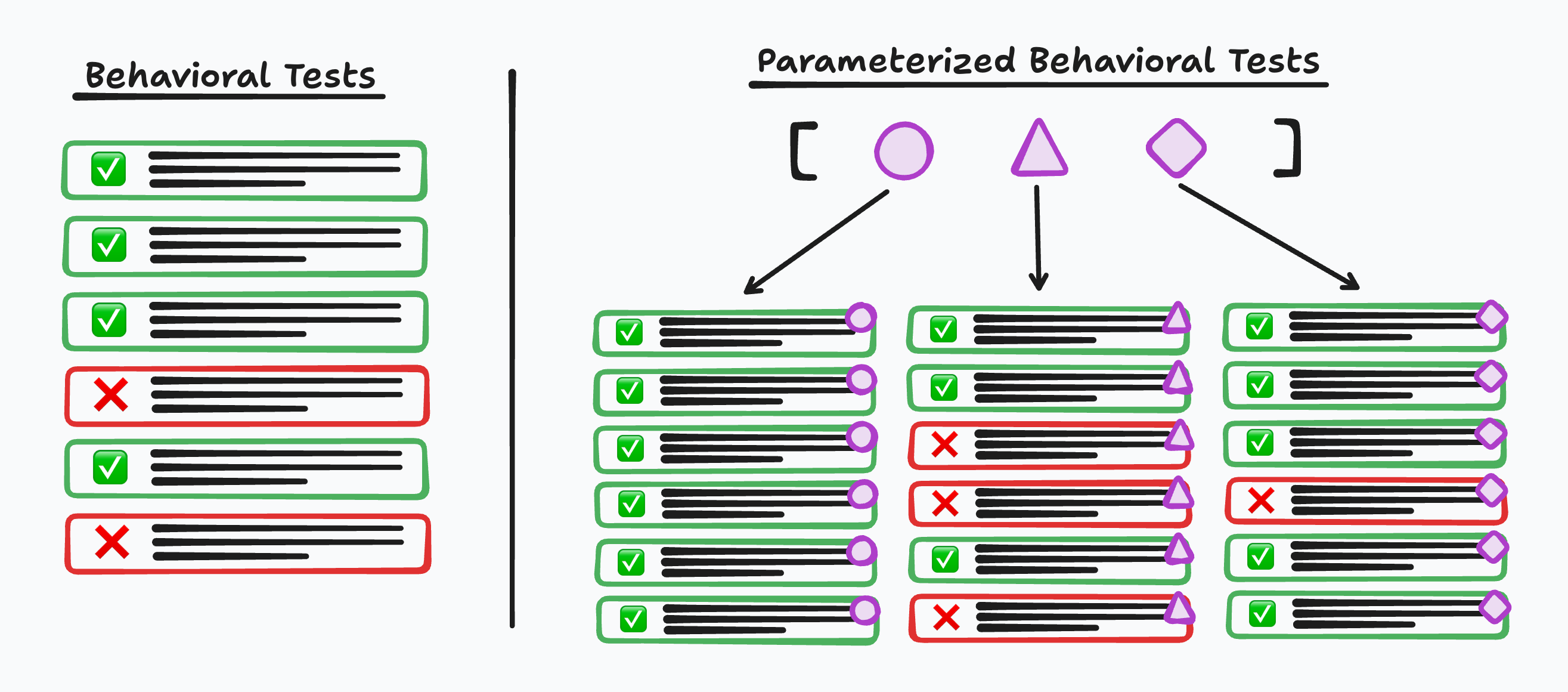
|
||||
|
||||
And here are four samples of alt text for that image that I requested from
|
||||
various Claude models via inline prompts to the `claude` CLI:
|
||||
|
||||
```bash
|
||||
❯ claude -p "Produce a concise alt text for the following image: @image.png" \
|
||||
--model opus --effort medium --output-format json \
|
||||
| jq '.result'
|
||||
"Alt text:\n\n> Diagram comparing two test suites. Left, \"Behavioral Tests\": a single column of six test rows, four passing (green check) and two failing (red X). Right, \"Parameterized Behavioral Tests\": a list of three parameters (circle, triangle, diamond) with arrows fanning out to three columns, each rerunning the same six tests tagged with that parameter's shape — the circle column all passing, the triangle column with three failures, the diamond column with one failure."
|
||||
|
||||
❯ claude -p "Produce a concise alt text for the following image: @image.png" \
|
||||
--model sonnet --effort medium --output-format json \
|
||||
| jq '.result'
|
||||
"Alt text: \"Diagram contrasting plain behavioral tests (a single list of pass/fail checks) with parameterized behavioral tests, where one test template is run against multiple parameter sets (circle, triangle, diamond), producing separate pass/fail results for each.\""
|
||||
|
||||
❯ claude -p "Produce a concise alt text for the following image: @image.png" \
|
||||
--model haiku --output-format json \
|
||||
| jq '.result'
|
||||
"Diagram contrasting behavioral tests (list with pass/fail results) vs parameterized behavioral tests (matrix showing same tests run with different parameter shapes, each with pass/fail outcomes)."
|
||||
|
||||
❯ claude -p "Produce a concise alt text for the following image: @image.png" \
|
||||
--model fable --effort medium --output-format json \
|
||||
| jq '.result'
|
||||
"Diagram comparing \"Behavioral Tests\" (one column of six test cards, four passing with green checks, two failing with red X's) against \"Parameterized Behavioral Tests\" (a set of three parameters shown as a purple circle, triangle, and diamond, each fanning out into its own column of six test cards, with the circle column all passing and the triangle and diamond columns containing a mix of passes and failures)."
|
||||
```
|
||||
|
||||
I was surprised at how concise each of these were. When I was about to run each
|
||||
of these, I was expecting the results to be closer to what I saw in [_Include A File With Message To `ant`_](include-a-file-with-message-to-ant.md)
|
||||
|
||||
> A hand-drawn style diagram comparing two testing approaches, split by a
|
||||
> vertical line.
|
||||
>
|
||||
> On the left, under the heading "Behavioral Tests," is a single column of six
|
||||
> rounded rectangular test rows: four outlined in green with green check-mark
|
||||
> icons (passing) and two outlined in red with red X icons (failing), each
|
||||
> containing black scribble lines representing text.
|
||||
>
|
||||
> On the right, under the heading "Parameterized Behavioral Tests," a bracketed
|
||||
> list of three purple parameter symbols — a circle, a triangle, and a diamond —
|
||||
> sits at the top, with arrows pointing down to three separate columns of six
|
||||
> test rows each. Every row in a column is tagged with its corresponding
|
||||
> parameter shape on the right edge. The circle column shows all six rows
|
||||
> passing (green with check marks). The triangle column shows three passing and
|
||||
> three failing (red with X marks). The diamond column shows five passing and
|
||||
> one failing. The illustration conveys that a single behavioral test, when
|
||||
> parameterized, expands into multiple variants whose pass/fail outcomes can
|
||||
> differ per parameter.
|
||||
|
||||
I guess the "Be concise, _but descriptive_" made a difference.
|
||||
@@ -0,0 +1,50 @@
|
||||
# Include A File With Message To `ant`
|
||||
|
||||
The [Anthropic CLI tool](https://github.com/anthropics/anthropic-cli) (`ant`)
|
||||
allows including files, such as images, directly in the message being sent to
|
||||
the model. This is done with the `@` symbol followed by a relative path to the
|
||||
image on the file system.
|
||||
|
||||
I have a file `parameterized-behavioral-tests.png` in my current directory that
|
||||
I'd like to include. In the `content` array of the message I include an object
|
||||
of type `image` along with some `source` metadata. Within `source` the image
|
||||
file is referenced with the `data` field.
|
||||
|
||||
With that set, I then include a `text` object with my prompt asking for alt text
|
||||
of this image.
|
||||
|
||||
```bash
|
||||
❯ ant messages create \
|
||||
--model claude-opus-5 \
|
||||
--max-tokens 1024 \
|
||||
--message '{role: user, content: [
|
||||
{type: image, source: {type: base64, media_type: image/png, data: "@./parameterized-behavioral-tests.png"}},
|
||||
{type: text, text: "Produce a concise, but descriptive alt text for this image."}
|
||||
]}' \
|
||||
--transform 'content.#(type=="text").text' --raw-output
|
||||
|
||||
A hand-drawn style diagram comparing two testing approaches, split by a vertical
|
||||
line.
|
||||
|
||||
On the left, under the heading "Behavioral Tests," is a single column of six
|
||||
rounded rectangular test rows: four outlined in green with green check-mark
|
||||
icons (passing) and two outlined in red with red X icons (failing), each
|
||||
containing black scribble lines representing text.
|
||||
|
||||
On the right, under the heading "Parameterized Behavioral Tests," a bracketed
|
||||
list of three purple parameter symbols — a circle, a triangle, and a diamond —
|
||||
sits at the top, with arrows pointing down to three separate columns of six test
|
||||
rows each. Every row in a column is tagged with its corresponding parameter
|
||||
shape on the right edge. The circle column shows all six rows passing (green
|
||||
with check marks). The triangle column shows three passing and three failing
|
||||
(red with X marks). The diamond column shows five passing and one failing. The
|
||||
illustration conveys that a single behavioral test, when parameterized, expands
|
||||
into multiple variants whose pass/fail outcomes can differ per parameter.
|
||||
```
|
||||
|
||||
This is for [the image toward the top of this post on parameterized tests in
|
||||
pytest](https://www.visualmode.dev/parameterize-a-fixture-instead-of-a-test-case-with-pytest).
|
||||
The description is a bit wordier than I would have liked, but it is spot on. It
|
||||
is both visually descriptive and conveys what is being conceptually illustrated.
|
||||
|
||||
This whole thing was 3800 input tokens, 328 output tokens, and cost ~$0.02.
|
||||
@@ -0,0 +1,81 @@
|
||||
# Translate To Canonical Tags With Small Model
|
||||
|
||||
In [Don't Classify, Hallucinate](https://softwaredoug.com/blog/2026/08/10/hypothetical-classifications),
|
||||
Doug Turnbull discusses a technique for hallucinating classifications for a
|
||||
product and then using MiniLM to translate those classifications to actual
|
||||
product classifications in your system / vocabulary.
|
||||
|
||||
The second step in the process he described seemed most interesting to me, so I
|
||||
wanted to experiment with it.
|
||||
|
||||
First, here is my classification system -- that is, these are all the categories
|
||||
of [TIL posts](https://github.com/jbranchaud/til) that I write.
|
||||
|
||||
```bash
|
||||
# from my TIL repo
|
||||
❯ git ls-files '*/*.md' | cut -d/ -f1 | sort -u | paste -sd\| - | sed 's/.*/"&"/'
|
||||
"ack|ansible|astro|aws|bash|brew|chrome|claude-code|clojure|css|cursor|deno|devops|docker|drizzle|elixir|gatsby|git|github|github-actions|go|groq|heroku|html|http|inngest|internet|java|javascript|jj|jq|kitty|linux|llm|mac|math|mise|mongodb|mysql|neovim|netlify|next-auth|nextjs|phoenix|planetscale|pnpm|postgres|prisma|python|rails|react|react_native|react-testing-library|reason|remix|rspec|ruby|sed|shell|sqlite|streaming|tailwind|taskfile|tmux|typescript|unix|vercel|vim|vscode|webpack|workflow|xstate|yaml|zed|zod|zsh"
|
||||
```
|
||||
|
||||
I'll grab that output and use it in the following set of Python REPL steps. Here
|
||||
I need to import
|
||||
[`sentence_transformers`](https://sbert.net/docs/quickstart.html#sentence-transformer)
|
||||
which is "applicable for a wide range of tasks, such as semantic textual
|
||||
similarity, semantic search, clustering, classification, paraphrase mining, and
|
||||
more."
|
||||
|
||||
```python
|
||||
# I initiate this REPL with:
|
||||
# ❯ uv run --with sentence_transformers python
|
||||
>>> from sentence_transformers import SentenceTransformer
|
||||
>>> model = SentenceTransformer("sentence-transformers/all-MiniLM-L6-v2")
|
||||
>>> raw_tags = "ack|ansible|astro|aws|bash|brew|chrome|claude-code|clojure|css|cursor|deno|devops|docker|drizzle|elixir|gatsby|git|github|github-actions|go|groq|heroku|html|http|inngest|internet|java|javascript|jj|jq|kitty|linux|llm|mac|math|mise|mongodb|mysql|neovim|netlify|next-auth|nextjs|phoenix|planetscale|pnpm|postgres|prisma|python|rails|react|react_native|react-testing-library|reason|remix|rspec|ruby|sed|shell|sqlite|streaming|tailwind|taskfile|tmux|typescript|unix|vercel|vim|vscode|webpack|workflow|xstate|yaml|zed|zod|zsh"
|
||||
>>> tags = raw_tags.split("|")
|
||||
>>> tag_vecs = model.encode(tags, normalize_embeddings=True)
|
||||
>>> def resolve(fake_tags, threshold=0.5):
|
||||
... fake_vecs = model.encode(fake_tags, normalize_embeddings=True)
|
||||
... scores = fake_vecs @ tag_vecs.T
|
||||
... best, best_score = scores.argmax(1), scores.max(1)
|
||||
... return {tags[i] for i, s in zip(best, best_score) if s >= threshold
|
||||
...
|
||||
```
|
||||
|
||||
With that all set up, I take a set of tags for a post like this one that
|
||||
you're reading and see if I can get them to resolve to one or more tags directly
|
||||
from the canonical tag vocabulary.
|
||||
|
||||
```python
|
||||
>>> resolve(["Python 3.13", "uv", "ML / LLM / Classification"])
|
||||
{'python', 'llm'}
|
||||
```
|
||||
|
||||
A set of tags with varying structure and specificity can be translated into the
|
||||
relevant canonical tags that I started with.
|
||||
|
||||
I can also experiment a little with the threshold. Where is the line for
|
||||
"Version Control" being associated to "git"?
|
||||
|
||||
```python
|
||||
>>> resolve(["Version Control"])
|
||||
set()
|
||||
>>> resolve(["Version Control"], 0.2)
|
||||
{'git'}
|
||||
>>> resolve(["Version Control"], 0.3)
|
||||
{'git'}
|
||||
>>> resolve(["Version Control"], 0.4)
|
||||
{'git'}
|
||||
>>> resolve(["Version Control"], 0.5)
|
||||
set()
|
||||
>>> resolve(["Version Control"], 0.45)
|
||||
set()
|
||||
>>> resolve(["Version Control"], 0.42)
|
||||
{'git'}
|
||||
```
|
||||
|
||||
A quick note on what is happening in the `resolve` function above. We have the
|
||||
normalized embedding vectors for the _fake tags_ and the set of canonical tags.
|
||||
We then compute the dot product of the fake tags embeddings with the
|
||||
_transposed_ canonical tags. This gives us the cosine similarly between all of
|
||||
them which is an indication of how similar each fake tag vector is to each
|
||||
canonical tag vector. The ones above the `0.5` threshold make the cut and that
|
||||
set is returned. We may match one tag, a couple tags, or even no tags.
|
||||
@@ -0,0 +1,43 @@
|
||||
# Access CoreUtils That Conflict With Unix Utilities
|
||||
|
||||
In [another post about GNU CoreUtils](add-a-bunch-of-cli-utilities-with-coreutils.md) I explained how to
|
||||
install and use some of the provided utilities. The utilities I referenced were
|
||||
`seq` and `realpath` which are novel on MacOS. There are other CoreUtils that
|
||||
would conflict with existing system utilities. To avoid the conflicts, [those
|
||||
utilities are installed with `g`
|
||||
prefix](https://unix.stackexchange.com/a/729136).
|
||||
|
||||
A good example of this is `mv` and `gmv`. These are both utilities for moving
|
||||
files and largely behave the same. They are a few subtle differences though.
|
||||
|
||||
Here is the manpage for the built-in `mv` utility:
|
||||
|
||||
```
|
||||
NAME
|
||||
mv – move files
|
||||
|
||||
SYNOPSIS
|
||||
mv [-f | -i | -n] [-hv] source target
|
||||
mv [-f | -i | -n] [-v] source ... directory
|
||||
```
|
||||
|
||||
And here is the manpage for `gmv`:
|
||||
|
||||
```
|
||||
NAME
|
||||
mv - move (rename) files
|
||||
|
||||
SYNOPSIS
|
||||
mv [OPTION]... [-T] SOURCE DEST
|
||||
mv [OPTION]... SOURCE... DIRECTORY
|
||||
mv [OPTION]... -t DIRECTORY SOURCE...
|
||||
```
|
||||
|
||||
There are some different forms and flags available. `gmv` for instance supports
|
||||
a `-t` flag which specifies the _target_ directory so that all other listed
|
||||
paths are treated as sources of the move. This makes `gmv` easier to use with
|
||||
`xargs`, for instance.
|
||||
|
||||
Look through `fd '^g' /opt/homebrew/bin/` and you'll notice a bunch of them like
|
||||
`gls`, `gln`, `ghead`, `gwhoami`, `gyes`, etc. You can also look through all of
|
||||
them in the [`coreutils.json` homebrew formula](https://formulae.brew.sh/api/formula/coreutils.json).
|
||||
@@ -0,0 +1,16 @@
|
||||
# Clean Up Item Layout In Finder Window
|
||||
|
||||
Sometimes while doing a bunch of manual drag-n-drop of files and folders in a
|
||||
Finder.app window, I'll end up with a visual mess. Compared to other folders,
|
||||
nothing is organized on the grid.
|
||||
|
||||
I can tell Finder.app to clean that up with the _Clean Up_ menu option.
|
||||
|
||||
While focused on the folder that I'm concerned about, I can go to _View_ >
|
||||
_Clean Up_ in the top menu. Everything will snap into place.
|
||||
|
||||
On the specific Finder.app window, there is also a triple-dot actions menu that
|
||||
appears on the top right. The _Clean Up_ action is available there as well.
|
||||
|
||||
There is also a _Clean Up By_ option which is a nice way to organize by some
|
||||
attribute, such as the type (e.g Folder/File and extension).
|
||||
@@ -0,0 +1,21 @@
|
||||
# Control Which Monitor App Switcher Appears On
|
||||
|
||||
For the most part when I hit `cmd+tab` (and `cmd+shift+tab`) to switch between
|
||||
apps, the visual switcher UI (which shows a row of the open apps) appears on my
|
||||
main monitor. However, sometimes I will be hitting `cmd+tab` and nothing shows
|
||||
up on my main monitor. I look to the right at my side monitor and there is the
|
||||
app switcher UI.
|
||||
|
||||
Why is it appearing over there all of a sudden?
|
||||
|
||||
The reason is that the app switcher UI is anchored to the same screen where the
|
||||
doc is located. Though the doc defaults to my main monitor, if I access the doc
|
||||
from the side monitor, now it is anchored there.
|
||||
|
||||
To switch it back, I just have to make the doc slide up on my main monitor by
|
||||
running my mouse down to the bottom of that screen.
|
||||
|
||||
The switch up was because I accidentally accessed the doc on my side monitor
|
||||
without realizing.
|
||||
|
||||
[source](https://superuser.com/a/744680)
|
||||
@@ -0,0 +1,89 @@
|
||||
# Read The Lid Angle Sensor For A MacBook
|
||||
|
||||
MacOS has a bunch of internal HID (Human Interface Device) data that can surface
|
||||
details about all kinds of "devices" that comprise your machine. Some obvious
|
||||
ones are the keyboard and trackpad as well as external mice and keyboards. The
|
||||
battery and power source details are another which is sometimes integrated into
|
||||
tools that display battery status (e.g.
|
||||
[`tmux-battery`](https://github.com/tmux-plugins/tmux-battery)), though it uses
|
||||
`pmset` directly). And many, many more.
|
||||
|
||||
One example I'd never considered is that there is a sensor for the lid angle of
|
||||
the laptop that can tell the system whether the lid is open or closed and how
|
||||
open it is (i.e. at what angle). There is no public interface for this lid angle
|
||||
sensor, but people exploring all the HID devices have found the identifiers that
|
||||
correspond to it (e.g.
|
||||
[`pybooklid`](https://github.com/tcsenpai/pybooklid/blob/main/pybooklid/macbook_lid.py)).
|
||||
|
||||
Here is a minimal script that uses `uv`, `hidapi` (python bindings), and
|
||||
`libhidapi` (shared runtime lib for those bindings):
|
||||
|
||||
```python
|
||||
#!/usr/bin/env -S uv run --quiet --script
|
||||
# /// script
|
||||
# requires-python = ">=3.10"
|
||||
# dependencies = ["hidapi"]
|
||||
# ///
|
||||
"""Print MacBook lid angle in degrees."""
|
||||
import os, sys
|
||||
|
||||
if sys.platform == "darwin":
|
||||
brew = "/opt/homebrew/lib"
|
||||
if os.path.exists(brew):
|
||||
os.environ["DYLD_LIBRARY_PATH"] = f"{brew}:{os.environ.get('DYLD_LIBRARY_PATH','')}"
|
||||
|
||||
import hid
|
||||
|
||||
VENDOR_ID, PRODUCT_ID = 0x05AC, 0x8104
|
||||
USAGE_PAGE, USAGE = 0x0020, 0x008A
|
||||
REPORT_ID = 1
|
||||
|
||||
def read_angle():
|
||||
for info in hid.enumerate(VENDOR_ID, PRODUCT_ID):
|
||||
if info.get("usage_page") == USAGE_PAGE and info.get("usage") == USAGE:
|
||||
d = hid.device()
|
||||
path = info["path"]
|
||||
d.open_path(path if isinstance(path, bytes) else path.encode())
|
||||
try:
|
||||
data = d.get_feature_report(REPORT_ID, 8)
|
||||
if data and len(data) >= 3:
|
||||
return float((data[2] << 8) | data[1])
|
||||
finally:
|
||||
d.close()
|
||||
return None
|
||||
|
||||
if __name__ == "__main__":
|
||||
a = read_angle()
|
||||
if a is None:
|
||||
sys.exit("sensor not available")
|
||||
print(f"{a:.0f}")
|
||||
```
|
||||
|
||||
These IDs and usage values are the undocumented values that allow the script to
|
||||
navigate specifically to the lid angle sensor and specifically to the usage page
|
||||
and value that represent the current lid angle reading.
|
||||
|
||||
```
|
||||
VENDOR_ID, PRODUCT_ID = 0x05AC, 0x8104
|
||||
USAGE_PAGE, USAGE = 0x0020, 0x008A
|
||||
REPORT_ID = 1
|
||||
```
|
||||
|
||||
I added [this
|
||||
script](https://github.com/jbranchaud/dotfiles/blob/cbc7196607d1d6b25885f5387ca85b658bd765de/bin/lidangle)
|
||||
to [my dotfiles](https://github.com/jbranchaud/dotfiles) and made it executable
|
||||
(`chmod +x bin/lidangle`) so that I can try it out. I first ran it while it was
|
||||
closed and connected to my external monitor (`0`), then I opened it as far as it
|
||||
could go (`129`), and then I tried angling it close to what I thought was 90
|
||||
degress (`92`, so close).
|
||||
|
||||
```bash
|
||||
❯ lidangle
|
||||
0
|
||||
|
||||
❯ lidangle
|
||||
129
|
||||
|
||||
❯ lidangle
|
||||
92
|
||||
```
|
||||
@@ -0,0 +1,20 @@
|
||||
# Reveal Location Of File In Finder.app
|
||||
|
||||
In the terminal I have the path to an image file. I want to open Finder.app to
|
||||
the location of that image file so that I can drag and drop it into a file
|
||||
upload area in the browser.
|
||||
|
||||
Instead of opening a Finder.app window and navigating directory by directory to
|
||||
the location, I can use the `open` command. Using `open` directly with the image
|
||||
file will open the image in Preview.app. I want to reveal the directory that the
|
||||
image file is in within Finder.app. _Reveal_ is the keyword and the `-R` flag
|
||||
does just that.
|
||||
|
||||
Here is an example of this that I actually ran when uploading a screenshot that
|
||||
went into [this blogmark post](https://still.visualmode.dev/blogmarks/255):
|
||||
|
||||
```bash
|
||||
$ open -R /Users/lastword/images/tiobe-index-graph-march-2026.png
|
||||
```
|
||||
|
||||
See `man open` for more details.
|
||||
@@ -0,0 +1,41 @@
|
||||
# Set Default Search Directory For Finder
|
||||
|
||||
In MacOS's Finder.app, when I click the Search (magnifying glass) icon and type
|
||||
something in, it performs the search across all of "This Mac". This has always
|
||||
really bugged me because I'm usually already in the directory that I want to be
|
||||
specifically searching in.
|
||||
|
||||
A small quality-of-life improvement for me was to update the setting that
|
||||
controls this to search in the current directory instead.
|
||||
|
||||
This can be done via the Finder.app menu at the bottom of the _Advanced_ section
|
||||
in the _Settings_. The three setting options are:
|
||||
|
||||
- Search This Mac
|
||||
- Search the Current Folder
|
||||
- Search the Previous Search Scope
|
||||
|
||||
This can also be controlled from the command line using the `defaults write`
|
||||
command. The specific setting is called `FXDefaultSearchScope` and the above
|
||||
three settings translate to:
|
||||
|
||||
- `SCev` (Search This Mac)
|
||||
- `SCcf` (Search the Current Folder)
|
||||
- `SCsp` (Search the Previous Search Scope)
|
||||
|
||||
I can see the current default setting with `defaults read`:
|
||||
|
||||
```bash
|
||||
❯ defaults read com.apple.finder FXDefaultSearchScope
|
||||
SCev
|
||||
```
|
||||
|
||||
I can then change it to the _Search the Current Folder_ option like so:
|
||||
|
||||
```bash
|
||||
❯ defaults write com.apple.finder FXDefaultSearchScope -string "SCcf"
|
||||
```
|
||||
|
||||
All the open Finder windows still hold the original setting. I need to do a
|
||||
`killall Finder` to effectively reload them. Now if I try doing a search, it
|
||||
should default to the current directory instead of _This Mac_.
|
||||
@@ -0,0 +1,45 @@
|
||||
# Convert Arbitrary Number To Probability With Sigmoid
|
||||
|
||||
A sigmoid function is a useful function in statistics and machine learning for
|
||||
converting a number in the range of positive and negative real numbers into a
|
||||
value between 0 and 1. Sigmoid functions can be a bit more diverse than this,
|
||||
but this is a good basic definition.
|
||||
|
||||
Wikipedia defines another characteristic of sigmoid functions:
|
||||
|
||||
> A sigmoid function is any mathematical function whose graph has a
|
||||
> characteristic S-shaped or sigmoid curve.
|
||||
|
||||
This S-shape is because it is asymptotic at the ends allowing it to cover all
|
||||
real numbers in either direction.
|
||||
|
||||
A common sigmoid function and the one used by [PyTorch's `Sigmoid`](https://docs.pytorch.org/docs/2.13/generated/torch.nn.Sigmoid.html)
|
||||
is this exponential form -- `σ(x) = 1 / (1 + exp(-x))`.
|
||||
|
||||
Here is what this looks like plotted on a graph:
|
||||
|
||||
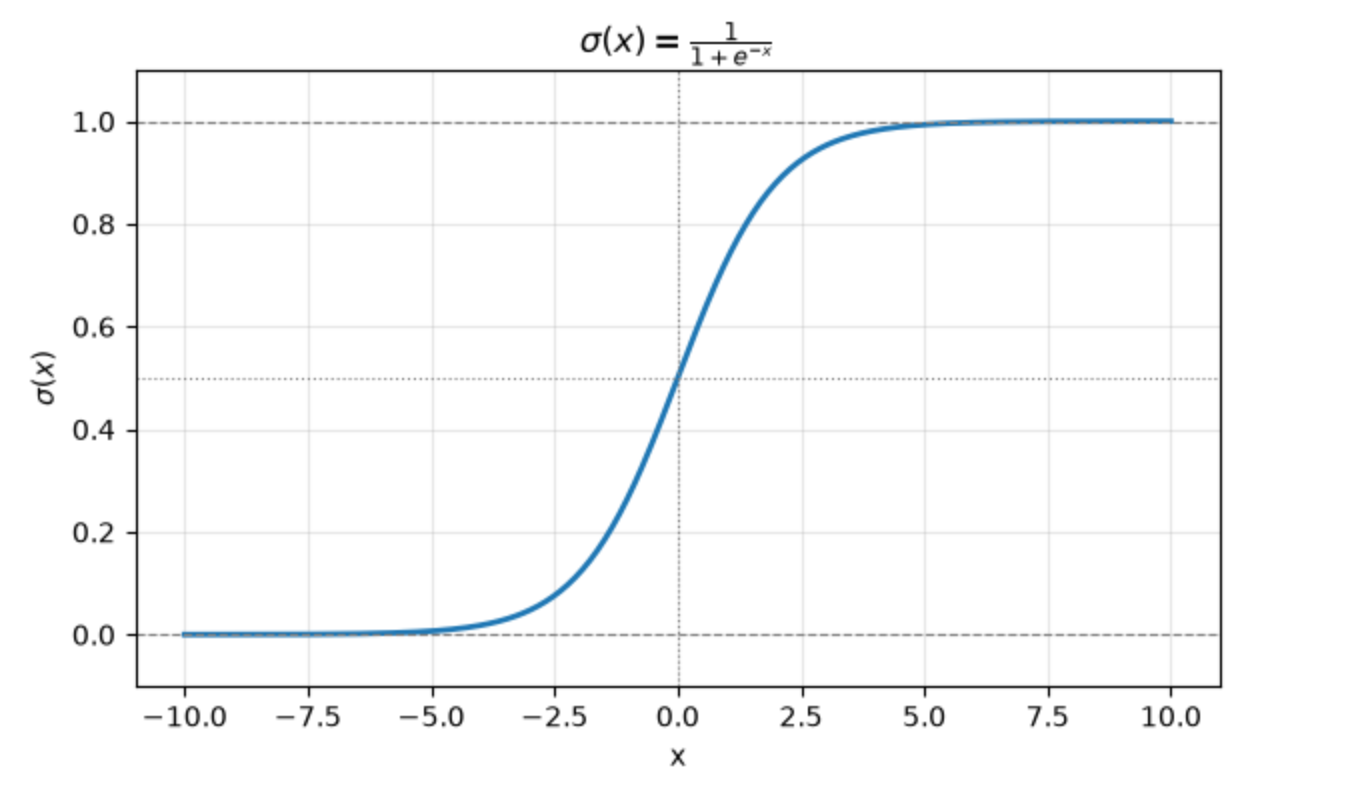
|
||||
|
||||
This function can be used any time we want to convert an arbitrary number into a
|
||||
probability. Large negative numbers will approach 0. Large positive numbers will
|
||||
approach 1. Numbers near 0 will settle somewhere in the middle.
|
||||
|
||||
Here are a few examples run through PyTorch's `sigmoid` function:
|
||||
|
||||
```python
|
||||
print("σ(-99) => ", torch.sigmoid(torch.tensor(-99.0)))
|
||||
print("σ(99) => ", torch.sigmoid(torch.tensor(99.0)))
|
||||
print("σ(0.123) => ", torch.sigmoid(torch.tensor(0.123)))
|
||||
print("σ(-2) => ", torch.sigmoid(torch.tensor(-2.0)))
|
||||
print("σ(1) => ", torch.sigmoid(torch.tensor(1.0)))
|
||||
```
|
||||
|
||||
which prints out:
|
||||
|
||||
```
|
||||
σ(-99) => tensor(0.)
|
||||
σ(99) => tensor(1.)
|
||||
σ(0.123) => tensor(0.5307)
|
||||
σ(-2) => tensor(0.1192)
|
||||
σ(1) => tensor(0.7311)
|
||||
```
|
||||
@@ -0,0 +1,42 @@
|
||||
# Generate Permutations Of All Valid 9-ball Racks
|
||||
|
||||
I wanted to produce a full listing of all valid rack arrangements for the game
|
||||
of [9-ball](https://en.wikipedia.org/wiki/Nine-ball). The constraints on how a
|
||||
9-ball rack can be arranged are, first, that the 1 ball must be placed at the
|
||||
head of the diamond and, second, that the 9 ball must be placed at the center of
|
||||
the diamond. After that, all other balls (2 through 8) can be placed in any
|
||||
arrangement.
|
||||
|
||||
Because each of those seven remaining balls can be arranged in distinct
|
||||
orderings where each ball is placed once, this is a
|
||||
[_permutation_](https://en.wikipedia.org/wiki/Permutation) problem.
|
||||
|
||||
> In elementary combinatorics, the k-permutations, or partial permutations, are
|
||||
> the ordered arrangements of k distinct elements selected from a set. When k is
|
||||
> equal to the size of the set, these are the permutations in the previous
|
||||
> sense.
|
||||
|
||||
For this problem, the seven distinct elements can be arranged into `7!` (seven
|
||||
factorial) unique permutations. That is, 5040 permutations.
|
||||
|
||||
I can use [Ruby's `Array#permutations`
|
||||
method](https://docs.ruby-lang.org/en/4.0/Array.html#method-i-permutation) to
|
||||
enumerate these 5040 permutations like so:
|
||||
|
||||
```ruby
|
||||
[2,3,4,5,6,7,8].permutation.map do |perm|
|
||||
[1, *perm[0..2], 9, *perm[3..7]]
|
||||
end.to_a
|
||||
=> [[1, 2, 3, 4, 9, 5, 6, 7, 8],
|
||||
[1, 2, 3, 4, 9, 5, 6, 8, 7],
|
||||
[1, 2, 3, 4, 9, 5, 7, 6, 8],
|
||||
[1, 2, 3, 4, 9, 5, 7, 8, 6],
|
||||
[1, 2, 3, 4, 9, 5, 8, 6, 7],
|
||||
[1, 2, 3, 4, 9, 5, 8, 7, 6],
|
||||
[1, 2, 3, 4, 9, 6, 5, 7, 8],
|
||||
...
|
||||
[1, 8, 7, 6, 9, 5, 3, 2, 4],
|
||||
[1, 8, 7, 6, 9, 5, 3, 4, 2],
|
||||
[1, 8, 7, 6, 9, 5, 4, 2, 3],
|
||||
[1, 8, 7, 6, 9, 5, 4, 3, 2]]
|
||||
```
|
||||
@@ -1,8 +1,7 @@
|
||||
# Create Umbrella Task For All Test Tasks
|
||||
|
||||
When I was first sketching out the [`mise`
|
||||
tasks](https://mise.jdx.dev/tasks/running-tasks.html) for a Rails app, I added
|
||||
the following two tasks. One is for running all the `rspec` tests. The Other is
|
||||
When I was first sketching out the [`mise` tasks](https://mise.jdx.dev/tasks/running-tasks.html) for a Rails app, I added
|
||||
the following two tasks. One is for running all the `rspec` tests. The other is
|
||||
for running all the `vitest` (JavaScript) tests.
|
||||
|
||||
```toml
|
||||
@@ -49,5 +48,4 @@ Running `mise run test:all` won't execute its own command, but because it
|
||||
depends on all other `test:*` tasks, the tests will get run through those
|
||||
dependencies.
|
||||
|
||||
This task naming pattern also allows for calling all tests with `mise run
|
||||
"test:**"`.
|
||||
This task naming pattern also allows for calling all tests with `mise run "test:**"`.
|
||||
|
||||
@@ -0,0 +1,27 @@
|
||||
# Look In Ruby Version Dotfile
|
||||
|
||||
Newer versions of [`mise`](https://mise.jdx.dev/dev-tools/) specifically only
|
||||
look for tool versions in `mise.toml` as well as the asdf `.tool-versions` file.
|
||||
A lot of Ruby projects use the `.ruby-version` file to indicate the Ruby version
|
||||
of a project. To continue to use the `.ruby-version` file instead of migrating
|
||||
to `mise.toml`, you need to tell `mise` that you prefer to use the idiomatic
|
||||
version file.
|
||||
|
||||
I added the following line to my
|
||||
[`~/.config/mise/config.toml`](https://github.com/jbranchaud/dotfiles/commit/8edeb7a9c53500e89e88b4079cbd1859ebebcbda)
|
||||
file:
|
||||
|
||||
```toml
|
||||
idiomatic_version_file_enable_tools = ["ruby"]
|
||||
```
|
||||
|
||||
Now, whenever `mise` is looking for the specified Ruby version of a project, it
|
||||
will also look for `.ruby-version`.
|
||||
|
||||
Here is a [full list of idomatic version files supported by
|
||||
`mise`](https://mise.jdx.dev/configuration.html#idiomatic-version-files).
|
||||
|
||||
See
|
||||
[`idiomatic_version_file_enable_tools`](https://mise.jdx.dev/configuration/settings.html#idiomatic_version_file_enable_tools)
|
||||
as well as the [Ruby-specific documentation](https://mise.jdx.dev/lang/ruby.html#ruby-version-and-gemfile-support)
|
||||
for more details.
|
||||
@@ -0,0 +1,37 @@
|
||||
# Override Your Project Mise File
|
||||
|
||||
A project I'm working on has a version-controlled `.mise.toml` file in it. Some
|
||||
changes were made to that recently that introduce some env vars that conflict
|
||||
with my setup. If I make edits to that file, then I have a modified version of
|
||||
`.mise.toml` sitting in my Git working copy.
|
||||
|
||||
```
|
||||
# .mise.toml
|
||||
[env]
|
||||
CONFIG_SETTING = "project"
|
||||
```
|
||||
|
||||
Instead, I can rely on the loading precedence rules of `mise` to override those
|
||||
project settings with my individual settings. I can do that with the
|
||||
`.mise.local.toml` file which is played on top of any `mise` configuration from
|
||||
files further down the precedence chain.
|
||||
|
||||
```
|
||||
# .mise.local.toml
|
||||
[env]
|
||||
CONFIG_SETTING = "override"
|
||||
```
|
||||
|
||||
Assuming I have `mise` setup with my shell environment to automatically load in
|
||||
these files, I can now check what takes precedence:
|
||||
|
||||
```bash
|
||||
$ echo $CONFIG_SETTING
|
||||
override
|
||||
```
|
||||
|
||||
Make sure `.mise.local.toml` is included in the `.gitignore` file to avoid
|
||||
checking in your personal environment overrides.
|
||||
|
||||
To be sure about what files are loaded and in what order, give `mise cfg` a try.
|
||||
I discuss that in more detail in [List The Files Being Loaded By Mise](list-the-files-being-loaded-by-mise.md).
|
||||
@@ -0,0 +1,38 @@
|
||||
# Pick From Tasks Using Interactive Picker
|
||||
|
||||
In [Add Mise Tasks For Common Workflow
|
||||
Commands](https://www.visualmode.dev/add-mise-tasks-for-common-workflow-commands),
|
||||
I wrote about a set of tasks I added as shortcuts for connecting to the `rails console` in various environments.
|
||||
|
||||
```toml
|
||||
# mise.toml
|
||||
[tasks."console:staging"]
|
||||
description = "Open a Rails console on staging"
|
||||
run = "ssh -t my-app-staging dokku run my-app rails console"
|
||||
|
||||
[tasks."console:prod"]
|
||||
description = "Open a Rails console on production"
|
||||
run = "ssh -t my-app-prod dokku run my-app rails console"
|
||||
```
|
||||
|
||||
When a project is configured with multiple `mise` tasks like this, we can invoke
|
||||
`mise run` without any specific arguments and it will prompt you with an
|
||||
interactive picker. The picker will populate with all the tasks like so:
|
||||
|
||||
```bash
|
||||
❯ mise run
|
||||
Tasks
|
||||
Select a task to run
|
||||
❯ console:prod Open a Rails console on production
|
||||
console:staging Open a Rails console on staging
|
||||
/
|
||||
esc clear filter • enter confirm
|
||||
```
|
||||
|
||||
We can navigate between the options with the arrow keys (and if we exit _filter_
|
||||
mode by hitting `esc`, then `j/k` also work to move down and up). While in
|
||||
_filter_ mode, we can type into the prompt which will filter the list of
|
||||
commands down to just the partial matches.
|
||||
|
||||
Once we're targeting the task we want to run, we hit `enter` and the task is
|
||||
executed.
|
||||
@@ -0,0 +1,29 @@
|
||||
# Search Through Bin Paths For Tool Locations
|
||||
|
||||
The `mise bin-paths` command will list all the bin paths that are managed by
|
||||
`mise`. When you tell `mise` to install a tool, it installs a specific version
|
||||
at a location where its binaries can be made accessible on the system path.
|
||||
|
||||
While `mise ls` is useful for seeing what is installed by `mise` and at what
|
||||
version, the `bin-paths` command can tell you where those tool installations
|
||||
with their binaries are located.
|
||||
|
||||
Combine this with `grep` or `rg` to narrow down the results to tools by a
|
||||
specific name:
|
||||
|
||||
```bash
|
||||
❯ mise bin-paths | rg 'neovim'
|
||||
/Users/lastword/.local/share/mise/installs/npm-neovim/5.4.0/bin
|
||||
/Users/lastword/.local/share/mise/installs/pipx-neovim-remote/2.5.1/bin
|
||||
/Users/lastword/.local/share/mise/installs/neovim/0.11.6/bin
|
||||
```
|
||||
|
||||
I can then look in one of these directories to see the one or more binaries that
|
||||
they include. For instance, here is what is in the `node` bin path:
|
||||
|
||||
```bash
|
||||
❯ ls /Users/lastword/.local/share/mise/installs/node/22.22.0/bin
|
||||
./ ../ claude@ corepack@ node* npm* npx@
|
||||
```
|
||||
|
||||
See `mise bin-paths --help` for more details.
|
||||
@@ -0,0 +1,29 @@
|
||||
# Avoid Vulnerabilities In New Package Versions
|
||||
|
||||
It seems like every week there is a new supply chain attack where malicious code
|
||||
is embedded in a popular, widely-used OSS package. This week's is
|
||||
[axios](https://www.stepsecurity.io/blog/axios-compromised-on-npm-malicious-versions-drop-remote-access-trojan).
|
||||
|
||||
The [`pnpm` package manager](https://pnpm.io/) has a nice feature that helps
|
||||
avoid installing these vulnerable package versions in the first place.
|
||||
|
||||
> To reduce the risk of installing compromised packages, you can delay the
|
||||
> installation of newly published versions. In most cases, malicious releases
|
||||
> are discovered and removed from the registry within an hour.
|
||||
|
||||
The [`minimumReleaseAge` config option](https://pnpm.io/settings#minimumreleaseage) tells `pnpm` to not install
|
||||
a dependency (including transitive ones) until it has been released for at least
|
||||
that many minutes.
|
||||
|
||||
For instance, if you wanted to set this to 72 hours, then you'd set this option
|
||||
to `4320` minutes like so:
|
||||
|
||||
```
|
||||
$ pnpm config set minimum-release-age 4320 -g
|
||||
```
|
||||
|
||||
The global flag (`-g`) will set that in your global config location, e.g.
|
||||
`$XDG_CONFIG_HOME/pnpm/rc`. You could also add it specifically to your project
|
||||
in the `pnpm-workspace.yaml` file.
|
||||
|
||||
[source](https://bsky.app/profile/styfle.dev/post/3miekuyeyrs2w)
|
||||
@@ -0,0 +1,44 @@
|
||||
# Compute Median Instead Of Average
|
||||
|
||||
One of the first aggregate functions we might use in PostgreSQL, besides `sum`,
|
||||
is `avg`.
|
||||
|
||||
```sql
|
||||
select avg(book_count) as average_books_read
|
||||
from (
|
||||
select users.id, count(books.id) as book_count
|
||||
from users
|
||||
left join books
|
||||
on books.user_id = users.id
|
||||
where books.read_in_year = 2025
|
||||
group by users.id
|
||||
) as user_book_counts;
|
||||
```
|
||||
|
||||
This computes the average of the set of values which sums them all up
|
||||
and divides by the count. The average (maybe you've heard this also called the
|
||||
_mean_) is not always the best way to understand data, especially when there are
|
||||
outliers.
|
||||
|
||||
Instead, we might want to compute the _median_ value of our set of data. There
|
||||
is no easily identifiable `median` aggregate function. Instead, we can use
|
||||
`percentile_cont` with a value of `0.5`. This gets us the 50th percentile of our
|
||||
set of data which is the definition of the _median_.
|
||||
|
||||
```sql
|
||||
select percentile_cont(0.5) within group (
|
||||
order by book_count
|
||||
) as median_books_read
|
||||
from (
|
||||
select users.id, count(books.id) as book_count
|
||||
from users
|
||||
left join books on books.user_id = users.id and books.read_in_year = 2025
|
||||
group by users.id
|
||||
) as user_book_counts;
|
||||
```
|
||||
|
||||
The full syntax for `percentile_cont` is `percentile_cong(precision) within
|
||||
group (order by ...)` because this is an aggregiate that has to work with an
|
||||
ordered-set of data.
|
||||
|
||||
[source](https://www.postgresql.org/docs/current/functions-aggregate.html)
|
||||
@@ -0,0 +1,96 @@
|
||||
# Sequence Side-Effect When Rolling Back Inserts
|
||||
|
||||
What is so powerful about the transaction guarantees of a system like PostgreSQL
|
||||
is that I can make all kinds of changes (big or small) within a transaction,
|
||||
then roll it back, and it's like nothing ever happened.
|
||||
|
||||
This is useful if I want to dry-run an crucial update statement in the
|
||||
production environment. I can gauge how many rows I expect to be impacted, run
|
||||
the update in a transaction, inspect the state of the table, and rollback if
|
||||
needed. It's like the changes never happened.
|
||||
|
||||
Rolled back transactions aren't completely free of side-effects. They can leave
|
||||
a trace. In this case, that trace is increments to a sequence like you'd find
|
||||
attached to a primary key. Each `insert` of a row into a table with an
|
||||
autoincrementing sequence will have an effect on that sequence.
|
||||
|
||||
First, I'll create a fresh table and check the state of the sequence.
|
||||
|
||||
```sql
|
||||
> create table books (id bigserial primary key, title text not null, author text not null);
|
||||
CREATE TABLE
|
||||
|
||||
> select * from books_id_seq;
|
||||
┌────────────┬─────────┬───────────┐
|
||||
│ last_value │ log_cnt │ is_called │
|
||||
├────────────┼─────────┼───────────┤
|
||||
│ 1 │ 0 │ f │
|
||||
└────────────┴─────────┴───────────┘
|
||||
(1 row)
|
||||
```
|
||||
|
||||
Now, I'll start a transaction, do some inserts, and again check the state of the
|
||||
sequence.
|
||||
|
||||
```sql
|
||||
> begin;
|
||||
BEGIN
|
||||
|
||||
> insert into books (title, author) values ('Python in a Nutshell', 'Martelli et al'), ('Build an LLM', 'Sebastian Raschka'), ('The Joy of Abstraction', 'Eugenia Cheng');
|
||||
INSERT 0 3
|
||||
|
||||
> select * from books;
|
||||
┌────┬────────────────────────┬───────────────────┐
|
||||
│ id │ title │ author │
|
||||
├────┼────────────────────────┼───────────────────┤
|
||||
│ 1 │ Python in a Nutshell │ Martelli et al │
|
||||
│ 2 │ Build an LLM │ Sebastian Raschka │
|
||||
│ 3 │ The Joy of Abstraction │ Eugenia Cheng │
|
||||
└────┴────────────────────────┴───────────────────┘
|
||||
(3 rows)
|
||||
|
||||
> select * from books_id_seq;
|
||||
┌────────────┬─────────┬───────────┐
|
||||
│ last_value │ log_cnt │ is_called │
|
||||
├────────────┼─────────┼───────────┤
|
||||
│ 3 │ 30 │ t │
|
||||
└────────────┴─────────┴───────────┘
|
||||
(1 row)
|
||||
```
|
||||
|
||||
I will now rollback the transaction. I expect `books` to be empty again. But
|
||||
what happens to the state of `books_id_seq`?
|
||||
|
||||
```sql
|
||||
> rollback;
|
||||
ROLLBACK
|
||||
|
||||
> select * from books;
|
||||
┌────┬───────┬────────┐
|
||||
│ id │ title │ author │
|
||||
├────┼───────┼────────┤
|
||||
└────┴───────┴────────┘
|
||||
(0 rows)
|
||||
|
||||
> select * from books_id_seq;
|
||||
┌────────────┬─────────┬───────────┐
|
||||
│ last_value │ log_cnt │ is_called │
|
||||
├────────────┼─────────┼───────────┤
|
||||
│ 3 │ 30 │ t │
|
||||
└────────────┴─────────┴───────────┘
|
||||
(1 row)
|
||||
```
|
||||
|
||||
Despite rolling back, the state of `books_id_seq` remains with a `last_value` of
|
||||
`3`. This is because a sequence is used outside of transaction isolation.
|
||||
Multiple concurrent transactions may both need sequence values. Instead of them
|
||||
blocking on each other, the sequence can always be accessed. The tradeoff is
|
||||
that the `last_value` of a sequence is always marching forward and gaps will
|
||||
happen when transactions are rolled back.
|
||||
|
||||
This is normal and expected behavior. It is something to be aware of if you have
|
||||
a high-volume system that is doing a ton of inserting and rolling back (I've
|
||||
worked on systems that do this). However, the solution there is more to do with
|
||||
picking `bigint` (`bigserial`) for your sequence-backed column. That would
|
||||
reasonably eliminate concern for running out of sequence values. Or use UUIDs
|
||||
instead.
|
||||
@@ -0,0 +1,34 @@
|
||||
# Access Most Recent Return Value In REPL
|
||||
|
||||
One of my favorite features of Ruby's `irb` and `pry` are that you can use `_`
|
||||
to reference the most recent return value. Often as we use an interpreter or
|
||||
REPL, we end up with _intermediate_ values. That is, we've execute some kind of
|
||||
statement which returned a value and we now want to use that resulting value in
|
||||
our next statement. Python also supports `_`.
|
||||
|
||||
Let's say I've run a statement that took a while to process, but I forgot to
|
||||
assign it to a variable. Instead of re-running the whole thing, I can create a
|
||||
variable that references the previous return value using `_`.
|
||||
|
||||
```python
|
||||
>>> BytePairEncoding.train_bpe(long_text)
|
||||
{'merge_rules': [...], 'vocab': {...}}
|
||||
>>> result = _
|
||||
>>> list(result.keys())
|
||||
['merge_rules', 'vocab']
|
||||
```
|
||||
|
||||
Even if I don't necessarily want to assign it a variable, it can be nice to
|
||||
reference the previous value as I continue with what I'm doing:
|
||||
|
||||
```python
|
||||
>>> result['merge_rules'][0][1]
|
||||
256
|
||||
>>> result['vocab'][_]
|
||||
b'e '
|
||||
```
|
||||
|
||||
Notice how the value from the first statement gets used as part of a `dict`
|
||||
access.
|
||||
|
||||
[source](https://docs.python.org/3/tutorial/introduction.html#numbers)
|
||||
@@ -0,0 +1,35 @@
|
||||
# Access SQLite Result Values By Name With Row Factory
|
||||
|
||||
The default shape of a result from executing a row-returning statement with
|
||||
`sqlite3` is a tuple. Whose values can be accessed positionally.
|
||||
|
||||
```python
|
||||
>>> res = conn.execute("select * from projects;")
|
||||
>>> res.fetchone()
|
||||
(1, 'py-vmt', '2026-07-25 14:53:44', '2026-07-25 14:53:44')
|
||||
```
|
||||
|
||||
If I want something a bit nicer, I can enable [_Row Factory_
|
||||
results](https://docs.python.org/3/library/sqlite3.html#how-to-create-and-use-row-factories)
|
||||
for my connection. The values on a _row_ can be accessed by name as well as
|
||||
positionally.
|
||||
|
||||
```python
|
||||
>>> conn.row_factory = sqlite3.Row
|
||||
>>> res = conn.execute("select * from projects;")
|
||||
>>> res.fetchone()
|
||||
<sqlite3.Row object at 0x1019e3c40>
|
||||
>>> r1 = _
|
||||
>>> r1
|
||||
<sqlite3.Row object at 0x1019e3c40>
|
||||
>>> r1["name"]
|
||||
'py-vmt'
|
||||
>>> r1["id"]
|
||||
1
|
||||
>>> r1[1]
|
||||
'py-vmt'
|
||||
```
|
||||
|
||||
[I used Row Factory on a project
|
||||
recently](https://github.com/jbranchaud/py-vmt/pull/9/changes) and I think it
|
||||
made for an improvement in the readability of the code.
|
||||
@@ -0,0 +1,44 @@
|
||||
# Access Variables Outside Loop Scope
|
||||
|
||||
Here is a function that loops over a list to find the first occurrence of a
|
||||
falsy value.
|
||||
|
||||
```python
|
||||
def find_false(self):
|
||||
for item in self.items:
|
||||
item_type = type(item)
|
||||
print(f"Current item: {item} ({item_type})")
|
||||
if not item:
|
||||
break
|
||||
|
||||
print(f"First false item: {item} ({item_type})")
|
||||
```
|
||||
|
||||
Notice how at the end of the function, outside of the loop, I am able to access
|
||||
both `item` (defined in the loop definition) and `item_type` (defined within the
|
||||
loop's body).
|
||||
|
||||
Both of these variables are defined, by the loop, in _function scope_ and are
|
||||
accessible anywhere in the function after they have been defined.
|
||||
|
||||
The title of this TIL is a bit of a misnomer because Python doesn't have the
|
||||
concept of a _loop scope_. There are two levels of scope in Python --
|
||||
module/global scope and function scope.
|
||||
|
||||
I spend most of my time writing Ruby which also has _block scope_, so Python's
|
||||
simplified two-level scoping took me by surprise.
|
||||
|
||||
Though the code sample above is contrived, this function scope assignment can be
|
||||
taken advantage of with loop definitions in scenarios where you want to know
|
||||
what the last `item` defined was before the loop terminated.
|
||||
|
||||
```python
|
||||
for submission in submissions:
|
||||
if passes(submission, criteria):
|
||||
break
|
||||
else:
|
||||
raise ValueError("No submissions that meet given criteria")
|
||||
|
||||
print(f"Submit first passing submission: {submission.id}")
|
||||
submit(submission)
|
||||
```
|
||||
@@ -0,0 +1,61 @@
|
||||
# Annotate Return Type On Enum Function
|
||||
|
||||
I defined the following `StrEnum` class to capture the canonical set of valid
|
||||
values for a _storage format_ in
|
||||
[`py-vmt`](https://github.com/jbranchaud/py-vmt). It includes a `default`
|
||||
function that can be called to get what the system considers the default storage
|
||||
format.
|
||||
|
||||
```python
|
||||
class StorageFormat(StrEnum):
|
||||
SQLITE = "sqlite"
|
||||
JSON = "json"
|
||||
|
||||
@staticmethod
|
||||
def default():
|
||||
return StorageFormat.SQLITE
|
||||
```
|
||||
|
||||
This works, but what is missing is a type annotation for the return value of
|
||||
`default`.
|
||||
|
||||
I'd like to use `StorageFormat` as the return type annotation. However, the
|
||||
annotations are eagerly evaluated at the time the function definition is being
|
||||
processed. The `StorageFormat` class is not fully evaluated at that point and so
|
||||
isn't available.
|
||||
|
||||
Instead, what I can do is quote `StorageFormat` as a string to make it a
|
||||
_forward reference_.
|
||||
|
||||
```python
|
||||
class StorageFormat(StrEnum):
|
||||
SQLITE = "sqlite"
|
||||
JSON = "json"
|
||||
|
||||
@staticmethod
|
||||
def default() -> "StorageFormat":
|
||||
return StorageFormat.SQLITE
|
||||
```
|
||||
|
||||
The string type annotation will be lazily evaluated at a later time when
|
||||
`StorageFormat` fully exists. This is behavior that is slated to be deprecated.
|
||||
And it is no longer needed as of [Python 3.14 which lazily evaluates all
|
||||
annotations by default
|
||||
now](https://docs.python.org/3/reference/compound_stmts.html#annotations).
|
||||
|
||||
If I want to be more specific with the above annotation, I can import [`Literal`
|
||||
from `typing`](https://docs.python.org/3/library/typing.html#typing.Literal) and
|
||||
then wrap a specific enum value.
|
||||
|
||||
```python
|
||||
class StorageFormat(StrEnum):
|
||||
SQLITE = "sqlite"
|
||||
JSON = "json"
|
||||
|
||||
@staticmethod
|
||||
def default() -> "Literal[StorageFormat.SQLITE]":
|
||||
return StorageFormat.SQLITE
|
||||
```
|
||||
|
||||
Now it will specifically enforce `SQLITE` rather than accepting `SQLITE` or
|
||||
`JSON`.
|
||||
@@ -0,0 +1,47 @@
|
||||
# Another Way To Mark Keyword-Only Dataclass Fields
|
||||
|
||||
In [Configure Other Attributes Of Dataclass
|
||||
Field](configure-other-attributes-of-dataclass-field), I showed how the
|
||||
[`dataclasses.field`](https://docs.python.org/3/library/dataclasses.html#dataclasses.field)
|
||||
constructor function can be used. One of the parameters I demonstrated was
|
||||
`kw_only`. Each field constructed with `kw_only=True` will be required to be
|
||||
passed as a keyword-only parameter when constructing an instance of that
|
||||
`dataclass`.
|
||||
|
||||
Another way to specify keyword-only parameters with `dataclass` fields is to
|
||||
segment them with `KW_ONLY`. This sentinel value can be included as a
|
||||
pseudo-field where all fields that come after it are treated as keyword-only.
|
||||
|
||||
Translating the example from that other post would look like this:
|
||||
|
||||
```python
|
||||
from dataclasses import dataclass, field, KW_ONLY
|
||||
from datetime import datetime
|
||||
|
||||
@dataclass
|
||||
class Session:
|
||||
start_time: datetime
|
||||
project_name: str
|
||||
_: KW_ONLY
|
||||
tags: list[str] = field(default_factory=list, kw_only=True)
|
||||
end_time: datetime | None = None
|
||||
|
||||
# ...
|
||||
|
||||
sesh1 = Session(start1, "my-project", tags=["pytorch", "numpy"])
|
||||
sesh2 = Session(start2, "other-project", end_time=datetime.now())
|
||||
```
|
||||
|
||||
The field whose value is `KW_ONLY` is only used to signal that keyword-only
|
||||
boundary. It does not itself become a field of the dataclass.
|
||||
|
||||
On the one hand I like this approach because it feels closer to [the way this is
|
||||
signaled in standard function definition
|
||||
syntax](force-remaining-arguments-to-be-named.md).
|
||||
|
||||
```python
|
||||
def build_session(start_time, project_name, *, tags, end_time=None)
|
||||
```
|
||||
|
||||
On the other hand, it feels like magic `dataclass` syntax whereas the
|
||||
`kw_only=True` parameter is more explicit.
|
||||
@@ -0,0 +1,76 @@
|
||||
# Argument Defaults Are Evaluated When Function Is Defined
|
||||
|
||||
When you define a function with any arguments that have default values, those
|
||||
default values are evaluated and stored at the time that the function is defined
|
||||
(i.e. when it is evaluated by the interpreter). This might feel counter
|
||||
intuitive if you are coming from another language, like Ruby, where these kinds
|
||||
of defaults are evaluated at call time. This is unremarkable for scalar values
|
||||
like `4` or `"fallback"`. It's much more interesting when your defaults are
|
||||
function calls.
|
||||
|
||||
What if our default is something like `datetime.now()`?
|
||||
|
||||
Here I've defined a `Timer` class that has a `start` and `stop` method. The
|
||||
`stop` method can be called with a specific `datetime` value otherwise it falls
|
||||
back to `datetime.now()` -- but when is _now_?
|
||||
|
||||
```python
|
||||
from datetime import datetime, timezone
|
||||
import time
|
||||
|
||||
|
||||
class Timer:
|
||||
def __init__(self):
|
||||
self._start = None
|
||||
self._stop = None
|
||||
|
||||
def start(self):
|
||||
self._start = datetime.now(timezone.utc)
|
||||
self._stop = None
|
||||
|
||||
def stop(self, at=datetime.now(timezone.utc)):
|
||||
print(f"now: {datetime.now(timezone.utc)}")
|
||||
print(f" at: {at}")
|
||||
self._stop = at
|
||||
|
||||
elapsed = self._stop - self._start
|
||||
return elapsed
|
||||
```
|
||||
|
||||
Here I instantiate a timer, call `start`, sleep for 5 seconds, and then call
|
||||
`stop`.
|
||||
|
||||
```python
|
||||
timer = Timer()
|
||||
timer.start()
|
||||
|
||||
time.sleep(5)
|
||||
|
||||
print(f"Elapsed: {timer.stop()}")
|
||||
```
|
||||
|
||||
Here is what gets printed to `stdout`:
|
||||
|
||||
```
|
||||
now: 2026-05-22 00:45:05.654878+00:00
|
||||
at: 2026-05-22 00:45:00.649699+00:00
|
||||
Elapsed: -1 day, 23:59:59.999875
|
||||
```
|
||||
|
||||
Notice that the actual _now_ (when the `stop` method is running) is about 5
|
||||
seconds after the value of `at`. That is because `at`, which takes on the
|
||||
default argument value, is `datetime.now()` as evaluated at the time the
|
||||
function is interpreted. It is for that same reason that `self._stop` ends up
|
||||
being just a hair earlier than the call to `start` which sets `self._start`.
|
||||
Which explains why the _elapsed_ time is a negative value.
|
||||
|
||||
To avoid this awkwardness all together, set the default as `None` and then
|
||||
override `None` at the start of the function:
|
||||
|
||||
```python
|
||||
def stop(self, at = None):
|
||||
if at == None:
|
||||
at = datetime.now(timezone.utc)
|
||||
|
||||
# ...
|
||||
```
|
||||
@@ -0,0 +1,38 @@
|
||||
# Assert Is Only A Development Check
|
||||
|
||||
The `assert` keyword is used in Python to write a statement that will check some
|
||||
assertion and raise an error if it isn't met. This is only meant to be used as a
|
||||
check during development because it can be easily optimized out of the code.
|
||||
|
||||
```python
|
||||
stuff = None
|
||||
|
||||
assert stuff, "We need to have some stuff to proceed"
|
||||
|
||||
print(f"We have {stuff or 'something'}!")
|
||||
```
|
||||
|
||||
If I execute this code with `python`, it will raise on that second line of code.
|
||||
|
||||
```bash
|
||||
❯ python assert_example.py
|
||||
Traceback (most recent call last):
|
||||
File "/Users/lastword/dev/jbranchaud/py-vmt/assert_example.py", line 3, in <module>
|
||||
assert stuff, "We need to have some stuff to proceed"
|
||||
^^^^^
|
||||
AssertionError: We need to have some stuff to proceed
|
||||
```
|
||||
|
||||
This `assert` statement will be stripped out of the compiled bytecode if the
|
||||
`-O` (capital o) flag is used. Notice how running the same file with that flag
|
||||
does not lead to an `AssertionError`.
|
||||
|
||||
```python
|
||||
❯ python -O assert_example.py
|
||||
We have something!
|
||||
```
|
||||
|
||||
If I want to make sanity checks for situations that would be caused by a bug in
|
||||
the code, an `assert` statement can be a good candidate. However, if I am making
|
||||
runtime checks like validating user input, then an `if` statement and raising
|
||||
something like a `ValueError` is better.
|
||||
@@ -0,0 +1,47 @@
|
||||
# Avoid Modification With Frozen Dataclass
|
||||
|
||||
The `@dataclass` decorator can be set as _frozen_ to prevent modification of
|
||||
values on instances of that `dataclass`.
|
||||
|
||||
Without making it frozen, I can easily subvert validations by changing the value
|
||||
of attributes after the `__post_init__` validations are called.
|
||||
|
||||
```python
|
||||
>>> config = BPEConfig(300, []) # passes validations
|
||||
>>> config.vocab_size = 22 # this is invalid, wish this was prevented
|
||||
```
|
||||
|
||||
Here is the updated `@dataclass` declaration with `frozen=True` passed as a
|
||||
parameter.
|
||||
|
||||
```python
|
||||
from dataclasses import dataclass
|
||||
from typing import ClassVar
|
||||
|
||||
@dataclass(frozen=True)
|
||||
class BPEConfig:
|
||||
BASE_VOCAB_SIZE: ClassVar[int] = 256
|
||||
|
||||
vocab_size: int
|
||||
special_tokens: list[str]
|
||||
|
||||
def __post_init__(self):
|
||||
if self.vocab_size < self.BASE_VOCAB_SIZE:
|
||||
msg = f"vocab_size ({self.vocab_size}) must be greater than or equal to BASE_VOCAB_SIZE ({self.BASE_VOCAB_SIZE})"
|
||||
raise ValueError(msg)
|
||||
```
|
||||
|
||||
Now I am prevented from modifying a scalar value like `vocab_size` after the
|
||||
instance has been created.
|
||||
|
||||
```python
|
||||
>>> config = BPEConfig(300, [])
|
||||
>>> config.vocab_size = 22
|
||||
Traceback (most recent call last):
|
||||
File "<stdin>", line 1, in <module>
|
||||
File "<string>", line 4, in __setattr__
|
||||
dataclasses.FrozenInstanceError: cannot assign to field 'vocab_size'
|
||||
```
|
||||
|
||||
This doesn't prevent you from modifying the contents of attributes that are
|
||||
`list` or `dict` types.
|
||||
@@ -0,0 +1,26 @@
|
||||
# BasedPyright Will Use Pyright Config
|
||||
|
||||
I was transitioning my [`py-vmt` project](https://github.com/jbranchaud/py-vmt)
|
||||
from `pyright` to `basedpyright` for Python type checking. That's because Zed
|
||||
uses `basedpyright` by default and `pyright` doesn't work in Cursor, whereas
|
||||
`basedpyright` does. I wanted to unify around one set of type check tooling.
|
||||
|
||||
I swapped out `pyright` for `basedpyright` in my dev dependencies, updated what
|
||||
was being called in my `Taskfile.yml`, and GitHub workflow action.
|
||||
|
||||
What I didn't have to change, though, was the `tool.pyright` config heading in
|
||||
my `pyproject.toml`. For aesthetics I could have changed it to
|
||||
`tool.basedpyright`. However, `basedpyright` knows to look for either config, so
|
||||
I can leave that one as is.
|
||||
|
||||
```toml
|
||||
[tool.pyright]
|
||||
include = ["src", "tests"]
|
||||
typeCheckingMode = "basic"
|
||||
```
|
||||
|
||||
If I introduce a `pyrightconfig.json` file to the project, which is also
|
||||
supported by `basedpyright`, it will take precedence over the settings in
|
||||
`pyproject.toml`.
|
||||
|
||||
[source](https://docs.basedpyright.com/v1.24.0/configuration/config-files/)
|
||||
@@ -0,0 +1,50 @@
|
||||
# Check If Package Is Installed With Pip
|
||||
|
||||
I recently installed PyTorch, but when I tried using it, I was getting an error
|
||||
about `numpy` not being installed. I was kind of surprised by that because I
|
||||
thought I would have already had that.
|
||||
|
||||
I wanted to check, so I asked with `pip show`:
|
||||
|
||||
```bash
|
||||
❯ python3 -m pip show numpy
|
||||
WARNING: Package(s) not found: numpy
|
||||
```
|
||||
|
||||
I can even list everything that is installed with `pip` using `pip list` like
|
||||
so:
|
||||
|
||||
```bash
|
||||
❯ python3 -m pip list
|
||||
Package Version Build
|
||||
------------------ --------- -----
|
||||
certifi 2026.1.4
|
||||
cffi 2.0.0
|
||||
charset-normalizer 3.4.4
|
||||
click 8.3.1
|
||||
commonmark 0.9.1
|
||||
cryptography 46.0.3
|
||||
docutils 0.22.4
|
||||
filelock 3.24.2
|
||||
fsspec 2026.2.0
|
||||
idna 3.11
|
||||
Jinja2 3.1.6
|
||||
...
|
||||
```
|
||||
|
||||
I then installed `numpy` (`python3 -m pip install numpy`) and how I can use `pip
|
||||
show` again to confirm that.
|
||||
|
||||
```bash
|
||||
❯ python3 -m pip show numpy
|
||||
Name: numpy
|
||||
Version: 2.4.2
|
||||
Summary: Fundamental package for array computing in Python
|
||||
Home-page: https://numpy.org
|
||||
Author: Travis E. Oliphant et al.
|
||||
Author-email:
|
||||
License-Expression: BSD-3-Clause AND 0BSD AND MIT AND Zlib AND CC0-1.0
|
||||
Location: /Users/lastword/.local/share/mise/installs/python/3.12.12/lib/python3.12/site-packages
|
||||
Requires:
|
||||
Required-by:
|
||||
```
|
||||
@@ -0,0 +1,53 @@
|
||||
# Check Precondition Before Click Arg Parsing
|
||||
|
||||
When setting up various [Click](https://click.palletsprojects.com/en/stable/)
|
||||
subcommands with options, I ran into an issue with the order of some validation
|
||||
checks. I was putting the same precondition validation logic at the beginning of
|
||||
several subcommands. I was also putting callback validations on specific options
|
||||
to those subcommands. Ideally the option validations could rely on those
|
||||
precondition validations. However, the option callbacks run before anything in
|
||||
the body of the subcommands.
|
||||
|
||||
The solution was to move those preconditions out of the subcommand body
|
||||
(simplifying the subcommand) and into a `click.Command` subclass.
|
||||
|
||||
To demonstrate that, I'll first show the `click.Command` subclass:
|
||||
|
||||
```python
|
||||
class RequireActiveSessionCommand(click.Command):
|
||||
def parse_args(self, ctx, args):
|
||||
if ctx.obj.active_session is None:
|
||||
msg = "No active session being tracked. Start a session first."
|
||||
raise click.UsageError(msg)
|
||||
|
||||
return super().parse_args(ctx, args)
|
||||
```
|
||||
|
||||
The only thing this subclass overrides is `parse_args` where it gets ahead of
|
||||
the standard arg parsing logic to first check the precondition. In this case, I
|
||||
check that there is an active session. If there isn't, then I can raise a
|
||||
`click.UsageError`. Otherwise, it delegates back to the super-class
|
||||
implementation of `parse_args`.
|
||||
|
||||
This subclass then gets used for the commands that need to enforce this
|
||||
precondition. Two prime examples of that are the `stop` and `cancel` subcommands.
|
||||
|
||||
```python
|
||||
@cli.command(cls=RequireActiveSessionCommand)
|
||||
@click.option("--at", help='Hours previous to end the timer, e.g. "2 hours ago"', callback=validate_stop_at)
|
||||
@pass_cli
|
||||
def stop(cli_ctx: CliContext, at: datetime) -> None:
|
||||
# ... implementation omitted
|
||||
|
||||
@cli.command(cls=RequireActiveSessionCommand)
|
||||
@pass_cli
|
||||
def cancel(cli_ctx: CliContext):
|
||||
# ... implementation omitted
|
||||
```
|
||||
|
||||
Other subcommands, like `start` and `status` that don't need to enforce this
|
||||
precondition use the `@cli.command()` decorator without passing in a custom
|
||||
subclass.
|
||||
|
||||
This example is pulled directly from [this commit](https://github.com/jbranchaud/py-vmt/commit/505109b7a4013e05f085cded666c6b1ac7c3c250)
|
||||
of my [`py-vmt` time tracker tool](https://github.com/jbranchaud/py-vmt).
|
||||
@@ -0,0 +1,54 @@
|
||||
# Combine StrEnum With Pydantic For Union Type
|
||||
|
||||
I want a [Pydantic](https://pydantic.dev/docs/validation/latest/get-started/)
|
||||
model that I can use to verify the shape and values of user-provided config
|
||||
file. Let's say, for now, the only config value supported by the file is
|
||||
`storage_format` and it can be one of three values (`json`, `sqlite`,
|
||||
`inmemory`).
|
||||
|
||||
I can start with a
|
||||
[`StrEnum`](https://docs.python.org/3/library/enum.html#enum.StrEnum) class to
|
||||
represent the set of valid values for the storage format field.
|
||||
|
||||
```python
|
||||
from enum import StrEnum
|
||||
from typing import Literal
|
||||
|
||||
class StorageFormat(StrEnum):
|
||||
SQLITE = "sqlite"
|
||||
JSON = "json"
|
||||
INMEMORY = "inmemory"
|
||||
|
||||
@classmethod
|
||||
def default(cls) -> Literal[StorageFormat.SQLITE]:
|
||||
return cls.SQLITE
|
||||
```
|
||||
|
||||
Notice I've also provided a class method called `default` for serving up a
|
||||
fallback default value.
|
||||
|
||||
Here is the corresponding Pydantic `CliConfig` model which uses the
|
||||
`StorageFormat` string enum class as the type signature for its `storage_format`
|
||||
field.
|
||||
|
||||
```python
|
||||
from pydantic import BaseModel
|
||||
|
||||
class CliConfig(BaseModel):
|
||||
storage_format: StorageFormat = StorageFormat.default()
|
||||
```
|
||||
|
||||
For `storage_format` to be valid in the context of `CliConfig`, it must be one
|
||||
of the values defined by that `StrEnum`. I get auto-complete, I get type
|
||||
checking, and I can validate a config file I've just read into memory (in this
|
||||
case, using
|
||||
[`model_validate_json`](https://pydantic.dev/docs/validation/dev/api/pydantic/base_model/#pydantic.BaseModel.model_validate_json)).
|
||||
|
||||
```python
|
||||
def _read_config(self) -> CliConfig:
|
||||
if self.exists():
|
||||
raw_json = self.config_file.read_text()
|
||||
return CliConfig.model_validate_json(raw_json)
|
||||
|
||||
return CliConfig()
|
||||
```
|
||||
@@ -0,0 +1,71 @@
|
||||
# Commit Writes From Executed SQLite Statements
|
||||
|
||||
Let's look at a method that uses a
|
||||
[`sqlite3`](https://docs.python.org/3/library/sqlite3.html) connection to
|
||||
execute a couple statements against a SQLite database.
|
||||
|
||||
```python
|
||||
def write_session_with_project(self, session, *, active=False) -> None:
|
||||
# Delete the current active session if there is one
|
||||
self.conn.execute("""
|
||||
delete from sessions where active = 1;
|
||||
""")
|
||||
|
||||
# Upsert (find or create) the project based on `session.project_name`
|
||||
cursor = self.conn.execute(
|
||||
"""
|
||||
insert into projects (name) values (:project_name)
|
||||
on conflict (name) do update set name = excluded.name
|
||||
returning id;
|
||||
""",
|
||||
{"project_name": session.project_name},
|
||||
)
|
||||
project_id = cursor.fetchone()[0]
|
||||
|
||||
# ...
|
||||
|
||||
self.conn.commit()
|
||||
```
|
||||
|
||||
The first `conn.execute` call is going to implicitly start a database
|
||||
transaction before executing the statement. Subsequent statements are going to
|
||||
take place within that transaction. To apply all the changes in the transaction
|
||||
I have to eventually run `conn.commit()`. If there isn't an issue committing all
|
||||
the changes and nothing else raised before I committed, then those changes will
|
||||
all be applied atomically.
|
||||
|
||||
I will need to do my own exception handling with a try/catch that handles any
|
||||
rollback.
|
||||
|
||||
I'd rather not have to manage those extra pieces which is the kind of thing
|
||||
context managers typically help with. Let's improve upon this with the
|
||||
[Connection context manager](https://docs.python.org/3/library/sqlite3.html#how-to-use-the-connection-context-manager):
|
||||
|
||||
```python
|
||||
def write_session_with_project(self, session, *, active=False) -> None:
|
||||
with self.conn:
|
||||
# Delete the current active session if there is one
|
||||
self.conn.execute("""
|
||||
delete from sessions where active = 1;
|
||||
""")
|
||||
|
||||
# Upsert (find or create) the project based on `session.project_name`
|
||||
cursor = self.conn.execute(
|
||||
"""
|
||||
insert into projects (name) values (:project_name)
|
||||
on conflict (name) do update set name = excluded.name
|
||||
returning id;
|
||||
""",
|
||||
{"project_name": session.project_name},
|
||||
)
|
||||
project_id = cursor.fetchone()[0]
|
||||
|
||||
# ...
|
||||
```
|
||||
|
||||
I get the same transactional behavior as before for everything in the context
|
||||
manager body. However, now the `commit` is handled and if an exception occurs
|
||||
the `rollback` is handled as well.
|
||||
|
||||
Note: the connection context manager will still re-propagate an exception that
|
||||
occurred, so I may need to handle that with a try/catch somewhere.
|
||||
@@ -0,0 +1,63 @@
|
||||
# Configure Other Attributes Of Dataclass Field
|
||||
|
||||
I have a basic [`dataclass`](https://docs.python.org/3/library/dataclasses.html)
|
||||
defined with a few fields that looks like this:
|
||||
|
||||
```python
|
||||
from dataclasses import dataclass
|
||||
from datetime import datetime
|
||||
|
||||
@dataclass
|
||||
class Session:
|
||||
start_time: datetime
|
||||
project_name: str
|
||||
tags: list[str]
|
||||
end_time: datetime | None = None
|
||||
|
||||
# ...
|
||||
|
||||
new_session = Session(start_time, "my-project", [])
|
||||
```
|
||||
|
||||
This syntax lets me define the fields that make up arguments to the underlying
|
||||
`__init__` function. This only gets me so far though. What if I want `tags` to
|
||||
have a default value of `[]`? What if I want to force those optional fields
|
||||
(`tags` and `end_time`) to be keyword-only arguments?
|
||||
|
||||
To take the field definitions of my `dataclass` a bit further, I need the
|
||||
[`field` function](https://docs.python.org/3/library/dataclasses.html#dataclasses.field)
|
||||
which lets me configure more aspects of each field.
|
||||
|
||||
```python
|
||||
from dataclasses import dataclass, field
|
||||
from datetime import datetime
|
||||
|
||||
@dataclass
|
||||
class Session:
|
||||
start_time: datetime
|
||||
project_name: str
|
||||
tags: list[str] = field(default_factory=list, kw_only=True)
|
||||
end_time: datetime | None = field(default=None, kw_only=True)
|
||||
|
||||
# ...
|
||||
|
||||
sesh1 = Session(start1, "my-project", tags=["pytorch", "numpy"])
|
||||
sesh2 = Session(start2, "other-project", end_time=datetime.now())
|
||||
```
|
||||
|
||||
If I were to say the default value of `tags` is simply a `[]`, then the
|
||||
`dataclass` definition gets evaluated with a reference to that specific instance
|
||||
of an empty list. Every new `Session` I create would share and mutate that same
|
||||
list. For this reason, `dataclass` detects and warns you away from that.
|
||||
|
||||
Instead, I specify `list` as the `default_factory` for `tags`. Each new
|
||||
`Session` where `tags` is not provided will be factory'd a new empty list.
|
||||
|
||||
For scalar values, like `None`, I can use the `default` parameter instead like
|
||||
I've done for `end_time`.
|
||||
|
||||
As for marking certain fields as keyword-only, the `kw_only` parameter can be
|
||||
overridden with `True`.
|
||||
|
||||
See [the docs for `field`](https://docs.python.org/3/library/dataclasses.html#dataclasses.field)
|
||||
for all the other configurable options.
|
||||
@@ -0,0 +1,40 @@
|
||||
# Control Passing Of Time In Tests
|
||||
|
||||
While it is nice to be able to write pure functional code, our software still
|
||||
lives in the real world and may have to relate to or depend on the passing of
|
||||
time. In order to test this kind of code, we need time to behave in a reliable,
|
||||
deterministic way. One of the best ways to create a testing environment where
|
||||
that is true is to bring in tooling that hijacks time.
|
||||
|
||||
The [`freezegun` module](https://github.com/spulec/freezegun) is a great tool
|
||||
for that job. We can use it to freeze time at a specific testable point, advance
|
||||
time a specific amount, and much more.
|
||||
|
||||
Here is an example from the tests for [my CLI-based time tracking
|
||||
app](https://github.com/jbranchaud/py-vmt/blob/acb26e4840279d936a12f16c505ca7e75e9a6d20/tests/src/py_vmt/test_cli.py#L21)
|
||||
where I freeze time before starting a session. That gives me a chance to assert
|
||||
about the exact start time that is output by the command. Then I can advance
|
||||
time a little and assert that the `status` command outputs the correct thing.
|
||||
|
||||
```python
|
||||
import datetime
|
||||
from freezegun import freeze_time
|
||||
|
||||
# some other test setup omitted ...
|
||||
|
||||
initial_datetime = datetime.datetime(
|
||||
2026, 3, 14, 15, 5, 11, 0, datetime.timezone.utc
|
||||
)
|
||||
with freeze_time(initial_datetime) as frozen_datetime:
|
||||
# start a session
|
||||
start_result = runner.invoke(cli, ["start", "my-project"])
|
||||
output = "Started tracking 'my-project' at 10:05AM"
|
||||
assert output in start_result.output
|
||||
|
||||
frozen_datetime.tick(delta=datetime.timedelta(minutes=30))
|
||||
|
||||
# check status
|
||||
status_result = runner.invoke(cli, ["status"])
|
||||
output = "Tracking 'my-project' for 30m (since 10:05AM)"
|
||||
assert output in status_result.output
|
||||
```
|
||||
@@ -0,0 +1,44 @@
|
||||
# Create A Range Of Descending Values
|
||||
|
||||
A typical use of `range` looks something like this:
|
||||
|
||||
```python
|
||||
>>> list(range(1, 5))
|
||||
[1, 2, 3, 4]
|
||||
```
|
||||
|
||||
Which is equivalent to this one where we give a `step` value of `1`.
|
||||
|
||||
```python
|
||||
>>> list(range(1, 5, 1))
|
||||
[1, 2, 3, 4]
|
||||
```
|
||||
|
||||
If we try to create a _negative range_, that is, a range of values in decreasing
|
||||
order, we get an empty list.
|
||||
|
||||
```python
|
||||
>>> list(range(0, -7))
|
||||
[]
|
||||
```
|
||||
|
||||
That's because the `step` value still defaults to `1`. And there are no positive
|
||||
steps between `0` and `-7`. So, let's give `range` a `step` value of `-1`.
|
||||
|
||||
```python
|
||||
>>> list(range(0,-7, -1))
|
||||
[0, -1, -2, -3, -4, -5, -6]
|
||||
```
|
||||
|
||||
One practical use case of a negative range like this is using a list
|
||||
comprehension to transform it into a list of the _last seven days_.
|
||||
|
||||
```python
|
||||
>>> from datetime import datetime, timedelta
|
||||
>>> [datetime.now().date() + timedelta(days=days) for days in range(0,-7, -1)]
|
||||
[datetime.date(2026, 3, 19), datetime.date(2026, 3, 18), datetime.date(2026, 3, 17), datetime.date(2026, 3, 16), datetime.date(2026, 3, 15), datetime.date(2026, 3, 14), datetime.date(2026, 3, 13)]
|
||||
```
|
||||
|
||||
Of course this could have been written with a positive range and then
|
||||
subtracting the `timedelta`. I like that I have the option of doing this in
|
||||
whatever way makes the code most readable.
|
||||
@@ -0,0 +1,46 @@
|
||||
# Dedent Common Whitespace From Multiline String
|
||||
|
||||
I'm adding tests to cover some custom logic in the _usage_ messages that are
|
||||
produced by Click [in a CLI I'm building](https://github.com/jbranchaud/py-vmt).
|
||||
The usage output is a mutliline string formatted with some indentation. On top
|
||||
of that, I'm putting it in a Python test file with some additional syntactical
|
||||
indentation.
|
||||
|
||||
If this was Ruby, I would reach for the `<<~` heredoc syntax. The closest
|
||||
equivalent to that in Python is
|
||||
[`textwrap.dedent`](https://docs.python.org/3/library/textwrap.html#textwrap.dedent).
|
||||
|
||||
> Remove any common leading whitespace from every line in text.
|
||||
>
|
||||
> This can be used to make triple-quoted strings line up with the left edge of
|
||||
> the display, while still presenting them in the source code in indented form.
|
||||
|
||||
```python
|
||||
import textwrap
|
||||
|
||||
def test_base_help_message():
|
||||
runner = BetterCliRunner()
|
||||
|
||||
help_result = runner.invoke(cli, ["--help"])
|
||||
output = textwrap.dedent("""\
|
||||
Usage: vmt [OPTIONS] COMMAND [ARGS]...
|
||||
|
||||
Options:
|
||||
-v, --verbose See extra output when running commands
|
||||
--help Show this message and exit.
|
||||
|
||||
Commands:
|
||||
cancel
|
||||
log
|
||||
start
|
||||
status
|
||||
stop
|
||||
""")
|
||||
assert output in help_result.output
|
||||
```
|
||||
|
||||
Before adding in `textwrap.dedent`, the test was failing because of bits of
|
||||
extra whitespace that wasn't matching up with the actual CLI output.
|
||||
|
||||
Note: the leading `\` after the opening `"""` is needed to remove the leading
|
||||
newline that would otherwise be included.
|
||||
@@ -0,0 +1,46 @@
|
||||
# Deduplicate A List Into A Tuple
|
||||
|
||||
A `list` is not hashable which means you can't use it for things like `dict`
|
||||
keys or cache keys. Instead you need to convert it into something like a `set`
|
||||
or a `tuple`.
|
||||
|
||||
Here is an example list:
|
||||
|
||||
```python
|
||||
>>> l1 = [3,4,1,2,5,4,1]
|
||||
```
|
||||
|
||||
Turning this list into a `set` or `frozenset` is straightforward:
|
||||
|
||||
```python
|
||||
>>> set(l1)
|
||||
{1, 2, 3, 4, 5}
|
||||
>>> frozenset(l1)
|
||||
frozenset({1, 2, 3, 4, 5})
|
||||
```
|
||||
|
||||
If you're trying to preserve the order after deduplicating, then you'll want to
|
||||
use a `tuple` instead of a `set`. In order to deduplicate while maintaining the
|
||||
ordering, you can exploit the fact that `dict` keys maintain their order. A
|
||||
`list` can be transformed into the keys of a `dict` with
|
||||
[`dict.fromkeys`](https://docs.python.org/3/library/stdtypes.html#dict.fromkeys):
|
||||
|
||||
```python
|
||||
>>> dict.fromkeys(l1)
|
||||
{3: None, 4: None, 1: None, 2: None, 5: None}
|
||||
```
|
||||
|
||||
And here is your `tuple` which extracts the keys of the `dict`:
|
||||
|
||||
```python
|
||||
>>> tuple(dict.fromkeys(l1))
|
||||
(3, 4, 1, 2, 5)
|
||||
```
|
||||
|
||||
By comparison, here is the `tuple` transformed directly from the `list` without
|
||||
deduplication.
|
||||
|
||||
```python
|
||||
>>> tuple(l1)
|
||||
(3, 4, 1, 2, 5, 4, 1)
|
||||
```
|
||||
@@ -0,0 +1,60 @@
|
||||
# Define Sequence Of Tests With Parametrize Decorator
|
||||
|
||||
I have a function that I want to test across a bunch of different inputs. That
|
||||
way I can make sure the logic of that function handles all the different
|
||||
scenarios I have in mind.
|
||||
|
||||
While working on [`py-vmt`](https://github.com/jbranchaud/py-vmt), I started by
|
||||
writing a big single test function with a sequence of variable assignments and
|
||||
`assert` statements. Here's my starting point:
|
||||
|
||||
```python
|
||||
def test_format_time_delta_everything():
|
||||
# less than a minute
|
||||
thirty_seconds = timedelta(seconds=30)
|
||||
assert "30s" == format_time_delta(thirty_seconds)
|
||||
|
||||
# one minute exactly
|
||||
one_minute = timedelta(seconds=60)
|
||||
assert "1m" == format_time_delta(one_minute)
|
||||
|
||||
# more than a minute
|
||||
assert "1m30s" == format_time_delta(one_minute + thirty_seconds)
|
||||
|
||||
# bunch of minutes and seconds
|
||||
delta = timedelta(minutes=24, seconds=8)
|
||||
assert "24m8s" == format_time_delta(delta)
|
||||
|
||||
# one hour exactly
|
||||
one_hour = timedelta(hours=1)
|
||||
assert "1h" == format_time_delta(one_hour)
|
||||
|
||||
# more than one hour
|
||||
assert "1h24m" == format_time_delta(one_hour + delta)
|
||||
```
|
||||
|
||||
I knew I would eventually need to break it up into individual test functions,
|
||||
but I couldn't bare to start there because it seemed quite repetitive.
|
||||
|
||||
There is another way to approach this without all the duplication. Pytest comes
|
||||
with [a "parametrize" decorator](https://docs.pytest.org/en/stable/example/parametrize.html). This is
|
||||
used to define a set of test data (and expected values) that will get passed
|
||||
one-by-one to the test function as parameters.
|
||||
|
||||
```python
|
||||
@pytest.mark.parametrize("input,expected", [
|
||||
(timedelta(seconds=30), "30s"),
|
||||
(timedelta(seconds=60), "1m"),
|
||||
(timedelta(seconds=90), "1m30s"),
|
||||
(timedelta(minutes=24, seconds=8), "24m8s"),
|
||||
(timedelta(hours=1), "1h"),
|
||||
(timedelta(hours=1, minutes=24, seconds=8), "1h24m"),
|
||||
])
|
||||
def test_format_time_delta(input, expected):
|
||||
assert format_time_delta(input) == expected
|
||||
```
|
||||
|
||||
I ditch all of the duplication this way. I define a list of tuples that
|
||||
represent my input values and expected values. Then the body of the test can be
|
||||
minimal. And I get a separate test execution for each parameter tuple making it
|
||||
easier to see fine-grained pass/fail results.
|
||||
@@ -0,0 +1,42 @@
|
||||
# Define Typed Class Interface With Protocol
|
||||
|
||||
In [`py-vmt`](https://github.com/jbranchaud/py-vmt) I am defining different
|
||||
storage access layers for the CLI to use. I want a consistent interface that the
|
||||
core CLI logic can depend on regardless of whether it is a JSON file or a SQLite
|
||||
database. To achieve that I can define a class of unimplemented functions that
|
||||
inherits from
|
||||
[`typing.Protocol`](https://typing.python.org/en/latest/spec/protocol.html).
|
||||
|
||||
```python
|
||||
from typing import Protocol
|
||||
|
||||
class SessionRepository(Protocol):
|
||||
def active_session(self) -> Session | None: ...
|
||||
def write_active_session(self, session) -> None: ...
|
||||
def append_session(self, session) -> None: ...
|
||||
def all_sessions(self) -> list[Session]: ...
|
||||
def clear_active_session(self) -> None: ...
|
||||
```
|
||||
|
||||
Notice that none of these have default implementations. The `...` indicates that
|
||||
class implementing this protocol will define the implementation of those
|
||||
functions.
|
||||
|
||||
Now, my `CliContext` class, which needs some kind of `SessionRepository` to
|
||||
function can indicate as much in `__init__`.
|
||||
|
||||
```python
|
||||
class CliContext:
|
||||
def __init__(self, verbose: bool, repo: SessionRepository | None = None) -> None:
|
||||
self.verbose: bool = verbose
|
||||
self.active_session: Session | None = None
|
||||
self.repo: SessionRepository = repo or JsonRepository()
|
||||
self.active_session = self.repo.active_session()
|
||||
```
|
||||
|
||||
If `JsonRepository` doesn't define all of the methods specified in the protocol,
|
||||
then a type error will occur wherever it clashes with `SessionRepository`. Now
|
||||
as I implement `SqliteRepository` I have a standard interface to build against
|
||||
that I know I can seamlessly swap in.
|
||||
|
||||
[source](https://typing.python.org/en/latest/reference/protocols.html#simple-user-defined-protocols)
|
||||
@@ -0,0 +1,53 @@
|
||||
# Easy Key-Value Aggregates With defaultdict
|
||||
|
||||
The `collections` module has the `defaultdict` object that can be used to
|
||||
aggregate values tied to a key. What sets this apart from simply using a `dict`
|
||||
is that we get the base value for free. So if our aggregate value is a list,
|
||||
then we get `[]` by default for each new key. In the same way, we'd get `0` if
|
||||
it was constructed with `int`.
|
||||
|
||||
Here is the counter example from [Keep A Tally With
|
||||
collections.Counter](keep-a-tally-with-collections-counter.md)
|
||||
|
||||
```python
|
||||
from collections import defaultdict
|
||||
|
||||
def get_pair_counts(token_ids: list[int]) -> Counter:
|
||||
"""Count how often each adjacent pair appears"""
|
||||
counts = defaultdict(int)
|
||||
for i in range(len(token_ids) - 1):
|
||||
pair = (token_ids[i], token_ids[i + 1])
|
||||
counts[pair] += 1
|
||||
return counts
|
||||
```
|
||||
|
||||
We never have to initially set a key to `0`. If the key is not yet present, then
|
||||
`int()` (the zero-value constructor) is used as the `__missing__` value.
|
||||
|
||||
We can do the same with `list`:
|
||||
|
||||
```python
|
||||
>>> import collections
|
||||
>>> stuff = collections.defaultdict(list)
|
||||
>>> stuff['alpha'].append(1)
|
||||
>>> stuff['alpha']
|
||||
[1]
|
||||
>>> stuff['beta']
|
||||
[]
|
||||
```
|
||||
|
||||
In the same way, this uses `list()` as the `__missing__` value to start of each
|
||||
key with an `[]`.
|
||||
|
||||
I find this so handy because in other languages I've typically had to do
|
||||
something more like this:
|
||||
|
||||
```python
|
||||
words_by_length = {}
|
||||
for item in items:
|
||||
if len(item) not in words_by_length:
|
||||
words_by_length[len(item)] = []
|
||||
words_by_length[len(item)].append(item)
|
||||
```
|
||||
|
||||
This is much clunkier.
|
||||
@@ -0,0 +1,24 @@
|
||||
# Enable Pyright Type Checking In Cursor
|
||||
|
||||
In most ways [Cursor](https://cursor.com/), a clone of VS Code, behaves like VS
|
||||
Code and uses the same extensions as VS Code. It even offers to clone all your
|
||||
existing extensions and setup from VS Code when you first install it.
|
||||
|
||||
However, the Pyright type checking setup that I had in VS Code stopped working
|
||||
when I opened up the same Python project in Cursor. It seems that to get Pyright
|
||||
to reliably work with forks of VS Code, you need to use a compatible fork like
|
||||
[Based Pyright](https://docs.basedpyright.com/latest/).
|
||||
|
||||
Once I installed _Based Pyright_ from the extension marketplace, I was able to
|
||||
enable it in `.vscode/settings.json`:
|
||||
|
||||
```json
|
||||
{
|
||||
...,
|
||||
"basedpyright.analysis.typeCheckingMode": "basic"
|
||||
}
|
||||
```
|
||||
|
||||
I may have needed to restart Cursor at this point, I cannot remember exactly.
|
||||
However, once this setup was in place the helpful type checking errors started
|
||||
appearing as red squiggles.
|
||||
@@ -0,0 +1,47 @@
|
||||
# Escape Curly Braces Within Formatted String
|
||||
|
||||
Python's
|
||||
[_f-string_](https://docs.python.org/3/reference/lexical_analysis.html#f-strings)
|
||||
allows you to interpolate values into a string literal like so:
|
||||
|
||||
```python
|
||||
>>> amount = 25
|
||||
>>> print(f"Price: ${amount}")
|
||||
Price: $25
|
||||
```
|
||||
|
||||
The `{` and `}` are betting special treatment when `f` precedes the string
|
||||
literal. So, what if the resulting string is supposed to have literal `{` and
|
||||
`}` characters in it?
|
||||
|
||||
```python
|
||||
>>> f"JSON opens and closes with curlies: {...}"
|
||||
'JSON opens and closes with curlies: Ellipsis'
|
||||
```
|
||||
|
||||
I need a way of escaping them. The trick is to double them up.
|
||||
|
||||
```python
|
||||
>>> f"JSON opens and closes with curlies: {{...}}"
|
||||
'JSON opens and closes with curlies: {...}'
|
||||
```
|
||||
|
||||
A more practical example of where this is useful is in formatting an expected
|
||||
string of JSON in a test:
|
||||
|
||||
```python
|
||||
info_result = runner.invoke(cli, ["info", "--json"])
|
||||
output = textwrap.dedent(f"""
|
||||
{{
|
||||
"config_file": "{config_file}",
|
||||
"data_dir": "{data_dir}",
|
||||
"version": "{VMT_VERSION}",
|
||||
"schema_version": 1
|
||||
}}
|
||||
""").strip()
|
||||
assert output in info_result.output
|
||||
```
|
||||
|
||||
I'm doing some interpolation at various points in the string literal, but the
|
||||
outer curly braces are meant to be literal, the opening and closing of the JSON
|
||||
object.
|
||||
@@ -0,0 +1,44 @@
|
||||
# Experiment With SQLite Queries In Memory
|
||||
|
||||
Instead of connecting
|
||||
[`sqlite3`](https://docs.python.org/3/library/sqlite3.html) to a real file
|
||||
(database) like so:
|
||||
|
||||
```python
|
||||
db_file: Path = data_dir / "sessions.db"
|
||||
conn: Connection = sqlite3.connect(db_file)
|
||||
```
|
||||
|
||||
I can point it to `":memory:"`:
|
||||
|
||||
```python
|
||||
conn: Connection = sqlite3.connect(":memory:")
|
||||
```
|
||||
|
||||
One way this can be useful is when experimenting with some DDL (schema-modifying
|
||||
SQL statements), e.g. creating a table, adding a column, and so forth.
|
||||
|
||||
```python
|
||||
>>> import sqlite3
|
||||
>>> conn = sqlite3.connect(":memory:")
|
||||
>>> conn.execute("""
|
||||
... create table projects (
|
||||
... id integer primary key,
|
||||
... name text not null unique,
|
||||
... created_at text not null default (datetime('now')),
|
||||
... updated_at text not null default (datetime('now'))
|
||||
... );
|
||||
... """)
|
||||
<sqlite3.Cursor object at 0x105d6e2c0>
|
||||
>>> conn.execute("insert into projects (name) values ('TIL'), ('py-vmt'), ('Pool League Pro');")
|
||||
<sqlite3.Cursor object at 0x105d6e340>
|
||||
>>> result = conn.execute("select * from projects;")
|
||||
>>> rows = result.fetchall()
|
||||
>>> rows
|
||||
[(1, 'TIL', '2026-08-01 23:59:56', '2026-08-01 23:59:56'), (2, 'py-vmt', '2026-08-01 23:59:56', '2026-08-01 23:59:56'), (3, 'Pool League Pro', '2026-08-01 23:59:56', '2026-08-01 23:59:56')]
|
||||
```
|
||||
|
||||
This does not create any sort of on-disk version of the database. Two separate
|
||||
connections created this way will be independent in-memory database instances.
|
||||
This is technically more of [a SQLite feature](https://sqlite.org/inmemorydb.html) than a Python one, but it was in a
|
||||
Python context that I found this most useful.
|
||||
@@ -0,0 +1,61 @@
|
||||
# Force Remaining Arguments To Be Named
|
||||
|
||||
When the _positional argument collector_ (`*`) is used in a function definition,
|
||||
all the arguments that follow it must now be explicitly named when invoking that
|
||||
function. This is regardless of whether you are collecting positional arguments
|
||||
into a named tuple (e.g. `*rest`) or are using the empty/dummy version (`*`).
|
||||
|
||||
A friend recently recommended I use this syntax to force some configuration
|
||||
values (often booleans) to be explicitly named at call sites.
|
||||
|
||||
Here is an example of this in my [`py-vmt` project](https://github.com/jbranchaud/py-vmt):
|
||||
|
||||
```python
|
||||
class CliContext:
|
||||
def __init__(self, *, verbose: bool, repo: SessionRepository | None = None) -> None:
|
||||
self.verbose: bool = verbose
|
||||
self.active_session: Session | None = None
|
||||
self.repo: SessionRepository = repo or JsonRepository()
|
||||
self.active_session = self.repo.active_session()
|
||||
```
|
||||
|
||||
Notice that right after `self` is the `*` which means that both `verbose` and
|
||||
`repo` must be named arguments.
|
||||
|
||||
Here is a corresponding call site:
|
||||
|
||||
```python
|
||||
ctx.obj = CliContext(verbose=True)
|
||||
```
|
||||
|
||||
Now when I initialize `CliContext`, there is no choice for me to pass in an
|
||||
unnamed argument of `True`. It has to be paired with `verbose`. Above I've
|
||||
excluded `repo` because that falls back to a default value. If I were to include
|
||||
it, it would have to be named.
|
||||
|
||||
The same applies to this scenario where I'm collecting the positional arguments.
|
||||
|
||||
```python
|
||||
def build_identifier(first, *rest, delimiter="/"):
|
||||
if rest is None:
|
||||
return first
|
||||
|
||||
return delimiter.join([first, *rest])
|
||||
```
|
||||
|
||||
```python
|
||||
>>> print(build_identifier("taco"))
|
||||
taco
|
||||
>>> print(build_identifier("taco", "bell", "mas", delimiter="-"))
|
||||
taco-bell-mas
|
||||
>>> print(build_identifier("taco", "bell", "mas", "-"))
|
||||
taco/bell/mas/-
|
||||
```
|
||||
|
||||
Notice in the third example where I don't use a named argument for the
|
||||
delimiter. It instead gets swept up in the collection of positional arguments.
|
||||
|
||||
This language of _positional argument collector_ I got from [Python in a
|
||||
Nutshell, 4th
|
||||
Edition](https://www.oreilly.com/library/view/python-in-a/9781098113544/) (see
|
||||
pg. 96).
|
||||
@@ -0,0 +1,44 @@
|
||||
# Generate Sample PDFs With ReportLab
|
||||
|
||||
The `reportlab` package has a `pdfgen` module that provides a `Canvas` API for
|
||||
programmatically constructing a PDF.
|
||||
|
||||
I recently needed the most basic use of this to quickly construct a sample PDF
|
||||
that I could use as I experimented with [different `qpdf`
|
||||
commands](/workflow/remove-pages-from-a-pdf.md). I wanted to generate a 10-page
|
||||
PDF where each page included a large font number in the center. This way I could
|
||||
clearly see what was the first, second, third, and so on pages. Then I could
|
||||
quickly verify that the `qpdf` manipulations I was doing were working as
|
||||
expected.
|
||||
|
||||
I was able to do this without any setup or install. Using a `uv` one-liner (does
|
||||
a 10-line heredoc count as a one-liner?), I generated a PDF with some basic
|
||||
canvas rendering on each page.
|
||||
|
||||
```python
|
||||
❯ uv run --with reportlab python - <<'EOF'
|
||||
from reportlab.pdfgen import canvas
|
||||
N, W, H = 10, 612, 792
|
||||
c = canvas.Canvas("test.pdf", pagesize=(W, H))
|
||||
for i in range(1, N + 1):
|
||||
c.setFont("Helvetica-Bold", 220)
|
||||
c.drawCentredString(W / 2, H / 2 - 80, str(i))
|
||||
c.setFont("Helvetica", 28)
|
||||
c.drawCentredString(W / 2, 100, f"page {i} of {N}")
|
||||
c.showPage()
|
||||
c.save()
|
||||
EOF
|
||||
```
|
||||
|
||||
The `--with` makes the `reportlab` package available to the command being run.
|
||||
The command being run is `python` which evaluates that block of heredoc text.
|
||||
|
||||
Within the heredoc, I import `canvas` from the `reportlab` package that has been
|
||||
made available. I then create an in-memory PDF of a standard size. Then for-loop
|
||||
10 times to build each page of the PDF with a big number in the middle and a
|
||||
smaller `page x of N` lower down on the page. Finally, I save the PDF which
|
||||
writes it to the directory I executed this whole command from.
|
||||
|
||||
I had Claude help with the `canvas` API, however there are some decent
|
||||
[`reportlab.pdfgen` docs
|
||||
here](https://docs.reportlab.com/reportlab/userguide/ch2_graphics/).
|
||||
@@ -0,0 +1,64 @@
|
||||
# Get Absolute Seconds From `timedelta` Object
|
||||
|
||||
The [`timedelta` object provided by
|
||||
`datetime`](https://docs.python.org/3/library/datetime.html#timedelta-objects)
|
||||
is a useful built-in concept for representing a duration of time.
|
||||
|
||||
```python
|
||||
>>> from datetime import timedelta
|
||||
>>> diff = timedelta(hours=1, minutes=1, seconds=6)
|
||||
>>> diff.seconds
|
||||
3666
|
||||
```
|
||||
|
||||
It is pretty minimal though. There are only a couple things you can inspect
|
||||
about it -- `days`, `seconds` (as I did in the snippet above), and
|
||||
`microseconds`.
|
||||
|
||||
And perhaps that is enough to hint at the issue I recently ran into with it --
|
||||
specifically that you can access both `days` and `seconds`.
|
||||
|
||||
Let's look at what happens when I have a `timedelta` with more than a day worth
|
||||
of seconds.
|
||||
|
||||
```python
|
||||
>>> diff = timedelta(seconds=(3600 * 24 + 1))
|
||||
>>> diff.seconds
|
||||
1
|
||||
>>> diff.days
|
||||
1
|
||||
```
|
||||
|
||||
I thought `seconds` was going to produce `86401` instead of `1`. The reason is
|
||||
because any amount of duration over a day gets converted into the `days` value
|
||||
and its the remaining time smaller than a day that is represented by `seconds`.
|
||||
|
||||
In my [original implementation of
|
||||
`format_time_delta`](https://github.com/jbranchaud/py-vmt/blob/c14eaa56cf5f5c6d0120a95f04f95a6c87443e1c/src/py_vmt/time_helpers.py#L11-L14),
|
||||
I was trying to build a relative time string by converting `seconds` into hours,
|
||||
minutes, and seconds. That approach falls apart as soon as the delta is greater
|
||||
than a day.
|
||||
|
||||
```python
|
||||
def format_time_delta(diff) -> str:
|
||||
hours, remainder = divmod(diff.seconds, 3600)
|
||||
minutes, remainder = divmod(remainder, 60)
|
||||
seconds = remainder
|
||||
|
||||
# ...
|
||||
```
|
||||
|
||||
Instead, I needed to reach for [the `total_seconds()` function](https://docs.python.org/3/library/datetime.html#datetime.timedelta.total_seconds).
|
||||
This gives "the total number of seconds contained in the duration" and is
|
||||
described as equivalent to `diff / timedelta(seconds=1)`.
|
||||
|
||||
Here is the [updated version of `format_time_delta`](https://github.com/jbranchaud/py-vmt/blob/ec1875a9d73552f5481e3945ddf522e94d0cc018/src/py_vmt/time_helpers.py?plain=1#L11-L16):
|
||||
|
||||
```python
|
||||
def format_time_delta(diff: timedelta) -> str:
|
||||
total_seconds = int(diff.total_seconds())
|
||||
|
||||
hours, remainder = divmod(total_seconds, 3600)
|
||||
minutes, remainder = divmod(remainder, 60)
|
||||
seconds = remainder
|
||||
```
|
||||
@@ -0,0 +1,42 @@
|
||||
# Get Quotient And Remainder In One Operation
|
||||
|
||||
While writing some custom code to transform a number of seconds into the
|
||||
constituent hours, minutes, and seconds, I found myself needing to get both the
|
||||
quotient and remainder from a division between two numbers.
|
||||
|
||||
```python
|
||||
>>> import math
|
||||
>>> math.floor(3666 / 3600)
|
||||
1
|
||||
>>> 3666 % 3600
|
||||
66
|
||||
```
|
||||
|
||||
Instead, I can use Python's built-in
|
||||
[`divmod`](https://docs.python.org/3/library/functions.html#divmod) function to
|
||||
compute both values in one statement.
|
||||
|
||||
```python
|
||||
>>> divmod(3666, 3600)
|
||||
(1, 66)
|
||||
```
|
||||
|
||||
The result is a tuple with the first value being my quotient (in this case, the
|
||||
number of hours) and the remainder (the remaining number of seconds).
|
||||
|
||||
This kind of operation is known as [Euclidian
|
||||
Division](https://en.wikipedia.org/wiki/Euclidean_division).
|
||||
|
||||
Here is a snippet of some actual code where I use this in
|
||||
[`py-vmt`](https://github.com/jbranchaud/py-vmt/blob/b9eae8b258e9fd720cfa3bb63b601225df352051/src/py_vmt/time_helpers.py#L14-L16):
|
||||
|
||||
```python
|
||||
def format_time_delta(diff: timedelta) -> str:
|
||||
total_seconds = int(diff.total_seconds())
|
||||
|
||||
hours, remainder = divmod(total_seconds, 3600)
|
||||
minutes, remainder = divmod(remainder, 60)
|
||||
seconds = remainder
|
||||
|
||||
# ...
|
||||
```
|
||||
@@ -0,0 +1,51 @@
|
||||
# Globally Install CLI Tool With UV
|
||||
|
||||
When I add a tool like [`ruff`](https://github.com/astral-sh/ruff) to my project
|
||||
with [`uv`](https://docs.astral.sh/uv/):
|
||||
|
||||
```bash
|
||||
❯ uv add --dev ruff
|
||||
```
|
||||
|
||||
Then I can run that tool within that project using `uv`:
|
||||
|
||||
```bash
|
||||
❯ uv run ruff format
|
||||
```
|
||||
|
||||
However if I want to be able to run that tool via its binary directly,
|
||||
especially outside the context of that project, then I need to instead install
|
||||
it globally.
|
||||
|
||||
This can be done with `uv` using the `tool install` subcommand:
|
||||
|
||||
```bash
|
||||
❯ uv tool install ruff
|
||||
Resolved 1 package in 192ms
|
||||
Installed 1 package in 4ms
|
||||
+ ruff==0.15.20
|
||||
Installed 1 executable: ruff
|
||||
```
|
||||
|
||||
Now I can run `ruff` directly from anywhere:
|
||||
|
||||
```bash
|
||||
❯ ruff config line-length
|
||||
The line length to use when enforcing long-lines violations (like `E501`)
|
||||
and at which `isort` and the formatter prefers to wrap lines.
|
||||
|
||||
...
|
||||
```
|
||||
|
||||
The `ruff` binary gets symlinked into my `.local/bin/` directory which is coming
|
||||
from the `uv` tool directory.
|
||||
|
||||
```bash
|
||||
❯ which ruff
|
||||
/Users/lastword/.local/bin/ruff
|
||||
|
||||
❯ readlink -n /Users/lastword/.local/bin/ruff
|
||||
/Users/lastword/.local/share/uv/tools/ruff/bin/ruff
|
||||
```
|
||||
|
||||
See `uv tool install --help` for more details.
|
||||
@@ -0,0 +1,81 @@
|
||||
# Initialize A PyTorch Tensor
|
||||
|
||||
A _tensor_ is an n-dimensional array that takes on a specified shape and holds
|
||||
scalars, typically floats, in each of its positions.
|
||||
[PyTorch](https://pytorch.org/) has a comprehensive suite of tools for working
|
||||
with tensors. To work with tenors, the first thing I need to do is initialize
|
||||
one. Here are a handful of ways to create a 2-dimensional tensor (a matrix)
|
||||
depending on various needs.
|
||||
|
||||
Here is a 3x4 matrix full of zeros:
|
||||
|
||||
```python
|
||||
>>> torch.zeros(torch.Size((3, 4)))
|
||||
tensor([[0., 0., 0., 0.],
|
||||
[0., 0., 0., 0.],
|
||||
[0., 0., 0., 0.]])
|
||||
```
|
||||
|
||||
Here is a 3x4 matrix full of ones:
|
||||
|
||||
```python
|
||||
>>> torch.ones(3,4)
|
||||
tensor([[1., 1., 1., 1.],
|
||||
[1., 1., 1., 1.],
|
||||
[1., 1., 1., 1.]])
|
||||
```
|
||||
|
||||
And here is a 3x4 matrix full of a specific other value:
|
||||
|
||||
```python
|
||||
>>> torch.full((3,4), 13.0)
|
||||
tensor([[13., 13., 13., 13.],
|
||||
[13., 13., 13., 13.],
|
||||
[13., 13., 13., 13.]])
|
||||
```
|
||||
|
||||
PyTorch is very flexible. I can specify the shape of the `tensor` with
|
||||
positional arguments or a tuple for the dimensions. I can even construct a
|
||||
`torch.Size` object.
|
||||
|
||||
Here is an arguably more useful example where the matrix is seeded with random
|
||||
values in the range `[0,1)` using
|
||||
[`torch.rand`](https://docs.pytorch.org/docs/2.13/generated/torch.rand.html):
|
||||
|
||||
```python
|
||||
>>> torch.rand(torch.Size((3,4)))
|
||||
tensor([[0.4148, 0.8045, 0.3093, 0.3363],
|
||||
[0.0120, 0.7161, 0.1108, 0.5510],
|
||||
[0.4805, 0.9430, 0.2852, 0.0966]])
|
||||
```
|
||||
|
||||
These could be used as starting weights in a training process that then get
|
||||
tweaked over time.
|
||||
|
||||
There are other random tensor functions like
|
||||
[`torch.randint`](https://docs.pytorch.org/docs/2.13/generated/torch.randint.html)
|
||||
and
|
||||
[`torch.randn`](https://docs.pytorch.org/docs/2.13/generated/torch.randn.html).
|
||||
|
||||
How about a [random permutation](https://docs.pytorch.org/docs/2.13/generated/torch.randperm.html)
|
||||
of integers `[0,12)` reshaped into a 3x4 matrix:
|
||||
|
||||
```python
|
||||
>>> torch.randperm(12).reshape(3,4)
|
||||
tensor([[ 0, 3, 1, 11],
|
||||
[ 7, 8, 9, 4],
|
||||
[10, 5, 6, 2]])
|
||||
```
|
||||
|
||||
And though there are many other ways to initialize a tensor, the last one I will
|
||||
show is
|
||||
[`torch.eye`](https://docs.pytorch.org/docs/2.13/generated/torch.eye.html) which
|
||||
creates a matrix with ones down the diagonal.
|
||||
|
||||
```python
|
||||
>>> torch.eye(4)
|
||||
tensor([[1., 0., 0., 0.],
|
||||
[0., 1., 0., 0.],
|
||||
[0., 0., 1., 0.],
|
||||
[0., 0., 0., 1.]])
|
||||
```
|
||||
@@ -0,0 +1,17 @@
|
||||
# Install With PIP For Specific Interpreter
|
||||
|
||||
The `pip` module can be invoked for any of its commands, such as install, using
|
||||
a specific Python interpreter like so:
|
||||
|
||||
```bash
|
||||
$ python3 -m pip install black
|
||||
```
|
||||
|
||||
This avoid ambiguity between the version of Python I am using and version of the
|
||||
package manager I'm using.
|
||||
|
||||
Similarly if I need to upgrade `pip`, I can do the following:
|
||||
|
||||
```bash
|
||||
$ python3 -m pip install --upgrade pip
|
||||
```
|
||||
@@ -0,0 +1,27 @@
|
||||
# Iterate First N Items From Enumerable
|
||||
|
||||
As I'm working through the 2nd chapter of [Build a Large Language Model (from
|
||||
scratch)](https://still.visualmode.dev/blogmarks/227), I came across a code
|
||||
example processing a dictionary of words. This example used a for loop to print
|
||||
out each dictionary entry until an index of 50 was reached on then it did a
|
||||
`break`.
|
||||
|
||||
This struck me as an odd way to grab and process N items from a list. I did some
|
||||
searching and found `itertools` which provides
|
||||
[`islice`](https://docs.python.org/3/library/itertools.html#itertools.islice).
|
||||
|
||||
```python
|
||||
from itertools import islice
|
||||
|
||||
# preprocess words from a file into a word list
|
||||
all_words = ... # not shown here
|
||||
|
||||
vocab = {token: integer for integer, token in enumerate(all_words)}
|
||||
for item in islice(enumerate(vocab.items()), 50):
|
||||
print(item)
|
||||
```
|
||||
|
||||
The `islice` function is a better approach because the intention (to grab the
|
||||
first 50 things) is encoded in the function call rather than buried in a loop
|
||||
body. It also has equivalent memory efficiency to the original example because
|
||||
it lazily processes the list of `vocab` items.
|
||||
@@ -0,0 +1,34 @@
|
||||
# Iterate Over A Dictionary
|
||||
|
||||
Let's say we have a `dict` that contains counts of occurrences for each word in
|
||||
some sample text:
|
||||
|
||||
```python
|
||||
words_frequency = {
|
||||
"the": 4,
|
||||
"a": 3,
|
||||
"dog": 1,
|
||||
"bone": 1,
|
||||
"wants": 1,
|
||||
...
|
||||
}
|
||||
```
|
||||
|
||||
Here is how we can iterate over the `dict`, accessing both the keys and values:
|
||||
|
||||
```python
|
||||
for word, count in word_frequency.items():
|
||||
print(f"- {word} appears {count} time{'' if count == 1 else 's'}")
|
||||
```
|
||||
|
||||
Using the
|
||||
[`items()`](https://docs.python.org/3/library/stdtypes.html#dict.items) method,
|
||||
we're able to access both _key_ and _value_ with the for loop as it iterates.
|
||||
|
||||
Another approach is to loop directly on the `dict` which implicitly surfaces the
|
||||
_key_ for iteration. This can then be used to get the value from the `dict`:
|
||||
|
||||
```python
|
||||
for word in word_frequency:
|
||||
print(f"- {word}: {word_frequency[word]}
|
||||
```
|
||||
@@ -0,0 +1,30 @@
|
||||
# Join A List Of Strings
|
||||
|
||||
Though joining a list of strings in Python is a basic task, I wanted to write
|
||||
about it because it is backward from how it is done in Ruby (which trips me up
|
||||
every single time).
|
||||
|
||||
So, in Ruby I would do the following:
|
||||
|
||||
```ruby
|
||||
> character = ["Gimli", "Dwarf", "Fighter", "Lvl 23"]
|
||||
=> ["Gimli", "Dwarf", "Fighter", "Lvl 23"]
|
||||
> character.join(" ~ ")
|
||||
=> "Gimli ~ Dwarf ~ Fighter ~ Lvl 23"
|
||||
```
|
||||
|
||||
Notice that I call
|
||||
[`join`](https://docs.ruby-lang.org/en/master/Array.html#method-i-join) on the
|
||||
list of strings, passing it the specific separator that I want to use.
|
||||
|
||||
Python does it the other way around:
|
||||
|
||||
```python
|
||||
>>> character = ["Gimli", "Dwarf", "Fighter", "Lvl 23"]
|
||||
>>> " ~ ".join(character)
|
||||
'Gimli ~ Dwarf ~ Fighter ~ Lvl 23'
|
||||
```
|
||||
|
||||
The separator is the object that I call
|
||||
[`join`](https://docs.python.org/3/library/stdtypes.html#str.join) on, passing
|
||||
it the list of strings that I want to join.
|
||||
@@ -0,0 +1,40 @@
|
||||
# Keep A Tally With collections.Counter
|
||||
|
||||
Python's `collections` module comes with a
|
||||
[`Counter`](https://docs.python.org/3/library/collections.html#collections.Counter)
|
||||
object which is a specialized dict subclass focussed on tallying counts of keys.
|
||||
|
||||
> It is a collection where elements are stored as dictionary keys and their
|
||||
> counts are stored as dictionary values. Counts are allowed to be any integer
|
||||
> value including zero or negative counts.
|
||||
|
||||
I used it recently while doing an exploratory implementation of a Byte-Pair
|
||||
Encoding (BPE):
|
||||
|
||||
```python
|
||||
from collections import Counter
|
||||
|
||||
def get_pair_counts(token_ids: list[int]) -> Counter:
|
||||
"""Count how often each adjacent pair appears"""
|
||||
counts = Counter()
|
||||
for i in range(len(token_ids) - 1):
|
||||
pair = (token_ids[i], token_ids[i + 1])
|
||||
counts[pair] += 1
|
||||
return counts
|
||||
```
|
||||
|
||||
Here I'm able to count the number of occurrences of each pair of bytes from the
|
||||
input text. A tuple of `int` values is hashable, so they work great as keys for
|
||||
a `Counter`.
|
||||
|
||||
The count value of any key will default to `0`. That makes it straightforward to
|
||||
increment from there as you iterating over occurrences.
|
||||
|
||||
```python
|
||||
>>> counts = Counter()
|
||||
>>> counts['hello']
|
||||
0
|
||||
>>> count['hello'] += 1
|
||||
>>> count['hello']
|
||||
1
|
||||
```
|
||||
@@ -0,0 +1,81 @@
|
||||
# Lint And Format Project With Ruff
|
||||
|
||||
[Ruff](https://docs.astral.sh/ruff/) is "an extremely fast Python linter and
|
||||
code formatter, written in Rust." I recently added it to my [`py-vmt` CLI project](https://github.com/jbranchaud/py-vmt) and here are some of the commands
|
||||
I used right out of the box.
|
||||
|
||||
First, I use `uv` and so I installed it like so:
|
||||
|
||||
```bash
|
||||
❯ uv add --dev ruff
|
||||
```
|
||||
|
||||
First, I checked for linting errors. There were a bunch. The output looked like
|
||||
this:
|
||||
|
||||
```bash
|
||||
❯ uv run ruff check
|
||||
F841 Local variable `frozen_datetime` is assigned to but never used
|
||||
--> tests/src/py_vmt/test_cli.py:88:43
|
||||
|
|
||||
86 | 2026, 3, 14, 15, 5, 11, 0, datetime.timezone.utc
|
||||
87 | )
|
||||
88 | with freeze_time(initial_datetime) as frozen_datetime:
|
||||
| ^^^^^^^^^^^^^^^
|
||||
89 | # cancel session without one started
|
||||
90 | cancel_result = runner.invoke(cli, ["cancel"])
|
||||
|
|
||||
help: Remove assignment to unused variable `frozen_datetime`
|
||||
|
||||
...
|
||||
|
||||
Found 11 errors.
|
||||
[*] 2 fixable with the `--fix` option (7 hidden fixes can be enabled with the `--unsafe-fixes` option).
|
||||
```
|
||||
|
||||
Some of them could be automatically fixed, so I dealt with those first using the
|
||||
`--fix` flag.
|
||||
|
||||
```bash
|
||||
❯ uv run ruff check --fix
|
||||
```
|
||||
|
||||
The remaining lint issues I had to deal with manually. Once I had addressed all
|
||||
of them I got this message:
|
||||
|
||||
```bash
|
||||
❯ uv run ruff check
|
||||
All checks passed!
|
||||
```
|
||||
|
||||
With the lint issues out of the way, the next stuff was to use `ruff` to apply
|
||||
consistent auto-formatting across the entire project. Because I hadn't been
|
||||
using any auto-formatter up to this point on this project, I can expect the diff
|
||||
to be significant.
|
||||
|
||||
I can start with a dry run using the `--check` flag. This gives a summary of how
|
||||
much formatting churn there is going to be.
|
||||
|
||||
```bash
|
||||
❯ uv run ruff format --check
|
||||
Would reformat: src/py_vmt/cli.py
|
||||
Would reformat: src/py_vmt/session.py
|
||||
Would reformat: src/py_vmt/time_helpers.py
|
||||
Would reformat: tests/src/py_vmt/test_cli.py
|
||||
Would reformat: tests/src/py_vmt/test_session.py
|
||||
Would reformat: tests/src/py_vmt/test_time_helpers.py
|
||||
6 files would be reformatted, 3 files already formatted
|
||||
```
|
||||
|
||||
I'm using git and I have a clean working copy, so there is no real harm in just
|
||||
going for it either.
|
||||
|
||||
```bash
|
||||
❯ uv run ruff format
|
||||
6 files reformatted, 3 files left unchanged
|
||||
```
|
||||
|
||||
That makes all the formatting changes and I can use `git diff` to browse through
|
||||
them before eventually committing them.
|
||||
|
||||
See `uv run ruff check --help` and `uv run ruff format --help` for more details.
|
||||
@@ -0,0 +1,35 @@
|
||||
# Load A File Into The Python REPL
|
||||
|
||||
I opened up a Python REPL to try some things out.
|
||||
|
||||
```
|
||||
$ python3
|
||||
>>> import math
|
||||
>>> math.floor(5/2)
|
||||
2
|
||||
```
|
||||
|
||||
Now, I want to reference a Python file I've been working on so that I can
|
||||
manually test the behavior of what I'm building. To do this, I can import a file
|
||||
by its name in the same way that I would import any module. Then I can use that
|
||||
namespace for class and method references. Crucially, the file should exist in
|
||||
the same directory the REPL was started from.
|
||||
|
||||
First, here is the file:
|
||||
|
||||
```python
|
||||
# bpe.py
|
||||
class BytePairEncoding:
|
||||
def text_to_bytes(text: str) -> list[int]:
|
||||
"""Convert a string to a list of byte values (0-255)"""
|
||||
return list(text.encode("utf-8"))
|
||||
```
|
||||
|
||||
Now to use it from the REPL:
|
||||
|
||||
```
|
||||
$ python
|
||||
>>> import bpe
|
||||
>>> bpe.BytePairEncoding.text_to_bytes("Gimme some bytes!")
|
||||
[71, 105, 109, 109, 101, 32, 115, 111, 109, 101, 32, 98, 121, 116, 101, 115, 33]
|
||||
```
|
||||
@@ -0,0 +1,41 @@
|
||||
# Look Inside Pytest tmp_path
|
||||
|
||||
In [Isolate and Debug File Side-Effects with Pytest
|
||||
`tmp_path`](https://www.visualmode.dev/isolate-and-debug-file-side-effects-with-pytest-tmp-path),
|
||||
I wrote about how I use
|
||||
[`tmp_path`](https://docs.pytest.org/en/stable/reference/reference.html#std-fixture-tmp_path)
|
||||
in a Pytest fixture to test [my `py-vmt` CLI](https://github.com/jbranchaud/py-vmt). During testing of the CLI interface
|
||||
via [`click`'s testing utilities](https://click.palletsprojects.com/en/stable/testing/), `vmt` creates,
|
||||
modifies, and reads from files. Isolating that behavior with the `tmp_path`
|
||||
fixture is useful because it prevents individual test cases from conflicting
|
||||
with one another.
|
||||
|
||||
Here is what the fixture looks like at the top of my test file:
|
||||
|
||||
```python
|
||||
# auto fixture for all test cases that monkeypatches the platform dirs to a tmp
|
||||
# path so that test side-effects don't persist between runs
|
||||
@pytest.fixture(autouse=True)
|
||||
def use_tmp_platform_dirs(tmp_path, monkeypatch):
|
||||
data_dir = tmp_path / "data"
|
||||
config_dir = tmp_path / "config"
|
||||
data_dir.mkdir()
|
||||
config_dir.mkdir()
|
||||
monkeypatch.setattr(CliContext, "get_data_dir", staticmethod(lambda: data_dir))
|
||||
monkeypatch.setattr(CliContext, "get_config_dir", staticmethod(lambda: config_dir))
|
||||
```
|
||||
|
||||
The root of the temp directory is located at `tempfile.gettempdir()` and the
|
||||
directories from there are organized with this structure:
|
||||
|
||||
```
|
||||
{temproot}/pytest-of-{user}/pytest-{num}/{testname}/
|
||||
```
|
||||
|
||||
So, in the case of `vmt`, I can find the `config` and `data` dirs for a specific
|
||||
test run here:
|
||||
|
||||
```bash
|
||||
❯ ls /var/folders/zc/q6gnvbgx6kq77828jn38716r0000gn/T/pytest-of-lastword/pytest-2/test_start_status_stop_flow0
|
||||
config data
|
||||
```
|
||||
@@ -0,0 +1,45 @@
|
||||
# Make Dataclass Sortable By Specific Field
|
||||
|
||||
One way to sort a list of some `dataclass` is to define the `key` parameter when
|
||||
calling `sort` or `sorted` like I discussed in [Sort a List of Dataclass
|
||||
Instances](sort-a-list-of-dataclass-instances.md):
|
||||
|
||||
```python
|
||||
for date in sessions_grouped_by_day.keys():
|
||||
sessions_grouped_by_day[date].sort(
|
||||
key=lambda session: session.start_time.time()
|
||||
)
|
||||
```
|
||||
|
||||
But then that lambda for `key` needs to be defined everywhere you sort.
|
||||
|
||||
If the dataclass has a single, specific field that acts as a natural proxy for
|
||||
sort order, then you can define that in the `dataclass` implementation with the
|
||||
`__lt__` method.
|
||||
|
||||
As long as a class defines the _less than_ dunder method, it will be sortable.
|
||||
|
||||
Here is what that looks like for this `Session` dataclass:
|
||||
|
||||
```python
|
||||
from dataclasses import dataclass
|
||||
from datetime import datetime, timezone
|
||||
|
||||
@dataclass
|
||||
class Session:
|
||||
start_time: datetime
|
||||
project_name: str
|
||||
end_time: datetime | None = None
|
||||
|
||||
def __lt__(self, other):
|
||||
if not isinstance(other, Session):
|
||||
return NotImplemented
|
||||
return self.start_time < other.start_time
|
||||
|
||||
# more methods below ...
|
||||
```
|
||||
|
||||
This implementation of `__lt__` tells the sorting methods that _this_ (`self`)
|
||||
instance of `Session` can be compared to some `other` instance of `Session` by
|
||||
comparing their `start_time` values to see which is less than. The guard at the
|
||||
beginning makes sure only instances of `Session` are being compared.
|
||||
@@ -0,0 +1,48 @@
|
||||
# Make Secure Temp File For Atomic Write
|
||||
|
||||
Two types of failure modes that can occur while writing to a shared file on the
|
||||
file system are 1) a corrupted file due to a crash mid-write and 2) another
|
||||
process reading a partial file mid-write.
|
||||
|
||||
One way I've handled this in [`py-vmt`](https://github.com/jbranchaud/py-vmt) is
|
||||
to perform the write operations on a secure temp file and then use the OS-level
|
||||
atomic `rename` operation. I do this by [creating a
|
||||
`contextmanager`](https://docs.python.org/3/library/contextlib.html#contextlib.contextmanager)
|
||||
that uses
|
||||
[`tempfile.mkstemp`](https://docs.python.org/3/library/tempfile.html#tempfile.mkstemp)
|
||||
and [`os.replace`](https://docs.python.org/3/library/os.html#os.replace).
|
||||
|
||||
Here is what the `contextmanager` looks like:
|
||||
|
||||
```python
|
||||
from contextlib import contextmanager
|
||||
from pathlib import Path
|
||||
import os, tempfile
|
||||
|
||||
@contextmanager
|
||||
def atomic_write(path: Path):
|
||||
# write to a tmp file in the same directory, then atomically swap it
|
||||
fd, temp_file_path = tempfile.mkstemp(dir=path.parent, suffix=".tmp")
|
||||
try:
|
||||
with os.fdopen(fd, "w") as file:
|
||||
yield file
|
||||
os.replace(temp_file_path, path)
|
||||
except BaseException:
|
||||
os.unlink(temp_file_path)
|
||||
raise
|
||||
```
|
||||
|
||||
This explicitly creates a secure temp file in the same directory as the given
|
||||
path with `.tmp` as the suffix. I then open the file descriptor using the
|
||||
`os.fdopen` context manager (which will manage closing the file descriptor for
|
||||
me). The `@contextmanager` decorator plus the `yield file` are what allow this
|
||||
to be used as a `with` block. Once any file operations are done, then I use
|
||||
`os.replace` to atomically swap out the original file with the temp file.
|
||||
|
||||
Here is how I use it to write updates to JSON data files:
|
||||
|
||||
```python
|
||||
def write_active_session(self, session: Session) -> None:
|
||||
with atomic_write(self.active_session_file) as file:
|
||||
json.dump(session.marshal(), file)
|
||||
```
|
||||
Some files were not shown because too many files have changed in this diff Show More
Reference in New Issue
Block a user