mirror of
https://github.com/jbranchaud/til
synced 2026-09-02 09:41:47 +00:00
Compare commits
4
Commits
| Author | SHA1 | Date | |
|---|---|---|---|
  copilot-swe-agent[bot]andjbranchaud copilot-swe-agent[bot]andjbranchaud
|
c58bfbb37f | ||
|
copilot-swe-agent[bot]andjbranchaud
|
9b5af6a535 | ||
|
copilot-swe-agent[bot]andjbranchaud
|
62d194f492 | ||
|
copilot-swe-agent[bot]
|
7a7a0faf94 |
@@ -6,15 +6,14 @@ A collection of concise write-ups on small things I learn day to day across a
|
||||
variety of languages and technologies. These are things that don't really
|
||||
warrant a full blog post. These are things I've picked up by [Learning In
|
||||
Public™](https://dev.to/jbranchaud/how-i-built-a-learning-machine-45k9) and
|
||||
working across different projects via [VisualMode](https://www.visualmode.dev/).
|
||||
pairing with smart people at Hashrocket.
|
||||
|
||||
For a steady stream of TILs, [sign up for my newsletter](https://visualmode.kit.com/newsletter).
|
||||
|
||||
_1877 TILs and counting..._
|
||||
_1715 TILs and counting..._
|
||||
|
||||
See some of the other learning resources I work on:
|
||||
|
||||
- [The VisualMode Blog](https://visualmode.dev/blog)
|
||||
- [Get Started with Vimium](https://egghead.io/courses/get-started-with-vimium~3t5f7)
|
||||
- [Ruby Operator Lookup](https://www.visualmode.dev/ruby-operators)
|
||||
- [Vim Un-Alphabet](https://www.youtube.com/playlist?list=PL46-cKSxMYYCMpzXo6p0Cof8hJInYgohU)
|
||||
@@ -30,7 +29,6 @@ If you've learned something here, support my efforts writing daily TILs by
|
||||
* [Ansible](#ansible)
|
||||
* [Astro](#astro)
|
||||
* [AWS](#aws)
|
||||
* [Bash](#bash)
|
||||
* [Brew](#brew)
|
||||
* [Chrome](#chrome)
|
||||
* [Claude Code](#claude-code)
|
||||
@@ -60,7 +58,6 @@ If you've learned something here, support my efforts writing daily TILs by
|
||||
* [Linux](#linux)
|
||||
* [LLM](#llm)
|
||||
* [Mac](#mac)
|
||||
* [Math](#math)
|
||||
* [Mise](#mise)
|
||||
* [MongoDB](#mongodb)
|
||||
* [MySQL](#mysql)
|
||||
@@ -98,7 +95,6 @@ If you've learned something here, support my efforts writing daily TILs by
|
||||
* [Workflow](#workflow)
|
||||
* [XState](#xstate)
|
||||
* [YAML](#yaml)
|
||||
* [Zed](#zed)
|
||||
* [Zod](#zod)
|
||||
* [Zsh](#zsh)
|
||||
|
||||
@@ -130,16 +126,11 @@ If you've learned something here, support my efforts writing daily TILs by
|
||||
- [Turn Off Output Pager For A Command](aws/turn-off-output-pager-for-a-command.md)
|
||||
- [Use Specific AWS Profile With CLI](aws/use-specific-aws-profile-with-cli.md)
|
||||
|
||||
### Bash
|
||||
|
||||
- [Edit The Current Command Prompt](bash/edit-the-current-command-prompt.md)
|
||||
|
||||
### Brew
|
||||
|
||||
- [Clean Up Your Brew Installations](brew/clean-up-your-brew-installations.md)
|
||||
- [Configure Brew Environment Variables](brew/configure-brew-environment-variables.md)
|
||||
- [Export List Of Everything Installed By Brew](brew/export-list-of-everything-installed-by-brew.md)
|
||||
- [Install From Nonstandard Brewfile](brew/install-from-nonstandard-brewfile.md)
|
||||
- [Install Go Packages In Brewfile](brew/install-go-packages-in-brewfile.md)
|
||||
- [List All Services Managed By Brew](brew/list-all-services-managed-by-brew.md)
|
||||
|
||||
@@ -148,7 +139,6 @@ If you've learned something here, support my efforts writing daily TILs by
|
||||
- [Access A Value Logged To The Console](chrome/access-a-value-logged-to-the-console.md)
|
||||
- [Chrome Supports Many Unix Keyboard Shortcuts](chrome/chrome-supports-many-unix-keyboard-shortcuts.md)
|
||||
- [Copy Some Data From The Console](chrome/copy-some-data-from-the-console.md)
|
||||
- [Duplicate Current Browser Tab](chrome/duplicate-current-browser-tab.md)
|
||||
- [Duplicate The Current Tab](chrome/duplicate-the-current-tab.md)
|
||||
- [Easier Access To Network Throttling Controls](chrome/easier-access-to-network-throttling-controls.md)
|
||||
- [Keybinding To Focus The Address Bar](chrome/keybinding-to-focus-the-address-bar.md)
|
||||
@@ -167,13 +157,8 @@ If you've learned something here, support my efforts writing daily TILs by
|
||||
|
||||
### Claude Code
|
||||
|
||||
- [Allow Edits From The Start](claude-code/allow-edits-from-the-start.md)
|
||||
- [Distinguish Sessions With Different Colors](claude-code/distinguish-sessions-with-different-colors.md)
|
||||
- [Monitor Usage Limits From CLI](claude-code/monitor-usage-limits-from-cli.md)
|
||||
- [Open Current Prompt In Default Editor](claude-code/open-current-prompt-in-default-editor.md)
|
||||
- [Resume Specific Session](claude-code/resume-specific-session.md)
|
||||
- [Set Permission Mode When Starting Session](claude-code/set-permission-mode-when-starting-session.md)
|
||||
- [Stash The Current Prompt To Send Another First](claude-code/stash-the-current-prompt-to-send-another-first.md)
|
||||
|
||||
### Clojure
|
||||
|
||||
@@ -244,7 +229,6 @@ If you've learned something here, support my efforts writing daily TILs by
|
||||
- [Check For Cached Site Assocation File For iOS](devops/check-for-cached-site-association-file-for-ios.md)
|
||||
- [Check The Status of All Services](devops/check-the-status-of-all-services.md)
|
||||
- [Check The Syntax Of nginx Files](devops/check-the-syntax-of-nginx-files.md)
|
||||
- [Cloudflare Allows CNAME For Apex Domain](devops/cloudflare-allows-cname-for-apex-domain.md)
|
||||
- [Connect To An RDS PostgreSQL Database](devops/connect-to-an-rds-postgresql-database.md)
|
||||
- [Default Rails Deploy Script On Hatchbox](devops/default-rails-deploy-script-on-hatchbox.md)
|
||||
- [Determine The IP Address Of A Domain](devops/determine-the-ip-address-of-a-domain.md)
|
||||
@@ -254,7 +238,6 @@ If you've learned something here, support my efforts writing daily TILs by
|
||||
- [Reload The nginx Configuration](devops/reload-the-nginx-configuration.md)
|
||||
- [Resolve The Public IP Of A URL](devops/resolve-the-public-ip-of-a-url.md)
|
||||
- [Running Out Of inode Space](devops/running-out-of-inode-space.md)
|
||||
- [Set, Get, And Unset Env Vars With Dokku](devops/set-get-and-unset-env-vars-with-dokku.md)
|
||||
- [Set Up Domain For Hatchbox Rails App](devops/set-up-domain-for-hatchbox-rails-app.md)
|
||||
- [SSH Into A Docker Container](devops/ssh-into-a-docker-container.md)
|
||||
- [SSL Certificates Can Cover Multiple Domains](devops/ssl-certificates-can-cover-multiple-domains.md)
|
||||
@@ -347,7 +330,6 @@ If you've learned something here, support my efforts writing daily TILs by
|
||||
- [Check How A File Is Being Ignored](git/check-how-a-file-is-being-ignored.md)
|
||||
- [Check If A File Has Changed In A Script](git/check-if-a-file-has-changed-in-a-script.md)
|
||||
- [Check If A File Is Under Version Control](git/check-if-a-file-is-under-version-control.md)
|
||||
- [Check What Branches Contain A Specific Commit](git/check-what-branches-contain-a-specific-commit.md)
|
||||
- [Checking Commit Ancestry](git/checking-commit-ancestry.md)
|
||||
- [Checkout Old Version Of A File](git/checkout-old-version-of-a-file.md)
|
||||
- [Checkout Previous Branch](git/checkout-previous-branch.md)
|
||||
@@ -366,10 +348,8 @@ If you've learned something here, support my efforts writing daily TILs by
|
||||
- [Count Number Of Commits On A Branch](git/count-number-of-commits-on-a-branch.md)
|
||||
- [Create A New Branch With Git Switch](git/create-a-new-branch-with-git-switch.md)
|
||||
- [Delete All Untracked Files](git/delete-all-untracked-files.md)
|
||||
- [Determine Absolute Path Of Top-Level Project Directory](git/determine-absolute-path-of-top-level-project-directory.md)
|
||||
- [Determine The Hash Id For A Blob](git/determine-the-hash-id-for-a-blob.md)
|
||||
- [Diffing With Patience](git/diffing-with-patience.md)
|
||||
- [Display All Git Log Entries In My Local Timezone](git/display-all-git-log-entries-in-my-local-timezone.md)
|
||||
- [Dropping Commits With Git Rebase](git/dropping-commits-with-git-rebase.md)
|
||||
- [Dry Runs in Git](git/dry-runs-in-git.md)
|
||||
- [Exclude A File From A Diff Output](git/exclude-a-file-from-a-diff-output.md)
|
||||
@@ -399,12 +379,9 @@ If you've learned something here, support my efforts writing daily TILs by
|
||||
- [Interactively Unstage Changes](git/interactively-unstage-changes.md)
|
||||
- [Keep File Locally With `git rm`](git/keep-file-locally-with-git-rm.md)
|
||||
- [Last Commit A File Appeared In](git/last-commit-a-file-appeared-in.md)
|
||||
- [List All Authors On Git Repository](git/list-all-authors-on-git-repository.md)
|
||||
- [List All Commits Where File Was Added Or Deleted](git/list-all-commits-where-file-was-added-or-deleted.md)
|
||||
- [List All Files Added During Span Of Time](git/list-all-files-added-during-span-of-time.md)
|
||||
- [List All Files Changed Between Two Branches](git/list-all-files-changed-between-two-branches.md)
|
||||
- [List All Git Aliases From gitconfig](git/list-all-git-aliases-from-gitconfig.md)
|
||||
- [List And Count All Posts In TIL Repo](git/list-and-count-all-posts-in-til-repo.md)
|
||||
- [List Branches That Contain A Commit](git/list-branches-that-contain-a-commit.md)
|
||||
- [List Commits On A Branch](git/list-commits-on-a-branch.md)
|
||||
- [List Different Commits Between Two Branches](git/list-different-commits-between-two-branches.md)
|
||||
@@ -413,11 +390,9 @@ If you've learned something here, support my efforts writing daily TILs by
|
||||
- [List Most Git Commands](git/list-most-git-commands.md)
|
||||
- [List Untracked Files](git/list-untracked-files.md)
|
||||
- [List Untracked Files For Scripting](git/list-untracked-files-for-scripting.md)
|
||||
- [Mark A Release With An Annotated Tag](git/mark-a-release-with-an-annotated-tag.md)
|
||||
- [Move The Latest Commit To A New Branch](git/move-the-latest-commit-to-a-new-branch.md)
|
||||
- [Override The Global Git Ignore File](git/override-the-global-git-ignore-file.md)
|
||||
- [Pick Specific Changes To Stash](git/pick-specific-changes-to-stash.md)
|
||||
- [Programmatically Grab SHA For Head Commit](git/programmatically-grab-sha-for-head-commit.md)
|
||||
- [Pulling In Changes During An Interactive Rebase](git/pulling-in-changes-during-an-interactive-rebase.md)
|
||||
- [Push To A Branch On Another Remote](git/push-to-a-branch-on-another-remote.md)
|
||||
- [Quicker Commit Fixes With The Fixup Flag](git/quicker-commit-fixes-with-the-fixup-flag.md)
|
||||
@@ -448,7 +423,6 @@ If you've learned something here, support my efforts writing daily TILs by
|
||||
- [Show What Is In A Stash](git/show-what-is-in-a-stash.md)
|
||||
- [Single Key Presses in Interactive Mode](git/single-key-presses-in-interactive-mode.md)
|
||||
- [Skip A Bad Commit When Bisecting](git/skip-a-bad-commit-when-bisecting.md)
|
||||
- [Skip Git Hooks As Needed](git/skip-git-hooks-as-needed.md)
|
||||
- [Skip Pre-Commit Hooks](git/skip-pre-commit-hooks.md)
|
||||
- [Staging Changes Within Vim](git/staging-changes-within-vim.md)
|
||||
- [Staging Stashes Interactively](git/staging-stashes-interactively.md)
|
||||
@@ -460,7 +434,6 @@ If you've learned something here, support my efforts writing daily TILs by
|
||||
- [Transition A Branch From One Base To Another](git/transition-a-branch-from-one-base-to-another.md)
|
||||
- [Turn Off The Output Pager For One Command](git/turn-off-the-output-pager-for-one-command.md)
|
||||
- [Two Kinds Of Dotted Range Notation](git/two-kinds-of-dotted-range-notation.md)
|
||||
- [Undo Latest Changes Committed To Specific File](git/undo-latest-changes-committed-to-specific-file.md)
|
||||
- [Unstage Changes Wih Git Restore](git/unstage-changes-with-git-restore.md)
|
||||
- [Untrack A Directory Of Files Without Deleting](git/untrack-a-directory-of-files-without-deleting.md)
|
||||
- [Untrack A File Without Deleting It](git/untrack-a-file-without-deleting-it.md)
|
||||
@@ -476,11 +449,7 @@ If you've learned something here, support my efforts writing daily TILs by
|
||||
### GitHub
|
||||
|
||||
- [Access Your GitHub Profile Photo](github/access-your-github-profile-photo.md)
|
||||
- [Create And Push To New Repo From CLI](github/create-and-push-to-new-repo-from-cli.md)
|
||||
- [List PRs Awaiting Your Review](github/list-prs-awaiting-your-review.md)
|
||||
- [Open A PR To An Unforked Repo](github/open-a-pr-to-an-unforked-repo.md)
|
||||
- [Open File To Specific Line In Browser](github/open-file-to-specific-line-in-browser.md)
|
||||
- [Process JSON Output From gh With jq](github/process-json-output-from-gh-with-jq.md)
|
||||
- [Target Another Repo When Creating A PR](github/target-another-repo-when-creating-a-pr.md)
|
||||
- [Tell gh What The Default Repo Is](github/tell-gh-what-the-default-repo-is.md)
|
||||
|
||||
@@ -490,7 +459,6 @@ If you've learned something here, support my efforts writing daily TILs by
|
||||
- [Capture An Output Value For Use In A Later Step](github-actions/capture-an-output-value-for-use-in-a-later-step.md)
|
||||
- [Disable A Workflow With The gh CLI](github-actions/disable-a-workflow-with-the-gh-cli.md)
|
||||
- [Reference An Encrypted Secret In An Action](github-actions/reference-an-encrypted-secret-in-an-action.md)
|
||||
- [Run Schedule Action To Commit Regular Updates](github-actions/run-scheduled-action-to-commit-regular-updates.md)
|
||||
- [Trigger A Workflow Via An API Call](github-actions/trigger-a-workflow-via-an-api-call.md)
|
||||
- [Use Labels To Block PR Merge](github-actions/use-labels-to-block-pr-merge.md)
|
||||
|
||||
@@ -532,7 +500,6 @@ If you've learned something here, support my efforts writing daily TILs by
|
||||
|
||||
### Heroku
|
||||
|
||||
- [Check Ruby Version For Production App](heroku/check-ruby-version-for-production-app.md)
|
||||
- [Connect To A Database By Color](heroku/connect-to-a-database-by-color.md)
|
||||
- [Deploy A Review App To A Different Stack](heroku/deploy-a-review-app-to-a-different-stack.md)
|
||||
- [Diagnose Problems In A Heroku Postgres Database](heroku/diagnose-problems-in-a-heroku-postgres-database.md)
|
||||
@@ -578,7 +545,6 @@ If you've learned something here, support my efforts writing daily TILs by
|
||||
- [Focus The URL Bar](internet/focus-the-url-bar.md)
|
||||
- [Get Random Images From Unsplash](internet/get-random-images-from-unsplash.md)
|
||||
- [Grab The RSS Feed For A Substack Blog](internet/grab-the-rss-feed-for-a-substack-blog.md)
|
||||
- [Hide Overflowing Text For Google Sheets Column](internet/hide-overflowing-text-for-google-sheets-column.md)
|
||||
- [Search Tweets By Author](internet/search-tweets-by-author.md)
|
||||
- [Show All Pivotal Stories With Blockers](internet/show-all-pivotal-stories-with-blockers.md)
|
||||
- [Verify Site Ownership With DNS Record](internet/verify-site-ownership-with-dns-record.md)
|
||||
@@ -621,7 +587,6 @@ If you've learned something here, support my efforts writing daily TILs by
|
||||
- [Easy Date Comparison With DayJS](javascript/easy-date-comparison-with-dayjs.md)
|
||||
- [Expand Emojis With The Spread Operator](javascript/expand-emojis-with-the-spread-operator.md)
|
||||
- [Fill An Input With A Ton Of Text](javascript/fill-an-input-with-a-ton-of-text.md)
|
||||
- [Filter By Truthy Values With Boolean Function](javascript/filter-by-truthy-values-with-boolean-function.md)
|
||||
- [Find The Version Of An Installed Dependency](javascript/find-the-version-of-an-installed-dependency.md)
|
||||
- [Find Where Yarn Is Installing Binaries](javascript/find-where-yarn-is-installing-binaries.md)
|
||||
- [for...in Iterates Over Object Properties](javascript/for-in-iterates-over-object-properties.md)
|
||||
@@ -636,7 +601,6 @@ If you've learned something here, support my efforts writing daily TILs by
|
||||
- [Get The Response Status From An Axios Error](javascript/get-the-response-status-from-an-axios-error.md)
|
||||
- [Get The Time Components Of A Date](javascript/get-the-time-components-of-a-date.md)
|
||||
- [Get The Time Zone Of The Client Computer](javascript/get-the-time-zone-of-the-client-computer.md)
|
||||
- [Get User's Preferred Language From Browser](javascript/get-users-preferred-language-from-browser.md)
|
||||
- [Globally Install A Package With Yarn](javascript/globally-install-a-package-with-yarn.md)
|
||||
- [Globally Install Specific Version Of PNPM](javascript/globally-install-specific-version-of-pnpm.md)
|
||||
- [Immutable Remove With The Spread Operator](javascript/immutable-remove-with-the-spread-operator.md)
|
||||
@@ -653,7 +617,6 @@ If you've learned something here, support my efforts writing daily TILs by
|
||||
- [Matching Multiple Values In A Switch Statement](javascript/matching-multiple-values-in-a-switch-statement.md)
|
||||
- [Mock A Function With Return Values Using Jest](javascript/mock-a-function-with-return-values-using-jest.md)
|
||||
- [New Dates Can Take Out Of Bounds Values](javascript/new-dates-can-take-out-of-bounds-values.md)
|
||||
- [`npm run` Has Some Typo Aliases](javascript/npm-run-has-some-typo-aliases.md)
|
||||
- [Numbers Are Empty](javascript/numbers-are-empty.md)
|
||||
- [Object Initialization With Shorthand Property Names](javascript/object-initialization-with-shorthand-property-names.md)
|
||||
- [Obtain Undefined Value With The Void Operator](javascript/obtain-undefined-value-with-the-void-operator.md)
|
||||
@@ -738,23 +701,18 @@ If you've learned something here, support my efforts writing daily TILs by
|
||||
|
||||
### LLM
|
||||
|
||||
- [Count Number Of Tokens In A File](llm/count-number-of-tokens-in-a-file.md)
|
||||
- [Include A File With Message To `ant`](llm/include-a-file-with-message-to-ant.md)
|
||||
- [Send cURL To Claude Text Completion API](llm/send-curl-to-claude-text-completion-api.md)
|
||||
- [Use The llm CLI With Claude Models](llm/use-the-llm-cli-with-claude-models.md)
|
||||
|
||||
### Mac
|
||||
|
||||
- [Access All Screen And Video Capture Options](mac/access-all-screen-and-video-capture-options.md)
|
||||
- [Access CoreUtils That Conflict With Unix Utilities](mac/access-coreutils-that-conflict-with-unix-utilities.md)
|
||||
- [Access System Information On OS X](mac/access-system-information-on-osx.md)
|
||||
- [Access Unsupported Screen Resolutions With RDM](mac/access-unsupported-screen-resolutions-with-rdm.md)
|
||||
- [Add A Bunch Of CLI Utilities With coreutils](mac/add-a-bunch-of-cli-utilities-with-coreutils.md)
|
||||
- [Capture Screenshot To Clipboard From CLI](mac/capture-screenshot-to-clipboard-from-cli.md)
|
||||
- [Check Network Quality Stats From The Command Line](mac/check-network-quality-stats-from-the-command-line.md)
|
||||
- [Clean Up Item Layout In Finder Window](mac/clean-up-item-layout-in-finder-window.md)
|
||||
- [Clean Up Old Homebrew Files](mac/clean-up-old-homebrew-files.md)
|
||||
- [Control Which Monitor App Switcher Appears On](mac/control-which-monitor-app-switcher-appears-on.md)
|
||||
- [Convert An HEIC Image File To JPG](mac/convert-an-heic-image-file-to-jpg.md)
|
||||
- [Default Screenshot Location](mac/default-screenshot-location.md)
|
||||
- [Detect How Long A User Has Been Idle](mac/detect-how-long-a-user-has-been-idle.md)
|
||||
@@ -770,15 +728,12 @@ If you've learned something here, support my efforts writing daily TILs by
|
||||
- [Open Finder.app To Specific Directory](mac/open-finder-app-to-specific-directory.md)
|
||||
- [Prevent Sleep With The Caffeinate Command](mac/prevent-sleep-with-the-caffeinate-command.md)
|
||||
- [Quickly Type En Dashes And Em Dashes](mac/quickly-type-en-dashes-and-em-dashes.md)
|
||||
- [Read The Lid Angle Sensor For A MacBook](mac/read-the-lid-angle-sensor-for-a-macbook.md)
|
||||
- [Require Additional JS Libraries In Postman](mac/require-additional-js-libraries-in-postman.md)
|
||||
- [Resize App Windows With AppleScript](mac/resize-app-windows-with-applescript.md)
|
||||
- [Resizing Both Corners Of A Window](mac/resizing-both-corners-of-a-window.md)
|
||||
- [Reveal Location Of File In Finder.app](mac/reveal-location-of-file-in-finder-app.md)
|
||||
- [Run A Hardware Check](mac/run-a-hardware-check.md)
|
||||
- [Run AppleScript Commands Inline In The Terminal](mac/run-applescript-commands-inline-in-the-terminal.md)
|
||||
- [Set A Window To Its Default Zoom Level](mac/set-a-window-to-its-default-zoom-level.md)
|
||||
- [Set Default Search Directory For Finder](mac/set-default-search-directory-for-finder.md)
|
||||
- [Specify App When Opening From Command Line](mac/specify-app-when-opening-from-command-line.md)
|
||||
- [Start Amphetamine Session With AppleScript](mac/start-amphetamine-session-with-applescript.md)
|
||||
- [Uninstall LogiTech G Hub From Mac](mac/uninstall-logitech-g-hub-from-mac.md)
|
||||
@@ -787,22 +742,13 @@ If you've learned something here, support my efforts writing daily TILs by
|
||||
- [View All Windows Of The Current App](mac/view-all-windows-of-the-current-app.md)
|
||||
- [Write System Clipboard To A File](mac/write-system-clipboard-to-a-file.md)
|
||||
|
||||
### Math
|
||||
|
||||
- [Convert Arbitrary Number To Probability With Sigmoid](math/convert-arbitrary-number-to-probability-with-sigmoid.md)
|
||||
- [Generate Permutations Of All Valid 9-ball Racks](math/generate-permutations-of-all-valid-9-ball-racks.md)
|
||||
|
||||
### Mise
|
||||
|
||||
- [Create Umbrella Task For All Test Tasks](mise/create-umbrella-task-for-all-test-tasks.md)
|
||||
- [List The Files Being Loaded By Mise](mise/list-the-files-being-loaded-by-mise.md)
|
||||
- [Look In Ruby Version Dotfile](mise/look-in-ruby-version-dotfile.md)
|
||||
- [Override Your Project Mise File](mise/override-your-project-mise-file.md)
|
||||
- [Pick From Tasks Using Interactive Picker](mise/pick-from-tasks-using-interactive-picker.md)
|
||||
- [Preserve Color Output For Task Command](mise/preserve-color-output-for-task-command.md)
|
||||
- [Read Existing Dot Env File Into Env Vars](mise/read-existing-dot-env-file-into-env-vars.md)
|
||||
- [Run A Command With Specific Tool Version](mise/run-a-command-with-specific-tool-version.md)
|
||||
- [Search Through Bin Paths For Tool Locations](mise/search-through-bin-paths-for-tool-locations.md)
|
||||
|
||||
### MongoDB
|
||||
|
||||
@@ -880,7 +826,6 @@ If you've learned something here, support my efforts writing daily TILs by
|
||||
|
||||
### pnpm
|
||||
|
||||
- [Avoid Vulnerabilities In New Package Versions](pnpm/avoid-vulnerabilities-in-new-package-versions.md)
|
||||
- [Execute A Command From The Workspace Root](pnpm/execute-a-command-from-the-workspace-root.md)
|
||||
- [Install Command Runs For Entire Workspace](pnpm/install-command-runs-for-entire-workspace.md)
|
||||
- [List The Installed Version Of A Specific Package](pnpm/list-the-installed-version-of-a-specific-package.md)
|
||||
@@ -909,7 +854,6 @@ If you've learned something here, support my efforts writing daily TILs by
|
||||
- [Clear The Screen In psql](postgres/clear-the-screen-in-psql.md)
|
||||
- [Clear The Screen In psql (2)](postgres/clear-the-screen-in-psql-2.md)
|
||||
- [Compute Hashes With pgcrypto](postgres/compute-hashes-with-pgcrypto.md)
|
||||
- [Compute Median Instead Of Average](postgres/compute-median-instead-of-average.md)
|
||||
- [Compute The Levenshtein Distance Of Two Strings](postgres/compute-the-levenshtein-distance-of-two-strings.md)
|
||||
- [Compute The md5 Hash Of A String](postgres/compute-the-md5-hash-of-a-string.md)
|
||||
- [Concatenate Strings With A Separator](postgres/concatenate-strings-with-a-separator.md)
|
||||
@@ -1017,7 +961,6 @@ If you've learned something here, support my efforts writing daily TILs by
|
||||
- [Restarting Sequences When Truncating Tables](postgres/restarting-sequences-when-truncating-tables.md)
|
||||
- [Salt And Hash A Password With pgcrypto](postgres/salt-and-hash-a-password-with-pgcrypto.md)
|
||||
- [Send A Command To psql](postgres/send-a-command-to-psql.md)
|
||||
- [Sequence Side-Effect When Rolling Back Inserts](postgres/sequence-side-effect-when-rolling-back-inserts.md)
|
||||
- [Set Inclusion With hstore](postgres/set-inclusion-with-hstore.md)
|
||||
- [Set A Seed For The Random Number Generator](postgres/set-a-seed-for-the-random-number-generator.md)
|
||||
- [Set A Statement Timeout Threshold For A Session](postgres/set-a-statement-timeout-threshold-for-a-session.md)
|
||||
@@ -1078,73 +1021,13 @@ If you've learned something here, support my efforts writing daily TILs by
|
||||
### Python
|
||||
|
||||
- [Access Instance Variables](python/access-instance-variables.md)
|
||||
- [Access Most Recent Return Value In REPL](python/access-most-recent-return-value-in-repl.md)
|
||||
- [Access SQLite Result Values By Name With Row Factory](python/access-sqlite-result-values-by-name-with-row-factory.md)
|
||||
- [Access Variables Outside Loop Scope](python/access-variables-outside-loop-scope.md)
|
||||
- [Annotate Return Type On Enum Function](python/annotate-return-type-on-enum-function.md)
|
||||
- [Another Way To Mark Keyword-Only Dataclass Fields](python/another-way-to-mark-keyword-only-dataclass-fields.md)
|
||||
- [Argument Defaults Are Evaluated When Function Is Defined](python/argument-defaults-are-evaluated-when-function-is-defined.md)
|
||||
- [Assert Is Only A Development Check](python/assert-is-only-a-development-check.md)
|
||||
- [Avoid Modification With Frozen Dataclass](python/avoid-modification-with-frozen-dataclass.md)
|
||||
- [BasedPyright Will Use Pyright Config](python/basedpyright-will-use-pyright-config.md)
|
||||
- [Break Debugger On First Line Of Program](python/break-debugger-on-first-line-of-program.md)
|
||||
- [Check If Package Is Installed With Pip](python/check-if-package-is-installed-with-pip.md)
|
||||
- [Check Precondition Before Click Arg Parsing](python/check-precondition-before-click-arg-parsing.md)
|
||||
- [Combine StrEnum With Pydantic For Union Type](python/combine-strenum-with-pydantic-for-union-type.md)
|
||||
- [Commit Writes From Executed SQLite Statements](python/commit-writes-from-executed-sqlite-statements.md)
|
||||
- [Configure Other Attributes Of Dataclass Field](python/configure-other-attributes-of-dataclass-field.md)
|
||||
- [Control Passing Of Time In Tests](python/control-passing-of-time-in-tests.md)
|
||||
- [Create A Dummy DataFrame In Pandas](python/create-a-dummy-dataframe-in-pandas.md)
|
||||
- [Create A Range Of Descending Values](python/create-a-range-of-descending-values.md)
|
||||
- [Dedent Common Whitespace From Multiline String](python/dedent-common-whitespace-from-multiline-string.md)
|
||||
- [Deduplicate A List Into A Tuple](python/deduplicate-a-list-into-a-tuple.md)
|
||||
- [Define Sequence Of Tests With Parametrize Decorator](python/define-sequence-of-tests-with-parametrize-decorator.md)
|
||||
- [Define Typed Class Interface With Protocol](python/define-typed-class-interface-with-protocol.md)
|
||||
- [Dunder Methods](python/dunder-methods.md)
|
||||
- [Easy Key-Value Aggregates With defaultdict](python/easy-key-value-aggregates-with-defaultdict.md)
|
||||
- [Enable Pyright Type Checking In Cursor](python/enable-pyright-type-checking-in-cursor.md)
|
||||
- [Escape Curly Braces Within Formatted String](python/escape-curly-braces-within-formatted-string.md)
|
||||
- [Experiment With SQLite Queries In Memory](python/experiment-with-sqlite-queries-in-memory.md)
|
||||
- [Force Remaining Arguments To Be Named](python/force-remaining-arguments-to-be-named.md)
|
||||
- [Generate Sample PDFs With ReportLab](python/generate-sample-pdfs-with-reportlab.md)
|
||||
- [Get Absolute Seconds From `timedelta` Object](python/get-absolute-seconds-from-timedelta-object.md)
|
||||
- [Get Quotient And Remainder In One Operation](python/get-quotient-and-remainder-in-one-operation.md)
|
||||
- [Globally Install CLI Tool With UV](python/globally-install-cli-tool-with-uv.md)
|
||||
- [Initialize A PyTorch Tensor](python/initialize-a-pytorch-tensor.md)
|
||||
- [Install With PIP For Specific Interpreter](python/install-with-pip-for-specific-interpreter.md)
|
||||
- [Iterate First N Items From Enumerable](python/iterate-first-n-items-from-enumerable.md)
|
||||
- [Iterate Over A Dictionary](python/iterate-over-a-dictionary.md)
|
||||
- [Join A List Of Strings](python/join-a-list-of-strings.md)
|
||||
- [Keep A Tally With collections.Counter](python/keep-a-tally-with-collections-counter.md)
|
||||
- [Lint And Format Project With Ruff](python/lint-and-format-project-with-ruff.md)
|
||||
- [Load A File Into The Python REPL](python/load-a-file-into-the-python-repl.md)
|
||||
- [Look Inside Pytest tmp_path](python/look-inside-pytest-tmp-path.md)
|
||||
- [Make Dataclass Sortable By Specific Field](python/make-dataclass-sortable-by-specific-field.md)
|
||||
- [Make Secure Temp File For Atomic Write](python/make-secure-temp-file-for-atomic-write.md)
|
||||
- [Override The Boolean Context Of A Class](python/override-the-boolean-context-of-a-class.md)
|
||||
- [Override Timezone That All Tests Run In](python/override-timezone-that-all-tests-run-in.md)
|
||||
- [Parse Relative Time To datetime Object](python/parse-relative-time-to-datetime-object.md)
|
||||
- [Publish A Package To A Test Env As A Dry Run](python/publish-a-package-to-a-test-env-as-a-dry-run.md)
|
||||
- [Reclassify Certain Packages As Dev Dependencies](python/reclassify-certain-packages-as-dev-dependencies.md)
|
||||
- [Register SQLite Adapter To Serialize Datetimes](python/register-sqlite-adapter-to-serialize-datetimes.md)
|
||||
- [Resurface Exceptions Swallowed By Click Under Test](python/resurface-exceptions-swallowed-by-click-under-test.md)
|
||||
- [Select Implementation With Class Registry](python/select-implementation-with-class-registry.md)
|
||||
- [Set Up Pyright Type Checking In GitHub](python/set-up-pyright-type-checking-in-github.md)
|
||||
- [Skip Specific Pytest Test Cases](python/skip-specific-pytest-test-cases.md)
|
||||
- [Sort A List Of Dataclass Instances](python/sort-a-list-of-dataclass-instances.md)
|
||||
- [Sort Normalized Version Of Data](python/sort-normalized-version-of-data.md)
|
||||
- [Specify Parameter Name For Click Option](python/specify-parameter-name-for-click-option.md)
|
||||
- [Start Jupyter Notebook With Extra Packages](python/start-jupyter-notebook-with-extra-packages.md)
|
||||
- [Start The Debugger When A Test Errors](python/start-the-debugger-when-a-test-errors.md)
|
||||
- [Store And Access Immutable Data In A Tuple](python/store-and-access-immutable-data-in-a-tuple.md)
|
||||
- [Strictly Separate Positional And Keyword Arguments](python/strictly-separate-positional-and-keyword-arguments.md)
|
||||
- [Test A Function With Pytest](python/test-a-function-with-pytest.md)
|
||||
- [Try Out The Latest Version Of Ruff](python/try-out-the-latest-version-of-ruff.md)
|
||||
- [Turn Method Into Cached Property On Class Instance](python/turn-method-into-cached-property-on-class-instance.md)
|
||||
- [Use pipx To Install End User Apps](python/use-pipx-to-install-end-user-apps.md)
|
||||
- [Use `__post_init__` For `dataclass` Validations](python/use-post-init-for-dataclass-validations.md)
|
||||
- [Use Verbose Flag To Get More Diff](python/use-verbose-flag-to-get-more-diff.md)
|
||||
- [Validate Click Option With Callback](python/validate-click-option-with-callback.md)
|
||||
|
||||
### Rails
|
||||
|
||||
@@ -1179,12 +1062,9 @@ If you've learned something here, support my efforts writing daily TILs by
|
||||
- [Cast Common Boolean-Like Values To Booleans](rails/cast-common-boolean-like-values-to-booleans.md)
|
||||
- [Change The Nullability Of A Column](rails/change-the-nullability-of-a-column.md)
|
||||
- [Change The Time Zone Offset Of A DateTime Object](rails/change-the-time-zone-offset-of-a-datetime-object.md)
|
||||
- [Check How Database Is Configured](rails/check-how-database-is-configured.md)
|
||||
- [Check If ActiveRecord Update Fails](rails/check-if-activerecord-update-fails.md)
|
||||
- [Check If Any Records Have A Null Value](rails/check-if-any-records-have-a-null-value.md)
|
||||
- [Check Specific Attributes On ActiveRecord Array](rails/check-specific-attributes-on-activerecord-array.md)
|
||||
- [Check The Current Named Log Level](rails/check-the-current-named-log-level.md)
|
||||
- [Clean Up Memory Hungry Rails Console Processes](rails/clean-up-memory-hungry-rails-console-processes.md)
|
||||
- [Code Statistics For An Application](rails/code-statistics-for-an-application.md)
|
||||
- [Columns With Default Values Are Nil On Create](rails/columns-with-default-values-are-nil-on-create.md)
|
||||
- [Comparing DateTimes Down To Second Precision](rails/comparing-datetimes-down-to-second-precision.md)
|
||||
@@ -1200,7 +1080,6 @@ If you've learned something here, support my efforts writing daily TILs by
|
||||
- [Customize Paths And Helpers For Devise Routes](rails/customize-paths-and-helpers-for-devise-routes.md)
|
||||
- [Customize Template For New Schema Migration](rails/customize-template-for-new-schema-migration.md)
|
||||
- [Customize The Path Of A Resource Route](rails/customize-the-path-of-a-resource-route.md)
|
||||
- [Define Conditional Routing Logic In Routes File](rails/define-conditional-routing-logic-in-routes-file.md)
|
||||
- [Define The Root Path For The App](rails/define-the-root-path-for-the-app.md)
|
||||
- [Delete Paranoid Records](rails/delete-paranoid-records.md)
|
||||
- [Demodulize A Class Name](rails/demodulize-a-class-name.md)
|
||||
@@ -1216,7 +1095,6 @@ If you've learned something here, support my efforts writing daily TILs by
|
||||
- [Filter ActiveStorage Blobs To Only Images](rails/filter-active-storage-blobs-to-only-images.md)
|
||||
- [Find Or Create A Record With FactoryBot](rails/find-or-create-a-record-with-factory-bot.md)
|
||||
- [Find Records With Multiple Associated Records](rails/find-records-with-multiple-associated-records.md)
|
||||
- [Flipper Discards Actors When Feature Fully Enabled](rails/flipper-discards-actors-when-feature-fully-enabled.md)
|
||||
- [Force All Users To Sign Out](rails/force-all-users-to-sign-out.md)
|
||||
- [Format DateTime With Builtin Formats](rails/format-datetime-with-builtin-formats.md)
|
||||
- [Format Specific html.erb Template Files](rails/format-specific-html-erb-template-files.md)
|
||||
@@ -1232,8 +1110,6 @@ If you've learned something here, support my efforts writing daily TILs by
|
||||
- [Get The Column Names For A Model](rails/get-the-column-names-for-a-model.md)
|
||||
- [Get The Current Time](rails/get-the-current-time.md)
|
||||
- [Grab A Random Record From The Database](rails/grab-a-random-record-from-the-database.md)
|
||||
- [Halt ActionMailer Delivery With Callback](rails/halt-action-mailer-delivery-with-callback.md)
|
||||
- [Handle Bad Numerical Amounts With BigDecimal](rails/handle-bad-numerical-amounts-with-big-decimal.md)
|
||||
- [Handle Named Arguments In A Rake Task](rails/handle-named-arguments-in-a-rake-task.md)
|
||||
- [Hash Slicing](rails/hash-slicing.md)
|
||||
- [Ignore Poltergeist JavaScript Errors](rails/ignore-poltergeist-javascript-errors.md)
|
||||
@@ -1277,7 +1153,6 @@ If you've learned something here, support my efforts writing daily TILs by
|
||||
- [Read-Only Models](rails/read-only-models.md)
|
||||
- [Rebuild Tailwind Bundle For Dev Server](rails/rebuild-tailwind-bundle-for-dev-server.md)
|
||||
- [Remove A Database Column From A Table](rails/remove-a-database-column-from-a-table.md)
|
||||
- [Remove Blank Values From A Hash](rails/remove-blank-values-from-a-hash.md)
|
||||
- [Remove The Default Value On A Column](rails/remove-the-default-value-on-a-column.md)
|
||||
- [Render An Alternative ActionMailer Template](rails/render-an-alternative-action-mailer-template.md)
|
||||
- [Render The Response Body In Controller Specs](rails/render-the-response-body-in-controller-specs.md)
|
||||
@@ -1469,7 +1344,6 @@ If you've learned something here, support my efforts writing daily TILs by
|
||||
- [Assoc For Hashes](ruby/assoc-for-hashes.md)
|
||||
- [Audit Your Ruby Project For Any CVEs](ruby/audit-your-ruby-project-for-any-cves.md)
|
||||
- [Avoid Double Negation With Minitest Refute](ruby/avoid-double-negation-with-minitest-refute.md)
|
||||
- [Avoid Dynamically Dispatching Private Methods](ruby/avoid-dynamically-dispatching-private-methods.md)
|
||||
- [Block Comments](ruby/block-comments.md)
|
||||
- [Block Syntaxes Have Different Precedence](ruby/block-syntaxes-have-different-precedence.md)
|
||||
- [Build HTTP And HTTPS URLs](ruby/build-http-and-https-urls.md)
|
||||
@@ -1497,7 +1371,6 @@ If you've learned something here, support my efforts writing daily TILs by
|
||||
- [Defaulting To Frozen String Literals](ruby/defaulting-to-frozen-string-literals.md)
|
||||
- [Define A Custom RSpec Matcher](ruby/define-a-custom-rspec-matcher.md)
|
||||
- [Define A Method On A Struct](ruby/define-a-method-on-a-struct.md)
|
||||
- [Define A Set Of Class Methods](ruby/define-a-set-of-class-methods.md)
|
||||
- [Define Multiline Strings With Heredocs](ruby/define-multiline-strings-with-heredocs.md)
|
||||
- [Destructure The First Item From An Array](ruby/destructure-the-first-item-from-an-array.md)
|
||||
- [Destructuring Arrays In Blocks](ruby/destructuring-arrays-in-blocks.md)
|
||||
@@ -1518,7 +1391,6 @@ If you've learned something here, support my efforts writing daily TILs by
|
||||
- [FactoryGirl Sequences](ruby/factory-girl-sequences.md)
|
||||
- [Fail](ruby/fail.md)
|
||||
- [Fetch Warns About Superseding Block Argument](ruby/fetch-warns-about-superseding-block-argument.md)
|
||||
- [Filter By Type](ruby/filter-by-type.md)
|
||||
- [Find The Min And Max With A Single Call](ruby/find-the-min-and-max-with-a-single-call.md)
|
||||
- [Finding The Source of Ruby Methods](ruby/finding-the-source-of-ruby-methods.md)
|
||||
- [Format A Hash Into A String Template](ruby/format-a-hash-into-a-string-template.md)
|
||||
@@ -1540,15 +1412,12 @@ If you've learned something here, support my efforts writing daily TILs by
|
||||
- [Install Latest Version Of Ruby With asdf](ruby/install-latest-version-of-ruby-with-asdf.md)
|
||||
- [Invoking Rake Tasks Multiple Times](ruby/invoking-rake-tasks-multiple-times.md)
|
||||
- [IRB Has Built-In Benchmarking With Ruby 3](ruby/irb-has-built-in-benchmarking-with-ruby-3.md)
|
||||
- [IRB Prints A Helpful Welcome Prompt](ruby/irb-prints-a-helpful-welcome-prompt.md)
|
||||
- [Join URI Path Parts](ruby/join-uri-path-parts.md)
|
||||
- [Jump Out Of A Nested Context With Throw/Catch](ruby/jump-out-of-a-nested-context-with-throw-catch.md)
|
||||
- [Last Raised Exception In The Call Stack](ruby/last-raised-exception-in-the-call-stack.md)
|
||||
- [Limit Split](ruby/limit-split.md)
|
||||
- [List The Running Ruby Version](ruby/list-the-running-ruby-version.md)
|
||||
- [Listing Local Variables](ruby/listing-local-variables.md)
|
||||
- [Load A Module And Execute A Statement](ruby/load-a-module-and-execute-a-statement.md)
|
||||
- [Make A Long String Of Text Readable](ruby/make-a-long-string-of-text-readable.md)
|
||||
- [Make An Executable Ruby Script](ruby/make-an-executable-ruby-script.md)
|
||||
- [Make Structs Easier To Use With Keyword Initialization](ruby/make-structs-easier-to-use-with-keyword-initialization.md)
|
||||
- [Map With Index Over An Array](ruby/map-with-index-over-an-array.md)
|
||||
@@ -1561,7 +1430,6 @@ If you've learned something here, support my efforts writing daily TILs by
|
||||
- [OpenStruct Has Bad Performance Characteristics](ruby/open-struct-has-bad-performance-characteristics.md)
|
||||
- [Or Operator Precedence](ruby/or-operator-precedence.md)
|
||||
- [Output Bytecode For A Ruby Program](ruby/output-bytecode-for-a-ruby-program.md)
|
||||
- [Override Output Field Separator](ruby/override-output-field-separator.md)
|
||||
- [Override The Initial Sequence Value](ruby/override-the-initial-sequence-value.md)
|
||||
- [Parallel Bundle Install](ruby/parallel-bundle-install.md)
|
||||
- [Parse JSON Into An OpenStruct](ruby/parse-json-into-an-open-struct.md)
|
||||
@@ -1603,7 +1471,6 @@ If you've learned something here, support my efforts writing daily TILs by
|
||||
- [Single And Double Quoted String Notation](ruby/single-and-double-quoted-string-notation.md)
|
||||
- [Skip Specific CVEs When Auditing Your Bundle](ruby/skip-specific-cves-when-auditing-your-bundle.md)
|
||||
- [Skip The Front Of An Array With Drop](ruby/skip-the-front-of-an-array-with-drop.md)
|
||||
- [Specify Default For Data Definition](ruby/specify-default-for-data-definition.md)
|
||||
- [Specify Dependencies For A Rake Task](ruby/specify-dependencies-for-a-rake-task.md)
|
||||
- [Specify How Random Array#sample Is](ruby/specify-how-random-array-sample-is.md)
|
||||
- [Split A Float Into Its Integer And Decimal](ruby/split-a-float-into-its-integer-and-decimal.md)
|
||||
@@ -1623,8 +1490,6 @@ If you've learned something here, support my efforts writing daily TILs by
|
||||
- [Update The Gemfile Bundled With Version](ruby/update-the-gemfile-bundled-with-version.md)
|
||||
- [Use A Case Statement As A Cond Statement](ruby/use-a-case-statement-as-a-cond-statement.md)
|
||||
- [Use dotenv In A Non-Rails Project](ruby/use-dotenv-in-a-non-rails-project.md)
|
||||
- [Use Rescue As Part Of Inline Statement](ruby/use-rescue-as-part-of-inline-statement.md)
|
||||
- [Use Slice To Reorder Hash Keys](ruby/use-slice-to-reorder-hash-keys.md)
|
||||
- [Use Tap For Better Test Data Setup](ruby/use-tap-for-better-test-data-setup.md)
|
||||
- [Using BCrypt To Create And Check Hashed Passwords](ruby/using-bcrypt-to-create-and-check-hashed-passwords.md)
|
||||
- [What To Do When You Don't Rescue](ruby/what-to-do-when-you-dont-rescue.md)
|
||||
@@ -1652,11 +1517,8 @@ If you've learned something here, support my efforts writing daily TILs by
|
||||
|
||||
### SQLite
|
||||
|
||||
- [Add Check Constraint To Existing Column](sqlite/add-check-constraint-to-existing-column.md)
|
||||
- [Display Results In Readable Column Format](sqlite/display-results-in-readable-column-format.md)
|
||||
- [Explore The Database Schema](sqlite/explore-the-database-schema.md)
|
||||
- [Manage Lightweight Schema Migrations With `user_version`](sqlite/manage-lightweight-schema-migrations-with-user-version.md)
|
||||
- [Output Query Result In Nicely Formatted Table](sqlite/output-query-result-in-nicely-formatted-table.md)
|
||||
|
||||
### Streaming
|
||||
|
||||
@@ -1672,9 +1534,7 @@ If you've learned something here, support my efforts writing daily TILs by
|
||||
|
||||
### Taskfile
|
||||
|
||||
- [Add Default Task To List All Tasks](taskfile/add-default-task-to-list-all-tasks.md)
|
||||
- [Create Interactive Picker For Set Of Subtasks](taskfile/create-interactive-picker-for-set-of-subtasks.md)
|
||||
- [Initialize New Taskfile For A Project](taskfile/initialize-new-taskfile-for-a-project.md)
|
||||
- [Run A Task If It Meets Criteria](taskfile/run-a-task-if-it-meets-criteria.md)
|
||||
|
||||
### tmux
|
||||
@@ -1686,7 +1546,6 @@ If you've learned something here, support my efforts writing daily TILs by
|
||||
- [Change Base Directory Of Existing Session](tmux/change-base-directory-of-existing-session.md)
|
||||
- [Change Base Directory Without Detaching](tmux/change-base-directory-without-detaching.md)
|
||||
- [Change The Default Prefix Key](tmux/change-the-default-prefix-key.md)
|
||||
- [Connect To Individual Overmind Processes Via tmux](tmux/connect-to-individual-overmind-processes-via-tmux.md)
|
||||
- [Create A Named tmux Session](tmux/create-a-named-tmux-session.md)
|
||||
- [Create A New Session In A New Server](tmux/create-a-new-session-in-a-new-server.md)
|
||||
- [Cycle Through Layouts](tmux/cycle-through-layouts.md)
|
||||
@@ -1699,7 +1558,6 @@ If you've learned something here, support my efforts writing daily TILs by
|
||||
- [Kill Other Connections To A Session](tmux/kill-other-connections-to-a-session.md)
|
||||
- [Kill The Current Session](tmux/kill-the-current-session.md)
|
||||
- [List All Key Bindings](tmux/list-all-key-bindings.md)
|
||||
- [List Processes Running Across All Session](tmux/list-processes-running-across-all-sessions.md)
|
||||
- [List Sessions](tmux/list-sessions.md)
|
||||
- [Open New Splits To The Current Directory](tmux/open-new-splits-to-the-current-directory.md)
|
||||
- [Open New Window With A Specific Directory](tmux/open-new-window-with-a-specific-directory.md)
|
||||
@@ -1746,9 +1604,7 @@ If you've learned something here, support my efforts writing daily TILs by
|
||||
### Unix
|
||||
|
||||
- [All The Environment Variables](unix/all-the-environment-variables.md)
|
||||
- [Apply Successive Filters To Lines In Less](unix/apply-successive-filters-to-lines-in-less.md)
|
||||
- [Authorize A cURL Request](unix/authorize-a-curl-request.md)
|
||||
- [Browse And Search Help Docs](unix/browse-and-search-help-docs.md)
|
||||
- [Cat A File With Line Numbers](unix/cat-a-file-with-line-numbers.md)
|
||||
- [Cat Files With Color Using Bat](unix/cat-files-with-color-using-bat.md)
|
||||
- [Change Default Shell For A User](unix/change-default-shell-for-a-user.md)
|
||||
@@ -1759,9 +1615,7 @@ If you've learned something here, support my efforts writing daily TILs by
|
||||
- [Check SSH Key Fingerprints Of Known Hosts](unix/check-ssh-key-fingerprints-of-known-hosts.md)
|
||||
- [Check The Current Working Directory](unix/check-the-current-working-directory.md)
|
||||
- [Check The Installed OpenSSL Version](unix/check-the-installed-openssl-version.md)
|
||||
- [Check What Is Inside A Zip File](unix/check-what-is-inside-a-zip-file.md)
|
||||
- [Clear The Screen](unix/clear-the-screen.md)
|
||||
- [Combine All My TILs Into A Single File](unix/combine-all-my-tils-into-a-single-file.md)
|
||||
- [Command Line Length Limitations](unix/command-line-length-limitations.md)
|
||||
- [Compare Two Variables In A Bash Script](unix/compare-two-variables-in-a-bash-script.md)
|
||||
- [Configure cd To Behave Like pushd In Zsh](unix/configure-cd-to-behave-like-pushd-in-zsh.md)
|
||||
@@ -1779,16 +1633,11 @@ If you've learned something here, support my efforts writing daily TILs by
|
||||
- [Curl With Cookies](unix/curl-with-cookies.md)
|
||||
- [Curling For Headers](unix/curling-for-headers.md)
|
||||
- [Curling With Basic Auth Credentials](unix/curling-with-basic-auth-credentials.md)
|
||||
- [Deduplicate List While Preserving Original Order](unix/deduplicate-list-while-preserving-original-order.md)
|
||||
- [Delete Empty Files With Find](unix/delete-empty-files-with-find.md)
|
||||
- [Determine ipv4 And ipv6 Public IP Addresses](unix/determine-ipv4-and-ipv6-public-ip-addresses.md)
|
||||
- [Diff Two Files In Unified Format](unix/diff-two-files-in-unified-format.md)
|
||||
- [Different Ways To Generate A v4 UUID](unix/different-ways-to-generate-a-v4-uuid.md)
|
||||
- [Display All The Terminal Colors](unix/display-all-the-terminal-colors.md)
|
||||
- [Display Free Disk Space](unix/display-free-disk-space.md)
|
||||
- [Display Line Numbers While Using Less](unix/display-line-numbers-while-using-less.md)
|
||||
- [Display The Contents Of A Directory As A Tree](unix/display-the-contents-of-a-directory-as-a-tree.md)
|
||||
- [Display The Target Of A Symbolic Link](unix/display-the-target-of-a-symbolic-link.md)
|
||||
- [Do A Dry Run Of An rsync](unix/do-a-dry-run-of-an-rsync.md)
|
||||
- [Do Not Overwrite Existing Files](unix/do-not-overwrite-existing-files.md)
|
||||
- [Download A File With Curl](unix/download-a-file-with-curl.md)
|
||||
@@ -1813,7 +1662,6 @@ If you've learned something here, support my efforts writing daily TILs by
|
||||
- [Fix Previous Command With fc](unix/fix-previous-command-with-fc.md)
|
||||
- [Fix Shim Path After asdf Upgrade](unix/fix-shim-path-after-asdf-upgrade.md)
|
||||
- [Fix Unlinked Node Binaries With asdf](unix/fix-unlinked-node-binaries-with-asdf.md)
|
||||
- [Format And Display Small Amounts Of Columnar Data](unix/format-and-display-small-amounts-of-columnar-data.md)
|
||||
- [Forward Multiple Ports Over SSH](unix/forward-multiple-ports-over-ssh.md)
|
||||
- [Generate A SAML Key And Certificate Pair](unix/generate-a-saml-key-and-certificate-pair.md)
|
||||
- [Generate A Sequence Of Numbered Items](unix/generate-a-sequence-of-numbered-items.md)
|
||||
@@ -1836,7 +1684,6 @@ If you've learned something here, support my efforts writing daily TILs by
|
||||
- [Ignore A Directory During ripgrep Search](unix/ignore-a-directory-during-ripgrep-search.md)
|
||||
- [Ignore The Alias When Running A Command](unix/ignore-the-alias-when-running-a-command.md)
|
||||
- [Include Ignore Files In Ripgrep Search](unix/include-ignore-files-in-ripgrep-search.md)
|
||||
- [Inspect EXIF Data For An Image File](unix/inspect-exif-data-for-an-image-file.md)
|
||||
- [Interactively Browse Available Node Versions](unix/interactively-browse-availabile-node-versions.md)
|
||||
- [Interactively Switch asdf Package Versions](unix/interactively-switch-asdf-package-versions.md)
|
||||
- [Interpret Cron Schedule From The CLI](unix/interpret-cron-schedule-from-the-cli.md)
|
||||
@@ -1865,7 +1712,6 @@ If you've learned something here, support my efforts writing daily TILs by
|
||||
- [Make Neovim The Default Way To View Man Pages](unix/make-neovim-the-default-way-to-view-man-pages.md)
|
||||
- [Manually Pass Two Git Files To Delta](unix/manually-pass-two-git-files-to-delta.md)
|
||||
- [Map A Domain To localhost](unix/map-a-domain-to-localhost.md)
|
||||
- [Move A List Of Files To Another Directory](unix/move-a-list-of-files-to-another-directory.md)
|
||||
- [Negative Look-Ahead Search With ripgrep](unix/negative-look-ahead-search-with-ripgrep.md)
|
||||
- [Occupy A Local Port With Netcat](unix/occupy-a-local-port-with-netcat.md)
|
||||
- [Only Show The Matches](unix/only-show-the-matches.md)
|
||||
@@ -1876,7 +1722,6 @@ If you've learned something here, support my efforts writing daily TILs by
|
||||
- [Print A Range Of Lines For A File With Bat](unix/print-a-range-of-lines-for-a-file-with-bat.md)
|
||||
- [Print DateTime Represented By Unix Timestamp](unix/print-datetime-represented-by-unix-timestamp.md)
|
||||
- [Print Milliseconds In Human-Readable Format](unix/print-milliseconds-in-human-readable-format.md)
|
||||
- [Print Out File With Bat Without Formatting](unix/print-out-file-with-bat-without-formatting.md)
|
||||
- [Print Out Files In Reverse](unix/print-out-files-in-reverse.md)
|
||||
- [Print The Current Date In Human-Readable Format](unix/print-the-current-date-in-human-readable-format.md)
|
||||
- [Produce A Lowercase V4 UUID](unix/produce-a-lowercase-v4-uuid.md)
|
||||
@@ -1885,8 +1730,6 @@ If you've learned something here, support my efforts writing daily TILs by
|
||||
- [Rename A Bunch Of Files By Constructing mv Commands](unix/rename-a-bunch-of-files-by-constructing-mv-commands.md)
|
||||
- [Repeat Yourself](unix/repeat-yourself.md)
|
||||
- [Replace Pattern Across Many Files In A Project](unix/replace-pattern-across-many-files-in-a-project.md)
|
||||
- [Restart Specific Overmind Process](unix/restart-specific-overmind-process.md)
|
||||
- [Reverse Each Line Of A File](unix/reverse-each-line-of-a-file.md)
|
||||
- [Run A Command Repeatedly Several Times](unix/run-a-command-repeatedly-several-times.md)
|
||||
- [Run A cURL Command Without The Progress Meter](unix/run-a-curl-command-without-the-progress-meter.md)
|
||||
- [Safely Edit The Sudoers File With Vim](unix/safely-edit-the-sudoers-file-with-vim.md)
|
||||
@@ -1902,7 +1745,6 @@ If you've learned something here, support my efforts writing daily TILs by
|
||||
- [Show A File Preview When Searching With FZF](unix/show-a-file-preview-when-searching-with-fzf.md)
|
||||
- [Show Disk Usage For The Current Directory](unix/show-disk-usage-for-the-current-directory.md)
|
||||
- [Show The Size Of Everything In A Directory](unix/show-the-size-of-everything-in-a-directory.md)
|
||||
- [Show Tree View Of Processes And Subprocesses](unix/show-tree-view-of-processes-and-subprocesses.md)
|
||||
- [Skip Paging If Output Fits On Screen With Less](unix/skip-paging-if-output-fits-on-screen-with-less.md)
|
||||
- [SSH Escape Sequences](unix/ssh-escape-sequences.md)
|
||||
- [SSH With Port Forwarding](unix/ssh-with-port-forwarding.md)
|
||||
@@ -1911,7 +1753,6 @@ If you've learned something here, support my efforts writing daily TILs by
|
||||
- [Switch Versions of a Brew Formula](unix/switch-versions-of-a-brew-formula.md)
|
||||
- [Tell direnv To Load The Env File](unix/tell-direnv-to-load-the-env-file.md)
|
||||
- [Touch Access And Modify Times Individually](unix/touch-access-and-modify-times-individually.md)
|
||||
- [Track Line Occurrences From Input With AWK](unix/track-line-occurrences-from-input-with-awk.md)
|
||||
- [Transform Text To Lowercase](unix/transform-text-to-lowercase.md)
|
||||
- [Type Fewer Paths With Brace Expansion](unix/type-fewer-paths-with-brace-expansion.md)
|
||||
- [Undo Changes Made To Current Terminal Prompt](unix/undo-changes-made-to-current-terminal-prompt.md)
|
||||
@@ -1919,11 +1760,8 @@ If you've learned something here, support my efforts writing daily TILs by
|
||||
- [Unrestrict Where ripgrep Searches](unix/unrestrict-where-ripgrep-searches.md)
|
||||
- [Update Package Versions Known By asdf Plugin](unix/update-package-versions-known-by-asdf-plugin.md)
|
||||
- [Use fzf To Change Directories](unix/use-fzf-to-change-directories.md)
|
||||
- [Use Negative Lookbehind Matching With ripgrep](unix/use-negative-lookbehind-matching-with-ripgrep.md)
|
||||
- [Use Regex Pattern Matching With Grep](unix/use-regex-pattern-matching-with-grep.md)
|
||||
- [Use The Readline Keybindings Anywhere](unix/use-the-readline-keybindings-anywhere.md)
|
||||
- [View A Web Page In The Terminal](unix/view-a-web-page-in-the-terminal.md)
|
||||
- [View Manpages With More Color Using Bat](unix/view-manpages-with-more-color-using-bat.md)
|
||||
- [View The Source For A Brew Formula](unix/view-the-source-for-a-brew-formula.md)
|
||||
- [Watch The Difference](unix/watch-the-difference.md)
|
||||
- [Watch This Run Repeatedly](unix/watch-this-run-repeatedly.md)
|
||||
@@ -2107,7 +1945,6 @@ If you've learned something here, support my efforts writing daily TILs by
|
||||
- [Advance Through Search Results](vscode/advance-through-search-results.md)
|
||||
- [Enable Breadcrumbs For Version 1.26 Release](vscode/enable-breadcrumbs-for-version-126-release.md)
|
||||
- [Find The Location Of User Settings JSON File](vscode/find-the-location-of-user-settings-json-file.md)
|
||||
- [Jump Between Changes In Git Diff View](vscode/jump-between-changes-in-git-diff-view.md)
|
||||
- [Jump To Problems In The Current File](vscode/jump-to-problems-in-the-current-file.md)
|
||||
- [Open An Integrated Terminal Window](vscode/open-an-integrated-terminal-window.md)
|
||||
- [Open File On Remote Like GitHub](vscode/open-file-on-remote-like-github.md)
|
||||
@@ -2147,23 +1984,19 @@ If you've learned something here, support my efforts writing daily TILs by
|
||||
- [Get Your Public IP Address](workflow/get-your-public-ip-address.md)
|
||||
- [Import A Github Project Into CodeSandbox](workflow/import-a-github-project-into-codesandbox.md)
|
||||
- [Interactively Kill A Process With fkill](workflow/interactively-kill-a-process-with-fkill.md)
|
||||
- [Move YouTube Subtitles Out Of The Way](workflow/move-youtube-subtitles-out-of-the-way.md)
|
||||
- [Open Slack's Keyboard Shortcuts Reference Panel](workflow/open-slacks-keyboard-shortcuts-reference-panel.md)
|
||||
- [Pop Videos Out As Picture-in-Picture](workflow/pop-videos-out-as-picture-in-picture.md)
|
||||
- [Prune The Excess From node_modules](workflow/prune-the-excess-from-node-modules.md)
|
||||
- [Remove Pages From A PDF](workflow/remove-pages-from-a-pdf.md)
|
||||
- [Rotate An Image To Be Oriented Upright](workflow/rotate-an-image-to-be-oriented-upright.md)
|
||||
- [See Overlaps For A Set Of Time Zones](workflow/see-overlaps-for-a-set-of-time-zones.md)
|
||||
- [Send A Message To A Discord Channel](workflow/send-a-message-to-a-discord-channel.md)
|
||||
- [Send A PDF To Your Kindle](workflow/send-a-pdf-to-your-kindle.md)
|
||||
- [Set Recurring Reminders In Slack](workflow/set-recurring-reminders-in-slack.md)
|
||||
- [Show All Linear Keyboard Shortcuts](workflow/show-all-linear-keyboard-shortcuts.md)
|
||||
- [Show Linting Errors In Zed](workflow/show-linting-errors-in-zed.md)
|
||||
- [Temporarily Hide CleanShot X Capture Previews](workflow/temporarily-hide-cleanshot-x-capture-previews.md)
|
||||
- [Toggle Between Stories In Storybook](workflow/toggle-between-stories-in-storybook.md)
|
||||
- [Update asdf Plugins With Latest Package Versions](workflow/update-asdf-plugins-with-latest-package-versions.md)
|
||||
- [View A Nicely-Formatted CSV In Terminal](workflow/view-a-nicely-formatted-csv-in-terminal.md)
|
||||
- [View Nicely Formatted Markdown From Terminal](workflow/view-nicely-formatted-markdown-from-terminal.md)
|
||||
- [View The PR For The Current GitHub Branch](workflow/view-the-pr-for-the-current-github-branch.md)
|
||||
|
||||
### XState
|
||||
@@ -2183,11 +2016,6 @@ If you've learned something here, support my efforts writing daily TILs by
|
||||
- [Create Multi-Line Strings Without The Line Breaks](yaml/create-multi-line-strings-without-the-line-breaks.md)
|
||||
- [YAML Is A Superset Of JSON](yaml/yaml-is-a-superset-of-json.md)
|
||||
|
||||
### Zed
|
||||
|
||||
- [Jump From Section To Section](zed/jump-from-section-to-section.md)
|
||||
- [Open Picker To Switch Between Projects](zed/open-picker-to-switch-between-projects.md)
|
||||
|
||||
### Zod
|
||||
|
||||
- [Check If An Object Is Empty With Zod](zod/check-if-an-object-is-empty-with-zod.md)
|
||||
@@ -2203,10 +2031,7 @@ If you've learned something here, support my efforts writing daily TILs by
|
||||
- [Add To The Path Via Path Array](zsh/add-to-the-path-via-path-array.md)
|
||||
- [Create And Jump Into A Directory](zsh/create-and-jump-into-a-directory.md)
|
||||
- [Link A Scalar To An Array](zsh/link-a-scalar-to-an-array.md)
|
||||
- [List Available Zle Keybindings](zsh/list-available-zle-keybindings.md)
|
||||
- [Open Current Command Line Prompt In Editor](zsh/open-current-command-line-prompt-in-editor.md)
|
||||
- [Use A Space To Exclude Command From History](zsh/use-a-space-to-exclude-command-from-history.md)
|
||||
- [Where And Which Are Whence](zsh/where-and-which-are-whence.md)
|
||||
|
||||
## Usage
|
||||
|
||||
@@ -2231,7 +2056,7 @@ I shamelessly stole this idea from
|
||||
|
||||
## License
|
||||
|
||||
© 2015-2026 Josh Branchaud
|
||||
© 2015-2025 Josh Branchaud
|
||||
|
||||
This repository is licensed under the MIT license. See `LICENSE` for
|
||||
details.
|
||||
|
||||
+7
-32
@@ -11,37 +11,6 @@ tasks:
|
||||
cmds:
|
||||
- task --list
|
||||
|
||||
browse:list:
|
||||
desc: Print deduped, newest-first TIL paths
|
||||
silent: true
|
||||
cmds:
|
||||
- |
|
||||
git log --diff-filter=A --name-only --pretty=format: -- '*/*.md' \
|
||||
| grep -v '^$' \
|
||||
| awk '!seen[$0]++'
|
||||
|
||||
browse:
|
||||
desc: Pick from 5 most recent TILs (fzf) and open in browser
|
||||
interactive: true
|
||||
silent: true
|
||||
cmds:
|
||||
- |
|
||||
LIST=$(task browse:list)
|
||||
FILE=$(printf '%s\n' "$LIST" | head -5 | fzf --prompt="Open TIL: " --height=40% --reverse) || true
|
||||
if [ -n "$FILE" ]; then
|
||||
gh browse "$FILE"
|
||||
fi
|
||||
|
||||
browse:latest:
|
||||
desc: Open the single most recent TIL in the browser
|
||||
silent: true
|
||||
cmds:
|
||||
- |
|
||||
FILE=$(task browse:list | awk 'NR==1')
|
||||
if [ -n "$FILE" ]; then
|
||||
gh browse "$FILE"
|
||||
fi
|
||||
|
||||
notes:
|
||||
desc: Interactive picker for notes tasks
|
||||
cmds:
|
||||
@@ -63,7 +32,8 @@ tasks:
|
||||
notes:sync:
|
||||
desc: Sync latest changes from the notes submodule
|
||||
cmds:
|
||||
- cd {{.NOTES_DIR}} && git checkout main && git pull
|
||||
- git submodule update --remote {{.NOTES_DIR}}
|
||||
- cd {{.NOTES_DIR}} && git checkout main
|
||||
silent: false
|
||||
|
||||
notes:open:
|
||||
@@ -91,6 +61,11 @@ tasks:
|
||||
cmds:
|
||||
- git status
|
||||
|
||||
notes:pull:
|
||||
desc: Pull latest changes (alias for sync)
|
||||
cmds:
|
||||
- task notes:sync
|
||||
|
||||
notes:diff:
|
||||
desc: Show uncommitted changes in notes
|
||||
dir: '{{.NOTES_DIR}}'
|
||||
|
||||
@@ -1,18 +0,0 @@
|
||||
# Edit The Current Command Prompt
|
||||
|
||||
A neat feature of `bash` is the ability to open whatever the current state of
|
||||
the command prompt is into your default editor.
|
||||
|
||||
Let's say we have a really long command that we've just tried to run, but it
|
||||
failed and we need to make a small change somewhere in the middle. Instead of
|
||||
holding the left arrow key for 30 seconds, we can instead hit `CTRL-X CTRL-E`.
|
||||
|
||||
This pops us into our `EDITOR` (or maybe `VISUAL`, not sure which). In my case,
|
||||
that is `nvim`. I now have access to all the features I'm used to in `nvim` for
|
||||
quickly navigating to and editing, searching and replacing, or whatever.
|
||||
|
||||
Once I've got the command how I like it, I can save and exit (`:wq`) and the
|
||||
updated command will be executed.
|
||||
|
||||
This is similar to [the `fc` builtin](unix/fix-previous-command-with-fc.md),
|
||||
which also happens to be available for `zsh`.
|
||||
@@ -1,25 +0,0 @@
|
||||
# Install From Nonstandard Brewfile
|
||||
|
||||
When you want to install the packages listed in the `Brewfile` for your current
|
||||
project (or dotfiles), you can run:
|
||||
|
||||
```bash
|
||||
$ brew bundle
|
||||
```
|
||||
|
||||
And `brew` knows to look for and use the `Brewfile` in the current directory.
|
||||
|
||||
If, however, you are trying to run `brew bundle` for a `Brewfile` located
|
||||
somewhere besides the current directory *OR* you want to target a file with a
|
||||
non-standard name (like
|
||||
[`Brewfile.personal`](https://github.com/jbranchaud/dotfiles/blob/main/Brewfile.personal)),
|
||||
then you can use the `--file` flag.
|
||||
|
||||
```bash
|
||||
$ brew bundle --file Brewfile.personal
|
||||
```
|
||||
|
||||
This is what I do [here in my `dotfiles`
|
||||
repo](https://github.com/jbranchaud/dotfiles/blob/b053f6251cae7ed52f698fc2a2c40ba82c5881b0/installer/mac-setup.sh#L42-L48).
|
||||
|
||||
See `man brew` and find the section on `brew bundle` for more details.
|
||||
@@ -1,24 +0,0 @@
|
||||
# Duplicate Current Browser Tab
|
||||
|
||||
Let's say I'm on a specific page within a web app. Maybe I'm typing out a
|
||||
comment on that page. Before I can hit submit, I need to reference something
|
||||
elsewhere in the app, perhaps on the previous page.
|
||||
|
||||
I can `cmd+t` to open a new tab, type out the URL, hit enter, and then navigate
|
||||
around until I find the page I'm looking for. I do this exact thing sometimes,
|
||||
but it feels slow and clunky.
|
||||
|
||||
The other way I accomplish this which feels way smoother is to _duplicate the
|
||||
current tab_. I can do that by `cmd`-clicking the reload button next to the URL
|
||||
bar.
|
||||
|
||||
This opens another tab at the same URL with the same navigation history. I can
|
||||
switch to that tab and hit the back button to go to the previous page, find the
|
||||
thing I wanted to reference, and then return to the previous tab to finish what
|
||||
I was doing.
|
||||
|
||||
To give a more concrete example: this happens all the time with GitHub PR
|
||||
comments where I want to copy the URL or number of a specific PR to reference in
|
||||
a comment I'm leaving on the current PR. Duplicating the tab, going _back_ to
|
||||
the PR index view, finding the other PR, and copying its URL -- to me that is a
|
||||
quicker flow popping open a fresh browser tab.
|
||||
@@ -1,35 +0,0 @@
|
||||
# Allow Edits From The Start
|
||||
|
||||
A common pattern for me when using Claude Code is that I start it up in a
|
||||
project, I prompt it with a question or feature spec, it either comes up with a
|
||||
plan or just starts working, and as soon as it is ready to make its first edits
|
||||
to a file, it prompts me something like:
|
||||
|
||||
```
|
||||
Do you want to make this edit to Taskfile.yml?
|
||||
❯ 1. Yes
|
||||
2. Yes, allow all edits during this session (shift+tab)
|
||||
3. Type here to tell Claude what to do differently
|
||||
```
|
||||
|
||||
That's a nice default so that I don't get surprised by Claude Code editing a
|
||||
bunch of files.
|
||||
|
||||
However, if I'm in a git-backed project and I'm going into a session intending
|
||||
to make edits, then I can skip the formalities. I can tell Claude Code when
|
||||
starting up the session that edits are allowed.
|
||||
|
||||
```sh
|
||||
$ claude --permission-mode acceptEdits
|
||||
```
|
||||
|
||||
When I do this, I'll see the following indicator below the prompt input field:
|
||||
|
||||
```
|
||||
⏵⏵ accept edits on (shift+tab to cycle)
|
||||
```
|
||||
|
||||
If I've already started `claude` but I forgot to specify that permission mode, I
|
||||
can also toggle right into _accept edits_ by hitting `Shift+Tab`.
|
||||
|
||||
[source](https://www.youtube.com/watch?v=_IK18goX4X8)
|
||||
@@ -1,24 +0,0 @@
|
||||
# Distinguish Sessions With Different Colors
|
||||
|
||||
I sometimes have several Claude Code sessions open at once. As I bounce between
|
||||
tmux windows, it can sometimes be tricky to tell them apart at a glance. One way
|
||||
that Claude Code can help with this is with some light styling. You can change
|
||||
the accent color of a session with the `/color` command.
|
||||
|
||||
Run it as is and it will choose a random color to set the session to.
|
||||
|
||||
Or you can pick from any of the available colors which it will give you a hint
|
||||
for if you type a space after `/color`.
|
||||
|
||||
```
|
||||
/color [red|blue|green|yellow|purple|orange|pink|cyan|default]
|
||||
```
|
||||
|
||||
I can run the following to set it to cyan:
|
||||
|
||||
```
|
||||
/color cyan
|
||||
```
|
||||
|
||||
More details on this kinds of commands can be found in the [_Commands_
|
||||
docs](https://code.claude.com/docs/en/commands).
|
||||
@@ -1,22 +0,0 @@
|
||||
# Resume Specific Session
|
||||
|
||||
There are a few different ways to resume a [Claude
|
||||
Code](https://code.claude.com/docs/en/overview) session.
|
||||
|
||||
First, if I have exited a session for the current project and I want to pick
|
||||
back up with that most recent one, then I can use `claude --continue`.
|
||||
|
||||
If I have had a few recent sessions for the current project and I want to
|
||||
remember what they were and pick up where I left off with one of them, then I
|
||||
can use `claude --resume` (with no argument). That will open a picker where I
|
||||
can browser through a summary of the recent sessions based on their starting
|
||||
prompt. The one I pick is the session that will be resumed.
|
||||
|
||||
Finally, if I have grabbed a specific session ID (UUID) during the session from
|
||||
the `/status` output, then I can reference that value directly.
|
||||
|
||||
```sh
|
||||
$ claude --resume 92170532-be31-4a91-b2a9-025b8fa78232
|
||||
```
|
||||
|
||||
See `claude --help` for more details.
|
||||
@@ -1,29 +0,0 @@
|
||||
# Set Permission Mode When Starting Session
|
||||
|
||||
The way I typically use Claude Code day-to-day is with a couple long-running
|
||||
sessions for one to two clones of the project. I start a session with `claude`
|
||||
and then hit `shift+tab` until I've toggled it to _auto_ mode. I do tightly
|
||||
scoped features and `/clear` the context in between each.
|
||||
|
||||
I get used to being in _auto_ mode, so whenever I start a new `claude` session I
|
||||
forget to first toggle from _manual_ to _auto_ mode.
|
||||
|
||||
This is where the
|
||||
[`--permission-mode`](https://code.claude.com/docs/en/permission-modes) flag can
|
||||
help. I can start a session directly in _auto_ mode like so:
|
||||
|
||||
```bash
|
||||
❯ claude --permission-mode auto
|
||||
```
|
||||
|
||||
Or if I know I want to generate a plan first, I can start it in _plan_ mode.
|
||||
|
||||
```bash
|
||||
❯ claude --permission-mode plan
|
||||
```
|
||||
|
||||
There is also the `--dangerously-skip-permissions` flag which is equivalent to
|
||||
`--permission-mode bypassPermissions`. I tend to stay away from those unless I'm
|
||||
working from a sandboxed dev container.
|
||||
|
||||
See `claude --help` for more details.
|
||||
@@ -1,25 +0,0 @@
|
||||
# Stash The Current Prompt To Send Another First
|
||||
|
||||
I've been working my way through the current cohort of Matt Pocock's [Claude
|
||||
Code for Real
|
||||
Engineers](https://www.aihero.dev/cohorts/claude-code-for-real-engineers-2026-04).
|
||||
The best part about going through a series of videos like this is being able to
|
||||
pick up big and small tips and tricks from another person's workflow.
|
||||
|
||||
One of the small things I picked up in an early video is the ability to stash
|
||||
the current prompt.
|
||||
|
||||
Let's say I've gone to the trouble of writing out a detailed prompt, `@`'ing
|
||||
some files, and so forth. Then I realize I need first prompt Claude to do
|
||||
something else first. Instead of copy-pasting that prompt into my notes,
|
||||
deleting it, issuing a different prompt, and then pasting it back in, I can hit
|
||||
`Ctrl-s`.
|
||||
|
||||
`Ctrl-s` will _stash_ the current prompt, clearing out the prompt input. I can
|
||||
then type in something else. Once I hit enter for that new prompt, it will be
|
||||
sent to Claude and the stashed prompt will be immediately populated back into
|
||||
the input.
|
||||
|
||||
Though `Ctrl-s` is mentioned when you hit `?` from within `claude` session, I
|
||||
don't see it documented anywhere in their [Interactive Mode
|
||||
reference](https://code.claude.com/docs/en/interactive-mode).
|
||||
@@ -1,19 +0,0 @@
|
||||
# Cloudflare Allows CNAME For Apex Domain
|
||||
|
||||
If you want to set up a custom root (apex) domain with an app hosting provider
|
||||
[like
|
||||
Heroku](https://devcenter.heroku.com/articles/custom-domains#add-a-custom-root-domain),
|
||||
you're going to need to work with a DNS provider that supports the non-standard
|
||||
`ALIAS` records (or something equivalent).
|
||||
|
||||
In my case, I have my domain registered with Cloudflare. Cloudflare supports
|
||||
this kind of CNAME lookup of an apex domain through [_CNAME
|
||||
flattening_](https://developers.cloudflare.com/dns/cname-flattening/).
|
||||
|
||||
Unlike other registrars that use a separate `ALIAS` record concept, Cloudflare
|
||||
allows you to set up a specialized `CNAME` record. Go into the DNS settings for
|
||||
the domain of interest, click "Add Record", and then select `CNAME`. From there,
|
||||
instead of entering a traditional subdomain like `www`, you put the `@` symbol
|
||||
which tells Cloudflare that this is a record for the apex domain. That record
|
||||
will still point to a target like `abc123.herokudns.com` as a more traditional
|
||||
`CANME` would do.
|
||||
@@ -1,29 +0,0 @@
|
||||
# Set, Get, And Unset Env Vars With Dokku
|
||||
|
||||
The `dokku` CLI provides `config` subcommands for managing environment variables
|
||||
for the target container.
|
||||
|
||||
An env var can be set for an active container with `config:set`:
|
||||
|
||||
```bash
|
||||
$ dokku config:set app-name JEMALLOC_ENABLED=true MALLOC_CONF="stats_print:true"
|
||||
```
|
||||
|
||||
Notice I'm able to set multiple env vars at once if needed.
|
||||
|
||||
If I ever need to check what an env var is currently set to for one of my app
|
||||
containers, I can use `config:get`:
|
||||
|
||||
```bash
|
||||
$ dokku config:get app-name JEMALLOC_ENABLED
|
||||
true
|
||||
```
|
||||
|
||||
I can always override any value with another `config:set`. However, if I need to
|
||||
entirely remove the env var, I can use `config:unset`:
|
||||
|
||||
```bash
|
||||
$ dokku config:unset app-name MALLOC_CONF
|
||||
```
|
||||
|
||||
[source](https://dokku.com/docs/configuration/environment-variables/)
|
||||
@@ -1,27 +0,0 @@
|
||||
# Check What Branches Contain A Specific Commit
|
||||
|
||||
The `git branch` command comes with a `--contains` flag that can tell me what
|
||||
local branches contain a specific commit based on the SHA of that commit.
|
||||
|
||||
```bash
|
||||
❯ git branch --contains a73d9173c2399069fa202fe65da0a8927814fd84
|
||||
* main
|
||||
jb/migrate-to-basedpyright
|
||||
jb/migrate-date-files-to-repository-pattern
|
||||
```
|
||||
|
||||
I am currently on the `main` branch which is why it shows the `*` next to that
|
||||
one. This SHA also appears on those other two branches.
|
||||
|
||||
This command could be useful in a variety of situations.
|
||||
|
||||
1. If I'm looking at a commit on a branch and I cannot remember if it has been
|
||||
integrated upstream yet. This check could tell me (unless commit squashing
|
||||
happens).
|
||||
2. If I'm on `main`, as I was above, and I am trying to remember what branch
|
||||
introduced a commit, this can help with that sleuthing. This assumes I don't
|
||||
delete branches.
|
||||
3. Maybe I've just run a `git bisect` to track down a bad commit and I want to
|
||||
see what are all the local branches that are impacted.
|
||||
|
||||
See `man git-branch` for more details.
|
||||
@@ -1,39 +0,0 @@
|
||||
# Determine Absolute Path Of Top-Level Project Directory
|
||||
|
||||
The `git rev-parse` command is a git plumbing command for parsing different
|
||||
kinds of things in git into a canonical form that can be used in a deterministic
|
||||
way by scripts. I would typically think of using it to work with branch names,
|
||||
tags, and other kinds of refs.
|
||||
|
||||
There is a handy, sorta off-label use for it in determining the absolute path of
|
||||
the root directory for the current git repository. Use the `--show-toplevel`
|
||||
flag with no other arguments.
|
||||
|
||||
```bash
|
||||
❯ git rev-parse --show-toplevel
|
||||
/Users/lastword/dev/jbranchaud/til
|
||||
```
|
||||
|
||||
Here, I am in the local copy of [my TIL repo](https://github.com/jbranchaud/til). This command gives me the absolute
|
||||
path of the top-level directory where that `.git` directory resides.
|
||||
|
||||
This is useful for scripts that need to orient themselves to the current
|
||||
project's top-level directory regardless of what directory they are being
|
||||
executed from. This is useful for things like a git hook script or monorepos
|
||||
with scripts located in a specific sub-project directory.
|
||||
|
||||
Also worth mentioning is the `--show-superproject-working-tree` flag. In my TIL
|
||||
repo, I have a private repository included as a submodule. Within that directory
|
||||
`--show-toplevel` will produce the absolute path to the submodule. If I instead
|
||||
want the absolute path of the _super project_ (in this case TIL), then I can use
|
||||
this other flag.
|
||||
|
||||
```bash
|
||||
❯ git rev-parse --show-toplevel
|
||||
/Users/lastword/dev/jbranchaud/til/notes
|
||||
|
||||
❯ git rev-parse --show-superproject-working-tree
|
||||
/Users/lastword/dev/jbranchaud/til
|
||||
```
|
||||
|
||||
See `man git-rev-parse` for more details.
|
||||
@@ -1,30 +0,0 @@
|
||||
# Display All Git Log Entries In My Local Timezone
|
||||
|
||||
I tend to work with remote teams distributed across across multiple time zones.
|
||||
In that context, it is important to have an awareness of what time zone each
|
||||
person is operating in and to communicate clearly around that.
|
||||
|
||||
When looking at the output for `git log` on a distributed team, the timestamps
|
||||
for each entry can be all over the place. If I want to understand when something
|
||||
was committed, I have to look at the time as well as the time zone offset and
|
||||
mentally translate it to my own time zone.
|
||||
|
||||
There is a `git config` option to alleviate this issue by having `git log`
|
||||
convert and display all timestamps into your local time zone.
|
||||
|
||||
```bash
|
||||
$ git config --global log.date rfc-local
|
||||
```
|
||||
|
||||
Running that will add this entry to your _global_ git config file:
|
||||
|
||||
```
|
||||
[log]
|
||||
date = rfc-local
|
||||
```
|
||||
|
||||
Now the time that was displaying as `Wed Apr 8 20:12:33 2026 -0400` will display
|
||||
as `Wed, 8 Apr 2026 19:12:33 -0500`.
|
||||
|
||||
This also helps with smoothing out differences from DST and for commits produced
|
||||
by AI agents in sandbox environments where the locale is set to UTC.
|
||||
@@ -1,68 +0,0 @@
|
||||
# List All Authors On Git Repository
|
||||
|
||||
The `git log` is the ledger of all commits made to the repository. If I am on
|
||||
the `main` branch and I have the latest pulled from the remote, then running
|
||||
`git log` will be a complete listing of all commits.
|
||||
|
||||
`git log` includes more information than just authorship. I can narrow that all
|
||||
down to only author name and author email using the `--format` flag. For all the
|
||||
format string options available, I can run `man git-log` and jump to the `PRETTY
|
||||
FORMATS` section, scrolling just past the built-in formats.
|
||||
|
||||
The two I am interested in are `%an` (Author Name) and `%ae` (Author Email). I
|
||||
can arrange these however I want in the format string argument. Here is what it
|
||||
looks like for the [`egghead-next`
|
||||
project](https://github.com/skillrecordings/egghead-next):
|
||||
|
||||
```bash
|
||||
❯ git log --format='%an <%ae>'
|
||||
Zac Jones <zacjones93@gmail.com>
|
||||
Zac Jones <zacjones93@gmail.com>
|
||||
Zac Jones <zacjones93@gmail.com>
|
||||
Zac Jones <zacjones93@gmail.com>
|
||||
Zac Jones <zacjones93@gmail.com>
|
||||
Zac Jones <zacjones93@gmail.com>
|
||||
Zac Jones <zacjones93@gmail.com>
|
||||
John Lindquist <johnlindquist@gmail.com>
|
||||
Zac Jones <zacjones93@gmail.com>
|
||||
...
|
||||
```
|
||||
|
||||
I get _name_ followed by _email_ wrapped in angle brackets. This is only so
|
||||
useful though because I am going to see tons duplicate authors especially for a
|
||||
project with hundreds and thousands of commits. I can narrow this down with [a
|
||||
deduplication trick via
|
||||
`awk`](unix/deduplicate-list-while-preserving-original-order.md):
|
||||
|
||||
```bash
|
||||
❯ git log --format='%an <%ae>' | awk '!seen[$0]++'
|
||||
Zac Jones <zacjones93@gmail.com>
|
||||
John Lindquist <johnlindquist@gmail.com>
|
||||
Josh Branchaud <jbranchaud@gmail.com>
|
||||
Vojta Holik <vojta@egghead.io>
|
||||
Creeland A. Provinsal <cree@egghead.io>
|
||||
joel <joelhooks@gmail.com>
|
||||
Creeland <cree@provinsal.com>
|
||||
...
|
||||
```
|
||||
|
||||
That's already a big improvement. The only other change I want to make is
|
||||
related to the default ordering of `git log`. It lists out commits in descending
|
||||
order (most recent first). I want to see authors listed in the order that they
|
||||
first committed to the project. Adding in the `--reverse` flag will solve for
|
||||
that.
|
||||
|
||||
```bash
|
||||
❯ git log --reverse --format='%an <%ae>' | awk '!seen[$0]++'
|
||||
Joel Hooks <joelhooks@gmail.com>
|
||||
johnlindquist <johnlindquist@gmail.com>
|
||||
John Lindquist <johnlindquist@gmail.com>
|
||||
William Johnson <w.alexander.johnson@gmail.com>
|
||||
depfu[bot] <23717796+depfu[bot]@users.noreply.github.com>
|
||||
Evgeniy Nagalskiy <evgeniy.nagalskiy@gmail.com>
|
||||
Taylor Bell <taylorbell@gmail.com>
|
||||
Maggie Appleton <maggie.fm.appleton@gmail.com>
|
||||
...
|
||||
```
|
||||
|
||||
See `man git-log` for more details.
|
||||
@@ -1,36 +0,0 @@
|
||||
# List All Commits Where File Was Added Or Deleted
|
||||
|
||||
I noticed I wasn't able to find a file with a specific name anywhere in my
|
||||
codebase. I expected it to be there, so I wondered when it had been added and
|
||||
deleted from the codebase according to the git commit history.
|
||||
|
||||
This calls for running a `git log`, but with a couple flags. First, I'll include
|
||||
`--name-status` so that each commit that is listed includes the file names with
|
||||
the change status (i.e. `A` for added and `D` for deleted). Then the
|
||||
`--diff-filter` flag tells git that I am only looking for `A`dded and `D`eleted
|
||||
files. Then the `--` indicates that a file path will follow, even a regex
|
||||
pattern is valid here.
|
||||
|
||||
```bash
|
||||
git log --name-status --diff-filter=AD -- '*_mock_payment_form.*'
|
||||
```
|
||||
|
||||
I'm looking for what is called a _partial_ in Rails. I know the filename
|
||||
consists of `_mock_payment_form`. The leading `*` is so that I can be vague
|
||||
about the directory this might be found in. That's useful if this file was
|
||||
potentially moved around. The trailing `.*` indicates the file extension which I
|
||||
also want to be vague about.
|
||||
|
||||
For any of the commits returned by this `git log`, I can grab the SHA and run
|
||||
`git show <SHA>` to see the full picture of that commit.
|
||||
|
||||
Another flag that might be useful to add is the `--all` flag which will look
|
||||
across all refs/branches instead of just the branch (`main`) that I'm currently
|
||||
on.
|
||||
|
||||
```bash
|
||||
git log --all --name-status --diff-filter=AD -- '*_mock_payment_form.*'
|
||||
```
|
||||
|
||||
Perhaps I'm thinking of a file that was added on an abandoned feature branch.
|
||||
`--all` will help turn up that in the results as well.
|
||||
@@ -1,39 +0,0 @@
|
||||
# List And Count All Posts In TIL Repo
|
||||
|
||||
I want to be able to reliably list and count all posts in [my TIL
|
||||
repo](https://github.com/jbranchaud/til). I do this to check that the count in
|
||||
the README is accurate and in [the workflow
|
||||
script](https://github.com/jbranchaud/jbranchaud/blob/71cba39dffb2bff68bf16d8895e435065e400250/scripts/update_tils.py#L101)
|
||||
that powers [my GitHub Profile
|
||||
README](https://github.com/jbranchaud/jbranchaud). In the past, I've used
|
||||
pattern matching on the listing of all TILs in the
|
||||
[README.md](https://github.com/jbranchaud/til/blob/master/README.md). That is
|
||||
error prone and has required me to use two different markdown list styles.
|
||||
|
||||
A better approach is to ask `git` how many posts it currently has under version
|
||||
control. I use a consistent directory structure where each TIL post is a
|
||||
markdown file that is nested within a single category directory.
|
||||
|
||||
```bash
|
||||
❯ git ls-files -- */*.md
|
||||
ack/ack-bar.md
|
||||
ack/case-insensitive-search.md
|
||||
ack/list-available-file-types.md
|
||||
...
|
||||
```
|
||||
|
||||
Using `git ls-files` has the added benefit of only listing files that are
|
||||
currently checked in to the project. So if I run this locally, it won't pick up
|
||||
a draft post that hasn't been committed yet.
|
||||
|
||||
I can then pipe this to `wc -l` (count of all lines) to produce the count:
|
||||
|
||||
```bash
|
||||
❯ git ls-files -- */*.md | wc -l | xargs
|
||||
1850
|
||||
```
|
||||
|
||||
Note: the empty `xargs` is a trick to trim the whitespace padding that `wc`
|
||||
introduces.
|
||||
|
||||
See `man git-ls-files` for more details.
|
||||
@@ -1,74 +0,0 @@
|
||||
# Mark A Release With An Annotated Tag
|
||||
|
||||
There are two kinds of tags in Git -- lightweight tags and annotated tags.
|
||||
|
||||
The [`git-tag` docs](https://git-scm.com/docs/git-tag) explain the distinction:
|
||||
|
||||
> Annotated tags are meant for release while lightweight tags are meant for
|
||||
> private or temporary object labels.
|
||||
|
||||
When an annotated tag is created, a _tag object_ is created which has a creation
|
||||
timestamp, a "tagger" (who created it), a message, and potentially a signature
|
||||
if GPG commit signing is configured.
|
||||
|
||||
I can create an annotated tag for the `HEAD` commit like so:
|
||||
|
||||
```bash
|
||||
❯ git tag -a v0.1.0 -m "Release v0.1.0"
|
||||
```
|
||||
|
||||
I can then inspect what was created in a number of ways using `git tag --list`,
|
||||
`git show`, `git cat-file`, and `git log --show-signature`.
|
||||
|
||||
```bash
|
||||
❯ git tag --list
|
||||
v0.1.0
|
||||
|
||||
❯ git show --no-patch v0.1.0
|
||||
tag v0.1.0
|
||||
Tagger: jbranchaud <jbranchaud@gmail.com>
|
||||
Date: Sun, 2 Aug 2026 13:57:37 -0500
|
||||
|
||||
Release v0.1.0
|
||||
|
||||
commit 8a533ecfda526ebd1a4695639830f5620dd8572d (HEAD -> main, tag: v0.1.0, origin/main, origin/HEAD)
|
||||
Author: jbranchaud <jbranchaud@gmail.com>
|
||||
Date: Sun, 2 Aug 2026 12:51:41 -0500
|
||||
|
||||
Add changelog with v0.1.0 release changes documented
|
||||
|
||||
❯ git cat-file -t v0.1.0
|
||||
tag
|
||||
|
||||
❯ git cat-file -p v0.1.0
|
||||
object 8a533ecfda526ebd1a4695639830f5620dd8572d
|
||||
type commit
|
||||
tag v0.1.0
|
||||
tagger jbranchaud <jbranchaud@gmail.com> 1785697057 -0500
|
||||
|
||||
Release v0.1.0
|
||||
|
||||
❯ git log --show-signature
|
||||
commit 8a533ecfda526ebd1a4695639830f5620dd8572d (HEAD -> main, tag: v0.1.0, origin/main, origin/HEAD)
|
||||
gpg: Signature made Sun Aug 2 13:57:09 2026 CDT
|
||||
gpg: using RSA key B2570A9DA3E2A537781501B11A8656918A8D016B
|
||||
gpg: Good signature from "jbranchaud <jbranchaud@gmail.com>" [ultimate]
|
||||
Author: jbranchaud <jbranchaud@gmail.com>
|
||||
Date: Sun, 2 Aug 2026 12:51:41 -0500
|
||||
|
||||
Add changelog with v0.1.0 release changes documented
|
||||
|
||||
...
|
||||
```
|
||||
|
||||
This tag will be included in a push when I run either of the following:
|
||||
|
||||
```bash
|
||||
❯ git push origin main
|
||||
❯ git push origin v0.1.0
|
||||
```
|
||||
|
||||
This tag, which is now tied to a _release_, can be seen at [_Releases /
|
||||
v0.1.0_](https://github.com/jbranchaud/py-vmt/releases/tag/v0.1.0) on GitHub.
|
||||
|
||||
See `man git-tag` for more details.
|
||||
@@ -1,33 +0,0 @@
|
||||
# Programmatically Grab SHA For Head Commit
|
||||
|
||||
When I use `gh browse path/to/some-file.txt`, it opens the browser to that file
|
||||
in GitHub. However, it targets the default branch (`main`) by default which is
|
||||
not very useful as a permalink because what that file looks like on `main` is
|
||||
liable to change.
|
||||
|
||||
There is a `--commit` flag you can use to have it instead open to that file at a
|
||||
specific commit SHA.
|
||||
|
||||
So what SHA do I pass as an argument to that flag?
|
||||
|
||||
Often what I would like to grab is a reference to the current version of the
|
||||
file which is whatever it looks like for the `HEAD` commit. But `HEAD` is
|
||||
another moving target reference. The `git rev-parse` command can translate
|
||||
`HEAD` into a specific SHA though.
|
||||
|
||||
```bash
|
||||
❯ git rev-parse --short HEAD
|
||||
3402428
|
||||
|
||||
❯ git rev-parse HEAD
|
||||
3402428aadc02cfdc9825c8feb593443e72f50cd
|
||||
```
|
||||
|
||||
Either of those will work. I can use a bash command substitution then to tie it
|
||||
all together into a single command:
|
||||
|
||||
```bash
|
||||
❯ gh browse path/to/some-file.txt --commit=$(git rev-parse --short HEAD)
|
||||
```
|
||||
|
||||
See `man git-rev-parse` for more details.
|
||||
@@ -1,33 +0,0 @@
|
||||
# Skip Git Hooks As Needed
|
||||
|
||||
Projects have Git hooks configured for all sorts of reasons. Most common are
|
||||
`pre-commit` hooks which verify certain aspects of the contents of a commit.
|
||||
A `pre-commit` hook could check that the tests all pass, that the changes don't
|
||||
include any debugging statements, and so forth. There are all kinds of hooks
|
||||
though, like `pre-rebase` and `post-checkout`.
|
||||
|
||||
These hooks can sometimes get in the way and we may need to skip or disable them
|
||||
on a one-off basis.
|
||||
|
||||
Several Git commands offer a `--no-verify` flag which can skip running the hook
|
||||
associated with that command.
|
||||
|
||||
- `git commit --no-verify` (skips `pre-commit` and `commit-msg` hooks)
|
||||
- `git push --no-verify` (skips `pre-push` hook)
|
||||
- `git merge --no-verify` (skips `pre-merge-commit` hook)
|
||||
- `git am --no-verify` (skips `applypatch-msg` and `pre-applypatch` hooks)
|
||||
|
||||
If you look in the `.git/hooks` directory, there are several other hooks not
|
||||
covered by the above. So, what if I am doing an action like `git checkout` and I
|
||||
want to skip the `post-checkout` hook?
|
||||
|
||||
I can override the `hooksPath` config for that one command with the `-c` flag.
|
||||
|
||||
```sh
|
||||
$ git -c core.hooksPath=/dev/null checkout ...
|
||||
```
|
||||
|
||||
By setting it to `/dev/null`, it will find *no* hooks available, so none will be
|
||||
executed for this command.
|
||||
|
||||
See `man git-config` for more details on `core.hooksPath`.
|
||||
@@ -1,36 +0,0 @@
|
||||
# Undo Latest Changes Committed To Specific File
|
||||
|
||||
I'm reviewing the changes I've made in a PR before I request a review from my
|
||||
team. There are a scattering of changes in one file that I've changed my mind
|
||||
on. Everything else looks good though. So, I need to undo the changes in that
|
||||
file before proceeding.
|
||||
|
||||
Manually undoing them is going to be clunky. There is a way to do it with `git
|
||||
checkout`, but that is one of the ways in which `git-checkout` was overloaded
|
||||
leading to the release of `git-restore`.
|
||||
|
||||
Let's use `git-restore` instead. By specifying a `--source`, I can tell `git`
|
||||
what _ref_ in the commit history that file should be restored to. I'm on a
|
||||
short-lived feature branch, so pointing to `main` is good enough.
|
||||
|
||||
```bash
|
||||
$ git restore --source=main app/models/customer.rb
|
||||
```
|
||||
|
||||
If I've changed a file at multiple points on this feature branch and I don't
|
||||
want to undo all of them, then pointing to `main` is no longer going to work.
|
||||
Instead, I can point to the commit right before the current one (`HEAD`) that
|
||||
I'm trying to undo.
|
||||
|
||||
```bash
|
||||
$ git restore --source=HEAD~ app/models/customer.rb
|
||||
```
|
||||
|
||||
This really isn't much different than the `git-checkout` version, but I still
|
||||
find it to be a little clearer.
|
||||
|
||||
```bash
|
||||
$ git checkout HEAD~ -- app/models/customer.rb
|
||||
```
|
||||
|
||||
See `man git-restore` for more details.
|
||||
@@ -1,58 +0,0 @@
|
||||
# Run Scheduled Action To Commit Regular Updates
|
||||
|
||||
The quintessential example of what GitHub Actions are used for is running CI
|
||||
tasks like the test suite, type checker, linter, etc. Each CI step runs to
|
||||
completion and either passes or fails and you see the results in the GitHub PR
|
||||
interface. That's a great use case, but far from the only one. GitHub Actions
|
||||
are a much more general-purpose execution environment that can be used for much
|
||||
more.
|
||||
|
||||
Here is a recent example that expanded my mind a bit on what is possible with
|
||||
GitHub actions. Imagine a GitHub Action that is scheduled to run once a day, it
|
||||
executes a script that might make changes to the repo itself (e.g. the
|
||||
`README.md`), and then commits those changes (self-updating the repo).
|
||||
|
||||
Here is a minimal version of a workflow that does that:
|
||||
|
||||
```yaml
|
||||
on:
|
||||
schedule:
|
||||
- cron: '17 11 * * *' # daily at 11:17 UTC (06:17 CT)
|
||||
workflow_dispatch:
|
||||
|
||||
permissions:
|
||||
contents: write
|
||||
|
||||
jobs:
|
||||
update:
|
||||
runs-on: ubuntu-latest
|
||||
steps:
|
||||
- uses: actions/checkout@v4 # get the repo + push credentials
|
||||
|
||||
- run: ./bin/regenerate_readme.sh # apply updates to README
|
||||
|
||||
- run: |
|
||||
git config user.name "github-actions[bot]"
|
||||
git config user.email "github-actions[bot]@users.noreply.github.com"
|
||||
git add -A README.md
|
||||
git diff --staged --quiet || {
|
||||
git commit -m "chore: regenerate README with latest updates"
|
||||
git push
|
||||
} # commit updates to README if there are any, otherwise no-op
|
||||
```
|
||||
|
||||
Once a day at 11:17 UTC, GitHub Actions will run this workflow which is made up
|
||||
of a single job with permissions to write to the repo.
|
||||
|
||||
- First, it checks out the repo in the job container which includes push
|
||||
credentials.
|
||||
- Then it runs a script that might update the README (e.g. maybe based on other
|
||||
things that have since been committed to the repo).
|
||||
- Last, it attempts to stage any changes the script made to the README. If there
|
||||
are any, then it will commit them with that generic commit message. Finally it
|
||||
will push that commit to the main branch.
|
||||
|
||||
If this all sounds a bit untethered from a real-world example, then take a look
|
||||
at how I use this exact pattern to [apply daily updates to my GitHub Profile
|
||||
README](https://github.com/jbranchaud/jbranchaud/blob/main/.github/workflows/update-tils.yml)
|
||||
based on the latest [TILs](https://github.com/jbranchaud/til) I have written.
|
||||
@@ -1,45 +0,0 @@
|
||||
# Create And Push To New Repo From CLI
|
||||
|
||||
I figured there must be a good way to create a new repo in GitHub using the `gh`
|
||||
CLI based on a local git repo. I spend so much time in existing git projects
|
||||
that already have GitHub repos that I haven't had the chance to figure this out.
|
||||
Until now.
|
||||
|
||||
I just finished a first pass on a fresh project for [a GitHub profile
|
||||
README](https://github.com/jbranchaud/jbranchaud). It was time to put it up on
|
||||
GitHub and see if worked. Instead of going through the GitHub web UI to create
|
||||
this new repo, I found the `gh repo create` subcommand. I then asked Claude what
|
||||
flags I needed for my use case. The recommendation was as follows:
|
||||
|
||||
```bash
|
||||
❯ gh repo create --public --source=. --remote=origin --push
|
||||
✓ Created repository jbranchaud/jbranchaud on github.com
|
||||
https://github.com/jbranchaud/jbranchaud
|
||||
✓ Added remote https://github.com/jbranchaud/jbranchaud.git
|
||||
Enumerating objects: 11, done.
|
||||
Counting objects: 100% (11/11), done.
|
||||
Delta compression using up to 16 threads
|
||||
Compressing objects: 100% (6/6), done.
|
||||
Writing objects: 100% (11/11), 4.21 KiB | 4.21 MiB/s, done.
|
||||
Total 11 (delta 0), reused 0 (delta 0), pack-reused 0 (from 0)
|
||||
To https://github.com/jbranchaud/jbranchaud.git
|
||||
* [new branch] HEAD -> main
|
||||
branch 'main' set up to track 'origin/main' by rebasing.
|
||||
✓ Pushed commits to https://github.com/jbranchaud/jbranchaud.git
|
||||
```
|
||||
|
||||
This created the repo on GitHub for my authenticated profile (`jbranchaud`)
|
||||
using the name of the current directory (`jbranchaud`). It then setup the
|
||||
`origin` remote to point to that repo on GitHub. It then pushed the current
|
||||
state of `main` up to the remote.
|
||||
|
||||
- `--public` configures the created repo to be a public, rather than private,
|
||||
one.
|
||||
- `--source=.` tells the command to run for the current directory (I ran this
|
||||
from the root of this new project)
|
||||
- `--remote=origin` tells it what the remote should be called, though `origin`
|
||||
is the default, so this wasn't strictly necessary
|
||||
- `--push` tells the command to push to the remote once it is created and
|
||||
configured
|
||||
|
||||
See `gh repo create --help` for more details and examples.
|
||||
@@ -1,31 +0,0 @@
|
||||
# List PRs Awaiting Your Review
|
||||
|
||||
If you work on a software team or steward an open-source project, then there are
|
||||
likely some open PRs that you've been tagged to review. I am usually able to
|
||||
catch most review requests as they come up either from the GitHub email
|
||||
notifications or by keeping an eye on the PRs tab of active projects. Sometimes
|
||||
I get consumed by a task and something slips through the cracks.
|
||||
|
||||
There are a couple other ways to quickly check if anything is waiting on my
|
||||
review.
|
||||
|
||||
From the web UI I can visit the following URL which will show all PRs across all
|
||||
projects where my review has been requested:
|
||||
|
||||
[https://github.com/pulls/review-requested](https://github.com/pulls/review-requested)
|
||||
|
||||
The GitHub CLI (`gh`) can do the same and I can do it right from the terminal
|
||||
instead of navigating several clicks within GitHub's web UI.
|
||||
|
||||
```bash
|
||||
$ gh search prs --review-requested=@me --state=open
|
||||
```
|
||||
|
||||
That too will list PRs across all projects that are open and awaiting my review.
|
||||
|
||||
If that one ends up being a little too noisy, you can also use `gh` to _list_
|
||||
just PRs for the current project:
|
||||
|
||||
```bash
|
||||
$ gh pr list --search "review-requested:@me"
|
||||
```
|
||||
@@ -1,46 +0,0 @@
|
||||
# Open File To Specific Line In Browser
|
||||
|
||||
Often one of the best ways to point a teammate to a line of code is to share a
|
||||
GitHub link to a specific file and line number. Sometimes even a specific
|
||||
commit.
|
||||
|
||||
For the longest time I would manually open GitHub, navigate to that file, and so
|
||||
forth. The `gh` CLI supports this with the `browse` subcommand and it takes way
|
||||
less time if you already have the repo in your local filesystem.
|
||||
|
||||
For instance, if I want to point you to line 11 of the `zshrc.local` file in my
|
||||
`dotfiles` repo, I can run the following command:
|
||||
|
||||
```bash
|
||||
$ gh browse zshrc.local:11
|
||||
```
|
||||
|
||||
That would open a browser tab to
|
||||
[https://github.com/jbranchaud/dotfiles/blob/main/zshrc.local?plain=1#L11](https://github.com/jbranchaud/dotfiles/blob/main/zshrc.local?plain=1#L11).
|
||||
|
||||
If I wanted a range of lines, I could change it from `11` to, say, `11-27`:
|
||||
|
||||
```bash
|
||||
$ gh browse zshrc.local:11-27
|
||||
```
|
||||
|
||||
And I would see this in the browser --
|
||||
[https://github.com/jbranchaud/dotfiles/blob/main/zshrc.local?plain=1#L11-L27](https://github.com/jbranchaud/dotfiles/blob/main/zshrc.local?plain=1#L11-L27).
|
||||
|
||||
Both of these URLs are pointing to the `main` branch. If I instead want to
|
||||
reference a specific commit, I can use the `--commit` flag.
|
||||
|
||||
```bash
|
||||
$ gh browse zshrc.local:11-27 --commit=f2f9e78d4fc784643f725c88f7a5a7a077e7f261
|
||||
```
|
||||
|
||||
I grabbed that from the latest commit in `git log`. That opens to
|
||||
[https://github.com/jbranchaud/dotfiles/blob/f2f9e78d4fc784643f725c88f7a5a7a077e7f261/zshrc.local?plain=1#L11-L27](https://github.com/jbranchaud/dotfiles/blob/f2f9e78d4fc784643f725c88f7a5a7a077e7f261/zshrc.local?plain=1#L11-L27).
|
||||
|
||||
Another way of doing that would be to use `git rev-parse HEAD`:
|
||||
|
||||
```bash
|
||||
$ gh browse zshrc.local:11-27 --commit=$(git rev-parse HEAD)
|
||||
```
|
||||
|
||||
See `gh browse --help` for more details.
|
||||
@@ -1,58 +0,0 @@
|
||||
# Process JSON Output From gh With jq
|
||||
|
||||
The `gh` (GitHub) CLI is useful for accessing data about your profile and
|
||||
projects from the terminal. With the `--json` flag, we can access the data in a
|
||||
structured way which is useful for scripting.
|
||||
|
||||
Here is an example of pulling a list of all my repositories, limiting each
|
||||
entity to just the `nameWithOwner` and `description`:
|
||||
|
||||
```bash
|
||||
❯ gh repo list --limit 1000 --json nameWithOwner,description
|
||||
[
|
||||
{
|
||||
"description": "My personal site -- joshbranchaud.com",
|
||||
"nameWithOwner": "jbranchaud/personal-site"
|
||||
},
|
||||
{
|
||||
"description": "Private repo for the NOTES.md of my TIL repo",
|
||||
"nameWithOwner": "jbranchaud/til-notes-private"
|
||||
},
|
||||
...
|
||||
]
|
||||
```
|
||||
|
||||
If I'm using the `--json` flag, then I can add in the `--jq` flag to apply a
|
||||
`jq` query for additional processing of the output.
|
||||
|
||||
Here I convert it to a series of tuples:
|
||||
|
||||
```bash
|
||||
❯ gh repo list --limit 1000 --json nameWithOwner,description \
|
||||
--jq '.[] | [.nameWithOwner, .description]'
|
||||
[
|
||||
"jbranchaud/personal-site",
|
||||
"My personal site -- joshbranchaud.com"
|
||||
]
|
||||
[
|
||||
"jbranchaud/til-notes-private",
|
||||
"Private repo for the NOTES.md of my TIL repo"
|
||||
]
|
||||
...
|
||||
```
|
||||
|
||||
Then I can add one more pipe to that `jq` query to turn it into _tab-separated
|
||||
values_ using
|
||||
[`@tsv`](https://jqlang.org/manual/v1.5/#format-strings-and-escaping):
|
||||
|
||||
```bash
|
||||
❯ gh repo list --limit 1000 --json nameWithOwner,description \
|
||||
--jq '.[] | [.nameWithOwner, .description] | @tsv'
|
||||
jbranchaud/personal-site My personal site -- joshbranchaud.com
|
||||
jbranchaud/til-notes-private Private repo for the NOTES.md of my TIL repo
|
||||
...
|
||||
```
|
||||
|
||||
This is useful because I can then pipe it to another program, such as an `fzf`
|
||||
command like [this repo selector that opens the selected one in the
|
||||
browser](https://github.com/jbranchaud/dotfiles/commit/f964ca10c6c4db3475411c2991dc2f1dfd18c818).
|
||||
@@ -1,32 +0,0 @@
|
||||
# Check Ruby Version For Production App
|
||||
|
||||
While deploying a fresh Rails app to Heroku recently, I ran into an issue. The
|
||||
`it` block argument wasn't working despite being on Ruby 4.0. Or so I thought.
|
||||
|
||||
Running the following command reported the Ruby version of that Heroku server
|
||||
instance:
|
||||
|
||||
```bash
|
||||
❯ heroku run -- ruby --version
|
||||
Running ruby --version on ⬢ my-app... up, run.3090
|
||||
ruby 3.3.9 (2025-07-24 revision f5c772fc7c) [x86_64-linux]
|
||||
```
|
||||
|
||||
I was on `3.3.9` which must have been the fallback default at the time.
|
||||
|
||||
Though I had set the Ruby version in my `.ruby-version` file, I had neglected to
|
||||
specify it in the `Gemfile` as well. Once I added it to the `Gemfile` and
|
||||
redeployed, my Heroku server instance was running the expected version of Ruby.
|
||||
|
||||
```bash
|
||||
❯ heroku run -- ruby --version
|
||||
Running ruby --version on ⬢ my-app... up, run.5353
|
||||
ruby 4.0.0 (2025-12-25 revision 553f1675f3) +PRISM [x86_64-linux]
|
||||
```
|
||||
|
||||
Note: because [I have set `HEROKU_ORGANIZATION` and
|
||||
`HEROKU_APP`](set-default-team-and-app-for-project.md) in my environment
|
||||
(`.envrc`) for the local copy of the app, I don't need to specify those when
|
||||
running the `heroku run` command above.
|
||||
|
||||
See `heroku run --help` for more details.
|
||||
@@ -1,12 +0,0 @@
|
||||
# Hide Overflowing Text For Google Sheets Column
|
||||
|
||||
I imported a big CSV into a new Google Sheets document. This included a
|
||||
"Description" column with many of the descriptions varying between 50 and 80
|
||||
characters. The bottom line is that the description column was flowing over the
|
||||
top of the columns next to it. Instead of expanding the width of that column as
|
||||
far as the largest description, I wanted to hide the _overflow_.
|
||||
|
||||
The way to do this in Google Sheets is to highlight the entire column by
|
||||
clicking on the column grouping. Then under the _Format_ menu item is a
|
||||
_Wrapping_ submenu. The _Clip_ option is what I was looking for because it clips
|
||||
the text that gets shown at the edge of the column.
|
||||
@@ -1,42 +0,0 @@
|
||||
# Filter By Truthy Values With Boolean Function
|
||||
|
||||
The `Boolean` function (not to be confused with the `Boolean` constructor)
|
||||
evaluates any given value to its [boolean
|
||||
coercion](https://developer.mozilla.org/en-US/docs/Web/JavaScript/Reference/Global_Objects/Boolean#boolean_coercion).
|
||||
|
||||
```javascript
|
||||
> Boolean(0)
|
||||
false
|
||||
> Boolean(1)
|
||||
true
|
||||
> Boolean(null)
|
||||
false
|
||||
> Boolean([])
|
||||
true
|
||||
```
|
||||
|
||||
One way that this can be put to use is as a _boolean identity function_ for
|
||||
passing to other functions like `filter`.
|
||||
|
||||
```javascript
|
||||
> [0, 1, "", [], "four", null, "six", undefined, 7].filter(Boolean)
|
||||
[ 1, [], 'four', 'six', 7 ]
|
||||
```
|
||||
|
||||
This filters out all the non-truthy values from a list.
|
||||
|
||||
Let's say I'm building a list of nav items that will be rendered to the UI for a
|
||||
specific user. Based on permissions or feature flags, certain nav items may not
|
||||
be available. Those "empty" entries can be filtered out in this way.
|
||||
|
||||
```javascript
|
||||
nav_items = [
|
||||
{ label: "Home", href: "/" },
|
||||
isSystemAdmin && { label: "System", "/system" },
|
||||
featureEnabled(user, "api") && { label: "API", "/api" },
|
||||
].filter(Boolean)
|
||||
```
|
||||
|
||||
If any of those conditional nav items evaluate to `false`, then they will be
|
||||
filtered out. The resulting `nav_items` array is a clean list of actual nav
|
||||
items I want to render.
|
||||
@@ -1,34 +0,0 @@
|
||||
# Get User's Preferred Language From Browser
|
||||
|
||||
A great way to determine a user's preferred language if you aren't able to ask
|
||||
them directly is to look at the language setting for their browser's UI.
|
||||
|
||||
We can get this from the instance of
|
||||
[`Navigator`](https://developer.mozilla.org/en-US/docs/Web/API/Navigator) in the
|
||||
user's JavaScript runtime within the browser.
|
||||
|
||||
My browser's UI is set to US English, which I can verify like so:
|
||||
|
||||
```javascript
|
||||
> navigator.language
|
||||
'en-US'
|
||||
```
|
||||
|
||||
This is useful for all sorts of things like [formatting dates for
|
||||
display](basic-date-formatting-without-a-library.md):
|
||||
|
||||
```javascript
|
||||
> const now = new Date();
|
||||
> Intl.DateTimeFormat(navigator.language).format(now)
|
||||
'5/14/2026'
|
||||
```
|
||||
|
||||
Or for [formatting other kinds of units for
|
||||
display](formatting-values-with-units-for-display.md):
|
||||
|
||||
```javascript
|
||||
> const milesFormat =
|
||||
Intl.NumberFormat(navigator.language, { style: "unit", unit: "mile" });
|
||||
> milesFormat.format(1500)
|
||||
"1,500 mi"
|
||||
```
|
||||
@@ -1,62 +0,0 @@
|
||||
# `npm run` Has Some Typo Aliases
|
||||
|
||||
The developers of the `npm` CLI know that sometimes we are trying to run
|
||||
commands in a hurry. It's easy to be trying to type `npm run` and instead type
|
||||
`npm rum` or `npm urn`. No worries though, the command will still work.
|
||||
|
||||
If I run `npm help run`, I'll see a manpage that opens with the following:
|
||||
|
||||
```
|
||||
NPM-RUN(1) NPM-RUN(1)
|
||||
|
||||
NAME
|
||||
npm-run - Run arbitrary package scripts
|
||||
|
||||
Synopsis
|
||||
npm run <command> [-- <args>]
|
||||
|
||||
aliases: run-script, rum, urn
|
||||
|
||||
...
|
||||
```
|
||||
|
||||
Notice it lists a few _aliases_ including `rum` and `urn`.
|
||||
|
||||
Here are two examples of me running my test suite with `rum` and then `urn`.
|
||||
|
||||
```bash
|
||||
❯ npm rum test:run
|
||||
|
||||
> test:run
|
||||
> vitest run
|
||||
|
||||
|
||||
RUN v3.0.7 /Users/lastword/dev/jbranchaud/still
|
||||
|
||||
✓ app/javascript/utils/urlUtils.test.js (6 tests) 2ms
|
||||
✓ app/javascript/utils/clipboardImage.test.js (20 tests) 3ms
|
||||
|
||||
Test Files 2 passed (2)
|
||||
Tests 26 passed (26)
|
||||
Start at 22:07:53
|
||||
Duration 298ms (transform 17ms, setup 0ms, collect 22ms, tests 5ms, environment 270ms, prepare 63ms)
|
||||
|
||||
|
||||
❯ npm urn test:run
|
||||
|
||||
> test:run
|
||||
> vitest run
|
||||
|
||||
|
||||
RUN v3.0.7 /Users/lastword/dev/jbranchaud/still
|
||||
|
||||
✓ app/javascript/utils/urlUtils.test.js (6 tests) 3ms
|
||||
✓ app/javascript/utils/clipboardImage.test.js (20 tests) 3ms
|
||||
|
||||
Test Files 2 passed (2)
|
||||
Tests 26 passed (26)
|
||||
Start at 22:07:58
|
||||
Duration 305ms (transform 20ms, setup 0ms, collect 25ms, tests 6ms, environment 269ms, prepare 61ms)
|
||||
```
|
||||
|
||||
See `npm help run` for more details.
|
||||
@@ -1,26 +0,0 @@
|
||||
# Count Number Of Tokens In A File
|
||||
|
||||
Over time you have accumulated a bunch of small directives, corrections, and
|
||||
project details in your `CLAUDE.md` or `AGENTS.md` file. The file doesn't seem
|
||||
too big, but you are mindful that it is being included in every prompt. How many
|
||||
tokens is it eating from the context window?
|
||||
|
||||
OpenAI's BPE (Byte Pair Encoding) tokenization library,
|
||||
[`tiktoken`](https://github.com/openai/tiktoken), is an open-source Python
|
||||
package. If it is installed on our machine, then we can use it as part of the
|
||||
following one-liner to check a file:
|
||||
|
||||
```bash
|
||||
❯ python -c "import tiktoken, sys; print(len(tiktoken.encoding_for_model('gpt-4o').encode(open(sys.argv[1], 'r', encoding='utf-8').read())))" \
|
||||
AGENTS.md
|
||||
1018
|
||||
```
|
||||
|
||||
I ran this against the `AGENTS.md` file in a team project I'm on. It came out to
|
||||
1018 tokens. This is a very good approximation based on the tokenizer trained
|
||||
for `gpt-4o`. The tokenizers may vary a little from model to model, but the
|
||||
differences for our purposes here are going to be negligible.
|
||||
|
||||
This one-liner gets the "first" argument to the command, reads it in, and runs
|
||||
that string against the tokenizer. The length of the tokenized encoding is then
|
||||
printed.
|
||||
@@ -1,50 +0,0 @@
|
||||
# Include A File With Message To `ant`
|
||||
|
||||
The [Anthropic CLI tool](https://github.com/anthropics/anthropic-cli) (`ant`)
|
||||
allows including files, such as images, directly in the message being sent to
|
||||
the model. This is done with the `@` symbol followed by a relative path to the
|
||||
image on the file system.
|
||||
|
||||
I have a file `parameterized-behavioral-tests.png` in my current directory that
|
||||
I'd like to include. In the `content` array of the message I include an object
|
||||
of type `image` along with some `source` metadata. Within `source` the image
|
||||
file is referenced with the `data` field.
|
||||
|
||||
With that set, I then include a `text` object with my prompt asking for alt text
|
||||
of this image.
|
||||
|
||||
```bash
|
||||
❯ ant messages create \
|
||||
--model claude-opus-5 \
|
||||
--max-tokens 1024 \
|
||||
--message '{role: user, content: [
|
||||
{type: image, source: {type: base64, media_type: image/png, data: "@./parameterized-behavioral-tests.png"}},
|
||||
{type: text, text: "Produce a concise, but descriptive alt text for this image."}
|
||||
]}' \
|
||||
--transform 'content.#(type=="text").text' --raw-output
|
||||
|
||||
A hand-drawn style diagram comparing two testing approaches, split by a vertical
|
||||
line.
|
||||
|
||||
On the left, under the heading "Behavioral Tests," is a single column of six
|
||||
rounded rectangular test rows: four outlined in green with green check-mark
|
||||
icons (passing) and two outlined in red with red X icons (failing), each
|
||||
containing black scribble lines representing text.
|
||||
|
||||
On the right, under the heading "Parameterized Behavioral Tests," a bracketed
|
||||
list of three purple parameter symbols — a circle, a triangle, and a diamond —
|
||||
sits at the top, with arrows pointing down to three separate columns of six test
|
||||
rows each. Every row in a column is tagged with its corresponding parameter
|
||||
shape on the right edge. The circle column shows all six rows passing (green
|
||||
with check marks). The triangle column shows three passing and three failing
|
||||
(red with X marks). The diamond column shows five passing and one failing. The
|
||||
illustration conveys that a single behavioral test, when parameterized, expands
|
||||
into multiple variants whose pass/fail outcomes can differ per parameter.
|
||||
```
|
||||
|
||||
This is for [the image toward the top of this post on parameterized tests in
|
||||
pytest](https://www.visualmode.dev/parameterize-a-fixture-instead-of-a-test-case-with-pytest).
|
||||
The description is a bit wordier than I would have liked, but it is spot on. It
|
||||
is both visually descriptive and conveys what is being conceptually illustrated.
|
||||
|
||||
This whole thing was 3800 input tokens, 328 output tokens, and cost ~$0.02.
|
||||
@@ -1,43 +0,0 @@
|
||||
# Access CoreUtils That Conflict With Unix Utilities
|
||||
|
||||
In [another post about GNU CoreUtils](add-a-bunch-of-cli-utilities-with-coreutils.md) I explained how to
|
||||
install and use some of the provided utilities. The utilities I referenced were
|
||||
`seq` and `realpath` which are novel on MacOS. There are other CoreUtils that
|
||||
would conflict with existing system utilities. To avoid the conflicts, [those
|
||||
utilities are installed with `g`
|
||||
prefix](https://unix.stackexchange.com/a/729136).
|
||||
|
||||
A good example of this is `mv` and `gmv`. These are both utilities for moving
|
||||
files and largely behave the same. They are a few subtle differences though.
|
||||
|
||||
Here is the manpage for the built-in `mv` utility:
|
||||
|
||||
```
|
||||
NAME
|
||||
mv – move files
|
||||
|
||||
SYNOPSIS
|
||||
mv [-f | -i | -n] [-hv] source target
|
||||
mv [-f | -i | -n] [-v] source ... directory
|
||||
```
|
||||
|
||||
And here is the manpage for `gmv`:
|
||||
|
||||
```
|
||||
NAME
|
||||
mv - move (rename) files
|
||||
|
||||
SYNOPSIS
|
||||
mv [OPTION]... [-T] SOURCE DEST
|
||||
mv [OPTION]... SOURCE... DIRECTORY
|
||||
mv [OPTION]... -t DIRECTORY SOURCE...
|
||||
```
|
||||
|
||||
There are some different forms and flags available. `gmv` for instance supports
|
||||
a `-t` flag which specifies the _target_ directory so that all other listed
|
||||
paths are treated as sources of the move. This makes `gmv` easier to use with
|
||||
`xargs`, for instance.
|
||||
|
||||
Look through `fd '^g' /opt/homebrew/bin/` and you'll notice a bunch of them like
|
||||
`gls`, `gln`, `ghead`, `gwhoami`, `gyes`, etc. You can also look through all of
|
||||
them in the [`coreutils.json` homebrew formula](https://formulae.brew.sh/api/formula/coreutils.json).
|
||||
@@ -1,16 +0,0 @@
|
||||
# Clean Up Item Layout In Finder Window
|
||||
|
||||
Sometimes while doing a bunch of manual drag-n-drop of files and folders in a
|
||||
Finder.app window, I'll end up with a visual mess. Compared to other folders,
|
||||
nothing is organized on the grid.
|
||||
|
||||
I can tell Finder.app to clean that up with the _Clean Up_ menu option.
|
||||
|
||||
While focused on the folder that I'm concerned about, I can go to _View_ >
|
||||
_Clean Up_ in the top menu. Everything will snap into place.
|
||||
|
||||
On the specific Finder.app window, there is also a triple-dot actions menu that
|
||||
appears on the top right. The _Clean Up_ action is available there as well.
|
||||
|
||||
There is also a _Clean Up By_ option which is a nice way to organize by some
|
||||
attribute, such as the type (e.g Folder/File and extension).
|
||||
@@ -1,21 +0,0 @@
|
||||
# Control Which Monitor App Switcher Appears On
|
||||
|
||||
For the most part when I hit `cmd+tab` (and `cmd+shift+tab`) to switch between
|
||||
apps, the visual switcher UI (which shows a row of the open apps) appears on my
|
||||
main monitor. However, sometimes I will be hitting `cmd+tab` and nothing shows
|
||||
up on my main monitor. I look to the right at my side monitor and there is the
|
||||
app switcher UI.
|
||||
|
||||
Why is it appearing over there all of a sudden?
|
||||
|
||||
The reason is that the app switcher UI is anchored to the same screen where the
|
||||
doc is located. Though the doc defaults to my main monitor, if I access the doc
|
||||
from the side monitor, now it is anchored there.
|
||||
|
||||
To switch it back, I just have to make the doc slide up on my main monitor by
|
||||
running my mouse down to the bottom of that screen.
|
||||
|
||||
The switch up was because I accidentally accessed the doc on my side monitor
|
||||
without realizing.
|
||||
|
||||
[source](https://superuser.com/a/744680)
|
||||
@@ -1,89 +0,0 @@
|
||||
# Read The Lid Angle Sensor For A MacBook
|
||||
|
||||
MacOS has a bunch of internal HID (Human Interface Device) data that can surface
|
||||
details about all kinds of "devices" that comprise your machine. Some obvious
|
||||
ones are the keyboard and trackpad as well as external mice and keyboards. The
|
||||
battery and power source details are another which is sometimes integrated into
|
||||
tools that display battery status (e.g.
|
||||
[`tmux-battery`](https://github.com/tmux-plugins/tmux-battery)), though it uses
|
||||
`pmset` directly). And many, many more.
|
||||
|
||||
One example I'd never considered is that there is a sensor for the lid angle of
|
||||
the laptop that can tell the system whether the lid is open or closed and how
|
||||
open it is (i.e. at what angle). There is no public interface for this lid angle
|
||||
sensor, but people exploring all the HID devices have found the identifiers that
|
||||
correspond to it (e.g.
|
||||
[`pybooklid`](https://github.com/tcsenpai/pybooklid/blob/main/pybooklid/macbook_lid.py)).
|
||||
|
||||
Here is a minimal script that uses `uv`, `hidapi` (python bindings), and
|
||||
`libhidapi` (shared runtime lib for those bindings):
|
||||
|
||||
```python
|
||||
#!/usr/bin/env -S uv run --quiet --script
|
||||
# /// script
|
||||
# requires-python = ">=3.10"
|
||||
# dependencies = ["hidapi"]
|
||||
# ///
|
||||
"""Print MacBook lid angle in degrees."""
|
||||
import os, sys
|
||||
|
||||
if sys.platform == "darwin":
|
||||
brew = "/opt/homebrew/lib"
|
||||
if os.path.exists(brew):
|
||||
os.environ["DYLD_LIBRARY_PATH"] = f"{brew}:{os.environ.get('DYLD_LIBRARY_PATH','')}"
|
||||
|
||||
import hid
|
||||
|
||||
VENDOR_ID, PRODUCT_ID = 0x05AC, 0x8104
|
||||
USAGE_PAGE, USAGE = 0x0020, 0x008A
|
||||
REPORT_ID = 1
|
||||
|
||||
def read_angle():
|
||||
for info in hid.enumerate(VENDOR_ID, PRODUCT_ID):
|
||||
if info.get("usage_page") == USAGE_PAGE and info.get("usage") == USAGE:
|
||||
d = hid.device()
|
||||
path = info["path"]
|
||||
d.open_path(path if isinstance(path, bytes) else path.encode())
|
||||
try:
|
||||
data = d.get_feature_report(REPORT_ID, 8)
|
||||
if data and len(data) >= 3:
|
||||
return float((data[2] << 8) | data[1])
|
||||
finally:
|
||||
d.close()
|
||||
return None
|
||||
|
||||
if __name__ == "__main__":
|
||||
a = read_angle()
|
||||
if a is None:
|
||||
sys.exit("sensor not available")
|
||||
print(f"{a:.0f}")
|
||||
```
|
||||
|
||||
These IDs and usage values are the undocumented values that allow the script to
|
||||
navigate specifically to the lid angle sensor and specifically to the usage page
|
||||
and value that represent the current lid angle reading.
|
||||
|
||||
```
|
||||
VENDOR_ID, PRODUCT_ID = 0x05AC, 0x8104
|
||||
USAGE_PAGE, USAGE = 0x0020, 0x008A
|
||||
REPORT_ID = 1
|
||||
```
|
||||
|
||||
I added [this
|
||||
script](https://github.com/jbranchaud/dotfiles/blob/cbc7196607d1d6b25885f5387ca85b658bd765de/bin/lidangle)
|
||||
to [my dotfiles](https://github.com/jbranchaud/dotfiles) and made it executable
|
||||
(`chmod +x bin/lidangle`) so that I can try it out. I first ran it while it was
|
||||
closed and connected to my external monitor (`0`), then I opened it as far as it
|
||||
could go (`129`), and then I tried angling it close to what I thought was 90
|
||||
degress (`92`, so close).
|
||||
|
||||
```bash
|
||||
❯ lidangle
|
||||
0
|
||||
|
||||
❯ lidangle
|
||||
129
|
||||
|
||||
❯ lidangle
|
||||
92
|
||||
```
|
||||
@@ -1,20 +0,0 @@
|
||||
# Reveal Location Of File In Finder.app
|
||||
|
||||
In the terminal I have the path to an image file. I want to open Finder.app to
|
||||
the location of that image file so that I can drag and drop it into a file
|
||||
upload area in the browser.
|
||||
|
||||
Instead of opening a Finder.app window and navigating directory by directory to
|
||||
the location, I can use the `open` command. Using `open` directly with the image
|
||||
file will open the image in Preview.app. I want to reveal the directory that the
|
||||
image file is in within Finder.app. _Reveal_ is the keyword and the `-R` flag
|
||||
does just that.
|
||||
|
||||
Here is an example of this that I actually ran when uploading a screenshot that
|
||||
went into [this blogmark post](https://still.visualmode.dev/blogmarks/255):
|
||||
|
||||
```bash
|
||||
$ open -R /Users/lastword/images/tiobe-index-graph-march-2026.png
|
||||
```
|
||||
|
||||
See `man open` for more details.
|
||||
@@ -1,41 +0,0 @@
|
||||
# Set Default Search Directory For Finder
|
||||
|
||||
In MacOS's Finder.app, when I click the Search (magnifying glass) icon and type
|
||||
something in, it performs the search across all of "This Mac". This has always
|
||||
really bugged me because I'm usually already in the directory that I want to be
|
||||
specifically searching in.
|
||||
|
||||
A small quality-of-life improvement for me was to update the setting that
|
||||
controls this to search in the current directory instead.
|
||||
|
||||
This can be done via the Finder.app menu at the bottom of the _Advanced_ section
|
||||
in the _Settings_. The three setting options are:
|
||||
|
||||
- Search This Mac
|
||||
- Search the Current Folder
|
||||
- Search the Previous Search Scope
|
||||
|
||||
This can also be controlled from the command line using the `defaults write`
|
||||
command. The specific setting is called `FXDefaultSearchScope` and the above
|
||||
three settings translate to:
|
||||
|
||||
- `SCev` (Search This Mac)
|
||||
- `SCcf` (Search the Current Folder)
|
||||
- `SCsp` (Search the Previous Search Scope)
|
||||
|
||||
I can see the current default setting with `defaults read`:
|
||||
|
||||
```bash
|
||||
❯ defaults read com.apple.finder FXDefaultSearchScope
|
||||
SCev
|
||||
```
|
||||
|
||||
I can then change it to the _Search the Current Folder_ option like so:
|
||||
|
||||
```bash
|
||||
❯ defaults write com.apple.finder FXDefaultSearchScope -string "SCcf"
|
||||
```
|
||||
|
||||
All the open Finder windows still hold the original setting. I need to do a
|
||||
`killall Finder` to effectively reload them. Now if I try doing a search, it
|
||||
should default to the current directory instead of _This Mac_.
|
||||
@@ -1,45 +0,0 @@
|
||||
# Convert Arbitrary Number To Probability With Sigmoid
|
||||
|
||||
A sigmoid function is a useful function in statistics and machine learning for
|
||||
converting a number in the range of positive and negative real numbers into a
|
||||
value between 0 and 1. Sigmoid functions can be a bit more diverse than this,
|
||||
but this is a good basic definition.
|
||||
|
||||
Wikipedia defines another characteristic of sigmoid functions:
|
||||
|
||||
> A sigmoid function is any mathematical function whose graph has a
|
||||
> characteristic S-shaped or sigmoid curve.
|
||||
|
||||
This S-shape is because it is asymptotic at the ends allowing it to cover all
|
||||
real numbers in either direction.
|
||||
|
||||
A common sigmoid function and the one used by [PyTorch's `Sigmoid`](https://docs.pytorch.org/docs/2.13/generated/torch.nn.Sigmoid.html)
|
||||
is this exponential form -- `σ(x) = 1 / (1 + exp(-x))`.
|
||||
|
||||
Here is what this looks like plotted on a graph:
|
||||
|
||||
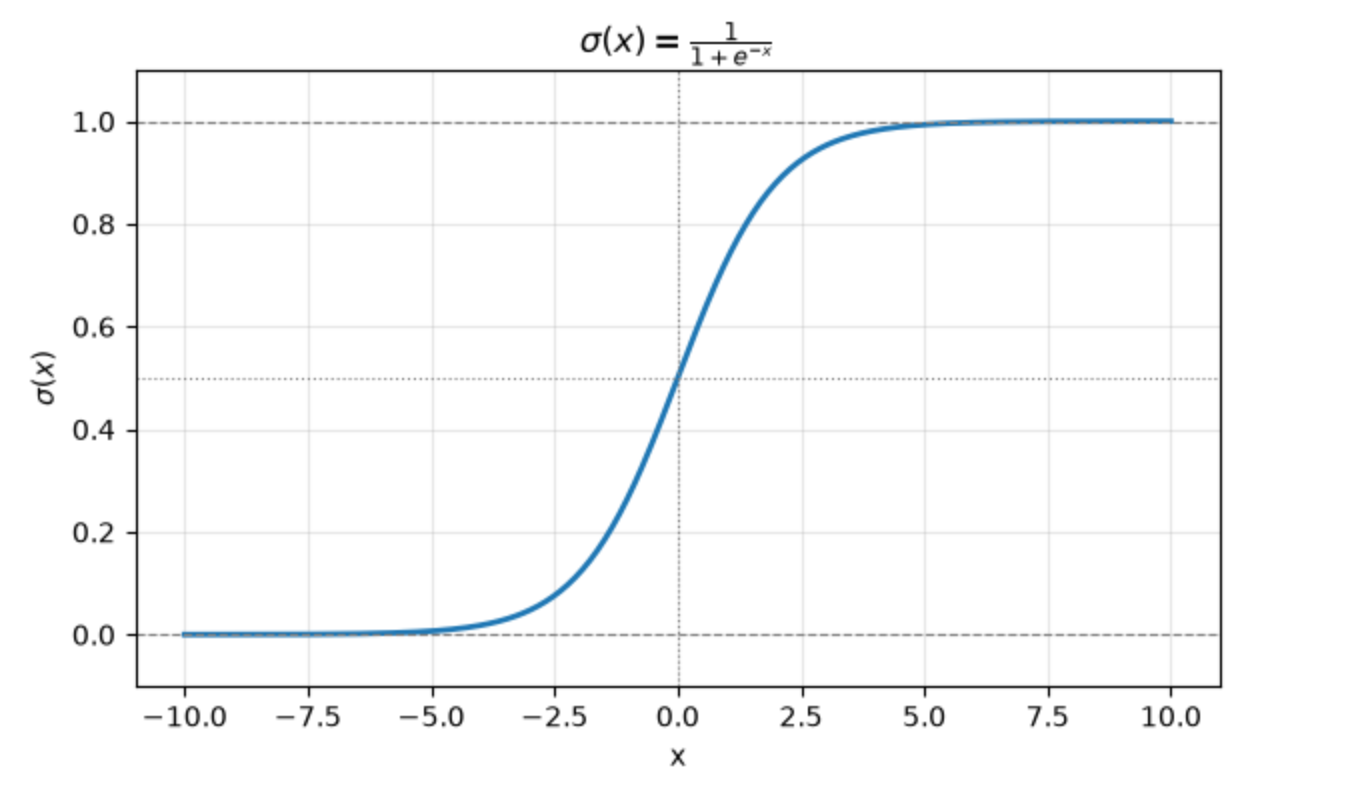
|
||||
|
||||
This function can be used any time we want to convert an arbitrary number into a
|
||||
probability. Large negative numbers will approach 0. Large positive numbers will
|
||||
approach 1. Numbers near 0 will settle somewhere in the middle.
|
||||
|
||||
Here are a few examples run through PyTorch's `sigmoid` function:
|
||||
|
||||
```python
|
||||
print("σ(-99) => ", torch.sigmoid(torch.tensor(-99.0)))
|
||||
print("σ(99) => ", torch.sigmoid(torch.tensor(99.0)))
|
||||
print("σ(0.123) => ", torch.sigmoid(torch.tensor(0.123)))
|
||||
print("σ(-2) => ", torch.sigmoid(torch.tensor(-2.0)))
|
||||
print("σ(1) => ", torch.sigmoid(torch.tensor(1.0)))
|
||||
```
|
||||
|
||||
which prints out:
|
||||
|
||||
```
|
||||
σ(-99) => tensor(0.)
|
||||
σ(99) => tensor(1.)
|
||||
σ(0.123) => tensor(0.5307)
|
||||
σ(-2) => tensor(0.1192)
|
||||
σ(1) => tensor(0.7311)
|
||||
```
|
||||
@@ -1,42 +0,0 @@
|
||||
# Generate Permutations Of All Valid 9-ball Racks
|
||||
|
||||
I wanted to produce a full listing of all valid rack arrangements for the game
|
||||
of [9-ball](https://en.wikipedia.org/wiki/Nine-ball). The constraints on how a
|
||||
9-ball rack can be arranged are, first, that the 1 ball must be placed at the
|
||||
head of the diamond and, second, that the 9 ball must be placed at the center of
|
||||
the diamond. After that, all other balls (2 through 8) can be placed in any
|
||||
arrangement.
|
||||
|
||||
Because each of those seven remaining balls can be arranged in distinct
|
||||
orderings where each ball is placed once, this is a
|
||||
[_permutation_](https://en.wikipedia.org/wiki/Permutation) problem.
|
||||
|
||||
> In elementary combinatorics, the k-permutations, or partial permutations, are
|
||||
> the ordered arrangements of k distinct elements selected from a set. When k is
|
||||
> equal to the size of the set, these are the permutations in the previous
|
||||
> sense.
|
||||
|
||||
For this problem, the seven distinct elements can be arranged into `7!` (seven
|
||||
factorial) unique permutations. That is, 5040 permutations.
|
||||
|
||||
I can use [Ruby's `Array#permutations`
|
||||
method](https://docs.ruby-lang.org/en/4.0/Array.html#method-i-permutation) to
|
||||
enumerate these 5040 permutations like so:
|
||||
|
||||
```ruby
|
||||
[2,3,4,5,6,7,8].permutation.map do |perm|
|
||||
[1, *perm[0..2], 9, *perm[3..7]]
|
||||
end.to_a
|
||||
=> [[1, 2, 3, 4, 9, 5, 6, 7, 8],
|
||||
[1, 2, 3, 4, 9, 5, 6, 8, 7],
|
||||
[1, 2, 3, 4, 9, 5, 7, 6, 8],
|
||||
[1, 2, 3, 4, 9, 5, 7, 8, 6],
|
||||
[1, 2, 3, 4, 9, 5, 8, 6, 7],
|
||||
[1, 2, 3, 4, 9, 5, 8, 7, 6],
|
||||
[1, 2, 3, 4, 9, 6, 5, 7, 8],
|
||||
...
|
||||
[1, 8, 7, 6, 9, 5, 3, 2, 4],
|
||||
[1, 8, 7, 6, 9, 5, 3, 4, 2],
|
||||
[1, 8, 7, 6, 9, 5, 4, 2, 3],
|
||||
[1, 8, 7, 6, 9, 5, 4, 3, 2]]
|
||||
```
|
||||
@@ -1,7 +1,8 @@
|
||||
# Create Umbrella Task For All Test Tasks
|
||||
|
||||
When I was first sketching out the [`mise` tasks](https://mise.jdx.dev/tasks/running-tasks.html) for a Rails app, I added
|
||||
the following two tasks. One is for running all the `rspec` tests. The other is
|
||||
When I was first sketching out the [`mise`
|
||||
tasks](https://mise.jdx.dev/tasks/running-tasks.html) for a Rails app, I added
|
||||
the following two tasks. One is for running all the `rspec` tests. The Other is
|
||||
for running all the `vitest` (JavaScript) tests.
|
||||
|
||||
```toml
|
||||
@@ -48,4 +49,5 @@ Running `mise run test:all` won't execute its own command, but because it
|
||||
depends on all other `test:*` tasks, the tests will get run through those
|
||||
dependencies.
|
||||
|
||||
This task naming pattern also allows for calling all tests with `mise run "test:**"`.
|
||||
This task naming pattern also allows for calling all tests with `mise run
|
||||
"test:**"`.
|
||||
|
||||
@@ -1,27 +0,0 @@
|
||||
# Look In Ruby Version Dotfile
|
||||
|
||||
Newer versions of [`mise`](https://mise.jdx.dev/dev-tools/) specifically only
|
||||
look for tool versions in `mise.toml` as well as the asdf `.tool-versions` file.
|
||||
A lot of Ruby projects use the `.ruby-version` file to indicate the Ruby version
|
||||
of a project. To continue to use the `.ruby-version` file instead of migrating
|
||||
to `mise.toml`, you need to tell `mise` that you prefer to use the idiomatic
|
||||
version file.
|
||||
|
||||
I added the following line to my
|
||||
[`~/.config/mise/config.toml`](https://github.com/jbranchaud/dotfiles/commit/8edeb7a9c53500e89e88b4079cbd1859ebebcbda)
|
||||
file:
|
||||
|
||||
```toml
|
||||
idiomatic_version_file_enable_tools = ["ruby"]
|
||||
```
|
||||
|
||||
Now, whenever `mise` is looking for the specified Ruby version of a project, it
|
||||
will also look for `.ruby-version`.
|
||||
|
||||
Here is a [full list of idomatic version files supported by
|
||||
`mise`](https://mise.jdx.dev/configuration.html#idiomatic-version-files).
|
||||
|
||||
See
|
||||
[`idiomatic_version_file_enable_tools`](https://mise.jdx.dev/configuration/settings.html#idiomatic_version_file_enable_tools)
|
||||
as well as the [Ruby-specific documentation](https://mise.jdx.dev/lang/ruby.html#ruby-version-and-gemfile-support)
|
||||
for more details.
|
||||
@@ -1,37 +0,0 @@
|
||||
# Override Your Project Mise File
|
||||
|
||||
A project I'm working on has a version-controlled `.mise.toml` file in it. Some
|
||||
changes were made to that recently that introduce some env vars that conflict
|
||||
with my setup. If I make edits to that file, then I have a modified version of
|
||||
`.mise.toml` sitting in my Git working copy.
|
||||
|
||||
```
|
||||
# .mise.toml
|
||||
[env]
|
||||
CONFIG_SETTING = "project"
|
||||
```
|
||||
|
||||
Instead, I can rely on the loading precedence rules of `mise` to override those
|
||||
project settings with my individual settings. I can do that with the
|
||||
`.mise.local.toml` file which is played on top of any `mise` configuration from
|
||||
files further down the precedence chain.
|
||||
|
||||
```
|
||||
# .mise.local.toml
|
||||
[env]
|
||||
CONFIG_SETTING = "override"
|
||||
```
|
||||
|
||||
Assuming I have `mise` setup with my shell environment to automatically load in
|
||||
these files, I can now check what takes precedence:
|
||||
|
||||
```bash
|
||||
$ echo $CONFIG_SETTING
|
||||
override
|
||||
```
|
||||
|
||||
Make sure `.mise.local.toml` is included in the `.gitignore` file to avoid
|
||||
checking in your personal environment overrides.
|
||||
|
||||
To be sure about what files are loaded and in what order, give `mise cfg` a try.
|
||||
I discuss that in more detail in [List The Files Being Loaded By Mise](list-the-files-being-loaded-by-mise.md).
|
||||
@@ -1,38 +0,0 @@
|
||||
# Pick From Tasks Using Interactive Picker
|
||||
|
||||
In [Add Mise Tasks For Common Workflow
|
||||
Commands](https://www.visualmode.dev/add-mise-tasks-for-common-workflow-commands),
|
||||
I wrote about a set of tasks I added as shortcuts for connecting to the `rails console` in various environments.
|
||||
|
||||
```toml
|
||||
# mise.toml
|
||||
[tasks."console:staging"]
|
||||
description = "Open a Rails console on staging"
|
||||
run = "ssh -t my-app-staging dokku run my-app rails console"
|
||||
|
||||
[tasks."console:prod"]
|
||||
description = "Open a Rails console on production"
|
||||
run = "ssh -t my-app-prod dokku run my-app rails console"
|
||||
```
|
||||
|
||||
When a project is configured with multiple `mise` tasks like this, we can invoke
|
||||
`mise run` without any specific arguments and it will prompt you with an
|
||||
interactive picker. The picker will populate with all the tasks like so:
|
||||
|
||||
```bash
|
||||
❯ mise run
|
||||
Tasks
|
||||
Select a task to run
|
||||
❯ console:prod Open a Rails console on production
|
||||
console:staging Open a Rails console on staging
|
||||
/
|
||||
esc clear filter • enter confirm
|
||||
```
|
||||
|
||||
We can navigate between the options with the arrow keys (and if we exit _filter_
|
||||
mode by hitting `esc`, then `j/k` also work to move down and up). While in
|
||||
_filter_ mode, we can type into the prompt which will filter the list of
|
||||
commands down to just the partial matches.
|
||||
|
||||
Once we're targeting the task we want to run, we hit `enter` and the task is
|
||||
executed.
|
||||
@@ -1,29 +0,0 @@
|
||||
# Search Through Bin Paths For Tool Locations
|
||||
|
||||
The `mise bin-paths` command will list all the bin paths that are managed by
|
||||
`mise`. When you tell `mise` to install a tool, it installs a specific version
|
||||
at a location where its binaries can be made accessible on the system path.
|
||||
|
||||
While `mise ls` is useful for seeing what is installed by `mise` and at what
|
||||
version, the `bin-paths` command can tell you where those tool installations
|
||||
with their binaries are located.
|
||||
|
||||
Combine this with `grep` or `rg` to narrow down the results to tools by a
|
||||
specific name:
|
||||
|
||||
```bash
|
||||
❯ mise bin-paths | rg 'neovim'
|
||||
/Users/lastword/.local/share/mise/installs/npm-neovim/5.4.0/bin
|
||||
/Users/lastword/.local/share/mise/installs/pipx-neovim-remote/2.5.1/bin
|
||||
/Users/lastword/.local/share/mise/installs/neovim/0.11.6/bin
|
||||
```
|
||||
|
||||
I can then look in one of these directories to see the one or more binaries that
|
||||
they include. For instance, here is what is in the `node` bin path:
|
||||
|
||||
```bash
|
||||
❯ ls /Users/lastword/.local/share/mise/installs/node/22.22.0/bin
|
||||
./ ../ claude@ corepack@ node* npm* npx@
|
||||
```
|
||||
|
||||
See `mise bin-paths --help` for more details.
|
||||
@@ -1,29 +0,0 @@
|
||||
# Avoid Vulnerabilities In New Package Versions
|
||||
|
||||
It seems like every week there is a new supply chain attack where malicious code
|
||||
is embedded in a popular, widely-used OSS package. This week's is
|
||||
[axios](https://www.stepsecurity.io/blog/axios-compromised-on-npm-malicious-versions-drop-remote-access-trojan).
|
||||
|
||||
The [`pnpm` package manager](https://pnpm.io/) has a nice feature that helps
|
||||
avoid installing these vulnerable package versions in the first place.
|
||||
|
||||
> To reduce the risk of installing compromised packages, you can delay the
|
||||
> installation of newly published versions. In most cases, malicious releases
|
||||
> are discovered and removed from the registry within an hour.
|
||||
|
||||
The [`minimumReleaseAge` config option](https://pnpm.io/settings#minimumreleaseage) tells `pnpm` to not install
|
||||
a dependency (including transitive ones) until it has been released for at least
|
||||
that many minutes.
|
||||
|
||||
For instance, if you wanted to set this to 72 hours, then you'd set this option
|
||||
to `4320` minutes like so:
|
||||
|
||||
```
|
||||
$ pnpm config set minimum-release-age 4320 -g
|
||||
```
|
||||
|
||||
The global flag (`-g`) will set that in your global config location, e.g.
|
||||
`$XDG_CONFIG_HOME/pnpm/rc`. You could also add it specifically to your project
|
||||
in the `pnpm-workspace.yaml` file.
|
||||
|
||||
[source](https://bsky.app/profile/styfle.dev/post/3miekuyeyrs2w)
|
||||
@@ -1,44 +0,0 @@
|
||||
# Compute Median Instead Of Average
|
||||
|
||||
One of the first aggregate functions we might use in PostgreSQL, besides `sum`,
|
||||
is `avg`.
|
||||
|
||||
```sql
|
||||
select avg(book_count) as average_books_read
|
||||
from (
|
||||
select users.id, count(books.id) as book_count
|
||||
from users
|
||||
left join books
|
||||
on books.user_id = users.id
|
||||
where books.read_in_year = 2025
|
||||
group by users.id
|
||||
) as user_book_counts;
|
||||
```
|
||||
|
||||
This computes the average of the set of values which sums them all up
|
||||
and divides by the count. The average (maybe you've heard this also called the
|
||||
_mean_) is not always the best way to understand data, especially when there are
|
||||
outliers.
|
||||
|
||||
Instead, we might want to compute the _median_ value of our set of data. There
|
||||
is no easily identifiable `median` aggregate function. Instead, we can use
|
||||
`percentile_cont` with a value of `0.5`. This gets us the 50th percentile of our
|
||||
set of data which is the definition of the _median_.
|
||||
|
||||
```sql
|
||||
select percentile_cont(0.5) within group (
|
||||
order by book_count
|
||||
) as median_books_read
|
||||
from (
|
||||
select users.id, count(books.id) as book_count
|
||||
from users
|
||||
left join books on books.user_id = users.id and books.read_in_year = 2025
|
||||
group by users.id
|
||||
) as user_book_counts;
|
||||
```
|
||||
|
||||
The full syntax for `percentile_cont` is `percentile_cong(precision) within
|
||||
group (order by ...)` because this is an aggregiate that has to work with an
|
||||
ordered-set of data.
|
||||
|
||||
[source](https://www.postgresql.org/docs/current/functions-aggregate.html)
|
||||
@@ -1,96 +0,0 @@
|
||||
# Sequence Side-Effect When Rolling Back Inserts
|
||||
|
||||
What is so powerful about the transaction guarantees of a system like PostgreSQL
|
||||
is that I can make all kinds of changes (big or small) within a transaction,
|
||||
then roll it back, and it's like nothing ever happened.
|
||||
|
||||
This is useful if I want to dry-run an crucial update statement in the
|
||||
production environment. I can gauge how many rows I expect to be impacted, run
|
||||
the update in a transaction, inspect the state of the table, and rollback if
|
||||
needed. It's like the changes never happened.
|
||||
|
||||
Rolled back transactions aren't completely free of side-effects. They can leave
|
||||
a trace. In this case, that trace is increments to a sequence like you'd find
|
||||
attached to a primary key. Each `insert` of a row into a table with an
|
||||
autoincrementing sequence will have an effect on that sequence.
|
||||
|
||||
First, I'll create a fresh table and check the state of the sequence.
|
||||
|
||||
```sql
|
||||
> create table books (id bigserial primary key, title text not null, author text not null);
|
||||
CREATE TABLE
|
||||
|
||||
> select * from books_id_seq;
|
||||
┌────────────┬─────────┬───────────┐
|
||||
│ last_value │ log_cnt │ is_called │
|
||||
├────────────┼─────────┼───────────┤
|
||||
│ 1 │ 0 │ f │
|
||||
└────────────┴─────────┴───────────┘
|
||||
(1 row)
|
||||
```
|
||||
|
||||
Now, I'll start a transaction, do some inserts, and again check the state of the
|
||||
sequence.
|
||||
|
||||
```sql
|
||||
> begin;
|
||||
BEGIN
|
||||
|
||||
> insert into books (title, author) values ('Python in a Nutshell', 'Martelli et al'), ('Build an LLM', 'Sebastian Raschka'), ('The Joy of Abstraction', 'Eugenia Cheng');
|
||||
INSERT 0 3
|
||||
|
||||
> select * from books;
|
||||
┌────┬────────────────────────┬───────────────────┐
|
||||
│ id │ title │ author │
|
||||
├────┼────────────────────────┼───────────────────┤
|
||||
│ 1 │ Python in a Nutshell │ Martelli et al │
|
||||
│ 2 │ Build an LLM │ Sebastian Raschka │
|
||||
│ 3 │ The Joy of Abstraction │ Eugenia Cheng │
|
||||
└────┴────────────────────────┴───────────────────┘
|
||||
(3 rows)
|
||||
|
||||
> select * from books_id_seq;
|
||||
┌────────────┬─────────┬───────────┐
|
||||
│ last_value │ log_cnt │ is_called │
|
||||
├────────────┼─────────┼───────────┤
|
||||
│ 3 │ 30 │ t │
|
||||
└────────────┴─────────┴───────────┘
|
||||
(1 row)
|
||||
```
|
||||
|
||||
I will now rollback the transaction. I expect `books` to be empty again. But
|
||||
what happens to the state of `books_id_seq`?
|
||||
|
||||
```sql
|
||||
> rollback;
|
||||
ROLLBACK
|
||||
|
||||
> select * from books;
|
||||
┌────┬───────┬────────┐
|
||||
│ id │ title │ author │
|
||||
├────┼───────┼────────┤
|
||||
└────┴───────┴────────┘
|
||||
(0 rows)
|
||||
|
||||
> select * from books_id_seq;
|
||||
┌────────────┬─────────┬───────────┐
|
||||
│ last_value │ log_cnt │ is_called │
|
||||
├────────────┼─────────┼───────────┤
|
||||
│ 3 │ 30 │ t │
|
||||
└────────────┴─────────┴───────────┘
|
||||
(1 row)
|
||||
```
|
||||
|
||||
Despite rolling back, the state of `books_id_seq` remains with a `last_value` of
|
||||
`3`. This is because a sequence is used outside of transaction isolation.
|
||||
Multiple concurrent transactions may both need sequence values. Instead of them
|
||||
blocking on each other, the sequence can always be accessed. The tradeoff is
|
||||
that the `last_value` of a sequence is always marching forward and gaps will
|
||||
happen when transactions are rolled back.
|
||||
|
||||
This is normal and expected behavior. It is something to be aware of if you have
|
||||
a high-volume system that is doing a ton of inserting and rolling back (I've
|
||||
worked on systems that do this). However, the solution there is more to do with
|
||||
picking `bigint` (`bigserial`) for your sequence-backed column. That would
|
||||
reasonably eliminate concern for running out of sequence values. Or use UUIDs
|
||||
instead.
|
||||
@@ -1,34 +0,0 @@
|
||||
# Access Most Recent Return Value In REPL
|
||||
|
||||
One of my favorite features of Ruby's `irb` and `pry` are that you can use `_`
|
||||
to reference the most recent return value. Often as we use an interpreter or
|
||||
REPL, we end up with _intermediate_ values. That is, we've execute some kind of
|
||||
statement which returned a value and we now want to use that resulting value in
|
||||
our next statement. Python also supports `_`.
|
||||
|
||||
Let's say I've run a statement that took a while to process, but I forgot to
|
||||
assign it to a variable. Instead of re-running the whole thing, I can create a
|
||||
variable that references the previous return value using `_`.
|
||||
|
||||
```python
|
||||
>>> BytePairEncoding.train_bpe(long_text)
|
||||
{'merge_rules': [...], 'vocab': {...}}
|
||||
>>> result = _
|
||||
>>> list(result.keys())
|
||||
['merge_rules', 'vocab']
|
||||
```
|
||||
|
||||
Even if I don't necessarily want to assign it a variable, it can be nice to
|
||||
reference the previous value as I continue with what I'm doing:
|
||||
|
||||
```python
|
||||
>>> result['merge_rules'][0][1]
|
||||
256
|
||||
>>> result['vocab'][_]
|
||||
b'e '
|
||||
```
|
||||
|
||||
Notice how the value from the first statement gets used as part of a `dict`
|
||||
access.
|
||||
|
||||
[source](https://docs.python.org/3/tutorial/introduction.html#numbers)
|
||||
@@ -1,35 +0,0 @@
|
||||
# Access SQLite Result Values By Name With Row Factory
|
||||
|
||||
The default shape of a result from executing a row-returning statement with
|
||||
`sqlite3` is a tuple. Whose values can be accessed positionally.
|
||||
|
||||
```python
|
||||
>>> res = conn.execute("select * from projects;")
|
||||
>>> res.fetchone()
|
||||
(1, 'py-vmt', '2026-07-25 14:53:44', '2026-07-25 14:53:44')
|
||||
```
|
||||
|
||||
If I want something a bit nicer, I can enable [_Row Factory_
|
||||
results](https://docs.python.org/3/library/sqlite3.html#how-to-create-and-use-row-factories)
|
||||
for my connection. The values on a _row_ can be accessed by name as well as
|
||||
positionally.
|
||||
|
||||
```python
|
||||
>>> conn.row_factory = sqlite3.Row
|
||||
>>> res = conn.execute("select * from projects;")
|
||||
>>> res.fetchone()
|
||||
<sqlite3.Row object at 0x1019e3c40>
|
||||
>>> r1 = _
|
||||
>>> r1
|
||||
<sqlite3.Row object at 0x1019e3c40>
|
||||
>>> r1["name"]
|
||||
'py-vmt'
|
||||
>>> r1["id"]
|
||||
1
|
||||
>>> r1[1]
|
||||
'py-vmt'
|
||||
```
|
||||
|
||||
[I used Row Factory on a project
|
||||
recently](https://github.com/jbranchaud/py-vmt/pull/9/changes) and I think it
|
||||
made for an improvement in the readability of the code.
|
||||
@@ -1,44 +0,0 @@
|
||||
# Access Variables Outside Loop Scope
|
||||
|
||||
Here is a function that loops over a list to find the first occurrence of a
|
||||
falsy value.
|
||||
|
||||
```python
|
||||
def find_false(self):
|
||||
for item in self.items:
|
||||
item_type = type(item)
|
||||
print(f"Current item: {item} ({item_type})")
|
||||
if not item:
|
||||
break
|
||||
|
||||
print(f"First false item: {item} ({item_type})")
|
||||
```
|
||||
|
||||
Notice how at the end of the function, outside of the loop, I am able to access
|
||||
both `item` (defined in the loop definition) and `item_type` (defined within the
|
||||
loop's body).
|
||||
|
||||
Both of these variables are defined, by the loop, in _function scope_ and are
|
||||
accessible anywhere in the function after they have been defined.
|
||||
|
||||
The title of this TIL is a bit of a misnomer because Python doesn't have the
|
||||
concept of a _loop scope_. There are two levels of scope in Python --
|
||||
module/global scope and function scope.
|
||||
|
||||
I spend most of my time writing Ruby which also has _block scope_, so Python's
|
||||
simplified two-level scoping took me by surprise.
|
||||
|
||||
Though the code sample above is contrived, this function scope assignment can be
|
||||
taken advantage of with loop definitions in scenarios where you want to know
|
||||
what the last `item` defined was before the loop terminated.
|
||||
|
||||
```python
|
||||
for submission in submissions:
|
||||
if passes(submission, criteria):
|
||||
break
|
||||
else:
|
||||
raise ValueError("No submissions that meet given criteria")
|
||||
|
||||
print(f"Submit first passing submission: {submission.id}")
|
||||
submit(submission)
|
||||
```
|
||||
@@ -1,61 +0,0 @@
|
||||
# Annotate Return Type On Enum Function
|
||||
|
||||
I defined the following `StrEnum` class to capture the canonical set of valid
|
||||
values for a _storage format_ in
|
||||
[`py-vmt`](https://github.com/jbranchaud/py-vmt). It includes a `default`
|
||||
function that can be called to get what the system considers the default storage
|
||||
format.
|
||||
|
||||
```python
|
||||
class StorageFormat(StrEnum):
|
||||
SQLITE = "sqlite"
|
||||
JSON = "json"
|
||||
|
||||
@staticmethod
|
||||
def default():
|
||||
return StorageFormat.SQLITE
|
||||
```
|
||||
|
||||
This works, but what is missing is a type annotation for the return value of
|
||||
`default`.
|
||||
|
||||
I'd like to use `StorageFormat` as the return type annotation. However, the
|
||||
annotations are eagerly evaluated at the time the function definition is being
|
||||
processed. The `StorageFormat` class is not fully evaluated at that point and so
|
||||
isn't available.
|
||||
|
||||
Instead, what I can do is quote `StorageFormat` as a string to make it a
|
||||
_forward reference_.
|
||||
|
||||
```python
|
||||
class StorageFormat(StrEnum):
|
||||
SQLITE = "sqlite"
|
||||
JSON = "json"
|
||||
|
||||
@staticmethod
|
||||
def default() -> "StorageFormat":
|
||||
return StorageFormat.SQLITE
|
||||
```
|
||||
|
||||
The string type annotation will be lazily evaluated at a later time when
|
||||
`StorageFormat` fully exists. This is behavior that is slated to be deprecated.
|
||||
And it is no longer needed as of [Python 3.14 which lazily evaluates all
|
||||
annotations by default
|
||||
now](https://docs.python.org/3/reference/compound_stmts.html#annotations).
|
||||
|
||||
If I want to be more specific with the above annotation, I can import [`Literal`
|
||||
from `typing`](https://docs.python.org/3/library/typing.html#typing.Literal) and
|
||||
then wrap a specific enum value.
|
||||
|
||||
```python
|
||||
class StorageFormat(StrEnum):
|
||||
SQLITE = "sqlite"
|
||||
JSON = "json"
|
||||
|
||||
@staticmethod
|
||||
def default() -> "Literal[StorageFormat.SQLITE]":
|
||||
return StorageFormat.SQLITE
|
||||
```
|
||||
|
||||
Now it will specifically enforce `SQLITE` rather than accepting `SQLITE` or
|
||||
`JSON`.
|
||||
@@ -1,47 +0,0 @@
|
||||
# Another Way To Mark Keyword-Only Dataclass Fields
|
||||
|
||||
In [Configure Other Attributes Of Dataclass
|
||||
Field](configure-other-attributes-of-dataclass-field), I showed how the
|
||||
[`dataclasses.field`](https://docs.python.org/3/library/dataclasses.html#dataclasses.field)
|
||||
constructor function can be used. One of the parameters I demonstrated was
|
||||
`kw_only`. Each field constructed with `kw_only=True` will be required to be
|
||||
passed as a keyword-only parameter when constructing an instance of that
|
||||
`dataclass`.
|
||||
|
||||
Another way to specify keyword-only parameters with `dataclass` fields is to
|
||||
segment them with `KW_ONLY`. This sentinel value can be included as a
|
||||
pseudo-field where all fields that come after it are treated as keyword-only.
|
||||
|
||||
Translating the example from that other post would look like this:
|
||||
|
||||
```python
|
||||
from dataclasses import dataclass, field, KW_ONLY
|
||||
from datetime import datetime
|
||||
|
||||
@dataclass
|
||||
class Session:
|
||||
start_time: datetime
|
||||
project_name: str
|
||||
_: KW_ONLY
|
||||
tags: list[str] = field(default_factory=list, kw_only=True)
|
||||
end_time: datetime | None = None
|
||||
|
||||
# ...
|
||||
|
||||
sesh1 = Session(start1, "my-project", tags=["pytorch", "numpy"])
|
||||
sesh2 = Session(start2, "other-project", end_time=datetime.now())
|
||||
```
|
||||
|
||||
The field whose value is `KW_ONLY` is only used to signal that keyword-only
|
||||
boundary. It does not itself become a field of the dataclass.
|
||||
|
||||
On the one hand I like this approach because it feels closer to [the way this is
|
||||
signaled in standard function definition
|
||||
syntax](force-remaining-arguments-to-be-named.md).
|
||||
|
||||
```python
|
||||
def build_session(start_time, project_name, *, tags, end_time=None)
|
||||
```
|
||||
|
||||
On the other hand, it feels like magic `dataclass` syntax whereas the
|
||||
`kw_only=True` parameter is more explicit.
|
||||
@@ -1,76 +0,0 @@
|
||||
# Argument Defaults Are Evaluated When Function Is Defined
|
||||
|
||||
When you define a function with any arguments that have default values, those
|
||||
default values are evaluated and stored at the time that the function is defined
|
||||
(i.e. when it is evaluated by the interpreter). This might feel counter
|
||||
intuitive if you are coming from another language, like Ruby, where these kinds
|
||||
of defaults are evaluated at call time. This is unremarkable for scalar values
|
||||
like `4` or `"fallback"`. It's much more interesting when your defaults are
|
||||
function calls.
|
||||
|
||||
What if our default is something like `datetime.now()`?
|
||||
|
||||
Here I've defined a `Timer` class that has a `start` and `stop` method. The
|
||||
`stop` method can be called with a specific `datetime` value otherwise it falls
|
||||
back to `datetime.now()` -- but when is _now_?
|
||||
|
||||
```python
|
||||
from datetime import datetime, timezone
|
||||
import time
|
||||
|
||||
|
||||
class Timer:
|
||||
def __init__(self):
|
||||
self._start = None
|
||||
self._stop = None
|
||||
|
||||
def start(self):
|
||||
self._start = datetime.now(timezone.utc)
|
||||
self._stop = None
|
||||
|
||||
def stop(self, at=datetime.now(timezone.utc)):
|
||||
print(f"now: {datetime.now(timezone.utc)}")
|
||||
print(f" at: {at}")
|
||||
self._stop = at
|
||||
|
||||
elapsed = self._stop - self._start
|
||||
return elapsed
|
||||
```
|
||||
|
||||
Here I instantiate a timer, call `start`, sleep for 5 seconds, and then call
|
||||
`stop`.
|
||||
|
||||
```python
|
||||
timer = Timer()
|
||||
timer.start()
|
||||
|
||||
time.sleep(5)
|
||||
|
||||
print(f"Elapsed: {timer.stop()}")
|
||||
```
|
||||
|
||||
Here is what gets printed to `stdout`:
|
||||
|
||||
```
|
||||
now: 2026-05-22 00:45:05.654878+00:00
|
||||
at: 2026-05-22 00:45:00.649699+00:00
|
||||
Elapsed: -1 day, 23:59:59.999875
|
||||
```
|
||||
|
||||
Notice that the actual _now_ (when the `stop` method is running) is about 5
|
||||
seconds after the value of `at`. That is because `at`, which takes on the
|
||||
default argument value, is `datetime.now()` as evaluated at the time the
|
||||
function is interpreted. It is for that same reason that `self._stop` ends up
|
||||
being just a hair earlier than the call to `start` which sets `self._start`.
|
||||
Which explains why the _elapsed_ time is a negative value.
|
||||
|
||||
To avoid this awkwardness all together, set the default as `None` and then
|
||||
override `None` at the start of the function:
|
||||
|
||||
```python
|
||||
def stop(self, at = None):
|
||||
if at == None:
|
||||
at = datetime.now(timezone.utc)
|
||||
|
||||
# ...
|
||||
```
|
||||
@@ -1,38 +0,0 @@
|
||||
# Assert Is Only A Development Check
|
||||
|
||||
The `assert` keyword is used in Python to write a statement that will check some
|
||||
assertion and raise an error if it isn't met. This is only meant to be used as a
|
||||
check during development because it can be easily optimized out of the code.
|
||||
|
||||
```python
|
||||
stuff = None
|
||||
|
||||
assert stuff, "We need to have some stuff to proceed"
|
||||
|
||||
print(f"We have {stuff or 'something'}!")
|
||||
```
|
||||
|
||||
If I execute this code with `python`, it will raise on that second line of code.
|
||||
|
||||
```bash
|
||||
❯ python assert_example.py
|
||||
Traceback (most recent call last):
|
||||
File "/Users/lastword/dev/jbranchaud/py-vmt/assert_example.py", line 3, in <module>
|
||||
assert stuff, "We need to have some stuff to proceed"
|
||||
^^^^^
|
||||
AssertionError: We need to have some stuff to proceed
|
||||
```
|
||||
|
||||
This `assert` statement will be stripped out of the compiled bytecode if the
|
||||
`-O` (capital o) flag is used. Notice how running the same file with that flag
|
||||
does not lead to an `AssertionError`.
|
||||
|
||||
```python
|
||||
❯ python -O assert_example.py
|
||||
We have something!
|
||||
```
|
||||
|
||||
If I want to make sanity checks for situations that would be caused by a bug in
|
||||
the code, an `assert` statement can be a good candidate. However, if I am making
|
||||
runtime checks like validating user input, then an `if` statement and raising
|
||||
something like a `ValueError` is better.
|
||||
@@ -1,47 +0,0 @@
|
||||
# Avoid Modification With Frozen Dataclass
|
||||
|
||||
The `@dataclass` decorator can be set as _frozen_ to prevent modification of
|
||||
values on instances of that `dataclass`.
|
||||
|
||||
Without making it frozen, I can easily subvert validations by changing the value
|
||||
of attributes after the `__post_init__` validations are called.
|
||||
|
||||
```python
|
||||
>>> config = BPEConfig(300, []) # passes validations
|
||||
>>> config.vocab_size = 22 # this is invalid, wish this was prevented
|
||||
```
|
||||
|
||||
Here is the updated `@dataclass` declaration with `frozen=True` passed as a
|
||||
parameter.
|
||||
|
||||
```python
|
||||
from dataclasses import dataclass
|
||||
from typing import ClassVar
|
||||
|
||||
@dataclass(frozen=True)
|
||||
class BPEConfig:
|
||||
BASE_VOCAB_SIZE: ClassVar[int] = 256
|
||||
|
||||
vocab_size: int
|
||||
special_tokens: list[str]
|
||||
|
||||
def __post_init__(self):
|
||||
if self.vocab_size < self.BASE_VOCAB_SIZE:
|
||||
msg = f"vocab_size ({self.vocab_size}) must be greater than or equal to BASE_VOCAB_SIZE ({self.BASE_VOCAB_SIZE})"
|
||||
raise ValueError(msg)
|
||||
```
|
||||
|
||||
Now I am prevented from modifying a scalar value like `vocab_size` after the
|
||||
instance has been created.
|
||||
|
||||
```python
|
||||
>>> config = BPEConfig(300, [])
|
||||
>>> config.vocab_size = 22
|
||||
Traceback (most recent call last):
|
||||
File "<stdin>", line 1, in <module>
|
||||
File "<string>", line 4, in __setattr__
|
||||
dataclasses.FrozenInstanceError: cannot assign to field 'vocab_size'
|
||||
```
|
||||
|
||||
This doesn't prevent you from modifying the contents of attributes that are
|
||||
`list` or `dict` types.
|
||||
@@ -1,26 +0,0 @@
|
||||
# BasedPyright Will Use Pyright Config
|
||||
|
||||
I was transitioning my [`py-vmt` project](https://github.com/jbranchaud/py-vmt)
|
||||
from `pyright` to `basedpyright` for Python type checking. That's because Zed
|
||||
uses `basedpyright` by default and `pyright` doesn't work in Cursor, whereas
|
||||
`basedpyright` does. I wanted to unify around one set of type check tooling.
|
||||
|
||||
I swapped out `pyright` for `basedpyright` in my dev dependencies, updated what
|
||||
was being called in my `Taskfile.yml`, and GitHub workflow action.
|
||||
|
||||
What I didn't have to change, though, was the `tool.pyright` config heading in
|
||||
my `pyproject.toml`. For aesthetics I could have changed it to
|
||||
`tool.basedpyright`. However, `basedpyright` knows to look for either config, so
|
||||
I can leave that one as is.
|
||||
|
||||
```toml
|
||||
[tool.pyright]
|
||||
include = ["src", "tests"]
|
||||
typeCheckingMode = "basic"
|
||||
```
|
||||
|
||||
If I introduce a `pyrightconfig.json` file to the project, which is also
|
||||
supported by `basedpyright`, it will take precedence over the settings in
|
||||
`pyproject.toml`.
|
||||
|
||||
[source](https://docs.basedpyright.com/v1.24.0/configuration/config-files/)
|
||||
@@ -1,50 +0,0 @@
|
||||
# Check If Package Is Installed With Pip
|
||||
|
||||
I recently installed PyTorch, but when I tried using it, I was getting an error
|
||||
about `numpy` not being installed. I was kind of surprised by that because I
|
||||
thought I would have already had that.
|
||||
|
||||
I wanted to check, so I asked with `pip show`:
|
||||
|
||||
```bash
|
||||
❯ python3 -m pip show numpy
|
||||
WARNING: Package(s) not found: numpy
|
||||
```
|
||||
|
||||
I can even list everything that is installed with `pip` using `pip list` like
|
||||
so:
|
||||
|
||||
```bash
|
||||
❯ python3 -m pip list
|
||||
Package Version Build
|
||||
------------------ --------- -----
|
||||
certifi 2026.1.4
|
||||
cffi 2.0.0
|
||||
charset-normalizer 3.4.4
|
||||
click 8.3.1
|
||||
commonmark 0.9.1
|
||||
cryptography 46.0.3
|
||||
docutils 0.22.4
|
||||
filelock 3.24.2
|
||||
fsspec 2026.2.0
|
||||
idna 3.11
|
||||
Jinja2 3.1.6
|
||||
...
|
||||
```
|
||||
|
||||
I then installed `numpy` (`python3 -m pip install numpy`) and how I can use `pip
|
||||
show` again to confirm that.
|
||||
|
||||
```bash
|
||||
❯ python3 -m pip show numpy
|
||||
Name: numpy
|
||||
Version: 2.4.2
|
||||
Summary: Fundamental package for array computing in Python
|
||||
Home-page: https://numpy.org
|
||||
Author: Travis E. Oliphant et al.
|
||||
Author-email:
|
||||
License-Expression: BSD-3-Clause AND 0BSD AND MIT AND Zlib AND CC0-1.0
|
||||
Location: /Users/lastword/.local/share/mise/installs/python/3.12.12/lib/python3.12/site-packages
|
||||
Requires:
|
||||
Required-by:
|
||||
```
|
||||
@@ -1,53 +0,0 @@
|
||||
# Check Precondition Before Click Arg Parsing
|
||||
|
||||
When setting up various [Click](https://click.palletsprojects.com/en/stable/)
|
||||
subcommands with options, I ran into an issue with the order of some validation
|
||||
checks. I was putting the same precondition validation logic at the beginning of
|
||||
several subcommands. I was also putting callback validations on specific options
|
||||
to those subcommands. Ideally the option validations could rely on those
|
||||
precondition validations. However, the option callbacks run before anything in
|
||||
the body of the subcommands.
|
||||
|
||||
The solution was to move those preconditions out of the subcommand body
|
||||
(simplifying the subcommand) and into a `click.Command` subclass.
|
||||
|
||||
To demonstrate that, I'll first show the `click.Command` subclass:
|
||||
|
||||
```python
|
||||
class RequireActiveSessionCommand(click.Command):
|
||||
def parse_args(self, ctx, args):
|
||||
if ctx.obj.active_session is None:
|
||||
msg = "No active session being tracked. Start a session first."
|
||||
raise click.UsageError(msg)
|
||||
|
||||
return super().parse_args(ctx, args)
|
||||
```
|
||||
|
||||
The only thing this subclass overrides is `parse_args` where it gets ahead of
|
||||
the standard arg parsing logic to first check the precondition. In this case, I
|
||||
check that there is an active session. If there isn't, then I can raise a
|
||||
`click.UsageError`. Otherwise, it delegates back to the super-class
|
||||
implementation of `parse_args`.
|
||||
|
||||
This subclass then gets used for the commands that need to enforce this
|
||||
precondition. Two prime examples of that are the `stop` and `cancel` subcommands.
|
||||
|
||||
```python
|
||||
@cli.command(cls=RequireActiveSessionCommand)
|
||||
@click.option("--at", help='Hours previous to end the timer, e.g. "2 hours ago"', callback=validate_stop_at)
|
||||
@pass_cli
|
||||
def stop(cli_ctx: CliContext, at: datetime) -> None:
|
||||
# ... implementation omitted
|
||||
|
||||
@cli.command(cls=RequireActiveSessionCommand)
|
||||
@pass_cli
|
||||
def cancel(cli_ctx: CliContext):
|
||||
# ... implementation omitted
|
||||
```
|
||||
|
||||
Other subcommands, like `start` and `status` that don't need to enforce this
|
||||
precondition use the `@cli.command()` decorator without passing in a custom
|
||||
subclass.
|
||||
|
||||
This example is pulled directly from [this commit](https://github.com/jbranchaud/py-vmt/commit/505109b7a4013e05f085cded666c6b1ac7c3c250)
|
||||
of my [`py-vmt` time tracker tool](https://github.com/jbranchaud/py-vmt).
|
||||
@@ -1,54 +0,0 @@
|
||||
# Combine StrEnum With Pydantic For Union Type
|
||||
|
||||
I want a [Pydantic](https://pydantic.dev/docs/validation/latest/get-started/)
|
||||
model that I can use to verify the shape and values of user-provided config
|
||||
file. Let's say, for now, the only config value supported by the file is
|
||||
`storage_format` and it can be one of three values (`json`, `sqlite`,
|
||||
`inmemory`).
|
||||
|
||||
I can start with a
|
||||
[`StrEnum`](https://docs.python.org/3/library/enum.html#enum.StrEnum) class to
|
||||
represent the set of valid values for the storage format field.
|
||||
|
||||
```python
|
||||
from enum import StrEnum
|
||||
from typing import Literal
|
||||
|
||||
class StorageFormat(StrEnum):
|
||||
SQLITE = "sqlite"
|
||||
JSON = "json"
|
||||
INMEMORY = "inmemory"
|
||||
|
||||
@classmethod
|
||||
def default(cls) -> Literal[StorageFormat.SQLITE]:
|
||||
return cls.SQLITE
|
||||
```
|
||||
|
||||
Notice I've also provided a class method called `default` for serving up a
|
||||
fallback default value.
|
||||
|
||||
Here is the corresponding Pydantic `CliConfig` model which uses the
|
||||
`StorageFormat` string enum class as the type signature for its `storage_format`
|
||||
field.
|
||||
|
||||
```python
|
||||
from pydantic import BaseModel
|
||||
|
||||
class CliConfig(BaseModel):
|
||||
storage_format: StorageFormat = StorageFormat.default()
|
||||
```
|
||||
|
||||
For `storage_format` to be valid in the context of `CliConfig`, it must be one
|
||||
of the values defined by that `StrEnum`. I get auto-complete, I get type
|
||||
checking, and I can validate a config file I've just read into memory (in this
|
||||
case, using
|
||||
[`model_validate_json`](https://pydantic.dev/docs/validation/dev/api/pydantic/base_model/#pydantic.BaseModel.model_validate_json)).
|
||||
|
||||
```python
|
||||
def _read_config(self) -> CliConfig:
|
||||
if self.exists():
|
||||
raw_json = self.config_file.read_text()
|
||||
return CliConfig.model_validate_json(raw_json)
|
||||
|
||||
return CliConfig()
|
||||
```
|
||||
@@ -1,71 +0,0 @@
|
||||
# Commit Writes From Executed SQLite Statements
|
||||
|
||||
Let's look at a method that uses a
|
||||
[`sqlite3`](https://docs.python.org/3/library/sqlite3.html) connection to
|
||||
execute a couple statements against a SQLite database.
|
||||
|
||||
```python
|
||||
def write_session_with_project(self, session, *, active=False) -> None:
|
||||
# Delete the current active session if there is one
|
||||
self.conn.execute("""
|
||||
delete from sessions where active = 1;
|
||||
""")
|
||||
|
||||
# Upsert (find or create) the project based on `session.project_name`
|
||||
cursor = self.conn.execute(
|
||||
"""
|
||||
insert into projects (name) values (:project_name)
|
||||
on conflict (name) do update set name = excluded.name
|
||||
returning id;
|
||||
""",
|
||||
{"project_name": session.project_name},
|
||||
)
|
||||
project_id = cursor.fetchone()[0]
|
||||
|
||||
# ...
|
||||
|
||||
self.conn.commit()
|
||||
```
|
||||
|
||||
The first `conn.execute` call is going to implicitly start a database
|
||||
transaction before executing the statement. Subsequent statements are going to
|
||||
take place within that transaction. To apply all the changes in the transaction
|
||||
I have to eventually run `conn.commit()`. If there isn't an issue committing all
|
||||
the changes and nothing else raised before I committed, then those changes will
|
||||
all be applied atomically.
|
||||
|
||||
I will need to do my own exception handling with a try/catch that handles any
|
||||
rollback.
|
||||
|
||||
I'd rather not have to manage those extra pieces which is the kind of thing
|
||||
context managers typically help with. Let's improve upon this with the
|
||||
[Connection context manager](https://docs.python.org/3/library/sqlite3.html#how-to-use-the-connection-context-manager):
|
||||
|
||||
```python
|
||||
def write_session_with_project(self, session, *, active=False) -> None:
|
||||
with self.conn:
|
||||
# Delete the current active session if there is one
|
||||
self.conn.execute("""
|
||||
delete from sessions where active = 1;
|
||||
""")
|
||||
|
||||
# Upsert (find or create) the project based on `session.project_name`
|
||||
cursor = self.conn.execute(
|
||||
"""
|
||||
insert into projects (name) values (:project_name)
|
||||
on conflict (name) do update set name = excluded.name
|
||||
returning id;
|
||||
""",
|
||||
{"project_name": session.project_name},
|
||||
)
|
||||
project_id = cursor.fetchone()[0]
|
||||
|
||||
# ...
|
||||
```
|
||||
|
||||
I get the same transactional behavior as before for everything in the context
|
||||
manager body. However, now the `commit` is handled and if an exception occurs
|
||||
the `rollback` is handled as well.
|
||||
|
||||
Note: the connection context manager will still re-propagate an exception that
|
||||
occurred, so I may need to handle that with a try/catch somewhere.
|
||||
@@ -1,63 +0,0 @@
|
||||
# Configure Other Attributes Of Dataclass Field
|
||||
|
||||
I have a basic [`dataclass`](https://docs.python.org/3/library/dataclasses.html)
|
||||
defined with a few fields that looks like this:
|
||||
|
||||
```python
|
||||
from dataclasses import dataclass
|
||||
from datetime import datetime
|
||||
|
||||
@dataclass
|
||||
class Session:
|
||||
start_time: datetime
|
||||
project_name: str
|
||||
tags: list[str]
|
||||
end_time: datetime | None = None
|
||||
|
||||
# ...
|
||||
|
||||
new_session = Session(start_time, "my-project", [])
|
||||
```
|
||||
|
||||
This syntax lets me define the fields that make up arguments to the underlying
|
||||
`__init__` function. This only gets me so far though. What if I want `tags` to
|
||||
have a default value of `[]`? What if I want to force those optional fields
|
||||
(`tags` and `end_time`) to be keyword-only arguments?
|
||||
|
||||
To take the field definitions of my `dataclass` a bit further, I need the
|
||||
[`field` function](https://docs.python.org/3/library/dataclasses.html#dataclasses.field)
|
||||
which lets me configure more aspects of each field.
|
||||
|
||||
```python
|
||||
from dataclasses import dataclass, field
|
||||
from datetime import datetime
|
||||
|
||||
@dataclass
|
||||
class Session:
|
||||
start_time: datetime
|
||||
project_name: str
|
||||
tags: list[str] = field(default_factory=list, kw_only=True)
|
||||
end_time: datetime | None = field(default=None, kw_only=True)
|
||||
|
||||
# ...
|
||||
|
||||
sesh1 = Session(start1, "my-project", tags=["pytorch", "numpy"])
|
||||
sesh2 = Session(start2, "other-project", end_time=datetime.now())
|
||||
```
|
||||
|
||||
If I were to say the default value of `tags` is simply a `[]`, then the
|
||||
`dataclass` definition gets evaluated with a reference to that specific instance
|
||||
of an empty list. Every new `Session` I create would share and mutate that same
|
||||
list. For this reason, `dataclass` detects and warns you away from that.
|
||||
|
||||
Instead, I specify `list` as the `default_factory` for `tags`. Each new
|
||||
`Session` where `tags` is not provided will be factory'd a new empty list.
|
||||
|
||||
For scalar values, like `None`, I can use the `default` parameter instead like
|
||||
I've done for `end_time`.
|
||||
|
||||
As for marking certain fields as keyword-only, the `kw_only` parameter can be
|
||||
overridden with `True`.
|
||||
|
||||
See [the docs for `field`](https://docs.python.org/3/library/dataclasses.html#dataclasses.field)
|
||||
for all the other configurable options.
|
||||
@@ -1,40 +0,0 @@
|
||||
# Control Passing Of Time In Tests
|
||||
|
||||
While it is nice to be able to write pure functional code, our software still
|
||||
lives in the real world and may have to relate to or depend on the passing of
|
||||
time. In order to test this kind of code, we need time to behave in a reliable,
|
||||
deterministic way. One of the best ways to create a testing environment where
|
||||
that is true is to bring in tooling that hijacks time.
|
||||
|
||||
The [`freezegun` module](https://github.com/spulec/freezegun) is a great tool
|
||||
for that job. We can use it to freeze time at a specific testable point, advance
|
||||
time a specific amount, and much more.
|
||||
|
||||
Here is an example from the tests for [my CLI-based time tracking
|
||||
app](https://github.com/jbranchaud/py-vmt/blob/acb26e4840279d936a12f16c505ca7e75e9a6d20/tests/src/py_vmt/test_cli.py#L21)
|
||||
where I freeze time before starting a session. That gives me a chance to assert
|
||||
about the exact start time that is output by the command. Then I can advance
|
||||
time a little and assert that the `status` command outputs the correct thing.
|
||||
|
||||
```python
|
||||
import datetime
|
||||
from freezegun import freeze_time
|
||||
|
||||
# some other test setup omitted ...
|
||||
|
||||
initial_datetime = datetime.datetime(
|
||||
2026, 3, 14, 15, 5, 11, 0, datetime.timezone.utc
|
||||
)
|
||||
with freeze_time(initial_datetime) as frozen_datetime:
|
||||
# start a session
|
||||
start_result = runner.invoke(cli, ["start", "my-project"])
|
||||
output = "Started tracking 'my-project' at 10:05AM"
|
||||
assert output in start_result.output
|
||||
|
||||
frozen_datetime.tick(delta=datetime.timedelta(minutes=30))
|
||||
|
||||
# check status
|
||||
status_result = runner.invoke(cli, ["status"])
|
||||
output = "Tracking 'my-project' for 30m (since 10:05AM)"
|
||||
assert output in status_result.output
|
||||
```
|
||||
@@ -1,44 +0,0 @@
|
||||
# Create A Range Of Descending Values
|
||||
|
||||
A typical use of `range` looks something like this:
|
||||
|
||||
```python
|
||||
>>> list(range(1, 5))
|
||||
[1, 2, 3, 4]
|
||||
```
|
||||
|
||||
Which is equivalent to this one where we give a `step` value of `1`.
|
||||
|
||||
```python
|
||||
>>> list(range(1, 5, 1))
|
||||
[1, 2, 3, 4]
|
||||
```
|
||||
|
||||
If we try to create a _negative range_, that is, a range of values in decreasing
|
||||
order, we get an empty list.
|
||||
|
||||
```python
|
||||
>>> list(range(0, -7))
|
||||
[]
|
||||
```
|
||||
|
||||
That's because the `step` value still defaults to `1`. And there are no positive
|
||||
steps between `0` and `-7`. So, let's give `range` a `step` value of `-1`.
|
||||
|
||||
```python
|
||||
>>> list(range(0,-7, -1))
|
||||
[0, -1, -2, -3, -4, -5, -6]
|
||||
```
|
||||
|
||||
One practical use case of a negative range like this is using a list
|
||||
comprehension to transform it into a list of the _last seven days_.
|
||||
|
||||
```python
|
||||
>>> from datetime import datetime, timedelta
|
||||
>>> [datetime.now().date() + timedelta(days=days) for days in range(0,-7, -1)]
|
||||
[datetime.date(2026, 3, 19), datetime.date(2026, 3, 18), datetime.date(2026, 3, 17), datetime.date(2026, 3, 16), datetime.date(2026, 3, 15), datetime.date(2026, 3, 14), datetime.date(2026, 3, 13)]
|
||||
```
|
||||
|
||||
Of course this could have been written with a positive range and then
|
||||
subtracting the `timedelta`. I like that I have the option of doing this in
|
||||
whatever way makes the code most readable.
|
||||
@@ -1,46 +0,0 @@
|
||||
# Dedent Common Whitespace From Multiline String
|
||||
|
||||
I'm adding tests to cover some custom logic in the _usage_ messages that are
|
||||
produced by Click [in a CLI I'm building](https://github.com/jbranchaud/py-vmt).
|
||||
The usage output is a mutliline string formatted with some indentation. On top
|
||||
of that, I'm putting it in a Python test file with some additional syntactical
|
||||
indentation.
|
||||
|
||||
If this was Ruby, I would reach for the `<<~` heredoc syntax. The closest
|
||||
equivalent to that in Python is
|
||||
[`textwrap.dedent`](https://docs.python.org/3/library/textwrap.html#textwrap.dedent).
|
||||
|
||||
> Remove any common leading whitespace from every line in text.
|
||||
>
|
||||
> This can be used to make triple-quoted strings line up with the left edge of
|
||||
> the display, while still presenting them in the source code in indented form.
|
||||
|
||||
```python
|
||||
import textwrap
|
||||
|
||||
def test_base_help_message():
|
||||
runner = BetterCliRunner()
|
||||
|
||||
help_result = runner.invoke(cli, ["--help"])
|
||||
output = textwrap.dedent("""\
|
||||
Usage: vmt [OPTIONS] COMMAND [ARGS]...
|
||||
|
||||
Options:
|
||||
-v, --verbose See extra output when running commands
|
||||
--help Show this message and exit.
|
||||
|
||||
Commands:
|
||||
cancel
|
||||
log
|
||||
start
|
||||
status
|
||||
stop
|
||||
""")
|
||||
assert output in help_result.output
|
||||
```
|
||||
|
||||
Before adding in `textwrap.dedent`, the test was failing because of bits of
|
||||
extra whitespace that wasn't matching up with the actual CLI output.
|
||||
|
||||
Note: the leading `\` after the opening `"""` is needed to remove the leading
|
||||
newline that would otherwise be included.
|
||||
@@ -1,46 +0,0 @@
|
||||
# Deduplicate A List Into A Tuple
|
||||
|
||||
A `list` is not hashable which means you can't use it for things like `dict`
|
||||
keys or cache keys. Instead you need to convert it into something like a `set`
|
||||
or a `tuple`.
|
||||
|
||||
Here is an example list:
|
||||
|
||||
```python
|
||||
>>> l1 = [3,4,1,2,5,4,1]
|
||||
```
|
||||
|
||||
Turning this list into a `set` or `frozenset` is straightforward:
|
||||
|
||||
```python
|
||||
>>> set(l1)
|
||||
{1, 2, 3, 4, 5}
|
||||
>>> frozenset(l1)
|
||||
frozenset({1, 2, 3, 4, 5})
|
||||
```
|
||||
|
||||
If you're trying to preserve the order after deduplicating, then you'll want to
|
||||
use a `tuple` instead of a `set`. In order to deduplicate while maintaining the
|
||||
ordering, you can exploit the fact that `dict` keys maintain their order. A
|
||||
`list` can be transformed into the keys of a `dict` with
|
||||
[`dict.fromkeys`](https://docs.python.org/3/library/stdtypes.html#dict.fromkeys):
|
||||
|
||||
```python
|
||||
>>> dict.fromkeys(l1)
|
||||
{3: None, 4: None, 1: None, 2: None, 5: None}
|
||||
```
|
||||
|
||||
And here is your `tuple` which extracts the keys of the `dict`:
|
||||
|
||||
```python
|
||||
>>> tuple(dict.fromkeys(l1))
|
||||
(3, 4, 1, 2, 5)
|
||||
```
|
||||
|
||||
By comparison, here is the `tuple` transformed directly from the `list` without
|
||||
deduplication.
|
||||
|
||||
```python
|
||||
>>> tuple(l1)
|
||||
(3, 4, 1, 2, 5, 4, 1)
|
||||
```
|
||||
@@ -1,60 +0,0 @@
|
||||
# Define Sequence Of Tests With Parametrize Decorator
|
||||
|
||||
I have a function that I want to test across a bunch of different inputs. That
|
||||
way I can make sure the logic of that function handles all the different
|
||||
scenarios I have in mind.
|
||||
|
||||
While working on [`py-vmt`](https://github.com/jbranchaud/py-vmt), I started by
|
||||
writing a big single test function with a sequence of variable assignments and
|
||||
`assert` statements. Here's my starting point:
|
||||
|
||||
```python
|
||||
def test_format_time_delta_everything():
|
||||
# less than a minute
|
||||
thirty_seconds = timedelta(seconds=30)
|
||||
assert "30s" == format_time_delta(thirty_seconds)
|
||||
|
||||
# one minute exactly
|
||||
one_minute = timedelta(seconds=60)
|
||||
assert "1m" == format_time_delta(one_minute)
|
||||
|
||||
# more than a minute
|
||||
assert "1m30s" == format_time_delta(one_minute + thirty_seconds)
|
||||
|
||||
# bunch of minutes and seconds
|
||||
delta = timedelta(minutes=24, seconds=8)
|
||||
assert "24m8s" == format_time_delta(delta)
|
||||
|
||||
# one hour exactly
|
||||
one_hour = timedelta(hours=1)
|
||||
assert "1h" == format_time_delta(one_hour)
|
||||
|
||||
# more than one hour
|
||||
assert "1h24m" == format_time_delta(one_hour + delta)
|
||||
```
|
||||
|
||||
I knew I would eventually need to break it up into individual test functions,
|
||||
but I couldn't bare to start there because it seemed quite repetitive.
|
||||
|
||||
There is another way to approach this without all the duplication. Pytest comes
|
||||
with [a "parametrize" decorator](https://docs.pytest.org/en/stable/example/parametrize.html). This is
|
||||
used to define a set of test data (and expected values) that will get passed
|
||||
one-by-one to the test function as parameters.
|
||||
|
||||
```python
|
||||
@pytest.mark.parametrize("input,expected", [
|
||||
(timedelta(seconds=30), "30s"),
|
||||
(timedelta(seconds=60), "1m"),
|
||||
(timedelta(seconds=90), "1m30s"),
|
||||
(timedelta(minutes=24, seconds=8), "24m8s"),
|
||||
(timedelta(hours=1), "1h"),
|
||||
(timedelta(hours=1, minutes=24, seconds=8), "1h24m"),
|
||||
])
|
||||
def test_format_time_delta(input, expected):
|
||||
assert format_time_delta(input) == expected
|
||||
```
|
||||
|
||||
I ditch all of the duplication this way. I define a list of tuples that
|
||||
represent my input values and expected values. Then the body of the test can be
|
||||
minimal. And I get a separate test execution for each parameter tuple making it
|
||||
easier to see fine-grained pass/fail results.
|
||||
@@ -1,42 +0,0 @@
|
||||
# Define Typed Class Interface With Protocol
|
||||
|
||||
In [`py-vmt`](https://github.com/jbranchaud/py-vmt) I am defining different
|
||||
storage access layers for the CLI to use. I want a consistent interface that the
|
||||
core CLI logic can depend on regardless of whether it is a JSON file or a SQLite
|
||||
database. To achieve that I can define a class of unimplemented functions that
|
||||
inherits from
|
||||
[`typing.Protocol`](https://typing.python.org/en/latest/spec/protocol.html).
|
||||
|
||||
```python
|
||||
from typing import Protocol
|
||||
|
||||
class SessionRepository(Protocol):
|
||||
def active_session(self) -> Session | None: ...
|
||||
def write_active_session(self, session) -> None: ...
|
||||
def append_session(self, session) -> None: ...
|
||||
def all_sessions(self) -> list[Session]: ...
|
||||
def clear_active_session(self) -> None: ...
|
||||
```
|
||||
|
||||
Notice that none of these have default implementations. The `...` indicates that
|
||||
class implementing this protocol will define the implementation of those
|
||||
functions.
|
||||
|
||||
Now, my `CliContext` class, which needs some kind of `SessionRepository` to
|
||||
function can indicate as much in `__init__`.
|
||||
|
||||
```python
|
||||
class CliContext:
|
||||
def __init__(self, verbose: bool, repo: SessionRepository | None = None) -> None:
|
||||
self.verbose: bool = verbose
|
||||
self.active_session: Session | None = None
|
||||
self.repo: SessionRepository = repo or JsonRepository()
|
||||
self.active_session = self.repo.active_session()
|
||||
```
|
||||
|
||||
If `JsonRepository` doesn't define all of the methods specified in the protocol,
|
||||
then a type error will occur wherever it clashes with `SessionRepository`. Now
|
||||
as I implement `SqliteRepository` I have a standard interface to build against
|
||||
that I know I can seamlessly swap in.
|
||||
|
||||
[source](https://typing.python.org/en/latest/reference/protocols.html#simple-user-defined-protocols)
|
||||
@@ -1,53 +0,0 @@
|
||||
# Easy Key-Value Aggregates With defaultdict
|
||||
|
||||
The `collections` module has the `defaultdict` object that can be used to
|
||||
aggregate values tied to a key. What sets this apart from simply using a `dict`
|
||||
is that we get the base value for free. So if our aggregate value is a list,
|
||||
then we get `[]` by default for each new key. In the same way, we'd get `0` if
|
||||
it was constructed with `int`.
|
||||
|
||||
Here is the counter example from [Keep A Tally With
|
||||
collections.Counter](keep-a-tally-with-collections-counter.md)
|
||||
|
||||
```python
|
||||
from collections import defaultdict
|
||||
|
||||
def get_pair_counts(token_ids: list[int]) -> Counter:
|
||||
"""Count how often each adjacent pair appears"""
|
||||
counts = defaultdict(int)
|
||||
for i in range(len(token_ids) - 1):
|
||||
pair = (token_ids[i], token_ids[i + 1])
|
||||
counts[pair] += 1
|
||||
return counts
|
||||
```
|
||||
|
||||
We never have to initially set a key to `0`. If the key is not yet present, then
|
||||
`int()` (the zero-value constructor) is used as the `__missing__` value.
|
||||
|
||||
We can do the same with `list`:
|
||||
|
||||
```python
|
||||
>>> import collections
|
||||
>>> stuff = collections.defaultdict(list)
|
||||
>>> stuff['alpha'].append(1)
|
||||
>>> stuff['alpha']
|
||||
[1]
|
||||
>>> stuff['beta']
|
||||
[]
|
||||
```
|
||||
|
||||
In the same way, this uses `list()` as the `__missing__` value to start of each
|
||||
key with an `[]`.
|
||||
|
||||
I find this so handy because in other languages I've typically had to do
|
||||
something more like this:
|
||||
|
||||
```python
|
||||
words_by_length = {}
|
||||
for item in items:
|
||||
if len(item) not in words_by_length:
|
||||
words_by_length[len(item)] = []
|
||||
words_by_length[len(item)].append(item)
|
||||
```
|
||||
|
||||
This is much clunkier.
|
||||
@@ -1,24 +0,0 @@
|
||||
# Enable Pyright Type Checking In Cursor
|
||||
|
||||
In most ways [Cursor](https://cursor.com/), a clone of VS Code, behaves like VS
|
||||
Code and uses the same extensions as VS Code. It even offers to clone all your
|
||||
existing extensions and setup from VS Code when you first install it.
|
||||
|
||||
However, the Pyright type checking setup that I had in VS Code stopped working
|
||||
when I opened up the same Python project in Cursor. It seems that to get Pyright
|
||||
to reliably work with forks of VS Code, you need to use a compatible fork like
|
||||
[Based Pyright](https://docs.basedpyright.com/latest/).
|
||||
|
||||
Once I installed _Based Pyright_ from the extension marketplace, I was able to
|
||||
enable it in `.vscode/settings.json`:
|
||||
|
||||
```json
|
||||
{
|
||||
...,
|
||||
"basedpyright.analysis.typeCheckingMode": "basic"
|
||||
}
|
||||
```
|
||||
|
||||
I may have needed to restart Cursor at this point, I cannot remember exactly.
|
||||
However, once this setup was in place the helpful type checking errors started
|
||||
appearing as red squiggles.
|
||||
@@ -1,47 +0,0 @@
|
||||
# Escape Curly Braces Within Formatted String
|
||||
|
||||
Python's
|
||||
[_f-string_](https://docs.python.org/3/reference/lexical_analysis.html#f-strings)
|
||||
allows you to interpolate values into a string literal like so:
|
||||
|
||||
```python
|
||||
>>> amount = 25
|
||||
>>> print(f"Price: ${amount}")
|
||||
Price: $25
|
||||
```
|
||||
|
||||
The `{` and `}` are betting special treatment when `f` precedes the string
|
||||
literal. So, what if the resulting string is supposed to have literal `{` and
|
||||
`}` characters in it?
|
||||
|
||||
```python
|
||||
>>> f"JSON opens and closes with curlies: {...}"
|
||||
'JSON opens and closes with curlies: Ellipsis'
|
||||
```
|
||||
|
||||
I need a way of escaping them. The trick is to double them up.
|
||||
|
||||
```python
|
||||
>>> f"JSON opens and closes with curlies: {{...}}"
|
||||
'JSON opens and closes with curlies: {...}'
|
||||
```
|
||||
|
||||
A more practical example of where this is useful is in formatting an expected
|
||||
string of JSON in a test:
|
||||
|
||||
```python
|
||||
info_result = runner.invoke(cli, ["info", "--json"])
|
||||
output = textwrap.dedent(f"""
|
||||
{{
|
||||
"config_file": "{config_file}",
|
||||
"data_dir": "{data_dir}",
|
||||
"version": "{VMT_VERSION}",
|
||||
"schema_version": 1
|
||||
}}
|
||||
""").strip()
|
||||
assert output in info_result.output
|
||||
```
|
||||
|
||||
I'm doing some interpolation at various points in the string literal, but the
|
||||
outer curly braces are meant to be literal, the opening and closing of the JSON
|
||||
object.
|
||||
@@ -1,44 +0,0 @@
|
||||
# Experiment With SQLite Queries In Memory
|
||||
|
||||
Instead of connecting
|
||||
[`sqlite3`](https://docs.python.org/3/library/sqlite3.html) to a real file
|
||||
(database) like so:
|
||||
|
||||
```python
|
||||
db_file: Path = data_dir / "sessions.db"
|
||||
conn: Connection = sqlite3.connect(db_file)
|
||||
```
|
||||
|
||||
I can point it to `":memory:"`:
|
||||
|
||||
```python
|
||||
conn: Connection = sqlite3.connect(":memory:")
|
||||
```
|
||||
|
||||
One way this can be useful is when experimenting with some DDL (schema-modifying
|
||||
SQL statements), e.g. creating a table, adding a column, and so forth.
|
||||
|
||||
```python
|
||||
>>> import sqlite3
|
||||
>>> conn = sqlite3.connect(":memory:")
|
||||
>>> conn.execute("""
|
||||
... create table projects (
|
||||
... id integer primary key,
|
||||
... name text not null unique,
|
||||
... created_at text not null default (datetime('now')),
|
||||
... updated_at text not null default (datetime('now'))
|
||||
... );
|
||||
... """)
|
||||
<sqlite3.Cursor object at 0x105d6e2c0>
|
||||
>>> conn.execute("insert into projects (name) values ('TIL'), ('py-vmt'), ('Pool League Pro');")
|
||||
<sqlite3.Cursor object at 0x105d6e340>
|
||||
>>> result = conn.execute("select * from projects;")
|
||||
>>> rows = result.fetchall()
|
||||
>>> rows
|
||||
[(1, 'TIL', '2026-08-01 23:59:56', '2026-08-01 23:59:56'), (2, 'py-vmt', '2026-08-01 23:59:56', '2026-08-01 23:59:56'), (3, 'Pool League Pro', '2026-08-01 23:59:56', '2026-08-01 23:59:56')]
|
||||
```
|
||||
|
||||
This does not create any sort of on-disk version of the database. Two separate
|
||||
connections created this way will be independent in-memory database instances.
|
||||
This is technically more of [a SQLite feature](https://sqlite.org/inmemorydb.html) than a Python one, but it was in a
|
||||
Python context that I found this most useful.
|
||||
@@ -1,61 +0,0 @@
|
||||
# Force Remaining Arguments To Be Named
|
||||
|
||||
When the _positional argument collector_ (`*`) is used in a function definition,
|
||||
all the arguments that follow it must now be explicitly named when invoking that
|
||||
function. This is regardless of whether you are collecting positional arguments
|
||||
into a named tuple (e.g. `*rest`) or are using the empty/dummy version (`*`).
|
||||
|
||||
A friend recently recommended I use this syntax to force some configuration
|
||||
values (often booleans) to be explicitly named at call sites.
|
||||
|
||||
Here is an example of this in my [`py-vmt` project](https://github.com/jbranchaud/py-vmt):
|
||||
|
||||
```python
|
||||
class CliContext:
|
||||
def __init__(self, *, verbose: bool, repo: SessionRepository | None = None) -> None:
|
||||
self.verbose: bool = verbose
|
||||
self.active_session: Session | None = None
|
||||
self.repo: SessionRepository = repo or JsonRepository()
|
||||
self.active_session = self.repo.active_session()
|
||||
```
|
||||
|
||||
Notice that right after `self` is the `*` which means that both `verbose` and
|
||||
`repo` must be named arguments.
|
||||
|
||||
Here is a corresponding call site:
|
||||
|
||||
```python
|
||||
ctx.obj = CliContext(verbose=True)
|
||||
```
|
||||
|
||||
Now when I initialize `CliContext`, there is no choice for me to pass in an
|
||||
unnamed argument of `True`. It has to be paired with `verbose`. Above I've
|
||||
excluded `repo` because that falls back to a default value. If I were to include
|
||||
it, it would have to be named.
|
||||
|
||||
The same applies to this scenario where I'm collecting the positional arguments.
|
||||
|
||||
```python
|
||||
def build_identifier(first, *rest, delimiter="/"):
|
||||
if rest is None:
|
||||
return first
|
||||
|
||||
return delimiter.join([first, *rest])
|
||||
```
|
||||
|
||||
```python
|
||||
>>> print(build_identifier("taco"))
|
||||
taco
|
||||
>>> print(build_identifier("taco", "bell", "mas", delimiter="-"))
|
||||
taco-bell-mas
|
||||
>>> print(build_identifier("taco", "bell", "mas", "-"))
|
||||
taco/bell/mas/-
|
||||
```
|
||||
|
||||
Notice in the third example where I don't use a named argument for the
|
||||
delimiter. It instead gets swept up in the collection of positional arguments.
|
||||
|
||||
This language of _positional argument collector_ I got from [Python in a
|
||||
Nutshell, 4th
|
||||
Edition](https://www.oreilly.com/library/view/python-in-a/9781098113544/) (see
|
||||
pg. 96).
|
||||
@@ -1,44 +0,0 @@
|
||||
# Generate Sample PDFs With ReportLab
|
||||
|
||||
The `reportlab` package has a `pdfgen` module that provides a `Canvas` API for
|
||||
programmatically constructing a PDF.
|
||||
|
||||
I recently needed the most basic use of this to quickly construct a sample PDF
|
||||
that I could use as I experimented with [different `qpdf`
|
||||
commands](/workflow/remove-pages-from-a-pdf.md). I wanted to generate a 10-page
|
||||
PDF where each page included a large font number in the center. This way I could
|
||||
clearly see what was the first, second, third, and so on pages. Then I could
|
||||
quickly verify that the `qpdf` manipulations I was doing were working as
|
||||
expected.
|
||||
|
||||
I was able to do this without any setup or install. Using a `uv` one-liner (does
|
||||
a 10-line heredoc count as a one-liner?), I generated a PDF with some basic
|
||||
canvas rendering on each page.
|
||||
|
||||
```python
|
||||
❯ uv run --with reportlab python - <<'EOF'
|
||||
from reportlab.pdfgen import canvas
|
||||
N, W, H = 10, 612, 792
|
||||
c = canvas.Canvas("test.pdf", pagesize=(W, H))
|
||||
for i in range(1, N + 1):
|
||||
c.setFont("Helvetica-Bold", 220)
|
||||
c.drawCentredString(W / 2, H / 2 - 80, str(i))
|
||||
c.setFont("Helvetica", 28)
|
||||
c.drawCentredString(W / 2, 100, f"page {i} of {N}")
|
||||
c.showPage()
|
||||
c.save()
|
||||
EOF
|
||||
```
|
||||
|
||||
The `--with` makes the `reportlab` package available to the command being run.
|
||||
The command being run is `python` which evaluates that block of heredoc text.
|
||||
|
||||
Within the heredoc, I import `canvas` from the `reportlab` package that has been
|
||||
made available. I then create an in-memory PDF of a standard size. Then for-loop
|
||||
10 times to build each page of the PDF with a big number in the middle and a
|
||||
smaller `page x of N` lower down on the page. Finally, I save the PDF which
|
||||
writes it to the directory I executed this whole command from.
|
||||
|
||||
I had Claude help with the `canvas` API, however there are some decent
|
||||
[`reportlab.pdfgen` docs
|
||||
here](https://docs.reportlab.com/reportlab/userguide/ch2_graphics/).
|
||||
@@ -1,64 +0,0 @@
|
||||
# Get Absolute Seconds From `timedelta` Object
|
||||
|
||||
The [`timedelta` object provided by
|
||||
`datetime`](https://docs.python.org/3/library/datetime.html#timedelta-objects)
|
||||
is a useful built-in concept for representing a duration of time.
|
||||
|
||||
```python
|
||||
>>> from datetime import timedelta
|
||||
>>> diff = timedelta(hours=1, minutes=1, seconds=6)
|
||||
>>> diff.seconds
|
||||
3666
|
||||
```
|
||||
|
||||
It is pretty minimal though. There are only a couple things you can inspect
|
||||
about it -- `days`, `seconds` (as I did in the snippet above), and
|
||||
`microseconds`.
|
||||
|
||||
And perhaps that is enough to hint at the issue I recently ran into with it --
|
||||
specifically that you can access both `days` and `seconds`.
|
||||
|
||||
Let's look at what happens when I have a `timedelta` with more than a day worth
|
||||
of seconds.
|
||||
|
||||
```python
|
||||
>>> diff = timedelta(seconds=(3600 * 24 + 1))
|
||||
>>> diff.seconds
|
||||
1
|
||||
>>> diff.days
|
||||
1
|
||||
```
|
||||
|
||||
I thought `seconds` was going to produce `86401` instead of `1`. The reason is
|
||||
because any amount of duration over a day gets converted into the `days` value
|
||||
and its the remaining time smaller than a day that is represented by `seconds`.
|
||||
|
||||
In my [original implementation of
|
||||
`format_time_delta`](https://github.com/jbranchaud/py-vmt/blob/c14eaa56cf5f5c6d0120a95f04f95a6c87443e1c/src/py_vmt/time_helpers.py#L11-L14),
|
||||
I was trying to build a relative time string by converting `seconds` into hours,
|
||||
minutes, and seconds. That approach falls apart as soon as the delta is greater
|
||||
than a day.
|
||||
|
||||
```python
|
||||
def format_time_delta(diff) -> str:
|
||||
hours, remainder = divmod(diff.seconds, 3600)
|
||||
minutes, remainder = divmod(remainder, 60)
|
||||
seconds = remainder
|
||||
|
||||
# ...
|
||||
```
|
||||
|
||||
Instead, I needed to reach for [the `total_seconds()` function](https://docs.python.org/3/library/datetime.html#datetime.timedelta.total_seconds).
|
||||
This gives "the total number of seconds contained in the duration" and is
|
||||
described as equivalent to `diff / timedelta(seconds=1)`.
|
||||
|
||||
Here is the [updated version of `format_time_delta`](https://github.com/jbranchaud/py-vmt/blob/ec1875a9d73552f5481e3945ddf522e94d0cc018/src/py_vmt/time_helpers.py?plain=1#L11-L16):
|
||||
|
||||
```python
|
||||
def format_time_delta(diff: timedelta) -> str:
|
||||
total_seconds = int(diff.total_seconds())
|
||||
|
||||
hours, remainder = divmod(total_seconds, 3600)
|
||||
minutes, remainder = divmod(remainder, 60)
|
||||
seconds = remainder
|
||||
```
|
||||
@@ -1,42 +0,0 @@
|
||||
# Get Quotient And Remainder In One Operation
|
||||
|
||||
While writing some custom code to transform a number of seconds into the
|
||||
constituent hours, minutes, and seconds, I found myself needing to get both the
|
||||
quotient and remainder from a division between two numbers.
|
||||
|
||||
```python
|
||||
>>> import math
|
||||
>>> math.floor(3666 / 3600)
|
||||
1
|
||||
>>> 3666 % 3600
|
||||
66
|
||||
```
|
||||
|
||||
Instead, I can use Python's built-in
|
||||
[`divmod`](https://docs.python.org/3/library/functions.html#divmod) function to
|
||||
compute both values in one statement.
|
||||
|
||||
```python
|
||||
>>> divmod(3666, 3600)
|
||||
(1, 66)
|
||||
```
|
||||
|
||||
The result is a tuple with the first value being my quotient (in this case, the
|
||||
number of hours) and the remainder (the remaining number of seconds).
|
||||
|
||||
This kind of operation is known as [Euclidian
|
||||
Division](https://en.wikipedia.org/wiki/Euclidean_division).
|
||||
|
||||
Here is a snippet of some actual code where I use this in
|
||||
[`py-vmt`](https://github.com/jbranchaud/py-vmt/blob/b9eae8b258e9fd720cfa3bb63b601225df352051/src/py_vmt/time_helpers.py#L14-L16):
|
||||
|
||||
```python
|
||||
def format_time_delta(diff: timedelta) -> str:
|
||||
total_seconds = int(diff.total_seconds())
|
||||
|
||||
hours, remainder = divmod(total_seconds, 3600)
|
||||
minutes, remainder = divmod(remainder, 60)
|
||||
seconds = remainder
|
||||
|
||||
# ...
|
||||
```
|
||||
@@ -1,51 +0,0 @@
|
||||
# Globally Install CLI Tool With UV
|
||||
|
||||
When I add a tool like [`ruff`](https://github.com/astral-sh/ruff) to my project
|
||||
with [`uv`](https://docs.astral.sh/uv/):
|
||||
|
||||
```bash
|
||||
❯ uv add --dev ruff
|
||||
```
|
||||
|
||||
Then I can run that tool within that project using `uv`:
|
||||
|
||||
```bash
|
||||
❯ uv run ruff format
|
||||
```
|
||||
|
||||
However if I want to be able to run that tool via its binary directly,
|
||||
especially outside the context of that project, then I need to instead install
|
||||
it globally.
|
||||
|
||||
This can be done with `uv` using the `tool install` subcommand:
|
||||
|
||||
```bash
|
||||
❯ uv tool install ruff
|
||||
Resolved 1 package in 192ms
|
||||
Installed 1 package in 4ms
|
||||
+ ruff==0.15.20
|
||||
Installed 1 executable: ruff
|
||||
```
|
||||
|
||||
Now I can run `ruff` directly from anywhere:
|
||||
|
||||
```bash
|
||||
❯ ruff config line-length
|
||||
The line length to use when enforcing long-lines violations (like `E501`)
|
||||
and at which `isort` and the formatter prefers to wrap lines.
|
||||
|
||||
...
|
||||
```
|
||||
|
||||
The `ruff` binary gets symlinked into my `.local/bin/` directory which is coming
|
||||
from the `uv` tool directory.
|
||||
|
||||
```bash
|
||||
❯ which ruff
|
||||
/Users/lastword/.local/bin/ruff
|
||||
|
||||
❯ readlink -n /Users/lastword/.local/bin/ruff
|
||||
/Users/lastword/.local/share/uv/tools/ruff/bin/ruff
|
||||
```
|
||||
|
||||
See `uv tool install --help` for more details.
|
||||
@@ -1,81 +0,0 @@
|
||||
# Initialize A PyTorch Tensor
|
||||
|
||||
A _tensor_ is an n-dimensional array that takes on a specified shape and holds
|
||||
scalars, typically floats, in each of its positions.
|
||||
[PyTorch](https://pytorch.org/) has a comprehensive suite of tools for working
|
||||
with tensors. To work with tenors, the first thing I need to do is initialize
|
||||
one. Here are a handful of ways to create a 2-dimensional tensor (a matrix)
|
||||
depending on various needs.
|
||||
|
||||
Here is a 3x4 matrix full of zeros:
|
||||
|
||||
```python
|
||||
>>> torch.zeros(torch.Size((3, 4)))
|
||||
tensor([[0., 0., 0., 0.],
|
||||
[0., 0., 0., 0.],
|
||||
[0., 0., 0., 0.]])
|
||||
```
|
||||
|
||||
Here is a 3x4 matrix full of ones:
|
||||
|
||||
```python
|
||||
>>> torch.ones(3,4)
|
||||
tensor([[1., 1., 1., 1.],
|
||||
[1., 1., 1., 1.],
|
||||
[1., 1., 1., 1.]])
|
||||
```
|
||||
|
||||
And here is a 3x4 matrix full of a specific other value:
|
||||
|
||||
```python
|
||||
>>> torch.full((3,4), 13.0)
|
||||
tensor([[13., 13., 13., 13.],
|
||||
[13., 13., 13., 13.],
|
||||
[13., 13., 13., 13.]])
|
||||
```
|
||||
|
||||
PyTorch is very flexible. I can specify the shape of the `tensor` with
|
||||
positional arguments or a tuple for the dimensions. I can even construct a
|
||||
`torch.Size` object.
|
||||
|
||||
Here is an arguably more useful example where the matrix is seeded with random
|
||||
values in the range `[0,1)` using
|
||||
[`torch.rand`](https://docs.pytorch.org/docs/2.13/generated/torch.rand.html):
|
||||
|
||||
```python
|
||||
>>> torch.rand(torch.Size((3,4)))
|
||||
tensor([[0.4148, 0.8045, 0.3093, 0.3363],
|
||||
[0.0120, 0.7161, 0.1108, 0.5510],
|
||||
[0.4805, 0.9430, 0.2852, 0.0966]])
|
||||
```
|
||||
|
||||
These could be used as starting weights in a training process that then get
|
||||
tweaked over time.
|
||||
|
||||
There are other random tensor functions like
|
||||
[`torch.randint`](https://docs.pytorch.org/docs/2.13/generated/torch.randint.html)
|
||||
and
|
||||
[`torch.randn`](https://docs.pytorch.org/docs/2.13/generated/torch.randn.html).
|
||||
|
||||
How about a [random permutation](https://docs.pytorch.org/docs/2.13/generated/torch.randperm.html)
|
||||
of integers `[0,12)` reshaped into a 3x4 matrix:
|
||||
|
||||
```python
|
||||
>>> torch.randperm(12).reshape(3,4)
|
||||
tensor([[ 0, 3, 1, 11],
|
||||
[ 7, 8, 9, 4],
|
||||
[10, 5, 6, 2]])
|
||||
```
|
||||
|
||||
And though there are many other ways to initialize a tensor, the last one I will
|
||||
show is
|
||||
[`torch.eye`](https://docs.pytorch.org/docs/2.13/generated/torch.eye.html) which
|
||||
creates a matrix with ones down the diagonal.
|
||||
|
||||
```python
|
||||
>>> torch.eye(4)
|
||||
tensor([[1., 0., 0., 0.],
|
||||
[0., 1., 0., 0.],
|
||||
[0., 0., 1., 0.],
|
||||
[0., 0., 0., 1.]])
|
||||
```
|
||||
@@ -1,17 +0,0 @@
|
||||
# Install With PIP For Specific Interpreter
|
||||
|
||||
The `pip` module can be invoked for any of its commands, such as install, using
|
||||
a specific Python interpreter like so:
|
||||
|
||||
```bash
|
||||
$ python3 -m pip install black
|
||||
```
|
||||
|
||||
This avoid ambiguity between the version of Python I am using and version of the
|
||||
package manager I'm using.
|
||||
|
||||
Similarly if I need to upgrade `pip`, I can do the following:
|
||||
|
||||
```bash
|
||||
$ python3 -m pip install --upgrade pip
|
||||
```
|
||||
@@ -1,27 +0,0 @@
|
||||
# Iterate First N Items From Enumerable
|
||||
|
||||
As I'm working through the 2nd chapter of [Build a Large Language Model (from
|
||||
scratch)](https://still.visualmode.dev/blogmarks/227), I came across a code
|
||||
example processing a dictionary of words. This example used a for loop to print
|
||||
out each dictionary entry until an index of 50 was reached on then it did a
|
||||
`break`.
|
||||
|
||||
This struck me as an odd way to grab and process N items from a list. I did some
|
||||
searching and found `itertools` which provides
|
||||
[`islice`](https://docs.python.org/3/library/itertools.html#itertools.islice).
|
||||
|
||||
```python
|
||||
from itertools import islice
|
||||
|
||||
# preprocess words from a file into a word list
|
||||
all_words = ... # not shown here
|
||||
|
||||
vocab = {token: integer for integer, token in enumerate(all_words)}
|
||||
for item in islice(enumerate(vocab.items()), 50):
|
||||
print(item)
|
||||
```
|
||||
|
||||
The `islice` function is a better approach because the intention (to grab the
|
||||
first 50 things) is encoded in the function call rather than buried in a loop
|
||||
body. It also has equivalent memory efficiency to the original example because
|
||||
it lazily processes the list of `vocab` items.
|
||||
@@ -1,34 +0,0 @@
|
||||
# Iterate Over A Dictionary
|
||||
|
||||
Let's say we have a `dict` that contains counts of occurrences for each word in
|
||||
some sample text:
|
||||
|
||||
```python
|
||||
words_frequency = {
|
||||
"the": 4,
|
||||
"a": 3,
|
||||
"dog": 1,
|
||||
"bone": 1,
|
||||
"wants": 1,
|
||||
...
|
||||
}
|
||||
```
|
||||
|
||||
Here is how we can iterate over the `dict`, accessing both the keys and values:
|
||||
|
||||
```python
|
||||
for word, count in word_frequency.items():
|
||||
print(f"- {word} appears {count} time{'' if count == 1 else 's'}")
|
||||
```
|
||||
|
||||
Using the
|
||||
[`items()`](https://docs.python.org/3/library/stdtypes.html#dict.items) method,
|
||||
we're able to access both _key_ and _value_ with the for loop as it iterates.
|
||||
|
||||
Another approach is to loop directly on the `dict` which implicitly surfaces the
|
||||
_key_ for iteration. This can then be used to get the value from the `dict`:
|
||||
|
||||
```python
|
||||
for word in word_frequency:
|
||||
print(f"- {word}: {word_frequency[word]}
|
||||
```
|
||||
@@ -1,30 +0,0 @@
|
||||
# Join A List Of Strings
|
||||
|
||||
Though joining a list of strings in Python is a basic task, I wanted to write
|
||||
about it because it is backward from how it is done in Ruby (which trips me up
|
||||
every single time).
|
||||
|
||||
So, in Ruby I would do the following:
|
||||
|
||||
```ruby
|
||||
> character = ["Gimli", "Dwarf", "Fighter", "Lvl 23"]
|
||||
=> ["Gimli", "Dwarf", "Fighter", "Lvl 23"]
|
||||
> character.join(" ~ ")
|
||||
=> "Gimli ~ Dwarf ~ Fighter ~ Lvl 23"
|
||||
```
|
||||
|
||||
Notice that I call
|
||||
[`join`](https://docs.ruby-lang.org/en/master/Array.html#method-i-join) on the
|
||||
list of strings, passing it the specific separator that I want to use.
|
||||
|
||||
Python does it the other way around:
|
||||
|
||||
```python
|
||||
>>> character = ["Gimli", "Dwarf", "Fighter", "Lvl 23"]
|
||||
>>> " ~ ".join(character)
|
||||
'Gimli ~ Dwarf ~ Fighter ~ Lvl 23'
|
||||
```
|
||||
|
||||
The separator is the object that I call
|
||||
[`join`](https://docs.python.org/3/library/stdtypes.html#str.join) on, passing
|
||||
it the list of strings that I want to join.
|
||||
@@ -1,40 +0,0 @@
|
||||
# Keep A Tally With collections.Counter
|
||||
|
||||
Python's `collections` module comes with a
|
||||
[`Counter`](https://docs.python.org/3/library/collections.html#collections.Counter)
|
||||
object which is a specialized dict subclass focussed on tallying counts of keys.
|
||||
|
||||
> It is a collection where elements are stored as dictionary keys and their
|
||||
> counts are stored as dictionary values. Counts are allowed to be any integer
|
||||
> value including zero or negative counts.
|
||||
|
||||
I used it recently while doing an exploratory implementation of a Byte-Pair
|
||||
Encoding (BPE):
|
||||
|
||||
```python
|
||||
from collections import Counter
|
||||
|
||||
def get_pair_counts(token_ids: list[int]) -> Counter:
|
||||
"""Count how often each adjacent pair appears"""
|
||||
counts = Counter()
|
||||
for i in range(len(token_ids) - 1):
|
||||
pair = (token_ids[i], token_ids[i + 1])
|
||||
counts[pair] += 1
|
||||
return counts
|
||||
```
|
||||
|
||||
Here I'm able to count the number of occurrences of each pair of bytes from the
|
||||
input text. A tuple of `int` values is hashable, so they work great as keys for
|
||||
a `Counter`.
|
||||
|
||||
The count value of any key will default to `0`. That makes it straightforward to
|
||||
increment from there as you iterating over occurrences.
|
||||
|
||||
```python
|
||||
>>> counts = Counter()
|
||||
>>> counts['hello']
|
||||
0
|
||||
>>> count['hello'] += 1
|
||||
>>> count['hello']
|
||||
1
|
||||
```
|
||||
@@ -1,81 +0,0 @@
|
||||
# Lint And Format Project With Ruff
|
||||
|
||||
[Ruff](https://docs.astral.sh/ruff/) is "an extremely fast Python linter and
|
||||
code formatter, written in Rust." I recently added it to my [`py-vmt` CLI project](https://github.com/jbranchaud/py-vmt) and here are some of the commands
|
||||
I used right out of the box.
|
||||
|
||||
First, I use `uv` and so I installed it like so:
|
||||
|
||||
```bash
|
||||
❯ uv add --dev ruff
|
||||
```
|
||||
|
||||
First, I checked for linting errors. There were a bunch. The output looked like
|
||||
this:
|
||||
|
||||
```bash
|
||||
❯ uv run ruff check
|
||||
F841 Local variable `frozen_datetime` is assigned to but never used
|
||||
--> tests/src/py_vmt/test_cli.py:88:43
|
||||
|
|
||||
86 | 2026, 3, 14, 15, 5, 11, 0, datetime.timezone.utc
|
||||
87 | )
|
||||
88 | with freeze_time(initial_datetime) as frozen_datetime:
|
||||
| ^^^^^^^^^^^^^^^
|
||||
89 | # cancel session without one started
|
||||
90 | cancel_result = runner.invoke(cli, ["cancel"])
|
||||
|
|
||||
help: Remove assignment to unused variable `frozen_datetime`
|
||||
|
||||
...
|
||||
|
||||
Found 11 errors.
|
||||
[*] 2 fixable with the `--fix` option (7 hidden fixes can be enabled with the `--unsafe-fixes` option).
|
||||
```
|
||||
|
||||
Some of them could be automatically fixed, so I dealt with those first using the
|
||||
`--fix` flag.
|
||||
|
||||
```bash
|
||||
❯ uv run ruff check --fix
|
||||
```
|
||||
|
||||
The remaining lint issues I had to deal with manually. Once I had addressed all
|
||||
of them I got this message:
|
||||
|
||||
```bash
|
||||
❯ uv run ruff check
|
||||
All checks passed!
|
||||
```
|
||||
|
||||
With the lint issues out of the way, the next stuff was to use `ruff` to apply
|
||||
consistent auto-formatting across the entire project. Because I hadn't been
|
||||
using any auto-formatter up to this point on this project, I can expect the diff
|
||||
to be significant.
|
||||
|
||||
I can start with a dry run using the `--check` flag. This gives a summary of how
|
||||
much formatting churn there is going to be.
|
||||
|
||||
```bash
|
||||
❯ uv run ruff format --check
|
||||
Would reformat: src/py_vmt/cli.py
|
||||
Would reformat: src/py_vmt/session.py
|
||||
Would reformat: src/py_vmt/time_helpers.py
|
||||
Would reformat: tests/src/py_vmt/test_cli.py
|
||||
Would reformat: tests/src/py_vmt/test_session.py
|
||||
Would reformat: tests/src/py_vmt/test_time_helpers.py
|
||||
6 files would be reformatted, 3 files already formatted
|
||||
```
|
||||
|
||||
I'm using git and I have a clean working copy, so there is no real harm in just
|
||||
going for it either.
|
||||
|
||||
```bash
|
||||
❯ uv run ruff format
|
||||
6 files reformatted, 3 files left unchanged
|
||||
```
|
||||
|
||||
That makes all the formatting changes and I can use `git diff` to browse through
|
||||
them before eventually committing them.
|
||||
|
||||
See `uv run ruff check --help` and `uv run ruff format --help` for more details.
|
||||
@@ -1,35 +0,0 @@
|
||||
# Load A File Into The Python REPL
|
||||
|
||||
I opened up a Python REPL to try some things out.
|
||||
|
||||
```
|
||||
$ python3
|
||||
>>> import math
|
||||
>>> math.floor(5/2)
|
||||
2
|
||||
```
|
||||
|
||||
Now, I want to reference a Python file I've been working on so that I can
|
||||
manually test the behavior of what I'm building. To do this, I can import a file
|
||||
by its name in the same way that I would import any module. Then I can use that
|
||||
namespace for class and method references. Crucially, the file should exist in
|
||||
the same directory the REPL was started from.
|
||||
|
||||
First, here is the file:
|
||||
|
||||
```python
|
||||
# bpe.py
|
||||
class BytePairEncoding:
|
||||
def text_to_bytes(text: str) -> list[int]:
|
||||
"""Convert a string to a list of byte values (0-255)"""
|
||||
return list(text.encode("utf-8"))
|
||||
```
|
||||
|
||||
Now to use it from the REPL:
|
||||
|
||||
```
|
||||
$ python
|
||||
>>> import bpe
|
||||
>>> bpe.BytePairEncoding.text_to_bytes("Gimme some bytes!")
|
||||
[71, 105, 109, 109, 101, 32, 115, 111, 109, 101, 32, 98, 121, 116, 101, 115, 33]
|
||||
```
|
||||
@@ -1,41 +0,0 @@
|
||||
# Look Inside Pytest tmp_path
|
||||
|
||||
In [Isolate and Debug File Side-Effects with Pytest
|
||||
`tmp_path`](https://www.visualmode.dev/isolate-and-debug-file-side-effects-with-pytest-tmp-path),
|
||||
I wrote about how I use
|
||||
[`tmp_path`](https://docs.pytest.org/en/stable/reference/reference.html#std-fixture-tmp_path)
|
||||
in a Pytest fixture to test [my `py-vmt` CLI](https://github.com/jbranchaud/py-vmt). During testing of the CLI interface
|
||||
via [`click`'s testing utilities](https://click.palletsprojects.com/en/stable/testing/), `vmt` creates,
|
||||
modifies, and reads from files. Isolating that behavior with the `tmp_path`
|
||||
fixture is useful because it prevents individual test cases from conflicting
|
||||
with one another.
|
||||
|
||||
Here is what the fixture looks like at the top of my test file:
|
||||
|
||||
```python
|
||||
# auto fixture for all test cases that monkeypatches the platform dirs to a tmp
|
||||
# path so that test side-effects don't persist between runs
|
||||
@pytest.fixture(autouse=True)
|
||||
def use_tmp_platform_dirs(tmp_path, monkeypatch):
|
||||
data_dir = tmp_path / "data"
|
||||
config_dir = tmp_path / "config"
|
||||
data_dir.mkdir()
|
||||
config_dir.mkdir()
|
||||
monkeypatch.setattr(CliContext, "get_data_dir", staticmethod(lambda: data_dir))
|
||||
monkeypatch.setattr(CliContext, "get_config_dir", staticmethod(lambda: config_dir))
|
||||
```
|
||||
|
||||
The root of the temp directory is located at `tempfile.gettempdir()` and the
|
||||
directories from there are organized with this structure:
|
||||
|
||||
```
|
||||
{temproot}/pytest-of-{user}/pytest-{num}/{testname}/
|
||||
```
|
||||
|
||||
So, in the case of `vmt`, I can find the `config` and `data` dirs for a specific
|
||||
test run here:
|
||||
|
||||
```bash
|
||||
❯ ls /var/folders/zc/q6gnvbgx6kq77828jn38716r0000gn/T/pytest-of-lastword/pytest-2/test_start_status_stop_flow0
|
||||
config data
|
||||
```
|
||||
@@ -1,45 +0,0 @@
|
||||
# Make Dataclass Sortable By Specific Field
|
||||
|
||||
One way to sort a list of some `dataclass` is to define the `key` parameter when
|
||||
calling `sort` or `sorted` like I discussed in [Sort a List of Dataclass
|
||||
Instances](sort-a-list-of-dataclass-instances.md):
|
||||
|
||||
```python
|
||||
for date in sessions_grouped_by_day.keys():
|
||||
sessions_grouped_by_day[date].sort(
|
||||
key=lambda session: session.start_time.time()
|
||||
)
|
||||
```
|
||||
|
||||
But then that lambda for `key` needs to be defined everywhere you sort.
|
||||
|
||||
If the dataclass has a single, specific field that acts as a natural proxy for
|
||||
sort order, then you can define that in the `dataclass` implementation with the
|
||||
`__lt__` method.
|
||||
|
||||
As long as a class defines the _less than_ dunder method, it will be sortable.
|
||||
|
||||
Here is what that looks like for this `Session` dataclass:
|
||||
|
||||
```python
|
||||
from dataclasses import dataclass
|
||||
from datetime import datetime, timezone
|
||||
|
||||
@dataclass
|
||||
class Session:
|
||||
start_time: datetime
|
||||
project_name: str
|
||||
end_time: datetime | None = None
|
||||
|
||||
def __lt__(self, other):
|
||||
if not isinstance(other, Session):
|
||||
return NotImplemented
|
||||
return self.start_time < other.start_time
|
||||
|
||||
# more methods below ...
|
||||
```
|
||||
|
||||
This implementation of `__lt__` tells the sorting methods that _this_ (`self`)
|
||||
instance of `Session` can be compared to some `other` instance of `Session` by
|
||||
comparing their `start_time` values to see which is less than. The guard at the
|
||||
beginning makes sure only instances of `Session` are being compared.
|
||||
@@ -1,48 +0,0 @@
|
||||
# Make Secure Temp File For Atomic Write
|
||||
|
||||
Two types of failure modes that can occur while writing to a shared file on the
|
||||
file system are 1) a corrupted file due to a crash mid-write and 2) another
|
||||
process reading a partial file mid-write.
|
||||
|
||||
One way I've handled this in [`py-vmt`](https://github.com/jbranchaud/py-vmt) is
|
||||
to perform the write operations on a secure temp file and then use the OS-level
|
||||
atomic `rename` operation. I do this by [creating a
|
||||
`contextmanager`](https://docs.python.org/3/library/contextlib.html#contextlib.contextmanager)
|
||||
that uses
|
||||
[`tempfile.mkstemp`](https://docs.python.org/3/library/tempfile.html#tempfile.mkstemp)
|
||||
and [`os.replace`](https://docs.python.org/3/library/os.html#os.replace).
|
||||
|
||||
Here is what the `contextmanager` looks like:
|
||||
|
||||
```python
|
||||
from contextlib import contextmanager
|
||||
from pathlib import Path
|
||||
import os, tempfile
|
||||
|
||||
@contextmanager
|
||||
def atomic_write(path: Path):
|
||||
# write to a tmp file in the same directory, then atomically swap it
|
||||
fd, temp_file_path = tempfile.mkstemp(dir=path.parent, suffix=".tmp")
|
||||
try:
|
||||
with os.fdopen(fd, "w") as file:
|
||||
yield file
|
||||
os.replace(temp_file_path, path)
|
||||
except BaseException:
|
||||
os.unlink(temp_file_path)
|
||||
raise
|
||||
```
|
||||
|
||||
This explicitly creates a secure temp file in the same directory as the given
|
||||
path with `.tmp` as the suffix. I then open the file descriptor using the
|
||||
`os.fdopen` context manager (which will manage closing the file descriptor for
|
||||
me). The `@contextmanager` decorator plus the `yield file` are what allow this
|
||||
to be used as a `with` block. Once any file operations are done, then I use
|
||||
`os.replace` to atomically swap out the original file with the temp file.
|
||||
|
||||
Here is how I use it to write updates to JSON data files:
|
||||
|
||||
```python
|
||||
def write_active_session(self, session: Session) -> None:
|
||||
with atomic_write(self.active_session_file) as file:
|
||||
json.dump(session.marshal(), file)
|
||||
```
|
||||
@@ -1,61 +0,0 @@
|
||||
# Override Timezone That All Tests Run In
|
||||
|
||||
I was building out the initial functionality of a Python project in my local dev
|
||||
env. I was writing tests along the way to guard against regressions. Many of the
|
||||
tests assert things about time, durations, and formatted timestamps. All was
|
||||
well.
|
||||
|
||||
Then I was getting the project setup on GitHub with a CI workflow to run the
|
||||
test suite. And a ton of tests were failing. It was all the tests dealing with
|
||||
time. They were all off by 5 hours.
|
||||
|
||||
I recognized that time difference immediately. That's the difference between my
|
||||
time here in Chicago and UTC. When I run the tests locally, they are all
|
||||
formatted the timezone setting on my machine -- `America/Chicago`. Whereas when
|
||||
I run them in this CI environment, they were suddenly being formatted to `UTC`.
|
||||
|
||||
What I needed to do was explicitly set the timezone that all the tests would
|
||||
always run in, regardless of environment.
|
||||
|
||||
I added the following to my `conftest.py` file:
|
||||
|
||||
```python
|
||||
import os
|
||||
import time
|
||||
|
||||
|
||||
# Set the timezone that all tests run in
|
||||
os.environ["TZ"] = "America/Chicago"
|
||||
time.tzset()
|
||||
```
|
||||
|
||||
First, I set the timezone (`TZ`) in `os.environ` to `America/Chicago`. That's a
|
||||
copy of the executing environment that Python makes when it starts up.
|
||||
|
||||
Second, because `TZ` may be tied to some cached info under the hood, I have to
|
||||
also run `time.tzset()`.
|
||||
|
||||
> Initialize, or reinitialize, the local timezone to the value stored in
|
||||
> os.environ[‘TZ’]. The TZ environment variable should be specified in standard
|
||||
> Unix timezone format as documented in the tzset man page (eg. ‘US/Eastern’,
|
||||
> ‘Europe/Amsterdam’).
|
||||
|
||||
Now, all of my tests run reliably in `America/Chicago`.
|
||||
|
||||
To demonstrate all of this from the Python repl, here is an example:
|
||||
|
||||
```python
|
||||
>>> from datetime import datetime
|
||||
>>> import os
|
||||
>>> import time
|
||||
>>> os.environ["TZ"] = "America/Los_Angeles"
|
||||
>>> time.tzset()
|
||||
>>> datetime.now()
|
||||
datetime.datetime(2026, 8, 15, 14, 3, 19, 373682)
|
||||
>>> os.environ["TZ"] = "America/Chicago"
|
||||
>>> time.tzset()
|
||||
>>> datetime.now()
|
||||
datetime.datetime(2026, 8, 15, 16, 3, 33, 322803)
|
||||
```
|
||||
|
||||
Notice the two hour difference between those two.
|
||||
@@ -1,62 +0,0 @@
|
||||
# Parse Relative Time To datetime Object
|
||||
|
||||
I was looking for an out-of-the-box solution for parsing natural language,
|
||||
relative time strings (e.g. `'33 minutes ago'`) into valid `datetime` objects.
|
||||
The best library for this is
|
||||
[`dateparser`](https://dateparser.readthedocs.io/en/latest/).
|
||||
|
||||
While it is as easy to use this as _import_ then _parse_:
|
||||
|
||||
```python
|
||||
>>> import dateparser
|
||||
>>> dateparser.parse('33 minutes ago')
|
||||
datetime.datetime(2026, 3, 7, 23, 19, 9, 17855)
|
||||
```
|
||||
|
||||
There is more to it if we need to deal with timezones.
|
||||
|
||||
In my use case, I wanted to my `datetime` object to be timezone-aware and I
|
||||
wanted to store it in `UTC`.
|
||||
|
||||
As is, the above simple `datetime` object is not `tzaware`, meaning it doesn't
|
||||
have any `tzinfo` attached to it.
|
||||
|
||||
```python
|
||||
>>> dateparser.parse('33 minutes ago').tzinfo is not None
|
||||
False
|
||||
```
|
||||
|
||||
We need to pass some additional settings during `parse`.
|
||||
|
||||
```python
|
||||
>>> settings = {'RETURN_AS_TIMEZONE_AWARE': True}
|
||||
>>> dateparser.parse('33 minutes ago', settings=settings)
|
||||
>>> _
|
||||
datetime.datetime(2026, 3, 8, 9, 53, 36, 225099, tzinfo=zoneinfo.ZoneInfo(key='America/Chicago'))
|
||||
>>> settings['TO_TIMEZONE'] = 'UTC'
|
||||
>>> dateparser.parse('33 minutes ago', settings=settings)
|
||||
>>> _
|
||||
datetime.datetime(2026, 3, 8, 14, 54, 47, 34041, tzinfo=<StaticTzInfo 'UTC'>)
|
||||
```
|
||||
|
||||
The first step to getting a `datetime` object that is `tzaware` is to set
|
||||
`RETURN_AS_TIMEZONE_AWARE` to `True`. That picks up the locale setting of the
|
||||
system it is running on -- in my case, I'm in Chicago.
|
||||
|
||||
I said I wanted to store this as UTC though. That means I need to pass an
|
||||
additional setting `TO_TIMEZONE` with a value of `'UTC'` which will translate
|
||||
the `datetime` from my local time to UTC -- notice the 5 hour difference from
|
||||
`9` to `14`.
|
||||
|
||||
Storing `datetime` details like this with timezone info _as_ UTC is nice because
|
||||
it keeps everything consistent at the storage layer and then at the presentation
|
||||
layer I can always convert it right back to the local timezone with
|
||||
`astimezone`.
|
||||
|
||||
```python
|
||||
>>> _.astimezone()
|
||||
datetime.datetime(2026, 3, 8, 9, 54, 47, 34041, tzinfo=datetime.timezone(datetime.timedelta(days=-1, seconds=68400), 'CDT'))
|
||||
```
|
||||
|
||||
See the [`datetime` docs](https://docs.python.org/3/library/datetime.html) for
|
||||
more details.
|
||||
@@ -1,35 +0,0 @@
|
||||
# Publish A Package To A Test Env As A Dry Run
|
||||
|
||||
As I was preparing to register a new Python package with PyPI and release my
|
||||
first version cut, I felt like there were a lot of unknowns. Is my package's
|
||||
name going to be valid? How will the package appear in PyPI? Did I configure
|
||||
everything correctly? Etc.
|
||||
|
||||
It turns out that PyPI has a great way of answering a lot of these questions.
|
||||
There is a [`test.pypi.org`](https://test.pypi.org/) site that parrots the
|
||||
publishing flow of `pypi.org`. This makes for a great target to do a dry-run
|
||||
publishing of a package.
|
||||
|
||||
First, I had to go through the same registration flow and 2FA setup as when I
|
||||
registered with `pypi.org`.
|
||||
|
||||
Second, I deviated from my tag and CI-triggered publishing flow by instead doing
|
||||
a one-off run of the `uv publish` command. That requires an API token which I
|
||||
generated in the web UI for `test.pypi.org`. I added that to my env as
|
||||
`TEST_PYPI_TOKEN`.
|
||||
|
||||
I then ran the following command:
|
||||
|
||||
```bash
|
||||
❯ uv publish --publish-url https://test.pypi.org/legacy/ --token "$TEST_PYPI_TOKEN"
|
||||
```
|
||||
|
||||
When this first ran for [`py-vmt`](https://github.com/jbranchaud/py-vmt), I got
|
||||
an error back from the publishing API telling me the package name is too similar
|
||||
to an existing package. I then had to make a few updates across the project to
|
||||
rename the published package name to `visualmode-tracker`. Running the `uv
|
||||
publish` command again worked with the updated name.
|
||||
|
||||
I was then able to go into the web UI and verify everything looked as expected.
|
||||
|
||||
I now have the confidence to publish this thing for real to `pypi.org`.
|
||||
@@ -1,76 +0,0 @@
|
||||
# Reclassify Certain Packages As Dev Dependencies
|
||||
|
||||
When I first started working on [py-vmt](https://github.com/jbranchaud/py-vmt),
|
||||
I wasn't differentiating certain test packages as _dev_ dependencies as opposed
|
||||
to standard, production dependencies. This can lead to bloated installs across a
|
||||
variety of distribution channels.
|
||||
|
||||
Notice that I have everything treated as production dependencies:
|
||||
|
||||
```bash
|
||||
❯ uv tree --no-dev
|
||||
Resolved 18 packages in 2ms
|
||||
py-vmt v0.1.0
|
||||
├── click v8.3.1
|
||||
├── dateparser v1.3.0
|
||||
│ ├── python-dateutil v2.9.0.post0
|
||||
│ │ └── six v1.17.0
|
||||
│ ├── pytz v2026.1.post1
|
||||
│ ├── regex v2026.2.28
|
||||
│ └── tzlocal v5.3.1
|
||||
├── freezegun v1.5.5
|
||||
│ └── python-dateutil v2.9.0.post0 (*)
|
||||
├── platformdirs v4.9.4
|
||||
├── pytest v9.0.2
|
||||
│ ├── iniconfig v2.3.0
|
||||
│ ├── packaging v26.0
|
||||
│ ├── pluggy v1.6.0
|
||||
│ └── pygments v2.19.2
|
||||
└── types-dateparser v1.3.0.20260211
|
||||
(*) Package tree already displayed
|
||||
```
|
||||
|
||||
`pytest`, `freezegun`, and `types-dateparser` are better suited as _dev_
|
||||
dependencies.
|
||||
|
||||
I can reclassify them by moving them from `dependencies` into a `dev` dependency
|
||||
group in `pyproject.toml`:
|
||||
|
||||
```toml
|
||||
dependencies = ["click>=8.3.1", "dateparser>=1.3.0", "platformdirs>=4.9.4"]
|
||||
[dependency-groups]
|
||||
dev = ["freezegun>=1.5.5", "pytest>=9.0.2", "types-dateparser>=1.3.0.20260211"]
|
||||
```
|
||||
|
||||
I only had `dependencies` before, so I had to add `[dependency-groups]` and `dev = []` to my `pyproject.toml` file.
|
||||
|
||||
I can then tell `uv` to sync up the installation and virtualenv based on the new
|
||||
organization of the dependencies.
|
||||
|
||||
```bash
|
||||
❯ uv sync
|
||||
warning: Skipping installation of entry points (`project.scripts`) because this project is not packaged; to install entry points, set `tool.uv.package = true` or define a `build-system`
|
||||
Resolved 18 packages in 518ms
|
||||
```
|
||||
|
||||
Now when I check the `--no-dev` tree of dependencies, it's just the essentials:
|
||||
|
||||
```bash
|
||||
❯ uv tree --no-dev
|
||||
Resolved 18 packages in 1ms
|
||||
py-vmt v0.1.0
|
||||
├── click v8.3.1
|
||||
├── dateparser v1.3.0
|
||||
│ ├── python-dateutil v2.9.0.post0
|
||||
│ │ └── six v1.17.0
|
||||
│ ├── pytz v2026.1.post1
|
||||
│ ├── regex v2026.2.28
|
||||
│ └── tzlocal v5.3.1
|
||||
└── platformdirs v4.9.
|
||||
```
|
||||
|
||||
Another way to achieve this would have been to run `uv remove` and `uv add` with
|
||||
the relevant sets of package names. In retrospect, I would have preferred using
|
||||
that approach in the first place. If you're wanting to be pinned to specific
|
||||
versions of certain packages, you'd have to be a little more careful to get this
|
||||
right.
|
||||
@@ -1,93 +0,0 @@
|
||||
# Register SQLite Adapter To Serialize Datetimes
|
||||
|
||||
SQLite doesn't have a datetime or timestamp data type, so that information has
|
||||
to be stored as `text` or a unix epoch `int`. That means when using Python's
|
||||
`sqlite3` module to perform writes I need to tell it what shape to write a
|
||||
datetime value.
|
||||
|
||||
I could manually convert `datetime` values everywhere they are involved in
|
||||
_write_ operations.
|
||||
|
||||
```python
|
||||
# Prepare `sessions` insert payload
|
||||
session_data = {
|
||||
"active": 1 if active else 0,
|
||||
"project_id": project_id,
|
||||
"start_time": datetime.isoformat(session.start_time),
|
||||
"end_time": None,
|
||||
}
|
||||
|
||||
if session.end_time:
|
||||
session_data["end_time"] = datetime.isoformat(session.end_time)
|
||||
|
||||
# Insert the new active session
|
||||
cursor = self.conn.execute(
|
||||
"""
|
||||
insert into sessions (active, project_id, start_time, end_time)
|
||||
values (:active, :project_id, :start_time, :end_time)
|
||||
returning id;
|
||||
""",
|
||||
session_data,
|
||||
)
|
||||
```
|
||||
|
||||
I've used `datetime.isoformat` above which formats `datetime` objects like so:
|
||||
|
||||
```python
|
||||
>>> datetime.now().isoformat()
|
||||
'2026-08-28T11:52:04.709907'
|
||||
```
|
||||
|
||||
I'd like to make two improvements.
|
||||
|
||||
1. I want these `datetime` values to be formatted instead like `2026-08-28T18:15:27.213Z`.
|
||||
2. I want `datetime` values to be serialized automatically in the specific shape
|
||||
without having to manually convert them everywhere.
|
||||
|
||||
I can achieve both of these things by [registering an adapter with `sqlite3`](https://docs.python.org/3/library/sqlite3.html#how-to-register-adapter-callables)
|
||||
that handles the serialize of `datetime` objects.
|
||||
|
||||
First, I define a function that can perform the `datetime` to `str` conversion.
|
||||
I decided to put this in `db.py` where I have some other database-specific
|
||||
functions.
|
||||
|
||||
```python
|
||||
from datetime import datetime, timezone
|
||||
|
||||
def to_db(dt: datetime) -> str:
|
||||
if dt.tzinfo is None or dt.utcoffset() is None:
|
||||
raise ValueError(f"Unable to store naive datetime: {dt!r}")
|
||||
dt = dt.astimezone(timezone.utc)
|
||||
return f"{dt:%Y-%m-%dT%H:%M:%S}.{dt.microsecond // 1000:03d}Z"
|
||||
```
|
||||
|
||||
Then I register the adapter before creating the connection that gets used for
|
||||
database interactions.
|
||||
|
||||
```python
|
||||
import sqlite3
|
||||
from datetime import datetime
|
||||
from pathlib import Path
|
||||
from sqlite3 import Connection
|
||||
|
||||
def initialize_conn(db_file: Path) -> Connection:
|
||||
# register adapters
|
||||
sqlite3.register_adapter(datetime, to_db)
|
||||
|
||||
conn: Connection = sqlite3.connect(db_file)
|
||||
conn.row_factory = sqlite3.Row
|
||||
|
||||
return conn
|
||||
```
|
||||
|
||||
Then I can run write operations with `datetime` objects knowing they will be
|
||||
correctly serialized.
|
||||
|
||||
```python
|
||||
with self.conn:
|
||||
query = "update sessions set active = :active, end_time = :end_time where active = 1;"
|
||||
self.conn.execute(
|
||||
query,
|
||||
{"active": 0, "end_time": session.end_time},
|
||||
)
|
||||
```
|
||||
@@ -1,55 +0,0 @@
|
||||
# Resurface Exceptions Swallowed By Click Under Test
|
||||
|
||||
The testing utilities provided by
|
||||
[Click](https://click.palletsprojects.com/en/stable/) are generally very nice to
|
||||
work with. One particular aspect of makes the testing feedback loop almost
|
||||
non-existent. Click stashes any actual exceptions that occur during a run of the
|
||||
`CliRunner` and instead shows an opaque failed assertion.
|
||||
|
||||
Here is the primary output of a failing test I'm dealing with for
|
||||
[`py-vmt`](https://github.com/jbranchaud/py-vmt):
|
||||
|
||||
```bash
|
||||
tests/src/py_vmt/test_cli.py:61: AssertionError
|
||||
======================================== short test summary info ========================================
|
||||
FAILED tests/src/py_vmt/test_cli.py::test_start_status_stop_flow[sqlite] - assert "Tracking 'my-project' for 30m (since 10:05AM)" in '• Not tracking\n'
|
||||
=========================================== 1 failed in 0.07s ===========================================
|
||||
```
|
||||
|
||||
What I'd rather see when this test fails is something a little closer to the
|
||||
root cause of the failure, like this:
|
||||
|
||||
```bash
|
||||
result = cursor.execute(fetch_active_session_sql)
|
||||
if result.fetchone() is None:
|
||||
return None
|
||||
> _id, _active, project_name, start_time, end_time = result.fetchone()
|
||||
^^^^^^^^^^^^^^^^^^^^^^^^^^^^^^^^^^^^^^^^^^^^^^^^
|
||||
E TypeError: cannot unpack non-iterable NoneType object
|
||||
|
||||
src/py_vmt/cli.py:46: TypeError
|
||||
======================================= short test summary info ========================================
|
||||
FAILED tests/src/py_vmt/test_cli.py::test_start_status_stop_flow[sqlite] - TypeError: cannot unpack non-iterable NoneType object
|
||||
========================================== 1 failed in 0.11s ===========================================
|
||||
```
|
||||
|
||||
That's more like it. `TypeError: cannot unpack non-iterable NoneType object` and
|
||||
a specific pointer to the line where this happened is way more helpful.
|
||||
|
||||
To get this improvement in my test failure output, I had to create a small
|
||||
wrapper around `CliRunner` that re-raises the exception I care about. I add this
|
||||
in my `conftest.py` in the same directory as my `test_cli.py` file.
|
||||
|
||||
```python
|
||||
from click.testing import CliRunner
|
||||
|
||||
class BetterCliRunner(CliRunner):
|
||||
def invoke(self, *args, **kwargs):
|
||||
result = super().invoke(*args, **kwargs)
|
||||
if result.exception and not isinstance(result.exception, SystemExit):
|
||||
raise result.exception
|
||||
return result
|
||||
```
|
||||
|
||||
Then in `test_cli.py` I import the `BetterCliRunner` class and replace all
|
||||
instantiations of `CliRunner()` with `BetterCliRunner()`.
|
||||
@@ -1,48 +0,0 @@
|
||||
# Select Implementation With Class Registry
|
||||
|
||||
I am working on [supporting multiple storage formats (JSON and
|
||||
SQLite)](https://github.com/jbranchaud/py-vmt/pull/1) for my [`py-vmt`
|
||||
project](https://github.com/jbranchaud/py-vmt). While SQLite will be the default
|
||||
storage format, the CLI can be configured via a `config.json` file to use
|
||||
another supported `storage_format` (e.g. JSON).
|
||||
|
||||
When the `CliContext` is initialized, I need to determine which will be used so
|
||||
that I can use the correct _repository_ implementation for reads, writes, etc. I
|
||||
decided to use a simplified _Class Registry Pattern_ to build the correct
|
||||
implementation without a messy chain of conditionals.
|
||||
|
||||
```python
|
||||
class CliContext:
|
||||
def __init__(self) -> None:
|
||||
self.config = self.read_config()
|
||||
self.repo = self._initialize_configured_repo()
|
||||
# ...
|
||||
|
||||
# ...
|
||||
|
||||
_REPOS: dict[str, type[SessionRepository]] = {
|
||||
"json": JsonRepository,
|
||||
"sqlite": SqliteRepository,
|
||||
}
|
||||
|
||||
def _initialize_configured_repo(self) -> SessionRepository:
|
||||
default_format = "sqlite"
|
||||
format = self.config.get("storage_format", default_format)
|
||||
try:
|
||||
return self._REPOS[format]()
|
||||
except KeyError:
|
||||
raise ValueError(f"Unknown storage_format: {format!r}")
|
||||
```
|
||||
|
||||
I define a `dict` called `_REPOS` that registers each of the repository
|
||||
implementations that I support. Notice each value is a `SessionRepository`
|
||||
class. Then the `_initialize_configured_repo` function (which is called in
|
||||
`__init__`) initializes the correct repository implementation. It first tries to
|
||||
grab the `storage_format` from the config, then pulls that out of `_REPOS`, and
|
||||
then tags on `()` to initialize it. If I have a bad config, a `KeyError` will
|
||||
be raised which I will re-raise as a `ValueError`.
|
||||
|
||||
Some class registries support decorators or have a whole mechanism registering
|
||||
and unregistering classes. I don't need anything quite that sophisticated, so I
|
||||
stuck to a hard-coded dict. If I add support for more storage formats, I can add
|
||||
their repository classes to the registry.
|
||||
@@ -1,62 +0,0 @@
|
||||
# Set Up Pyright Type Checking In GitHub
|
||||
|
||||
As I get into more of a PR workflow with my development of
|
||||
[`py-vmt`](https://github.com/jbranchaud/py-vmt), I need to set up some basic CI
|
||||
checks in GitHub. For starters I want the same `pyright` type checking that I
|
||||
have locally to be run in CI for consistency.
|
||||
|
||||
Though my editor is set up to do Pyright type checking as I work locally, I can
|
||||
also manually run it with:
|
||||
|
||||
```bash
|
||||
$ uv run pyright
|
||||
```
|
||||
|
||||
Pyright will look for the `tool.pyright` section in my `pyproject.toml` file
|
||||
which currently looks like the following:
|
||||
|
||||
```toml
|
||||
[tool.pyright]
|
||||
include = ["src", "tests"]
|
||||
```
|
||||
|
||||
I can get this same type checking in CI for PRs by adding the following
|
||||
`.github/workflows/typecheck.yml` file:
|
||||
|
||||
```yaml
|
||||
name: pyright
|
||||
|
||||
on:
|
||||
pull_request:
|
||||
push:
|
||||
branches: [main]
|
||||
|
||||
jobs:
|
||||
typecheck:
|
||||
runs-on: ubuntu-latest
|
||||
steps:
|
||||
- uses: actions/checkout@v4
|
||||
|
||||
- name: Install uv
|
||||
uses: astral-sh/setup-uv@v3
|
||||
with:
|
||||
enable-cache: true
|
||||
|
||||
- name: Set up Python
|
||||
run: uv python install
|
||||
|
||||
- name: Install dependencies
|
||||
run: uv sync --all-extras --dev
|
||||
|
||||
- name: Run pyright
|
||||
run: uv run pyright
|
||||
```
|
||||
|
||||
This adds a single `typecheck` job that installs `uv`, `python`, and my project
|
||||
dependencies, and then runs `uv run pyright` (just like I do locally) to perform
|
||||
type checking. If `pyright` discovers any type errors, the job will fail and I
|
||||
can view the output of the job to see what needs fixing. Once I have dealt with
|
||||
everything, the job will quietly pass with a green check mark.
|
||||
|
||||
Here is [the PR](https://github.com/jbranchaud/py-vmt/pull/2) where I added this
|
||||
CI job.
|
||||
@@ -1,38 +0,0 @@
|
||||
# Skip Specific Pytest Test Cases
|
||||
|
||||
While using a failing test case to build a small new feature for
|
||||
[`py-vmt`](https://github.com/jbranchaud/py-vmt), I realized I needed to do some
|
||||
refactoring first. It wasn't significant enough to warrant stashing my current
|
||||
changes and switching to a different branch, so I kept all the changes around. I
|
||||
did find the initial failing test distracting from the refactoring I was trying
|
||||
to do. To temporarily shelve that failure, I can use a Pytest decorator to mark
|
||||
it as _skipped_.
|
||||
|
||||
```python
|
||||
@pytest.mark.skip(reason="not yet implemented")
|
||||
def test_log_recent_activity():
|
||||
runner = CliRunner()
|
||||
|
||||
# set up the data dir file with some existing session entries
|
||||
initial_datetime = datetime.datetime(
|
||||
2026, 3, 14, 15, 5, 11, 0, datetime.timezone.utc
|
||||
)
|
||||
with freeze_time(initial_datetime) as frozen_datetime:
|
||||
# ...
|
||||
```
|
||||
|
||||
The [`@pytest.mark.skip` decorator](https://docs.pytest.org/en/stable/how-to/skipping.html#skipping-test-functions)
|
||||
tells the Pytest runner to skip of that specific test case instead of executing
|
||||
it. In the test runner output, I'll see an `s` rather than a `.` or `F` and the
|
||||
summary will include it in a count of skipped tests:
|
||||
|
||||
```
|
||||
=========================== 3 failed, 4 passed, 1 skipped in 0.09s ===========================
|
||||
```
|
||||
|
||||
Another way to think about this is to mark this test case as _expected to fail_
|
||||
with `@pytest.mark.xfail`. That will display as an `x` and show up in the summary as:
|
||||
|
||||
```
|
||||
=========================== 3 failed, 4 passed, 1 xfailed in 0.11s ===========================
|
||||
```
|
||||
@@ -1,52 +0,0 @@
|
||||
# Sort A List Of Dataclass Instances
|
||||
|
||||
Sorting lists of scalar values (integers, strings, floats, even booleans) in
|
||||
Python is simple because the natural ordering of the list elements will be used.
|
||||
We can call `sorted` on the list and it _just works_.
|
||||
|
||||
```python
|
||||
>>> items = ["orange", "apple", "banana", "mango"]
|
||||
>>> sorted(items)
|
||||
['apple', 'banana', 'mango', 'orange']
|
||||
```
|
||||
|
||||
However, if we have a list of non-scalar values, it is a little more complex. We
|
||||
have to give `sorted` some help with knowing how to sort things that don't have
|
||||
a natural ordering.
|
||||
|
||||
Let's take this `dataclass` that represents a time-based `Session` as an
|
||||
example.
|
||||
|
||||
```python
|
||||
from dataclasses import dataclass
|
||||
from datetime import datetime, timezone
|
||||
|
||||
@dataclass
|
||||
class Session:
|
||||
start_time: datetime
|
||||
project_name: str
|
||||
end_time: datetime | None = None
|
||||
|
||||
# plus several methods ...
|
||||
```
|
||||
|
||||
If I have a list of `Session` instances that I want to sort, I have to give
|
||||
`sorted` a `key` to sort on. In the case of these `Session` instances, we'll
|
||||
pass a `lambda` that can be evaluated to determine the sort value (which needs
|
||||
to be sortable). `datetime` instances are sortable and I want to sort these
|
||||
sessions based on their `start_time` values.
|
||||
|
||||
Here is a snippet from my `py_vmt` CLI where I make sure that each list of
|
||||
sessions in this day-by-day `dict` is sorted based on the `start_time`:
|
||||
|
||||
```python
|
||||
for date in sessions_grouped_by_day.keys():
|
||||
sessions_grouped_by_day[date].sort(
|
||||
key=lambda session: session.start_time.time()
|
||||
)
|
||||
```
|
||||
|
||||
`sort` (and `sorted`) translates each item in the list to the values produced
|
||||
by the lambda and then sorts them by those values.
|
||||
|
||||
[source](https://docs.python.org/3/howto/sorting.html)
|
||||
Some files were not shown because too many files have changed in this diff Show More
Reference in New Issue
Block a user