mirror of
https://github.com/jbranchaud/til
synced 2026-09-02 09:41:47 +00:00
Compare commits
52
Commits
4d0969ccad
..
master
| Author | SHA1 | Date | |
|---|---|---|---|
 jbranchaud jbranchaud
|
8ee23956d2 | ||
|
jbranchaud
|
7e4a02e66f | ||
|
jbranchaud
|
965bade9d4 | ||
|
jbranchaud
|
2a2a962864 | ||
|
jbranchaud
|
a1708116bb | ||
|
jbranchaud
|
85a6dd3644 | ||
|
jbranchaud
|
453e9edbdf | ||
|
jbranchaud
|
bcf957cabd | ||
|
jbranchaud
|
fe019c3338 | ||
|
jbranchaud
|
5773961c93 | ||
|
jbranchaud
|
8191e9303b | ||
|
jbranchaud
|
74e71cf1af | ||
|
jbranchaud
|
a16dcc7760 | ||
|
jbranchaud
|
c495194a0d | ||
|
jbranchaud
|
e3f8446980 | ||
|
jbranchaud
|
d4ebff5939 | ||
|
jbranchaud
|
565d6a4680 | ||
|
jbranchaud
|
3c1ec67965 | ||
|
jbranchaud
|
f83b5003de | ||
|
jbranchaud
|
78c9e92bae | ||
|
jbranchaud
|
2bb402ad40 | ||
|
jbranchaud
|
38b822fb5c | ||
|
jbranchaud
|
d0496bd8ce | ||
|
jbranchaud
|
47b83535b8 | ||
|
jbranchaud
|
a83030bb6d | ||
|
jbranchaud
|
eb419752c4 | ||
|
jbranchaud
|
b484204c2f | ||
|
jbranchaud
|
f2de2ce3f4 | ||
|
jbranchaud
|
4055ed7a7d | ||
|
jbranchaud
|
0866968be3 | ||
|
jbranchaud
|
2e34d6480b | ||
|
jbranchaud
|
64b464c931 | ||
|
jbranchaud
|
1a0b02168e | ||
|
jbranchaud
|
146274230e | ||
|
jbranchaud
|
300a22f18b | ||
|
jbranchaud
|
1225349978 | ||
|
jbranchaud
|
0fbf06a2ce | ||
|
jbranchaud
|
2c247f2e20 | ||
|
jbranchaud
|
6a67541aa4 | ||
|
jbranchaud
|
57188341a6 | ||
|
jbranchaud
|
ef29b716a7 | ||
|
jbranchaud
|
45abb66c0a | ||
|
jbranchaud
|
6e222acf41 | ||
|
jbranchaud
|
e72dfdd467 | ||
|
jbranchaud
|
8247e798ee | ||
|
jbranchaud
|
da556a3903 | ||
|
jbranchaud
|
348843186d | ||
|
jbranchaud
|
eb7b54b0cd | ||
|
jbranchaud
|
25f5029ad3 | ||
|
jbranchaud
|
7128f99da2 | ||
|
jbranchaud
|
8f47b3dae0 | ||
|
jbranchaud
|
51f83dcaf0 |
@@ -10,7 +10,7 @@ working across different projects via [VisualMode](https://www.visualmode.dev/).
|
||||
|
||||
For a steady stream of TILs, [sign up for my newsletter](https://visualmode.kit.com/newsletter).
|
||||
|
||||
_1829 TILs and counting..._
|
||||
_1877 TILs and counting..._
|
||||
|
||||
See some of the other learning resources I work on:
|
||||
|
||||
@@ -98,6 +98,7 @@ If you've learned something here, support my efforts writing daily TILs by
|
||||
* [Workflow](#workflow)
|
||||
* [XState](#xstate)
|
||||
* [YAML](#yaml)
|
||||
* [Zed](#zed)
|
||||
* [Zod](#zod)
|
||||
* [Zsh](#zsh)
|
||||
|
||||
@@ -147,6 +148,7 @@ If you've learned something here, support my efforts writing daily TILs by
|
||||
- [Access A Value Logged To The Console](chrome/access-a-value-logged-to-the-console.md)
|
||||
- [Chrome Supports Many Unix Keyboard Shortcuts](chrome/chrome-supports-many-unix-keyboard-shortcuts.md)
|
||||
- [Copy Some Data From The Console](chrome/copy-some-data-from-the-console.md)
|
||||
- [Duplicate Current Browser Tab](chrome/duplicate-current-browser-tab.md)
|
||||
- [Duplicate The Current Tab](chrome/duplicate-the-current-tab.md)
|
||||
- [Easier Access To Network Throttling Controls](chrome/easier-access-to-network-throttling-controls.md)
|
||||
- [Keybinding To Focus The Address Bar](chrome/keybinding-to-focus-the-address-bar.md)
|
||||
@@ -170,6 +172,7 @@ If you've learned something here, support my efforts writing daily TILs by
|
||||
- [Monitor Usage Limits From CLI](claude-code/monitor-usage-limits-from-cli.md)
|
||||
- [Open Current Prompt In Default Editor](claude-code/open-current-prompt-in-default-editor.md)
|
||||
- [Resume Specific Session](claude-code/resume-specific-session.md)
|
||||
- [Set Permission Mode When Starting Session](claude-code/set-permission-mode-when-starting-session.md)
|
||||
- [Stash The Current Prompt To Send Another First](claude-code/stash-the-current-prompt-to-send-another-first.md)
|
||||
|
||||
### Clojure
|
||||
@@ -401,6 +404,7 @@ If you've learned something here, support my efforts writing daily TILs by
|
||||
- [List All Files Added During Span Of Time](git/list-all-files-added-during-span-of-time.md)
|
||||
- [List All Files Changed Between Two Branches](git/list-all-files-changed-between-two-branches.md)
|
||||
- [List All Git Aliases From gitconfig](git/list-all-git-aliases-from-gitconfig.md)
|
||||
- [List And Count All Posts In TIL Repo](git/list-and-count-all-posts-in-til-repo.md)
|
||||
- [List Branches That Contain A Commit](git/list-branches-that-contain-a-commit.md)
|
||||
- [List Commits On A Branch](git/list-commits-on-a-branch.md)
|
||||
- [List Different Commits Between Two Branches](git/list-different-commits-between-two-branches.md)
|
||||
@@ -409,6 +413,7 @@ If you've learned something here, support my efforts writing daily TILs by
|
||||
- [List Most Git Commands](git/list-most-git-commands.md)
|
||||
- [List Untracked Files](git/list-untracked-files.md)
|
||||
- [List Untracked Files For Scripting](git/list-untracked-files-for-scripting.md)
|
||||
- [Mark A Release With An Annotated Tag](git/mark-a-release-with-an-annotated-tag.md)
|
||||
- [Move The Latest Commit To A New Branch](git/move-the-latest-commit-to-a-new-branch.md)
|
||||
- [Override The Global Git Ignore File](git/override-the-global-git-ignore-file.md)
|
||||
- [Pick Specific Changes To Stash](git/pick-specific-changes-to-stash.md)
|
||||
@@ -471,6 +476,7 @@ If you've learned something here, support my efforts writing daily TILs by
|
||||
### GitHub
|
||||
|
||||
- [Access Your GitHub Profile Photo](github/access-your-github-profile-photo.md)
|
||||
- [Create And Push To New Repo From CLI](github/create-and-push-to-new-repo-from-cli.md)
|
||||
- [List PRs Awaiting Your Review](github/list-prs-awaiting-your-review.md)
|
||||
- [Open A PR To An Unforked Repo](github/open-a-pr-to-an-unforked-repo.md)
|
||||
- [Open File To Specific Line In Browser](github/open-file-to-specific-line-in-browser.md)
|
||||
@@ -484,6 +490,7 @@ If you've learned something here, support my efforts writing daily TILs by
|
||||
- [Capture An Output Value For Use In A Later Step](github-actions/capture-an-output-value-for-use-in-a-later-step.md)
|
||||
- [Disable A Workflow With The gh CLI](github-actions/disable-a-workflow-with-the-gh-cli.md)
|
||||
- [Reference An Encrypted Secret In An Action](github-actions/reference-an-encrypted-secret-in-an-action.md)
|
||||
- [Run Schedule Action To Commit Regular Updates](github-actions/run-scheduled-action-to-commit-regular-updates.md)
|
||||
- [Trigger A Workflow Via An API Call](github-actions/trigger-a-workflow-via-an-api-call.md)
|
||||
- [Use Labels To Block PR Merge](github-actions/use-labels-to-block-pr-merge.md)
|
||||
|
||||
@@ -614,6 +621,7 @@ If you've learned something here, support my efforts writing daily TILs by
|
||||
- [Easy Date Comparison With DayJS](javascript/easy-date-comparison-with-dayjs.md)
|
||||
- [Expand Emojis With The Spread Operator](javascript/expand-emojis-with-the-spread-operator.md)
|
||||
- [Fill An Input With A Ton Of Text](javascript/fill-an-input-with-a-ton-of-text.md)
|
||||
- [Filter By Truthy Values With Boolean Function](javascript/filter-by-truthy-values-with-boolean-function.md)
|
||||
- [Find The Version Of An Installed Dependency](javascript/find-the-version-of-an-installed-dependency.md)
|
||||
- [Find Where Yarn Is Installing Binaries](javascript/find-where-yarn-is-installing-binaries.md)
|
||||
- [for...in Iterates Over Object Properties](javascript/for-in-iterates-over-object-properties.md)
|
||||
@@ -645,6 +653,7 @@ If you've learned something here, support my efforts writing daily TILs by
|
||||
- [Matching Multiple Values In A Switch Statement](javascript/matching-multiple-values-in-a-switch-statement.md)
|
||||
- [Mock A Function With Return Values Using Jest](javascript/mock-a-function-with-return-values-using-jest.md)
|
||||
- [New Dates Can Take Out Of Bounds Values](javascript/new-dates-can-take-out-of-bounds-values.md)
|
||||
- [`npm run` Has Some Typo Aliases](javascript/npm-run-has-some-typo-aliases.md)
|
||||
- [Numbers Are Empty](javascript/numbers-are-empty.md)
|
||||
- [Object Initialization With Shorthand Property Names](javascript/object-initialization-with-shorthand-property-names.md)
|
||||
- [Obtain Undefined Value With The Void Operator](javascript/obtain-undefined-value-with-the-void-operator.md)
|
||||
@@ -730,6 +739,7 @@ If you've learned something here, support my efforts writing daily TILs by
|
||||
### LLM
|
||||
|
||||
- [Count Number Of Tokens In A File](llm/count-number-of-tokens-in-a-file.md)
|
||||
- [Include A File With Message To `ant`](llm/include-a-file-with-message-to-ant.md)
|
||||
- [Send cURL To Claude Text Completion API](llm/send-curl-to-claude-text-completion-api.md)
|
||||
- [Use The llm CLI With Claude Models](llm/use-the-llm-cli-with-claude-models.md)
|
||||
|
||||
@@ -768,6 +778,7 @@ If you've learned something here, support my efforts writing daily TILs by
|
||||
- [Run A Hardware Check](mac/run-a-hardware-check.md)
|
||||
- [Run AppleScript Commands Inline In The Terminal](mac/run-applescript-commands-inline-in-the-terminal.md)
|
||||
- [Set A Window To Its Default Zoom Level](mac/set-a-window-to-its-default-zoom-level.md)
|
||||
- [Set Default Search Directory For Finder](mac/set-default-search-directory-for-finder.md)
|
||||
- [Specify App When Opening From Command Line](mac/specify-app-when-opening-from-command-line.md)
|
||||
- [Start Amphetamine Session With AppleScript](mac/start-amphetamine-session-with-applescript.md)
|
||||
- [Uninstall LogiTech G Hub From Mac](mac/uninstall-logitech-g-hub-from-mac.md)
|
||||
@@ -778,6 +789,7 @@ If you've learned something here, support my efforts writing daily TILs by
|
||||
|
||||
### Math
|
||||
|
||||
- [Convert Arbitrary Number To Probability With Sigmoid](math/convert-arbitrary-number-to-probability-with-sigmoid.md)
|
||||
- [Generate Permutations Of All Valid 9-ball Racks](math/generate-permutations-of-all-valid-9-ball-racks.md)
|
||||
|
||||
### Mise
|
||||
@@ -1005,6 +1017,7 @@ If you've learned something here, support my efforts writing daily TILs by
|
||||
- [Restarting Sequences When Truncating Tables](postgres/restarting-sequences-when-truncating-tables.md)
|
||||
- [Salt And Hash A Password With pgcrypto](postgres/salt-and-hash-a-password-with-pgcrypto.md)
|
||||
- [Send A Command To psql](postgres/send-a-command-to-psql.md)
|
||||
- [Sequence Side-Effect When Rolling Back Inserts](postgres/sequence-side-effect-when-rolling-back-inserts.md)
|
||||
- [Set Inclusion With hstore](postgres/set-inclusion-with-hstore.md)
|
||||
- [Set A Seed For The Random Number Generator](postgres/set-a-seed-for-the-random-number-generator.md)
|
||||
- [Set A Statement Timeout Threshold For A Session](postgres/set-a-statement-timeout-threshold-for-a-session.md)
|
||||
@@ -1066,7 +1079,10 @@ If you've learned something here, support my efforts writing daily TILs by
|
||||
|
||||
- [Access Instance Variables](python/access-instance-variables.md)
|
||||
- [Access Most Recent Return Value In REPL](python/access-most-recent-return-value-in-repl.md)
|
||||
- [Access SQLite Result Values By Name With Row Factory](python/access-sqlite-result-values-by-name-with-row-factory.md)
|
||||
- [Access Variables Outside Loop Scope](python/access-variables-outside-loop-scope.md)
|
||||
- [Annotate Return Type On Enum Function](python/annotate-return-type-on-enum-function.md)
|
||||
- [Another Way To Mark Keyword-Only Dataclass Fields](python/another-way-to-mark-keyword-only-dataclass-fields.md)
|
||||
- [Argument Defaults Are Evaluated When Function Is Defined](python/argument-defaults-are-evaluated-when-function-is-defined.md)
|
||||
- [Assert Is Only A Development Check](python/assert-is-only-a-development-check.md)
|
||||
- [Avoid Modification With Frozen Dataclass](python/avoid-modification-with-frozen-dataclass.md)
|
||||
@@ -1074,22 +1090,31 @@ If you've learned something here, support my efforts writing daily TILs by
|
||||
- [Break Debugger On First Line Of Program](python/break-debugger-on-first-line-of-program.md)
|
||||
- [Check If Package Is Installed With Pip](python/check-if-package-is-installed-with-pip.md)
|
||||
- [Check Precondition Before Click Arg Parsing](python/check-precondition-before-click-arg-parsing.md)
|
||||
- [Combine StrEnum With Pydantic For Union Type](python/combine-strenum-with-pydantic-for-union-type.md)
|
||||
- [Commit Writes From Executed SQLite Statements](python/commit-writes-from-executed-sqlite-statements.md)
|
||||
- [Configure Other Attributes Of Dataclass Field](python/configure-other-attributes-of-dataclass-field.md)
|
||||
- [Control Passing Of Time In Tests](python/control-passing-of-time-in-tests.md)
|
||||
- [Create A Dummy DataFrame In Pandas](python/create-a-dummy-dataframe-in-pandas.md)
|
||||
- [Create A Range Of Descending Values](python/create-a-range-of-descending-values.md)
|
||||
- [Dedent Common Whitespace From Multiline String](python/dedent-common-whitespace-from-multiline-string.md)
|
||||
- [Deduplicate A List Into A Tuple](python/deduplicate-a-list-into-a-tuple.md)
|
||||
- [Define Sequence Of Tests With Parametrize Decorator](python/define-sequence-of-tests-with-parametrize-decorator.md)
|
||||
- [Define Typed Class Interface With Protocol](python/define-typed-class-interface-with-protocol.md)
|
||||
- [Dunder Methods](python/dunder-methods.md)
|
||||
- [Easy Key-Value Aggregates With defaultdict](python/easy-key-value-aggregates-with-defaultdict.md)
|
||||
- [Enable Pyright Type Checking In Cursor](python/enable-pyright-type-checking-in-cursor.md)
|
||||
- [Escape Curly Braces Within Formatted String](python/escape-curly-braces-within-formatted-string.md)
|
||||
- [Experiment With SQLite Queries In Memory](python/experiment-with-sqlite-queries-in-memory.md)
|
||||
- [Force Remaining Arguments To Be Named](python/force-remaining-arguments-to-be-named.md)
|
||||
- [Generate Sample PDFs With ReportLab](python/generate-sample-pdfs-with-reportlab.md)
|
||||
- [Get Absolute Seconds From `timedelta` Object](python/get-absolute-seconds-from-timedelta-object.md)
|
||||
- [Get Quotient And Remainder In One Operation](python/get-quotient-and-remainder-in-one-operation.md)
|
||||
- [Globally Install CLI Tool With UV](python/globally-install-cli-tool-with-uv.md)
|
||||
- [Initialize A PyTorch Tensor](python/initialize-a-pytorch-tensor.md)
|
||||
- [Install With PIP For Specific Interpreter](python/install-with-pip-for-specific-interpreter.md)
|
||||
- [Iterate First N Items From Enumerable](python/iterate-first-n-items-from-enumerable.md)
|
||||
- [Iterate Over A Dictionary](python/iterate-over-a-dictionary.md)
|
||||
- [Join A List Of Strings](python/join-a-list-of-strings.md)
|
||||
- [Keep A Tally With collections.Counter](python/keep-a-tally-with-collections-counter.md)
|
||||
- [Lint And Format Project With Ruff](python/lint-and-format-project-with-ruff.md)
|
||||
- [Load A File Into The Python REPL](python/load-a-file-into-the-python-repl.md)
|
||||
@@ -1097,16 +1122,24 @@ If you've learned something here, support my efforts writing daily TILs by
|
||||
- [Make Dataclass Sortable By Specific Field](python/make-dataclass-sortable-by-specific-field.md)
|
||||
- [Make Secure Temp File For Atomic Write](python/make-secure-temp-file-for-atomic-write.md)
|
||||
- [Override The Boolean Context Of A Class](python/override-the-boolean-context-of-a-class.md)
|
||||
- [Override Timezone That All Tests Run In](python/override-timezone-that-all-tests-run-in.md)
|
||||
- [Parse Relative Time To datetime Object](python/parse-relative-time-to-datetime-object.md)
|
||||
- [Publish A Package To A Test Env As A Dry Run](python/publish-a-package-to-a-test-env-as-a-dry-run.md)
|
||||
- [Reclassify Certain Packages As Dev Dependencies](python/reclassify-certain-packages-as-dev-dependencies.md)
|
||||
- [Register SQLite Adapter To Serialize Datetimes](python/register-sqlite-adapter-to-serialize-datetimes.md)
|
||||
- [Resurface Exceptions Swallowed By Click Under Test](python/resurface-exceptions-swallowed-by-click-under-test.md)
|
||||
- [Select Implementation With Class Registry](python/select-implementation-with-class-registry.md)
|
||||
- [Set Up Pyright Type Checking In GitHub](python/set-up-pyright-type-checking-in-github.md)
|
||||
- [Skip Specific Pytest Test Cases](python/skip-specific-pytest-test-cases.md)
|
||||
- [Sort A List Of Dataclass Instances](python/sort-a-list-of-dataclass-instances.md)
|
||||
- [Sort Normalized Version Of Data](python/sort-normalized-version-of-data.md)
|
||||
- [Specify Parameter Name For Click Option](python/specify-parameter-name-for-click-option.md)
|
||||
- [Start Jupyter Notebook With Extra Packages](python/start-jupyter-notebook-with-extra-packages.md)
|
||||
- [Start The Debugger When A Test Errors](python/start-the-debugger-when-a-test-errors.md)
|
||||
- [Store And Access Immutable Data In A Tuple](python/store-and-access-immutable-data-in-a-tuple.md)
|
||||
- [Strictly Separate Positional And Keyword Arguments](python/strictly-separate-positional-and-keyword-arguments.md)
|
||||
- [Test A Function With Pytest](python/test-a-function-with-pytest.md)
|
||||
- [Try Out The Latest Version Of Ruff](python/try-out-the-latest-version-of-ruff.md)
|
||||
- [Turn Method Into Cached Property On Class Instance](python/turn-method-into-cached-property-on-class-instance.md)
|
||||
- [Use pipx To Install End User Apps](python/use-pipx-to-install-end-user-apps.md)
|
||||
- [Use `__post_init__` For `dataclass` Validations](python/use-post-init-for-dataclass-validations.md)
|
||||
@@ -1200,6 +1233,7 @@ If you've learned something here, support my efforts writing daily TILs by
|
||||
- [Get The Current Time](rails/get-the-current-time.md)
|
||||
- [Grab A Random Record From The Database](rails/grab-a-random-record-from-the-database.md)
|
||||
- [Halt ActionMailer Delivery With Callback](rails/halt-action-mailer-delivery-with-callback.md)
|
||||
- [Handle Bad Numerical Amounts With BigDecimal](rails/handle-bad-numerical-amounts-with-big-decimal.md)
|
||||
- [Handle Named Arguments In A Rake Task](rails/handle-named-arguments-in-a-rake-task.md)
|
||||
- [Hash Slicing](rails/hash-slicing.md)
|
||||
- [Ignore Poltergeist JavaScript Errors](rails/ignore-poltergeist-javascript-errors.md)
|
||||
@@ -1243,6 +1277,7 @@ If you've learned something here, support my efforts writing daily TILs by
|
||||
- [Read-Only Models](rails/read-only-models.md)
|
||||
- [Rebuild Tailwind Bundle For Dev Server](rails/rebuild-tailwind-bundle-for-dev-server.md)
|
||||
- [Remove A Database Column From A Table](rails/remove-a-database-column-from-a-table.md)
|
||||
- [Remove Blank Values From A Hash](rails/remove-blank-values-from-a-hash.md)
|
||||
- [Remove The Default Value On A Column](rails/remove-the-default-value-on-a-column.md)
|
||||
- [Render An Alternative ActionMailer Template](rails/render-an-alternative-action-mailer-template.md)
|
||||
- [Render The Response Body In Controller Specs](rails/render-the-response-body-in-controller-specs.md)
|
||||
@@ -1505,6 +1540,7 @@ If you've learned something here, support my efforts writing daily TILs by
|
||||
- [Install Latest Version Of Ruby With asdf](ruby/install-latest-version-of-ruby-with-asdf.md)
|
||||
- [Invoking Rake Tasks Multiple Times](ruby/invoking-rake-tasks-multiple-times.md)
|
||||
- [IRB Has Built-In Benchmarking With Ruby 3](ruby/irb-has-built-in-benchmarking-with-ruby-3.md)
|
||||
- [IRB Prints A Helpful Welcome Prompt](ruby/irb-prints-a-helpful-welcome-prompt.md)
|
||||
- [Join URI Path Parts](ruby/join-uri-path-parts.md)
|
||||
- [Jump Out Of A Nested Context With Throw/Catch](ruby/jump-out-of-a-nested-context-with-throw-catch.md)
|
||||
- [Last Raised Exception In The Call Stack](ruby/last-raised-exception-in-the-call-stack.md)
|
||||
@@ -1525,6 +1561,7 @@ If you've learned something here, support my efforts writing daily TILs by
|
||||
- [OpenStruct Has Bad Performance Characteristics](ruby/open-struct-has-bad-performance-characteristics.md)
|
||||
- [Or Operator Precedence](ruby/or-operator-precedence.md)
|
||||
- [Output Bytecode For A Ruby Program](ruby/output-bytecode-for-a-ruby-program.md)
|
||||
- [Override Output Field Separator](ruby/override-output-field-separator.md)
|
||||
- [Override The Initial Sequence Value](ruby/override-the-initial-sequence-value.md)
|
||||
- [Parallel Bundle Install](ruby/parallel-bundle-install.md)
|
||||
- [Parse JSON Into An OpenStruct](ruby/parse-json-into-an-open-struct.md)
|
||||
@@ -1615,8 +1652,11 @@ If you've learned something here, support my efforts writing daily TILs by
|
||||
|
||||
### SQLite
|
||||
|
||||
- [Add Check Constraint To Existing Column](sqlite/add-check-constraint-to-existing-column.md)
|
||||
- [Display Results In Readable Column Format](sqlite/display-results-in-readable-column-format.md)
|
||||
- [Explore The Database Schema](sqlite/explore-the-database-schema.md)
|
||||
- [Manage Lightweight Schema Migrations With `user_version`](sqlite/manage-lightweight-schema-migrations-with-user-version.md)
|
||||
- [Output Query Result In Nicely Formatted Table](sqlite/output-query-result-in-nicely-formatted-table.md)
|
||||
|
||||
### Streaming
|
||||
|
||||
@@ -1646,6 +1686,7 @@ If you've learned something here, support my efforts writing daily TILs by
|
||||
- [Change Base Directory Of Existing Session](tmux/change-base-directory-of-existing-session.md)
|
||||
- [Change Base Directory Without Detaching](tmux/change-base-directory-without-detaching.md)
|
||||
- [Change The Default Prefix Key](tmux/change-the-default-prefix-key.md)
|
||||
- [Connect To Individual Overmind Processes Via tmux](tmux/connect-to-individual-overmind-processes-via-tmux.md)
|
||||
- [Create A Named tmux Session](tmux/create-a-named-tmux-session.md)
|
||||
- [Create A New Session In A New Server](tmux/create-a-new-session-in-a-new-server.md)
|
||||
- [Cycle Through Layouts](tmux/cycle-through-layouts.md)
|
||||
@@ -1718,6 +1759,7 @@ If you've learned something here, support my efforts writing daily TILs by
|
||||
- [Check SSH Key Fingerprints Of Known Hosts](unix/check-ssh-key-fingerprints-of-known-hosts.md)
|
||||
- [Check The Current Working Directory](unix/check-the-current-working-directory.md)
|
||||
- [Check The Installed OpenSSL Version](unix/check-the-installed-openssl-version.md)
|
||||
- [Check What Is Inside A Zip File](unix/check-what-is-inside-a-zip-file.md)
|
||||
- [Clear The Screen](unix/clear-the-screen.md)
|
||||
- [Combine All My TILs Into A Single File](unix/combine-all-my-tils-into-a-single-file.md)
|
||||
- [Command Line Length Limitations](unix/command-line-length-limitations.md)
|
||||
@@ -1738,6 +1780,7 @@ If you've learned something here, support my efforts writing daily TILs by
|
||||
- [Curling For Headers](unix/curling-for-headers.md)
|
||||
- [Curling With Basic Auth Credentials](unix/curling-with-basic-auth-credentials.md)
|
||||
- [Deduplicate List While Preserving Original Order](unix/deduplicate-list-while-preserving-original-order.md)
|
||||
- [Delete Empty Files With Find](unix/delete-empty-files-with-find.md)
|
||||
- [Determine ipv4 And ipv6 Public IP Addresses](unix/determine-ipv4-and-ipv6-public-ip-addresses.md)
|
||||
- [Diff Two Files In Unified Format](unix/diff-two-files-in-unified-format.md)
|
||||
- [Different Ways To Generate A v4 UUID](unix/different-ways-to-generate-a-v4-uuid.md)
|
||||
@@ -2104,9 +2147,11 @@ If you've learned something here, support my efforts writing daily TILs by
|
||||
- [Get Your Public IP Address](workflow/get-your-public-ip-address.md)
|
||||
- [Import A Github Project Into CodeSandbox](workflow/import-a-github-project-into-codesandbox.md)
|
||||
- [Interactively Kill A Process With fkill](workflow/interactively-kill-a-process-with-fkill.md)
|
||||
- [Move YouTube Subtitles Out Of The Way](workflow/move-youtube-subtitles-out-of-the-way.md)
|
||||
- [Open Slack's Keyboard Shortcuts Reference Panel](workflow/open-slacks-keyboard-shortcuts-reference-panel.md)
|
||||
- [Pop Videos Out As Picture-in-Picture](workflow/pop-videos-out-as-picture-in-picture.md)
|
||||
- [Prune The Excess From node_modules](workflow/prune-the-excess-from-node-modules.md)
|
||||
- [Remove Pages From A PDF](workflow/remove-pages-from-a-pdf.md)
|
||||
- [Rotate An Image To Be Oriented Upright](workflow/rotate-an-image-to-be-oriented-upright.md)
|
||||
- [See Overlaps For A Set Of Time Zones](workflow/see-overlaps-for-a-set-of-time-zones.md)
|
||||
- [Send A Message To A Discord Channel](workflow/send-a-message-to-a-discord-channel.md)
|
||||
@@ -2138,6 +2183,11 @@ If you've learned something here, support my efforts writing daily TILs by
|
||||
- [Create Multi-Line Strings Without The Line Breaks](yaml/create-multi-line-strings-without-the-line-breaks.md)
|
||||
- [YAML Is A Superset Of JSON](yaml/yaml-is-a-superset-of-json.md)
|
||||
|
||||
### Zed
|
||||
|
||||
- [Jump From Section To Section](zed/jump-from-section-to-section.md)
|
||||
- [Open Picker To Switch Between Projects](zed/open-picker-to-switch-between-projects.md)
|
||||
|
||||
### Zod
|
||||
|
||||
- [Check If An Object Is Empty With Zod](zod/check-if-an-object-is-empty-with-zod.md)
|
||||
@@ -2154,7 +2204,9 @@ If you've learned something here, support my efforts writing daily TILs by
|
||||
- [Create And Jump Into A Directory](zsh/create-and-jump-into-a-directory.md)
|
||||
- [Link A Scalar To An Array](zsh/link-a-scalar-to-an-array.md)
|
||||
- [List Available Zle Keybindings](zsh/list-available-zle-keybindings.md)
|
||||
- [Open Current Command Line Prompt In Editor](zsh/open-current-command-line-prompt-in-editor.md)
|
||||
- [Use A Space To Exclude Command From History](zsh/use-a-space-to-exclude-command-from-history.md)
|
||||
- [Where And Which Are Whence](zsh/where-and-which-are-whence.md)
|
||||
|
||||
## Usage
|
||||
|
||||
|
||||
@@ -0,0 +1,24 @@
|
||||
# Duplicate Current Browser Tab
|
||||
|
||||
Let's say I'm on a specific page within a web app. Maybe I'm typing out a
|
||||
comment on that page. Before I can hit submit, I need to reference something
|
||||
elsewhere in the app, perhaps on the previous page.
|
||||
|
||||
I can `cmd+t` to open a new tab, type out the URL, hit enter, and then navigate
|
||||
around until I find the page I'm looking for. I do this exact thing sometimes,
|
||||
but it feels slow and clunky.
|
||||
|
||||
The other way I accomplish this which feels way smoother is to _duplicate the
|
||||
current tab_. I can do that by `cmd`-clicking the reload button next to the URL
|
||||
bar.
|
||||
|
||||
This opens another tab at the same URL with the same navigation history. I can
|
||||
switch to that tab and hit the back button to go to the previous page, find the
|
||||
thing I wanted to reference, and then return to the previous tab to finish what
|
||||
I was doing.
|
||||
|
||||
To give a more concrete example: this happens all the time with GitHub PR
|
||||
comments where I want to copy the URL or number of a specific PR to reference in
|
||||
a comment I'm leaving on the current PR. Duplicating the tab, going _back_ to
|
||||
the PR index view, finding the other PR, and copying its URL -- to me that is a
|
||||
quicker flow popping open a fresh browser tab.
|
||||
@@ -0,0 +1,29 @@
|
||||
# Set Permission Mode When Starting Session
|
||||
|
||||
The way I typically use Claude Code day-to-day is with a couple long-running
|
||||
sessions for one to two clones of the project. I start a session with `claude`
|
||||
and then hit `shift+tab` until I've toggled it to _auto_ mode. I do tightly
|
||||
scoped features and `/clear` the context in between each.
|
||||
|
||||
I get used to being in _auto_ mode, so whenever I start a new `claude` session I
|
||||
forget to first toggle from _manual_ to _auto_ mode.
|
||||
|
||||
This is where the
|
||||
[`--permission-mode`](https://code.claude.com/docs/en/permission-modes) flag can
|
||||
help. I can start a session directly in _auto_ mode like so:
|
||||
|
||||
```bash
|
||||
❯ claude --permission-mode auto
|
||||
```
|
||||
|
||||
Or if I know I want to generate a plan first, I can start it in _plan_ mode.
|
||||
|
||||
```bash
|
||||
❯ claude --permission-mode plan
|
||||
```
|
||||
|
||||
There is also the `--dangerously-skip-permissions` flag which is equivalent to
|
||||
`--permission-mode bypassPermissions`. I tend to stay away from those unless I'm
|
||||
working from a sandboxed dev container.
|
||||
|
||||
See `claude --help` for more details.
|
||||
@@ -0,0 +1,39 @@
|
||||
# List And Count All Posts In TIL Repo
|
||||
|
||||
I want to be able to reliably list and count all posts in [my TIL
|
||||
repo](https://github.com/jbranchaud/til). I do this to check that the count in
|
||||
the README is accurate and in [the workflow
|
||||
script](https://github.com/jbranchaud/jbranchaud/blob/71cba39dffb2bff68bf16d8895e435065e400250/scripts/update_tils.py#L101)
|
||||
that powers [my GitHub Profile
|
||||
README](https://github.com/jbranchaud/jbranchaud). In the past, I've used
|
||||
pattern matching on the listing of all TILs in the
|
||||
[README.md](https://github.com/jbranchaud/til/blob/master/README.md). That is
|
||||
error prone and has required me to use two different markdown list styles.
|
||||
|
||||
A better approach is to ask `git` how many posts it currently has under version
|
||||
control. I use a consistent directory structure where each TIL post is a
|
||||
markdown file that is nested within a single category directory.
|
||||
|
||||
```bash
|
||||
❯ git ls-files -- */*.md
|
||||
ack/ack-bar.md
|
||||
ack/case-insensitive-search.md
|
||||
ack/list-available-file-types.md
|
||||
...
|
||||
```
|
||||
|
||||
Using `git ls-files` has the added benefit of only listing files that are
|
||||
currently checked in to the project. So if I run this locally, it won't pick up
|
||||
a draft post that hasn't been committed yet.
|
||||
|
||||
I can then pipe this to `wc -l` (count of all lines) to produce the count:
|
||||
|
||||
```bash
|
||||
❯ git ls-files -- */*.md | wc -l | xargs
|
||||
1850
|
||||
```
|
||||
|
||||
Note: the empty `xargs` is a trick to trim the whitespace padding that `wc`
|
||||
introduces.
|
||||
|
||||
See `man git-ls-files` for more details.
|
||||
@@ -0,0 +1,74 @@
|
||||
# Mark A Release With An Annotated Tag
|
||||
|
||||
There are two kinds of tags in Git -- lightweight tags and annotated tags.
|
||||
|
||||
The [`git-tag` docs](https://git-scm.com/docs/git-tag) explain the distinction:
|
||||
|
||||
> Annotated tags are meant for release while lightweight tags are meant for
|
||||
> private or temporary object labels.
|
||||
|
||||
When an annotated tag is created, a _tag object_ is created which has a creation
|
||||
timestamp, a "tagger" (who created it), a message, and potentially a signature
|
||||
if GPG commit signing is configured.
|
||||
|
||||
I can create an annotated tag for the `HEAD` commit like so:
|
||||
|
||||
```bash
|
||||
❯ git tag -a v0.1.0 -m "Release v0.1.0"
|
||||
```
|
||||
|
||||
I can then inspect what was created in a number of ways using `git tag --list`,
|
||||
`git show`, `git cat-file`, and `git log --show-signature`.
|
||||
|
||||
```bash
|
||||
❯ git tag --list
|
||||
v0.1.0
|
||||
|
||||
❯ git show --no-patch v0.1.0
|
||||
tag v0.1.0
|
||||
Tagger: jbranchaud <jbranchaud@gmail.com>
|
||||
Date: Sun, 2 Aug 2026 13:57:37 -0500
|
||||
|
||||
Release v0.1.0
|
||||
|
||||
commit 8a533ecfda526ebd1a4695639830f5620dd8572d (HEAD -> main, tag: v0.1.0, origin/main, origin/HEAD)
|
||||
Author: jbranchaud <jbranchaud@gmail.com>
|
||||
Date: Sun, 2 Aug 2026 12:51:41 -0500
|
||||
|
||||
Add changelog with v0.1.0 release changes documented
|
||||
|
||||
❯ git cat-file -t v0.1.0
|
||||
tag
|
||||
|
||||
❯ git cat-file -p v0.1.0
|
||||
object 8a533ecfda526ebd1a4695639830f5620dd8572d
|
||||
type commit
|
||||
tag v0.1.0
|
||||
tagger jbranchaud <jbranchaud@gmail.com> 1785697057 -0500
|
||||
|
||||
Release v0.1.0
|
||||
|
||||
❯ git log --show-signature
|
||||
commit 8a533ecfda526ebd1a4695639830f5620dd8572d (HEAD -> main, tag: v0.1.0, origin/main, origin/HEAD)
|
||||
gpg: Signature made Sun Aug 2 13:57:09 2026 CDT
|
||||
gpg: using RSA key B2570A9DA3E2A537781501B11A8656918A8D016B
|
||||
gpg: Good signature from "jbranchaud <jbranchaud@gmail.com>" [ultimate]
|
||||
Author: jbranchaud <jbranchaud@gmail.com>
|
||||
Date: Sun, 2 Aug 2026 12:51:41 -0500
|
||||
|
||||
Add changelog with v0.1.0 release changes documented
|
||||
|
||||
...
|
||||
```
|
||||
|
||||
This tag will be included in a push when I run either of the following:
|
||||
|
||||
```bash
|
||||
❯ git push origin main
|
||||
❯ git push origin v0.1.0
|
||||
```
|
||||
|
||||
This tag, which is now tied to a _release_, can be seen at [_Releases /
|
||||
v0.1.0_](https://github.com/jbranchaud/py-vmt/releases/tag/v0.1.0) on GitHub.
|
||||
|
||||
See `man git-tag` for more details.
|
||||
@@ -0,0 +1,58 @@
|
||||
# Run Scheduled Action To Commit Regular Updates
|
||||
|
||||
The quintessential example of what GitHub Actions are used for is running CI
|
||||
tasks like the test suite, type checker, linter, etc. Each CI step runs to
|
||||
completion and either passes or fails and you see the results in the GitHub PR
|
||||
interface. That's a great use case, but far from the only one. GitHub Actions
|
||||
are a much more general-purpose execution environment that can be used for much
|
||||
more.
|
||||
|
||||
Here is a recent example that expanded my mind a bit on what is possible with
|
||||
GitHub actions. Imagine a GitHub Action that is scheduled to run once a day, it
|
||||
executes a script that might make changes to the repo itself (e.g. the
|
||||
`README.md`), and then commits those changes (self-updating the repo).
|
||||
|
||||
Here is a minimal version of a workflow that does that:
|
||||
|
||||
```yaml
|
||||
on:
|
||||
schedule:
|
||||
- cron: '17 11 * * *' # daily at 11:17 UTC (06:17 CT)
|
||||
workflow_dispatch:
|
||||
|
||||
permissions:
|
||||
contents: write
|
||||
|
||||
jobs:
|
||||
update:
|
||||
runs-on: ubuntu-latest
|
||||
steps:
|
||||
- uses: actions/checkout@v4 # get the repo + push credentials
|
||||
|
||||
- run: ./bin/regenerate_readme.sh # apply updates to README
|
||||
|
||||
- run: |
|
||||
git config user.name "github-actions[bot]"
|
||||
git config user.email "github-actions[bot]@users.noreply.github.com"
|
||||
git add -A README.md
|
||||
git diff --staged --quiet || {
|
||||
git commit -m "chore: regenerate README with latest updates"
|
||||
git push
|
||||
} # commit updates to README if there are any, otherwise no-op
|
||||
```
|
||||
|
||||
Once a day at 11:17 UTC, GitHub Actions will run this workflow which is made up
|
||||
of a single job with permissions to write to the repo.
|
||||
|
||||
- First, it checks out the repo in the job container which includes push
|
||||
credentials.
|
||||
- Then it runs a script that might update the README (e.g. maybe based on other
|
||||
things that have since been committed to the repo).
|
||||
- Last, it attempts to stage any changes the script made to the README. If there
|
||||
are any, then it will commit them with that generic commit message. Finally it
|
||||
will push that commit to the main branch.
|
||||
|
||||
If this all sounds a bit untethered from a real-world example, then take a look
|
||||
at how I use this exact pattern to [apply daily updates to my GitHub Profile
|
||||
README](https://github.com/jbranchaud/jbranchaud/blob/main/.github/workflows/update-tils.yml)
|
||||
based on the latest [TILs](https://github.com/jbranchaud/til) I have written.
|
||||
@@ -0,0 +1,45 @@
|
||||
# Create And Push To New Repo From CLI
|
||||
|
||||
I figured there must be a good way to create a new repo in GitHub using the `gh`
|
||||
CLI based on a local git repo. I spend so much time in existing git projects
|
||||
that already have GitHub repos that I haven't had the chance to figure this out.
|
||||
Until now.
|
||||
|
||||
I just finished a first pass on a fresh project for [a GitHub profile
|
||||
README](https://github.com/jbranchaud/jbranchaud). It was time to put it up on
|
||||
GitHub and see if worked. Instead of going through the GitHub web UI to create
|
||||
this new repo, I found the `gh repo create` subcommand. I then asked Claude what
|
||||
flags I needed for my use case. The recommendation was as follows:
|
||||
|
||||
```bash
|
||||
❯ gh repo create --public --source=. --remote=origin --push
|
||||
✓ Created repository jbranchaud/jbranchaud on github.com
|
||||
https://github.com/jbranchaud/jbranchaud
|
||||
✓ Added remote https://github.com/jbranchaud/jbranchaud.git
|
||||
Enumerating objects: 11, done.
|
||||
Counting objects: 100% (11/11), done.
|
||||
Delta compression using up to 16 threads
|
||||
Compressing objects: 100% (6/6), done.
|
||||
Writing objects: 100% (11/11), 4.21 KiB | 4.21 MiB/s, done.
|
||||
Total 11 (delta 0), reused 0 (delta 0), pack-reused 0 (from 0)
|
||||
To https://github.com/jbranchaud/jbranchaud.git
|
||||
* [new branch] HEAD -> main
|
||||
branch 'main' set up to track 'origin/main' by rebasing.
|
||||
✓ Pushed commits to https://github.com/jbranchaud/jbranchaud.git
|
||||
```
|
||||
|
||||
This created the repo on GitHub for my authenticated profile (`jbranchaud`)
|
||||
using the name of the current directory (`jbranchaud`). It then setup the
|
||||
`origin` remote to point to that repo on GitHub. It then pushed the current
|
||||
state of `main` up to the remote.
|
||||
|
||||
- `--public` configures the created repo to be a public, rather than private,
|
||||
one.
|
||||
- `--source=.` tells the command to run for the current directory (I ran this
|
||||
from the root of this new project)
|
||||
- `--remote=origin` tells it what the remote should be called, though `origin`
|
||||
is the default, so this wasn't strictly necessary
|
||||
- `--push` tells the command to push to the remote once it is created and
|
||||
configured
|
||||
|
||||
See `gh repo create --help` for more details and examples.
|
||||
@@ -0,0 +1,42 @@
|
||||
# Filter By Truthy Values With Boolean Function
|
||||
|
||||
The `Boolean` function (not to be confused with the `Boolean` constructor)
|
||||
evaluates any given value to its [boolean
|
||||
coercion](https://developer.mozilla.org/en-US/docs/Web/JavaScript/Reference/Global_Objects/Boolean#boolean_coercion).
|
||||
|
||||
```javascript
|
||||
> Boolean(0)
|
||||
false
|
||||
> Boolean(1)
|
||||
true
|
||||
> Boolean(null)
|
||||
false
|
||||
> Boolean([])
|
||||
true
|
||||
```
|
||||
|
||||
One way that this can be put to use is as a _boolean identity function_ for
|
||||
passing to other functions like `filter`.
|
||||
|
||||
```javascript
|
||||
> [0, 1, "", [], "four", null, "six", undefined, 7].filter(Boolean)
|
||||
[ 1, [], 'four', 'six', 7 ]
|
||||
```
|
||||
|
||||
This filters out all the non-truthy values from a list.
|
||||
|
||||
Let's say I'm building a list of nav items that will be rendered to the UI for a
|
||||
specific user. Based on permissions or feature flags, certain nav items may not
|
||||
be available. Those "empty" entries can be filtered out in this way.
|
||||
|
||||
```javascript
|
||||
nav_items = [
|
||||
{ label: "Home", href: "/" },
|
||||
isSystemAdmin && { label: "System", "/system" },
|
||||
featureEnabled(user, "api") && { label: "API", "/api" },
|
||||
].filter(Boolean)
|
||||
```
|
||||
|
||||
If any of those conditional nav items evaluate to `false`, then they will be
|
||||
filtered out. The resulting `nav_items` array is a clean list of actual nav
|
||||
items I want to render.
|
||||
@@ -0,0 +1,62 @@
|
||||
# `npm run` Has Some Typo Aliases
|
||||
|
||||
The developers of the `npm` CLI know that sometimes we are trying to run
|
||||
commands in a hurry. It's easy to be trying to type `npm run` and instead type
|
||||
`npm rum` or `npm urn`. No worries though, the command will still work.
|
||||
|
||||
If I run `npm help run`, I'll see a manpage that opens with the following:
|
||||
|
||||
```
|
||||
NPM-RUN(1) NPM-RUN(1)
|
||||
|
||||
NAME
|
||||
npm-run - Run arbitrary package scripts
|
||||
|
||||
Synopsis
|
||||
npm run <command> [-- <args>]
|
||||
|
||||
aliases: run-script, rum, urn
|
||||
|
||||
...
|
||||
```
|
||||
|
||||
Notice it lists a few _aliases_ including `rum` and `urn`.
|
||||
|
||||
Here are two examples of me running my test suite with `rum` and then `urn`.
|
||||
|
||||
```bash
|
||||
❯ npm rum test:run
|
||||
|
||||
> test:run
|
||||
> vitest run
|
||||
|
||||
|
||||
RUN v3.0.7 /Users/lastword/dev/jbranchaud/still
|
||||
|
||||
✓ app/javascript/utils/urlUtils.test.js (6 tests) 2ms
|
||||
✓ app/javascript/utils/clipboardImage.test.js (20 tests) 3ms
|
||||
|
||||
Test Files 2 passed (2)
|
||||
Tests 26 passed (26)
|
||||
Start at 22:07:53
|
||||
Duration 298ms (transform 17ms, setup 0ms, collect 22ms, tests 5ms, environment 270ms, prepare 63ms)
|
||||
|
||||
|
||||
❯ npm urn test:run
|
||||
|
||||
> test:run
|
||||
> vitest run
|
||||
|
||||
|
||||
RUN v3.0.7 /Users/lastword/dev/jbranchaud/still
|
||||
|
||||
✓ app/javascript/utils/urlUtils.test.js (6 tests) 3ms
|
||||
✓ app/javascript/utils/clipboardImage.test.js (20 tests) 3ms
|
||||
|
||||
Test Files 2 passed (2)
|
||||
Tests 26 passed (26)
|
||||
Start at 22:07:58
|
||||
Duration 305ms (transform 20ms, setup 0ms, collect 25ms, tests 6ms, environment 269ms, prepare 61ms)
|
||||
```
|
||||
|
||||
See `npm help run` for more details.
|
||||
@@ -0,0 +1,50 @@
|
||||
# Include A File With Message To `ant`
|
||||
|
||||
The [Anthropic CLI tool](https://github.com/anthropics/anthropic-cli) (`ant`)
|
||||
allows including files, such as images, directly in the message being sent to
|
||||
the model. This is done with the `@` symbol followed by a relative path to the
|
||||
image on the file system.
|
||||
|
||||
I have a file `parameterized-behavioral-tests.png` in my current directory that
|
||||
I'd like to include. In the `content` array of the message I include an object
|
||||
of type `image` along with some `source` metadata. Within `source` the image
|
||||
file is referenced with the `data` field.
|
||||
|
||||
With that set, I then include a `text` object with my prompt asking for alt text
|
||||
of this image.
|
||||
|
||||
```bash
|
||||
❯ ant messages create \
|
||||
--model claude-opus-5 \
|
||||
--max-tokens 1024 \
|
||||
--message '{role: user, content: [
|
||||
{type: image, source: {type: base64, media_type: image/png, data: "@./parameterized-behavioral-tests.png"}},
|
||||
{type: text, text: "Produce a concise, but descriptive alt text for this image."}
|
||||
]}' \
|
||||
--transform 'content.#(type=="text").text' --raw-output
|
||||
|
||||
A hand-drawn style diagram comparing two testing approaches, split by a vertical
|
||||
line.
|
||||
|
||||
On the left, under the heading "Behavioral Tests," is a single column of six
|
||||
rounded rectangular test rows: four outlined in green with green check-mark
|
||||
icons (passing) and two outlined in red with red X icons (failing), each
|
||||
containing black scribble lines representing text.
|
||||
|
||||
On the right, under the heading "Parameterized Behavioral Tests," a bracketed
|
||||
list of three purple parameter symbols — a circle, a triangle, and a diamond —
|
||||
sits at the top, with arrows pointing down to three separate columns of six test
|
||||
rows each. Every row in a column is tagged with its corresponding parameter
|
||||
shape on the right edge. The circle column shows all six rows passing (green
|
||||
with check marks). The triangle column shows three passing and three failing
|
||||
(red with X marks). The diamond column shows five passing and one failing. The
|
||||
illustration conveys that a single behavioral test, when parameterized, expands
|
||||
into multiple variants whose pass/fail outcomes can differ per parameter.
|
||||
```
|
||||
|
||||
This is for [the image toward the top of this post on parameterized tests in
|
||||
pytest](https://www.visualmode.dev/parameterize-a-fixture-instead-of-a-test-case-with-pytest).
|
||||
The description is a bit wordier than I would have liked, but it is spot on. It
|
||||
is both visually descriptive and conveys what is being conceptually illustrated.
|
||||
|
||||
This whole thing was 3800 input tokens, 328 output tokens, and cost ~$0.02.
|
||||
@@ -0,0 +1,41 @@
|
||||
# Set Default Search Directory For Finder
|
||||
|
||||
In MacOS's Finder.app, when I click the Search (magnifying glass) icon and type
|
||||
something in, it performs the search across all of "This Mac". This has always
|
||||
really bugged me because I'm usually already in the directory that I want to be
|
||||
specifically searching in.
|
||||
|
||||
A small quality-of-life improvement for me was to update the setting that
|
||||
controls this to search in the current directory instead.
|
||||
|
||||
This can be done via the Finder.app menu at the bottom of the _Advanced_ section
|
||||
in the _Settings_. The three setting options are:
|
||||
|
||||
- Search This Mac
|
||||
- Search the Current Folder
|
||||
- Search the Previous Search Scope
|
||||
|
||||
This can also be controlled from the command line using the `defaults write`
|
||||
command. The specific setting is called `FXDefaultSearchScope` and the above
|
||||
three settings translate to:
|
||||
|
||||
- `SCev` (Search This Mac)
|
||||
- `SCcf` (Search the Current Folder)
|
||||
- `SCsp` (Search the Previous Search Scope)
|
||||
|
||||
I can see the current default setting with `defaults read`:
|
||||
|
||||
```bash
|
||||
❯ defaults read com.apple.finder FXDefaultSearchScope
|
||||
SCev
|
||||
```
|
||||
|
||||
I can then change it to the _Search the Current Folder_ option like so:
|
||||
|
||||
```bash
|
||||
❯ defaults write com.apple.finder FXDefaultSearchScope -string "SCcf"
|
||||
```
|
||||
|
||||
All the open Finder windows still hold the original setting. I need to do a
|
||||
`killall Finder` to effectively reload them. Now if I try doing a search, it
|
||||
should default to the current directory instead of _This Mac_.
|
||||
@@ -0,0 +1,45 @@
|
||||
# Convert Arbitrary Number To Probability With Sigmoid
|
||||
|
||||
A sigmoid function is a useful function in statistics and machine learning for
|
||||
converting a number in the range of positive and negative real numbers into a
|
||||
value between 0 and 1. Sigmoid functions can be a bit more diverse than this,
|
||||
but this is a good basic definition.
|
||||
|
||||
Wikipedia defines another characteristic of sigmoid functions:
|
||||
|
||||
> A sigmoid function is any mathematical function whose graph has a
|
||||
> characteristic S-shaped or sigmoid curve.
|
||||
|
||||
This S-shape is because it is asymptotic at the ends allowing it to cover all
|
||||
real numbers in either direction.
|
||||
|
||||
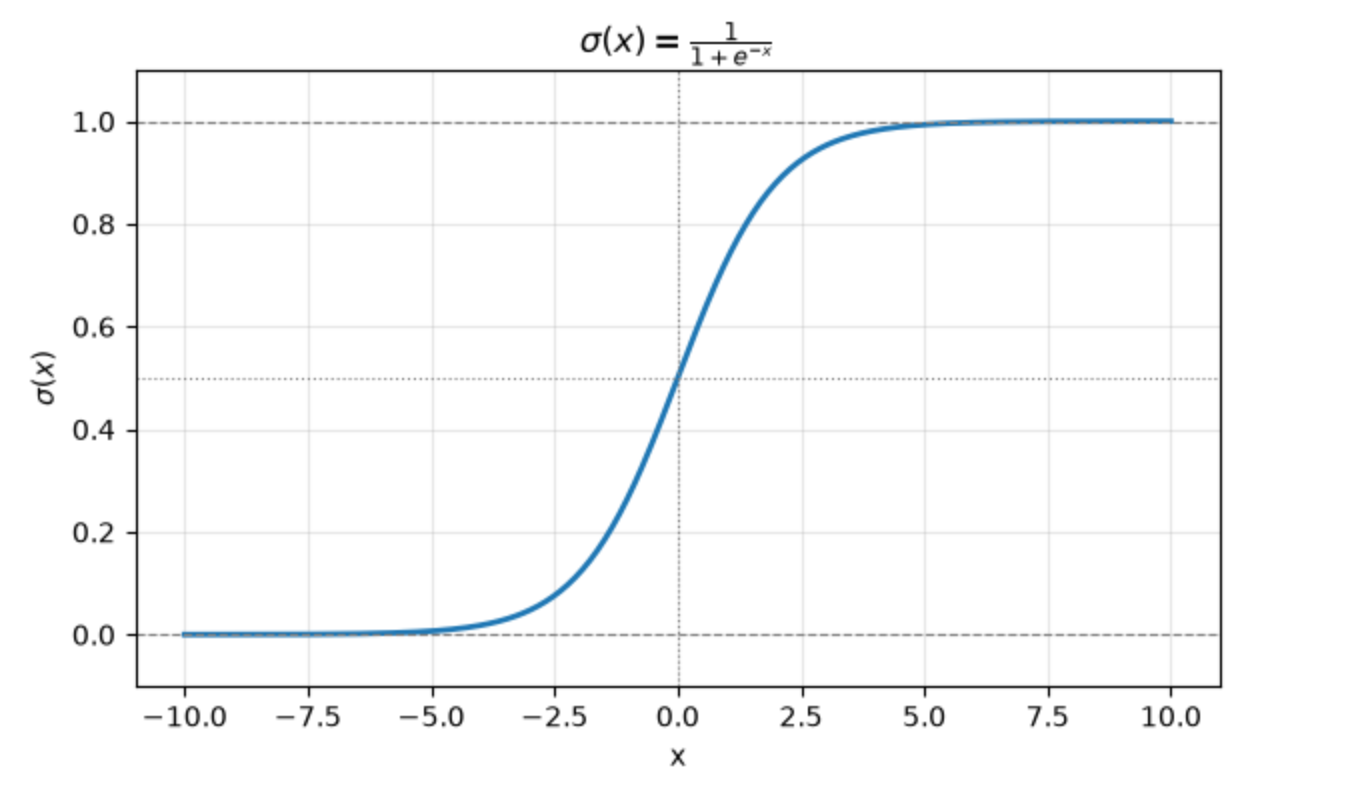
A common sigmoid function and the one used by [PyTorch's `Sigmoid`](https://docs.pytorch.org/docs/2.13/generated/torch.nn.Sigmoid.html)
|
||||
is this exponential form -- `σ(x) = 1 / (1 + exp(-x))`.
|
||||
|
||||
Here is what this looks like plotted on a graph:
|
||||
|
||||
|
||||
|
||||
This function can be used any time we want to convert an arbitrary number into a
|
||||
probability. Large negative numbers will approach 0. Large positive numbers will
|
||||
approach 1. Numbers near 0 will settle somewhere in the middle.
|
||||
|
||||
Here are a few examples run through PyTorch's `sigmoid` function:
|
||||
|
||||
```python
|
||||
print("σ(-99) => ", torch.sigmoid(torch.tensor(-99.0)))
|
||||
print("σ(99) => ", torch.sigmoid(torch.tensor(99.0)))
|
||||
print("σ(0.123) => ", torch.sigmoid(torch.tensor(0.123)))
|
||||
print("σ(-2) => ", torch.sigmoid(torch.tensor(-2.0)))
|
||||
print("σ(1) => ", torch.sigmoid(torch.tensor(1.0)))
|
||||
```
|
||||
|
||||
which prints out:
|
||||
|
||||
```
|
||||
σ(-99) => tensor(0.)
|
||||
σ(99) => tensor(1.)
|
||||
σ(0.123) => tensor(0.5307)
|
||||
σ(-2) => tensor(0.1192)
|
||||
σ(1) => tensor(0.7311)
|
||||
```
|
||||
@@ -0,0 +1,96 @@
|
||||
# Sequence Side-Effect When Rolling Back Inserts
|
||||
|
||||
What is so powerful about the transaction guarantees of a system like PostgreSQL
|
||||
is that I can make all kinds of changes (big or small) within a transaction,
|
||||
then roll it back, and it's like nothing ever happened.
|
||||
|
||||
This is useful if I want to dry-run an crucial update statement in the
|
||||
production environment. I can gauge how many rows I expect to be impacted, run
|
||||
the update in a transaction, inspect the state of the table, and rollback if
|
||||
needed. It's like the changes never happened.
|
||||
|
||||
Rolled back transactions aren't completely free of side-effects. They can leave
|
||||
a trace. In this case, that trace is increments to a sequence like you'd find
|
||||
attached to a primary key. Each `insert` of a row into a table with an
|
||||
autoincrementing sequence will have an effect on that sequence.
|
||||
|
||||
First, I'll create a fresh table and check the state of the sequence.
|
||||
|
||||
```sql
|
||||
> create table books (id bigserial primary key, title text not null, author text not null);
|
||||
CREATE TABLE
|
||||
|
||||
> select * from books_id_seq;
|
||||
┌────────────┬─────────┬───────────┐
|
||||
│ last_value │ log_cnt │ is_called │
|
||||
├────────────┼─────────┼───────────┤
|
||||
│ 1 │ 0 │ f │
|
||||
└────────────┴─────────┴───────────┘
|
||||
(1 row)
|
||||
```
|
||||
|
||||
Now, I'll start a transaction, do some inserts, and again check the state of the
|
||||
sequence.
|
||||
|
||||
```sql
|
||||
> begin;
|
||||
BEGIN
|
||||
|
||||
> insert into books (title, author) values ('Python in a Nutshell', 'Martelli et al'), ('Build an LLM', 'Sebastian Raschka'), ('The Joy of Abstraction', 'Eugenia Cheng');
|
||||
INSERT 0 3
|
||||
|
||||
> select * from books;
|
||||
┌────┬────────────────────────┬───────────────────┐
|
||||
│ id │ title │ author │
|
||||
├────┼────────────────────────┼───────────────────┤
|
||||
│ 1 │ Python in a Nutshell │ Martelli et al │
|
||||
│ 2 │ Build an LLM │ Sebastian Raschka │
|
||||
│ 3 │ The Joy of Abstraction │ Eugenia Cheng │
|
||||
└────┴────────────────────────┴───────────────────┘
|
||||
(3 rows)
|
||||
|
||||
> select * from books_id_seq;
|
||||
┌────────────┬─────────┬───────────┐
|
||||
│ last_value │ log_cnt │ is_called │
|
||||
├────────────┼─────────┼───────────┤
|
||||
│ 3 │ 30 │ t │
|
||||
└────────────┴─────────┴───────────┘
|
||||
(1 row)
|
||||
```
|
||||
|
||||
I will now rollback the transaction. I expect `books` to be empty again. But
|
||||
what happens to the state of `books_id_seq`?
|
||||
|
||||
```sql
|
||||
> rollback;
|
||||
ROLLBACK
|
||||
|
||||
> select * from books;
|
||||
┌────┬───────┬────────┐
|
||||
│ id │ title │ author │
|
||||
├────┼───────┼────────┤
|
||||
└────┴───────┴────────┘
|
||||
(0 rows)
|
||||
|
||||
> select * from books_id_seq;
|
||||
┌────────────┬─────────┬───────────┐
|
||||
│ last_value │ log_cnt │ is_called │
|
||||
├────────────┼─────────┼───────────┤
|
||||
│ 3 │ 30 │ t │
|
||||
└────────────┴─────────┴───────────┘
|
||||
(1 row)
|
||||
```
|
||||
|
||||
Despite rolling back, the state of `books_id_seq` remains with a `last_value` of
|
||||
`3`. This is because a sequence is used outside of transaction isolation.
|
||||
Multiple concurrent transactions may both need sequence values. Instead of them
|
||||
blocking on each other, the sequence can always be accessed. The tradeoff is
|
||||
that the `last_value` of a sequence is always marching forward and gaps will
|
||||
happen when transactions are rolled back.
|
||||
|
||||
This is normal and expected behavior. It is something to be aware of if you have
|
||||
a high-volume system that is doing a ton of inserting and rolling back (I've
|
||||
worked on systems that do this). However, the solution there is more to do with
|
||||
picking `bigint` (`bigserial`) for your sequence-backed column. That would
|
||||
reasonably eliminate concern for running out of sequence values. Or use UUIDs
|
||||
instead.
|
||||
@@ -0,0 +1,35 @@
|
||||
# Access SQLite Result Values By Name With Row Factory
|
||||
|
||||
The default shape of a result from executing a row-returning statement with
|
||||
`sqlite3` is a tuple. Whose values can be accessed positionally.
|
||||
|
||||
```python
|
||||
>>> res = conn.execute("select * from projects;")
|
||||
>>> res.fetchone()
|
||||
(1, 'py-vmt', '2026-07-25 14:53:44', '2026-07-25 14:53:44')
|
||||
```
|
||||
|
||||
If I want something a bit nicer, I can enable [_Row Factory_
|
||||
results](https://docs.python.org/3/library/sqlite3.html#how-to-create-and-use-row-factories)
|
||||
for my connection. The values on a _row_ can be accessed by name as well as
|
||||
positionally.
|
||||
|
||||
```python
|
||||
>>> conn.row_factory = sqlite3.Row
|
||||
>>> res = conn.execute("select * from projects;")
|
||||
>>> res.fetchone()
|
||||
<sqlite3.Row object at 0x1019e3c40>
|
||||
>>> r1 = _
|
||||
>>> r1
|
||||
<sqlite3.Row object at 0x1019e3c40>
|
||||
>>> r1["name"]
|
||||
'py-vmt'
|
||||
>>> r1["id"]
|
||||
1
|
||||
>>> r1[1]
|
||||
'py-vmt'
|
||||
```
|
||||
|
||||
[I used Row Factory on a project
|
||||
recently](https://github.com/jbranchaud/py-vmt/pull/9/changes) and I think it
|
||||
made for an improvement in the readability of the code.
|
||||
@@ -0,0 +1,61 @@
|
||||
# Annotate Return Type On Enum Function
|
||||
|
||||
I defined the following `StrEnum` class to capture the canonical set of valid
|
||||
values for a _storage format_ in
|
||||
[`py-vmt`](https://github.com/jbranchaud/py-vmt). It includes a `default`
|
||||
function that can be called to get what the system considers the default storage
|
||||
format.
|
||||
|
||||
```python
|
||||
class StorageFormat(StrEnum):
|
||||
SQLITE = "sqlite"
|
||||
JSON = "json"
|
||||
|
||||
@staticmethod
|
||||
def default():
|
||||
return StorageFormat.SQLITE
|
||||
```
|
||||
|
||||
This works, but what is missing is a type annotation for the return value of
|
||||
`default`.
|
||||
|
||||
I'd like to use `StorageFormat` as the return type annotation. However, the
|
||||
annotations are eagerly evaluated at the time the function definition is being
|
||||
processed. The `StorageFormat` class is not fully evaluated at that point and so
|
||||
isn't available.
|
||||
|
||||
Instead, what I can do is quote `StorageFormat` as a string to make it a
|
||||
_forward reference_.
|
||||
|
||||
```python
|
||||
class StorageFormat(StrEnum):
|
||||
SQLITE = "sqlite"
|
||||
JSON = "json"
|
||||
|
||||
@staticmethod
|
||||
def default() -> "StorageFormat":
|
||||
return StorageFormat.SQLITE
|
||||
```
|
||||
|
||||
The string type annotation will be lazily evaluated at a later time when
|
||||
`StorageFormat` fully exists. This is behavior that is slated to be deprecated.
|
||||
And it is no longer needed as of [Python 3.14 which lazily evaluates all
|
||||
annotations by default
|
||||
now](https://docs.python.org/3/reference/compound_stmts.html#annotations).
|
||||
|
||||
If I want to be more specific with the above annotation, I can import [`Literal`
|
||||
from `typing`](https://docs.python.org/3/library/typing.html#typing.Literal) and
|
||||
then wrap a specific enum value.
|
||||
|
||||
```python
|
||||
class StorageFormat(StrEnum):
|
||||
SQLITE = "sqlite"
|
||||
JSON = "json"
|
||||
|
||||
@staticmethod
|
||||
def default() -> "Literal[StorageFormat.SQLITE]":
|
||||
return StorageFormat.SQLITE
|
||||
```
|
||||
|
||||
Now it will specifically enforce `SQLITE` rather than accepting `SQLITE` or
|
||||
`JSON`.
|
||||
@@ -0,0 +1,47 @@
|
||||
# Another Way To Mark Keyword-Only Dataclass Fields
|
||||
|
||||
In [Configure Other Attributes Of Dataclass
|
||||
Field](configure-other-attributes-of-dataclass-field), I showed how the
|
||||
[`dataclasses.field`](https://docs.python.org/3/library/dataclasses.html#dataclasses.field)
|
||||
constructor function can be used. One of the parameters I demonstrated was
|
||||
`kw_only`. Each field constructed with `kw_only=True` will be required to be
|
||||
passed as a keyword-only parameter when constructing an instance of that
|
||||
`dataclass`.
|
||||
|
||||
Another way to specify keyword-only parameters with `dataclass` fields is to
|
||||
segment them with `KW_ONLY`. This sentinel value can be included as a
|
||||
pseudo-field where all fields that come after it are treated as keyword-only.
|
||||
|
||||
Translating the example from that other post would look like this:
|
||||
|
||||
```python
|
||||
from dataclasses import dataclass, field, KW_ONLY
|
||||
from datetime import datetime
|
||||
|
||||
@dataclass
|
||||
class Session:
|
||||
start_time: datetime
|
||||
project_name: str
|
||||
_: KW_ONLY
|
||||
tags: list[str] = field(default_factory=list, kw_only=True)
|
||||
end_time: datetime | None = None
|
||||
|
||||
# ...
|
||||
|
||||
sesh1 = Session(start1, "my-project", tags=["pytorch", "numpy"])
|
||||
sesh2 = Session(start2, "other-project", end_time=datetime.now())
|
||||
```
|
||||
|
||||
The field whose value is `KW_ONLY` is only used to signal that keyword-only
|
||||
boundary. It does not itself become a field of the dataclass.
|
||||
|
||||
On the one hand I like this approach because it feels closer to [the way this is
|
||||
signaled in standard function definition
|
||||
syntax](force-remaining-arguments-to-be-named.md).
|
||||
|
||||
```python
|
||||
def build_session(start_time, project_name, *, tags, end_time=None)
|
||||
```
|
||||
|
||||
On the other hand, it feels like magic `dataclass` syntax whereas the
|
||||
`kw_only=True` parameter is more explicit.
|
||||
@@ -0,0 +1,54 @@
|
||||
# Combine StrEnum With Pydantic For Union Type
|
||||
|
||||
I want a [Pydantic](https://pydantic.dev/docs/validation/latest/get-started/)
|
||||
model that I can use to verify the shape and values of user-provided config
|
||||
file. Let's say, for now, the only config value supported by the file is
|
||||
`storage_format` and it can be one of three values (`json`, `sqlite`,
|
||||
`inmemory`).
|
||||
|
||||
I can start with a
|
||||
[`StrEnum`](https://docs.python.org/3/library/enum.html#enum.StrEnum) class to
|
||||
represent the set of valid values for the storage format field.
|
||||
|
||||
```python
|
||||
from enum import StrEnum
|
||||
from typing import Literal
|
||||
|
||||
class StorageFormat(StrEnum):
|
||||
SQLITE = "sqlite"
|
||||
JSON = "json"
|
||||
INMEMORY = "inmemory"
|
||||
|
||||
@classmethod
|
||||
def default(cls) -> Literal[StorageFormat.SQLITE]:
|
||||
return cls.SQLITE
|
||||
```
|
||||
|
||||
Notice I've also provided a class method called `default` for serving up a
|
||||
fallback default value.
|
||||
|
||||
Here is the corresponding Pydantic `CliConfig` model which uses the
|
||||
`StorageFormat` string enum class as the type signature for its `storage_format`
|
||||
field.
|
||||
|
||||
```python
|
||||
from pydantic import BaseModel
|
||||
|
||||
class CliConfig(BaseModel):
|
||||
storage_format: StorageFormat = StorageFormat.default()
|
||||
```
|
||||
|
||||
For `storage_format` to be valid in the context of `CliConfig`, it must be one
|
||||
of the values defined by that `StrEnum`. I get auto-complete, I get type
|
||||
checking, and I can validate a config file I've just read into memory (in this
|
||||
case, using
|
||||
[`model_validate_json`](https://pydantic.dev/docs/validation/dev/api/pydantic/base_model/#pydantic.BaseModel.model_validate_json)).
|
||||
|
||||
```python
|
||||
def _read_config(self) -> CliConfig:
|
||||
if self.exists():
|
||||
raw_json = self.config_file.read_text()
|
||||
return CliConfig.model_validate_json(raw_json)
|
||||
|
||||
return CliConfig()
|
||||
```
|
||||
@@ -0,0 +1,71 @@
|
||||
# Commit Writes From Executed SQLite Statements
|
||||
|
||||
Let's look at a method that uses a
|
||||
[`sqlite3`](https://docs.python.org/3/library/sqlite3.html) connection to
|
||||
execute a couple statements against a SQLite database.
|
||||
|
||||
```python
|
||||
def write_session_with_project(self, session, *, active=False) -> None:
|
||||
# Delete the current active session if there is one
|
||||
self.conn.execute("""
|
||||
delete from sessions where active = 1;
|
||||
""")
|
||||
|
||||
# Upsert (find or create) the project based on `session.project_name`
|
||||
cursor = self.conn.execute(
|
||||
"""
|
||||
insert into projects (name) values (:project_name)
|
||||
on conflict (name) do update set name = excluded.name
|
||||
returning id;
|
||||
""",
|
||||
{"project_name": session.project_name},
|
||||
)
|
||||
project_id = cursor.fetchone()[0]
|
||||
|
||||
# ...
|
||||
|
||||
self.conn.commit()
|
||||
```
|
||||
|
||||
The first `conn.execute` call is going to implicitly start a database
|
||||
transaction before executing the statement. Subsequent statements are going to
|
||||
take place within that transaction. To apply all the changes in the transaction
|
||||
I have to eventually run `conn.commit()`. If there isn't an issue committing all
|
||||
the changes and nothing else raised before I committed, then those changes will
|
||||
all be applied atomically.
|
||||
|
||||
I will need to do my own exception handling with a try/catch that handles any
|
||||
rollback.
|
||||
|
||||
I'd rather not have to manage those extra pieces which is the kind of thing
|
||||
context managers typically help with. Let's improve upon this with the
|
||||
[Connection context manager](https://docs.python.org/3/library/sqlite3.html#how-to-use-the-connection-context-manager):
|
||||
|
||||
```python
|
||||
def write_session_with_project(self, session, *, active=False) -> None:
|
||||
with self.conn:
|
||||
# Delete the current active session if there is one
|
||||
self.conn.execute("""
|
||||
delete from sessions where active = 1;
|
||||
""")
|
||||
|
||||
# Upsert (find or create) the project based on `session.project_name`
|
||||
cursor = self.conn.execute(
|
||||
"""
|
||||
insert into projects (name) values (:project_name)
|
||||
on conflict (name) do update set name = excluded.name
|
||||
returning id;
|
||||
""",
|
||||
{"project_name": session.project_name},
|
||||
)
|
||||
project_id = cursor.fetchone()[0]
|
||||
|
||||
# ...
|
||||
```
|
||||
|
||||
I get the same transactional behavior as before for everything in the context
|
||||
manager body. However, now the `commit` is handled and if an exception occurs
|
||||
the `rollback` is handled as well.
|
||||
|
||||
Note: the connection context manager will still re-propagate an exception that
|
||||
occurred, so I may need to handle that with a try/catch somewhere.
|
||||
@@ -0,0 +1,63 @@
|
||||
# Configure Other Attributes Of Dataclass Field
|
||||
|
||||
I have a basic [`dataclass`](https://docs.python.org/3/library/dataclasses.html)
|
||||
defined with a few fields that looks like this:
|
||||
|
||||
```python
|
||||
from dataclasses import dataclass
|
||||
from datetime import datetime
|
||||
|
||||
@dataclass
|
||||
class Session:
|
||||
start_time: datetime
|
||||
project_name: str
|
||||
tags: list[str]
|
||||
end_time: datetime | None = None
|
||||
|
||||
# ...
|
||||
|
||||
new_session = Session(start_time, "my-project", [])
|
||||
```
|
||||
|
||||
This syntax lets me define the fields that make up arguments to the underlying
|
||||
`__init__` function. This only gets me so far though. What if I want `tags` to
|
||||
have a default value of `[]`? What if I want to force those optional fields
|
||||
(`tags` and `end_time`) to be keyword-only arguments?
|
||||
|
||||
To take the field definitions of my `dataclass` a bit further, I need the
|
||||
[`field` function](https://docs.python.org/3/library/dataclasses.html#dataclasses.field)
|
||||
which lets me configure more aspects of each field.
|
||||
|
||||
```python
|
||||
from dataclasses import dataclass, field
|
||||
from datetime import datetime
|
||||
|
||||
@dataclass
|
||||
class Session:
|
||||
start_time: datetime
|
||||
project_name: str
|
||||
tags: list[str] = field(default_factory=list, kw_only=True)
|
||||
end_time: datetime | None = field(default=None, kw_only=True)
|
||||
|
||||
# ...
|
||||
|
||||
sesh1 = Session(start1, "my-project", tags=["pytorch", "numpy"])
|
||||
sesh2 = Session(start2, "other-project", end_time=datetime.now())
|
||||
```
|
||||
|
||||
If I were to say the default value of `tags` is simply a `[]`, then the
|
||||
`dataclass` definition gets evaluated with a reference to that specific instance
|
||||
of an empty list. Every new `Session` I create would share and mutate that same
|
||||
list. For this reason, `dataclass` detects and warns you away from that.
|
||||
|
||||
Instead, I specify `list` as the `default_factory` for `tags`. Each new
|
||||
`Session` where `tags` is not provided will be factory'd a new empty list.
|
||||
|
||||
For scalar values, like `None`, I can use the `default` parameter instead like
|
||||
I've done for `end_time`.
|
||||
|
||||
As for marking certain fields as keyword-only, the `kw_only` parameter can be
|
||||
overridden with `True`.
|
||||
|
||||
See [the docs for `field`](https://docs.python.org/3/library/dataclasses.html#dataclasses.field)
|
||||
for all the other configurable options.
|
||||
@@ -0,0 +1,46 @@
|
||||
# Dedent Common Whitespace From Multiline String
|
||||
|
||||
I'm adding tests to cover some custom logic in the _usage_ messages that are
|
||||
produced by Click [in a CLI I'm building](https://github.com/jbranchaud/py-vmt).
|
||||
The usage output is a mutliline string formatted with some indentation. On top
|
||||
of that, I'm putting it in a Python test file with some additional syntactical
|
||||
indentation.
|
||||
|
||||
If this was Ruby, I would reach for the `<<~` heredoc syntax. The closest
|
||||
equivalent to that in Python is
|
||||
[`textwrap.dedent`](https://docs.python.org/3/library/textwrap.html#textwrap.dedent).
|
||||
|
||||
> Remove any common leading whitespace from every line in text.
|
||||
>
|
||||
> This can be used to make triple-quoted strings line up with the left edge of
|
||||
> the display, while still presenting them in the source code in indented form.
|
||||
|
||||
```python
|
||||
import textwrap
|
||||
|
||||
def test_base_help_message():
|
||||
runner = BetterCliRunner()
|
||||
|
||||
help_result = runner.invoke(cli, ["--help"])
|
||||
output = textwrap.dedent("""\
|
||||
Usage: vmt [OPTIONS] COMMAND [ARGS]...
|
||||
|
||||
Options:
|
||||
-v, --verbose See extra output when running commands
|
||||
--help Show this message and exit.
|
||||
|
||||
Commands:
|
||||
cancel
|
||||
log
|
||||
start
|
||||
status
|
||||
stop
|
||||
""")
|
||||
assert output in help_result.output
|
||||
```
|
||||
|
||||
Before adding in `textwrap.dedent`, the test was failing because of bits of
|
||||
extra whitespace that wasn't matching up with the actual CLI output.
|
||||
|
||||
Note: the leading `\` after the opening `"""` is needed to remove the leading
|
||||
newline that would otherwise be included.
|
||||
@@ -0,0 +1,47 @@
|
||||
# Escape Curly Braces Within Formatted String
|
||||
|
||||
Python's
|
||||
[_f-string_](https://docs.python.org/3/reference/lexical_analysis.html#f-strings)
|
||||
allows you to interpolate values into a string literal like so:
|
||||
|
||||
```python
|
||||
>>> amount = 25
|
||||
>>> print(f"Price: ${amount}")
|
||||
Price: $25
|
||||
```
|
||||
|
||||
The `{` and `}` are betting special treatment when `f` precedes the string
|
||||
literal. So, what if the resulting string is supposed to have literal `{` and
|
||||
`}` characters in it?
|
||||
|
||||
```python
|
||||
>>> f"JSON opens and closes with curlies: {...}"
|
||||
'JSON opens and closes with curlies: Ellipsis'
|
||||
```
|
||||
|
||||
I need a way of escaping them. The trick is to double them up.
|
||||
|
||||
```python
|
||||
>>> f"JSON opens and closes with curlies: {{...}}"
|
||||
'JSON opens and closes with curlies: {...}'
|
||||
```
|
||||
|
||||
A more practical example of where this is useful is in formatting an expected
|
||||
string of JSON in a test:
|
||||
|
||||
```python
|
||||
info_result = runner.invoke(cli, ["info", "--json"])
|
||||
output = textwrap.dedent(f"""
|
||||
{{
|
||||
"config_file": "{config_file}",
|
||||
"data_dir": "{data_dir}",
|
||||
"version": "{VMT_VERSION}",
|
||||
"schema_version": 1
|
||||
}}
|
||||
""").strip()
|
||||
assert output in info_result.output
|
||||
```
|
||||
|
||||
I'm doing some interpolation at various points in the string literal, but the
|
||||
outer curly braces are meant to be literal, the opening and closing of the JSON
|
||||
object.
|
||||
@@ -0,0 +1,44 @@
|
||||
# Experiment With SQLite Queries In Memory
|
||||
|
||||
Instead of connecting
|
||||
[`sqlite3`](https://docs.python.org/3/library/sqlite3.html) to a real file
|
||||
(database) like so:
|
||||
|
||||
```python
|
||||
db_file: Path = data_dir / "sessions.db"
|
||||
conn: Connection = sqlite3.connect(db_file)
|
||||
```
|
||||
|
||||
I can point it to `":memory:"`:
|
||||
|
||||
```python
|
||||
conn: Connection = sqlite3.connect(":memory:")
|
||||
```
|
||||
|
||||
One way this can be useful is when experimenting with some DDL (schema-modifying
|
||||
SQL statements), e.g. creating a table, adding a column, and so forth.
|
||||
|
||||
```python
|
||||
>>> import sqlite3
|
||||
>>> conn = sqlite3.connect(":memory:")
|
||||
>>> conn.execute("""
|
||||
... create table projects (
|
||||
... id integer primary key,
|
||||
... name text not null unique,
|
||||
... created_at text not null default (datetime('now')),
|
||||
... updated_at text not null default (datetime('now'))
|
||||
... );
|
||||
... """)
|
||||
<sqlite3.Cursor object at 0x105d6e2c0>
|
||||
>>> conn.execute("insert into projects (name) values ('TIL'), ('py-vmt'), ('Pool League Pro');")
|
||||
<sqlite3.Cursor object at 0x105d6e340>
|
||||
>>> result = conn.execute("select * from projects;")
|
||||
>>> rows = result.fetchall()
|
||||
>>> rows
|
||||
[(1, 'TIL', '2026-08-01 23:59:56', '2026-08-01 23:59:56'), (2, 'py-vmt', '2026-08-01 23:59:56', '2026-08-01 23:59:56'), (3, 'Pool League Pro', '2026-08-01 23:59:56', '2026-08-01 23:59:56')]
|
||||
```
|
||||
|
||||
This does not create any sort of on-disk version of the database. Two separate
|
||||
connections created this way will be independent in-memory database instances.
|
||||
This is technically more of [a SQLite feature](https://sqlite.org/inmemorydb.html) than a Python one, but it was in a
|
||||
Python context that I found this most useful.
|
||||
@@ -0,0 +1,44 @@
|
||||
# Generate Sample PDFs With ReportLab
|
||||
|
||||
The `reportlab` package has a `pdfgen` module that provides a `Canvas` API for
|
||||
programmatically constructing a PDF.
|
||||
|
||||
I recently needed the most basic use of this to quickly construct a sample PDF
|
||||
that I could use as I experimented with [different `qpdf`
|
||||
commands](/workflow/remove-pages-from-a-pdf.md). I wanted to generate a 10-page
|
||||
PDF where each page included a large font number in the center. This way I could
|
||||
clearly see what was the first, second, third, and so on pages. Then I could
|
||||
quickly verify that the `qpdf` manipulations I was doing were working as
|
||||
expected.
|
||||
|
||||
I was able to do this without any setup or install. Using a `uv` one-liner (does
|
||||
a 10-line heredoc count as a one-liner?), I generated a PDF with some basic
|
||||
canvas rendering on each page.
|
||||
|
||||
```python
|
||||
❯ uv run --with reportlab python - <<'EOF'
|
||||
from reportlab.pdfgen import canvas
|
||||
N, W, H = 10, 612, 792
|
||||
c = canvas.Canvas("test.pdf", pagesize=(W, H))
|
||||
for i in range(1, N + 1):
|
||||
c.setFont("Helvetica-Bold", 220)
|
||||
c.drawCentredString(W / 2, H / 2 - 80, str(i))
|
||||
c.setFont("Helvetica", 28)
|
||||
c.drawCentredString(W / 2, 100, f"page {i} of {N}")
|
||||
c.showPage()
|
||||
c.save()
|
||||
EOF
|
||||
```
|
||||
|
||||
The `--with` makes the `reportlab` package available to the command being run.
|
||||
The command being run is `python` which evaluates that block of heredoc text.
|
||||
|
||||
Within the heredoc, I import `canvas` from the `reportlab` package that has been
|
||||
made available. I then create an in-memory PDF of a standard size. Then for-loop
|
||||
10 times to build each page of the PDF with a big number in the middle and a
|
||||
smaller `page x of N` lower down on the page. Finally, I save the PDF which
|
||||
writes it to the directory I executed this whole command from.
|
||||
|
||||
I had Claude help with the `canvas` API, however there are some decent
|
||||
[`reportlab.pdfgen` docs
|
||||
here](https://docs.reportlab.com/reportlab/userguide/ch2_graphics/).
|
||||
@@ -0,0 +1,81 @@
|
||||
# Initialize A PyTorch Tensor
|
||||
|
||||
A _tensor_ is an n-dimensional array that takes on a specified shape and holds
|
||||
scalars, typically floats, in each of its positions.
|
||||
[PyTorch](https://pytorch.org/) has a comprehensive suite of tools for working
|
||||
with tensors. To work with tenors, the first thing I need to do is initialize
|
||||
one. Here are a handful of ways to create a 2-dimensional tensor (a matrix)
|
||||
depending on various needs.
|
||||
|
||||
Here is a 3x4 matrix full of zeros:
|
||||
|
||||
```python
|
||||
>>> torch.zeros(torch.Size((3, 4)))
|
||||
tensor([[0., 0., 0., 0.],
|
||||
[0., 0., 0., 0.],
|
||||
[0., 0., 0., 0.]])
|
||||
```
|
||||
|
||||
Here is a 3x4 matrix full of ones:
|
||||
|
||||
```python
|
||||
>>> torch.ones(3,4)
|
||||
tensor([[1., 1., 1., 1.],
|
||||
[1., 1., 1., 1.],
|
||||
[1., 1., 1., 1.]])
|
||||
```
|
||||
|
||||
And here is a 3x4 matrix full of a specific other value:
|
||||
|
||||
```python
|
||||
>>> torch.full((3,4), 13.0)
|
||||
tensor([[13., 13., 13., 13.],
|
||||
[13., 13., 13., 13.],
|
||||
[13., 13., 13., 13.]])
|
||||
```
|
||||
|
||||
PyTorch is very flexible. I can specify the shape of the `tensor` with
|
||||
positional arguments or a tuple for the dimensions. I can even construct a
|
||||
`torch.Size` object.
|
||||
|
||||
Here is an arguably more useful example where the matrix is seeded with random
|
||||
values in the range `[0,1)` using
|
||||
[`torch.rand`](https://docs.pytorch.org/docs/2.13/generated/torch.rand.html):
|
||||
|
||||
```python
|
||||
>>> torch.rand(torch.Size((3,4)))
|
||||
tensor([[0.4148, 0.8045, 0.3093, 0.3363],
|
||||
[0.0120, 0.7161, 0.1108, 0.5510],
|
||||
[0.4805, 0.9430, 0.2852, 0.0966]])
|
||||
```
|
||||
|
||||
These could be used as starting weights in a training process that then get
|
||||
tweaked over time.
|
||||
|
||||
There are other random tensor functions like
|
||||
[`torch.randint`](https://docs.pytorch.org/docs/2.13/generated/torch.randint.html)
|
||||
and
|
||||
[`torch.randn`](https://docs.pytorch.org/docs/2.13/generated/torch.randn.html).
|
||||
|
||||
How about a [random permutation](https://docs.pytorch.org/docs/2.13/generated/torch.randperm.html)
|
||||
of integers `[0,12)` reshaped into a 3x4 matrix:
|
||||
|
||||
```python
|
||||
>>> torch.randperm(12).reshape(3,4)
|
||||
tensor([[ 0, 3, 1, 11],
|
||||
[ 7, 8, 9, 4],
|
||||
[10, 5, 6, 2]])
|
||||
```
|
||||
|
||||
And though there are many other ways to initialize a tensor, the last one I will
|
||||
show is
|
||||
[`torch.eye`](https://docs.pytorch.org/docs/2.13/generated/torch.eye.html) which
|
||||
creates a matrix with ones down the diagonal.
|
||||
|
||||
```python
|
||||
>>> torch.eye(4)
|
||||
tensor([[1., 0., 0., 0.],
|
||||
[0., 1., 0., 0.],
|
||||
[0., 0., 1., 0.],
|
||||
[0., 0., 0., 1.]])
|
||||
```
|
||||
@@ -0,0 +1,30 @@
|
||||
# Join A List Of Strings
|
||||
|
||||
Though joining a list of strings in Python is a basic task, I wanted to write
|
||||
about it because it is backward from how it is done in Ruby (which trips me up
|
||||
every single time).
|
||||
|
||||
So, in Ruby I would do the following:
|
||||
|
||||
```ruby
|
||||
> character = ["Gimli", "Dwarf", "Fighter", "Lvl 23"]
|
||||
=> ["Gimli", "Dwarf", "Fighter", "Lvl 23"]
|
||||
> character.join(" ~ ")
|
||||
=> "Gimli ~ Dwarf ~ Fighter ~ Lvl 23"
|
||||
```
|
||||
|
||||
Notice that I call
|
||||
[`join`](https://docs.ruby-lang.org/en/master/Array.html#method-i-join) on the
|
||||
list of strings, passing it the specific separator that I want to use.
|
||||
|
||||
Python does it the other way around:
|
||||
|
||||
```python
|
||||
>>> character = ["Gimli", "Dwarf", "Fighter", "Lvl 23"]
|
||||
>>> " ~ ".join(character)
|
||||
'Gimli ~ Dwarf ~ Fighter ~ Lvl 23'
|
||||
```
|
||||
|
||||
The separator is the object that I call
|
||||
[`join`](https://docs.python.org/3/library/stdtypes.html#str.join) on, passing
|
||||
it the list of strings that I want to join.
|
||||
@@ -0,0 +1,61 @@
|
||||
# Override Timezone That All Tests Run In
|
||||
|
||||
I was building out the initial functionality of a Python project in my local dev
|
||||
env. I was writing tests along the way to guard against regressions. Many of the
|
||||
tests assert things about time, durations, and formatted timestamps. All was
|
||||
well.
|
||||
|
||||
Then I was getting the project setup on GitHub with a CI workflow to run the
|
||||
test suite. And a ton of tests were failing. It was all the tests dealing with
|
||||
time. They were all off by 5 hours.
|
||||
|
||||
I recognized that time difference immediately. That's the difference between my
|
||||
time here in Chicago and UTC. When I run the tests locally, they are all
|
||||
formatted the timezone setting on my machine -- `America/Chicago`. Whereas when
|
||||
I run them in this CI environment, they were suddenly being formatted to `UTC`.
|
||||
|
||||
What I needed to do was explicitly set the timezone that all the tests would
|
||||
always run in, regardless of environment.
|
||||
|
||||
I added the following to my `conftest.py` file:
|
||||
|
||||
```python
|
||||
import os
|
||||
import time
|
||||
|
||||
|
||||
# Set the timezone that all tests run in
|
||||
os.environ["TZ"] = "America/Chicago"
|
||||
time.tzset()
|
||||
```
|
||||
|
||||
First, I set the timezone (`TZ`) in `os.environ` to `America/Chicago`. That's a
|
||||
copy of the executing environment that Python makes when it starts up.
|
||||
|
||||
Second, because `TZ` may be tied to some cached info under the hood, I have to
|
||||
also run `time.tzset()`.
|
||||
|
||||
> Initialize, or reinitialize, the local timezone to the value stored in
|
||||
> os.environ[‘TZ’]. The TZ environment variable should be specified in standard
|
||||
> Unix timezone format as documented in the tzset man page (eg. ‘US/Eastern’,
|
||||
> ‘Europe/Amsterdam’).
|
||||
|
||||
Now, all of my tests run reliably in `America/Chicago`.
|
||||
|
||||
To demonstrate all of this from the Python repl, here is an example:
|
||||
|
||||
```python
|
||||
>>> from datetime import datetime
|
||||
>>> import os
|
||||
>>> import time
|
||||
>>> os.environ["TZ"] = "America/Los_Angeles"
|
||||
>>> time.tzset()
|
||||
>>> datetime.now()
|
||||
datetime.datetime(2026, 8, 15, 14, 3, 19, 373682)
|
||||
>>> os.environ["TZ"] = "America/Chicago"
|
||||
>>> time.tzset()
|
||||
>>> datetime.now()
|
||||
datetime.datetime(2026, 8, 15, 16, 3, 33, 322803)
|
||||
```
|
||||
|
||||
Notice the two hour difference between those two.
|
||||
@@ -0,0 +1,35 @@
|
||||
# Publish A Package To A Test Env As A Dry Run
|
||||
|
||||
As I was preparing to register a new Python package with PyPI and release my
|
||||
first version cut, I felt like there were a lot of unknowns. Is my package's
|
||||
name going to be valid? How will the package appear in PyPI? Did I configure
|
||||
everything correctly? Etc.
|
||||
|
||||
It turns out that PyPI has a great way of answering a lot of these questions.
|
||||
There is a [`test.pypi.org`](https://test.pypi.org/) site that parrots the
|
||||
publishing flow of `pypi.org`. This makes for a great target to do a dry-run
|
||||
publishing of a package.
|
||||
|
||||
First, I had to go through the same registration flow and 2FA setup as when I
|
||||
registered with `pypi.org`.
|
||||
|
||||
Second, I deviated from my tag and CI-triggered publishing flow by instead doing
|
||||
a one-off run of the `uv publish` command. That requires an API token which I
|
||||
generated in the web UI for `test.pypi.org`. I added that to my env as
|
||||
`TEST_PYPI_TOKEN`.
|
||||
|
||||
I then ran the following command:
|
||||
|
||||
```bash
|
||||
❯ uv publish --publish-url https://test.pypi.org/legacy/ --token "$TEST_PYPI_TOKEN"
|
||||
```
|
||||
|
||||
When this first ran for [`py-vmt`](https://github.com/jbranchaud/py-vmt), I got
|
||||
an error back from the publishing API telling me the package name is too similar
|
||||
to an existing package. I then had to make a few updates across the project to
|
||||
rename the published package name to `visualmode-tracker`. Running the `uv
|
||||
publish` command again worked with the updated name.
|
||||
|
||||
I was then able to go into the web UI and verify everything looked as expected.
|
||||
|
||||
I now have the confidence to publish this thing for real to `pypi.org`.
|
||||
@@ -0,0 +1,93 @@
|
||||
# Register SQLite Adapter To Serialize Datetimes
|
||||
|
||||
SQLite doesn't have a datetime or timestamp data type, so that information has
|
||||
to be stored as `text` or a unix epoch `int`. That means when using Python's
|
||||
`sqlite3` module to perform writes I need to tell it what shape to write a
|
||||
datetime value.
|
||||
|
||||
I could manually convert `datetime` values everywhere they are involved in
|
||||
_write_ operations.
|
||||
|
||||
```python
|
||||
# Prepare `sessions` insert payload
|
||||
session_data = {
|
||||
"active": 1 if active else 0,
|
||||
"project_id": project_id,
|
||||
"start_time": datetime.isoformat(session.start_time),
|
||||
"end_time": None,
|
||||
}
|
||||
|
||||
if session.end_time:
|
||||
session_data["end_time"] = datetime.isoformat(session.end_time)
|
||||
|
||||
# Insert the new active session
|
||||
cursor = self.conn.execute(
|
||||
"""
|
||||
insert into sessions (active, project_id, start_time, end_time)
|
||||
values (:active, :project_id, :start_time, :end_time)
|
||||
returning id;
|
||||
""",
|
||||
session_data,
|
||||
)
|
||||
```
|
||||
|
||||
I've used `datetime.isoformat` above which formats `datetime` objects like so:
|
||||
|
||||
```python
|
||||
>>> datetime.now().isoformat()
|
||||
'2026-08-28T11:52:04.709907'
|
||||
```
|
||||
|
||||
I'd like to make two improvements.
|
||||
|
||||
1. I want these `datetime` values to be formatted instead like `2026-08-28T18:15:27.213Z`.
|
||||
2. I want `datetime` values to be serialized automatically in the specific shape
|
||||
without having to manually convert them everywhere.
|
||||
|
||||
I can achieve both of these things by [registering an adapter with `sqlite3`](https://docs.python.org/3/library/sqlite3.html#how-to-register-adapter-callables)
|
||||
that handles the serialize of `datetime` objects.
|
||||
|
||||
First, I define a function that can perform the `datetime` to `str` conversion.
|
||||
I decided to put this in `db.py` where I have some other database-specific
|
||||
functions.
|
||||
|
||||
```python
|
||||
from datetime import datetime, timezone
|
||||
|
||||
def to_db(dt: datetime) -> str:
|
||||
if dt.tzinfo is None or dt.utcoffset() is None:
|
||||
raise ValueError(f"Unable to store naive datetime: {dt!r}")
|
||||
dt = dt.astimezone(timezone.utc)
|
||||
return f"{dt:%Y-%m-%dT%H:%M:%S}.{dt.microsecond // 1000:03d}Z"
|
||||
```
|
||||
|
||||
Then I register the adapter before creating the connection that gets used for
|
||||
database interactions.
|
||||
|
||||
```python
|
||||
import sqlite3
|
||||
from datetime import datetime
|
||||
from pathlib import Path
|
||||
from sqlite3 import Connection
|
||||
|
||||
def initialize_conn(db_file: Path) -> Connection:
|
||||
# register adapters
|
||||
sqlite3.register_adapter(datetime, to_db)
|
||||
|
||||
conn: Connection = sqlite3.connect(db_file)
|
||||
conn.row_factory = sqlite3.Row
|
||||
|
||||
return conn
|
||||
```
|
||||
|
||||
Then I can run write operations with `datetime` objects knowing they will be
|
||||
correctly serialized.
|
||||
|
||||
```python
|
||||
with self.conn:
|
||||
query = "update sessions set active = :active, end_time = :end_time where active = 1;"
|
||||
self.conn.execute(
|
||||
query,
|
||||
{"active": 0, "end_time": session.end_time},
|
||||
)
|
||||
```
|
||||
@@ -0,0 +1,55 @@
|
||||
# Resurface Exceptions Swallowed By Click Under Test
|
||||
|
||||
The testing utilities provided by
|
||||
[Click](https://click.palletsprojects.com/en/stable/) are generally very nice to
|
||||
work with. One particular aspect of makes the testing feedback loop almost
|
||||
non-existent. Click stashes any actual exceptions that occur during a run of the
|
||||
`CliRunner` and instead shows an opaque failed assertion.
|
||||
|
||||
Here is the primary output of a failing test I'm dealing with for
|
||||
[`py-vmt`](https://github.com/jbranchaud/py-vmt):
|
||||
|
||||
```bash
|
||||
tests/src/py_vmt/test_cli.py:61: AssertionError
|
||||
======================================== short test summary info ========================================
|
||||
FAILED tests/src/py_vmt/test_cli.py::test_start_status_stop_flow[sqlite] - assert "Tracking 'my-project' for 30m (since 10:05AM)" in '• Not tracking\n'
|
||||
=========================================== 1 failed in 0.07s ===========================================
|
||||
```
|
||||
|
||||
What I'd rather see when this test fails is something a little closer to the
|
||||
root cause of the failure, like this:
|
||||
|
||||
```bash
|
||||
result = cursor.execute(fetch_active_session_sql)
|
||||
if result.fetchone() is None:
|
||||
return None
|
||||
> _id, _active, project_name, start_time, end_time = result.fetchone()
|
||||
^^^^^^^^^^^^^^^^^^^^^^^^^^^^^^^^^^^^^^^^^^^^^^^^
|
||||
E TypeError: cannot unpack non-iterable NoneType object
|
||||
|
||||
src/py_vmt/cli.py:46: TypeError
|
||||
======================================= short test summary info ========================================
|
||||
FAILED tests/src/py_vmt/test_cli.py::test_start_status_stop_flow[sqlite] - TypeError: cannot unpack non-iterable NoneType object
|
||||
========================================== 1 failed in 0.11s ===========================================
|
||||
```
|
||||
|
||||
That's more like it. `TypeError: cannot unpack non-iterable NoneType object` and
|
||||
a specific pointer to the line where this happened is way more helpful.
|
||||
|
||||
To get this improvement in my test failure output, I had to create a small
|
||||
wrapper around `CliRunner` that re-raises the exception I care about. I add this
|
||||
in my `conftest.py` in the same directory as my `test_cli.py` file.
|
||||
|
||||
```python
|
||||
from click.testing import CliRunner
|
||||
|
||||
class BetterCliRunner(CliRunner):
|
||||
def invoke(self, *args, **kwargs):
|
||||
result = super().invoke(*args, **kwargs)
|
||||
if result.exception and not isinstance(result.exception, SystemExit):
|
||||
raise result.exception
|
||||
return result
|
||||
```
|
||||
|
||||
Then in `test_cli.py` I import the `BetterCliRunner` class and replace all
|
||||
instantiations of `CliRunner()` with `BetterCliRunner()`.
|
||||
@@ -0,0 +1,48 @@
|
||||
# Select Implementation With Class Registry
|
||||
|
||||
I am working on [supporting multiple storage formats (JSON and
|
||||
SQLite)](https://github.com/jbranchaud/py-vmt/pull/1) for my [`py-vmt`
|
||||
project](https://github.com/jbranchaud/py-vmt). While SQLite will be the default
|
||||
storage format, the CLI can be configured via a `config.json` file to use
|
||||
another supported `storage_format` (e.g. JSON).
|
||||
|
||||
When the `CliContext` is initialized, I need to determine which will be used so
|
||||
that I can use the correct _repository_ implementation for reads, writes, etc. I
|
||||
decided to use a simplified _Class Registry Pattern_ to build the correct
|
||||
implementation without a messy chain of conditionals.
|
||||
|
||||
```python
|
||||
class CliContext:
|
||||
def __init__(self) -> None:
|
||||
self.config = self.read_config()
|
||||
self.repo = self._initialize_configured_repo()
|
||||
# ...
|
||||
|
||||
# ...
|
||||
|
||||
_REPOS: dict[str, type[SessionRepository]] = {
|
||||
"json": JsonRepository,
|
||||
"sqlite": SqliteRepository,
|
||||
}
|
||||
|
||||
def _initialize_configured_repo(self) -> SessionRepository:
|
||||
default_format = "sqlite"
|
||||
format = self.config.get("storage_format", default_format)
|
||||
try:
|
||||
return self._REPOS[format]()
|
||||
except KeyError:
|
||||
raise ValueError(f"Unknown storage_format: {format!r}")
|
||||
```
|
||||
|
||||
I define a `dict` called `_REPOS` that registers each of the repository
|
||||
implementations that I support. Notice each value is a `SessionRepository`
|
||||
class. Then the `_initialize_configured_repo` function (which is called in
|
||||
`__init__`) initializes the correct repository implementation. It first tries to
|
||||
grab the `storage_format` from the config, then pulls that out of `_REPOS`, and
|
||||
then tags on `()` to initialize it. If I have a bad config, a `KeyError` will
|
||||
be raised which I will re-raise as a `ValueError`.
|
||||
|
||||
Some class registries support decorators or have a whole mechanism registering
|
||||
and unregistering classes. I don't need anything quite that sophisticated, so I
|
||||
stuck to a hard-coded dict. If I add support for more storage formats, I can add
|
||||
their repository classes to the registry.
|
||||
@@ -0,0 +1,55 @@
|
||||
# Specify Parameter Name For Click Option
|
||||
|
||||
[Click](https://click.palletsprojects.com/en/stable/)'s option decorator
|
||||
provides a versatile way to define flags for a command. It has good defaults
|
||||
that minimize the aspects of a flag that I need to be explicit about.
|
||||
|
||||
For example, a boolean `--init` flag for the `config` command could be specified
|
||||
like so:
|
||||
|
||||
```python
|
||||
@cli.command()
|
||||
@click.option(
|
||||
"--init",
|
||||
help="Initialize a config file with minimal defaults",
|
||||
is_flag=True,
|
||||
)
|
||||
@pass_cli
|
||||
def config(cli_ctx: CliContext, init: bool):
|
||||
# ...
|
||||
```
|
||||
|
||||
Notice, in particular, that the flag string (`--init`) that I pass as the first
|
||||
argument to `@click.option` has to correspond to the name of the parameter
|
||||
`init`. Click passes all the defined options as keyword arguments when invoking
|
||||
`config`. If the `init` parameter was changed to `initial`, there would be a
|
||||
runtime error like this: `TypeError: config() got an unexpected keyword argument 'init'`.
|
||||
|
||||
Like I said though, Click is flexible when I need it to be. I can leave the flag
|
||||
name as it is, but specify a different name to be used for the function
|
||||
parameter. I found this useful when I realized that as I added support for a
|
||||
`--json` flag I was inadvertently superseding the `json` import.
|
||||
|
||||
The second positional argument to `@click.option` can be included to rename that
|
||||
parameter:
|
||||
|
||||
```python
|
||||
import json
|
||||
|
||||
|
||||
@cli.command()
|
||||
@click.option(
|
||||
"--json",
|
||||
"use_json",
|
||||
help="Output all info details in JSON format",
|
||||
is_flag=True,
|
||||
)
|
||||
@pass_cli
|
||||
def info(cli_ctx: CliContext, use_json: bool):
|
||||
# ...
|
||||
|
||||
if use_json:
|
||||
click.echo(json.dumps(info_details, indent=2))
|
||||
```
|
||||
|
||||
Both of these code blocks are excerpts from my [`py-vmt` time tracker project](https://github.com/jbranchaud/py-vmt).
|
||||
@@ -0,0 +1,32 @@
|
||||
# Start Jupyter Notebook With Extra Packages
|
||||
|
||||
I can start up a one-off [Jupyter notebook](https://jupyter.org/) with
|
||||
[`uv`](https://docs.astral.sh/uv/) with the following command:
|
||||
|
||||
```bash
|
||||
❯ uv run --with jupyter jupyter lab
|
||||
```
|
||||
|
||||
The `--with` flag is a `uv run` feature for [requesting additional
|
||||
dependencies](https://docs.astral.sh/uv/concepts/projects/run/#requesting-additional-dependencies).
|
||||
In this case, it includes the `jupyter` package as a dependency which is
|
||||
necessary for the command to then run `jupyter lab`.
|
||||
|
||||
As I started following along with [Andrej Karpathy's "Neural Networks: Zero to
|
||||
Hero" series](https://karpathy.ai/zero-to-hero.html), I quickly ran into an
|
||||
issue with missing other dependencies. In the opening video, Andrej is importing
|
||||
`numpy` and `matplotlib`. To ensure those packages are also available for import
|
||||
in this notebook, I need to `--with` them as well.
|
||||
|
||||
```bash
|
||||
❯ uv run --with jupyter --with numpy --with matplotlib jupyter lab
|
||||
```
|
||||
|
||||
Now, when I execute the following step, I don't have any import issues:
|
||||
|
||||
```python
|
||||
import math
|
||||
import numpy as np
|
||||
import matplotlib.pyplot as plt
|
||||
%matplotlib inline
|
||||
```
|
||||
@@ -0,0 +1,69 @@
|
||||
# Try Out The Latest Version Of Ruff
|
||||
|
||||
I have [a Python project](https://github.com/jbranchaud/py-vmt) using
|
||||
[`ruff`](https://github.com/astral-sh/ruff) pinned to version `0.15.20`.
|
||||
|
||||
```toml
|
||||
[dependency-groups]
|
||||
dev = [
|
||||
"basedpyright>=1.39.9",
|
||||
"freezegun>=1.5.5",
|
||||
"pytest>=9.0.2",
|
||||
"ruff>=0.15.20",
|
||||
"types-dateparser>=1.3.0.20260211",
|
||||
]
|
||||
```
|
||||
|
||||
All source files are in alignment with the enabled `ruff` rules, so all checks
|
||||
pass.
|
||||
|
||||
[Simon Willison just posted](https://simonwillison.net/2026/Jul/25/ruff/) about
|
||||
a new version of `ruff` (`v0.16.0`) dropping that enables a TON of new rules. He
|
||||
mentioned running it against some of his biggest projects and getting a bunch of
|
||||
errors.
|
||||
|
||||
I was curious to see how my project would fare, so I ran the
|
||||
[`uvx`](https://docs.astral.sh/uv/guides/tools/) command that Simon recommended
|
||||
in his post.
|
||||
|
||||
```bash
|
||||
❯ uvx ruff@latest check .
|
||||
I001 [*] Import block is un-sorted or un-formatted
|
||||
--> defaults.py:1:1
|
||||
|
|
||||
1 | / from datetime import datetime, timezone
|
||||
2 | | import time
|
||||
| |___________^
|
||||
|
|
||||
help: Organize imports
|
||||
|
|
||||
1 + import time
|
||||
2 | from datetime import datetime, timezone
|
||||
- import time
|
||||
3 |
|
||||
|
|
||||
|
||||
UP017 [*] Use `datetime.UTC` alias
|
||||
--> defaults.py:11:36
|
||||
|
||||
...
|
||||
|
||||
Found 48 errors.
|
||||
[*] 41 fixable with the `--fix` option.
|
||||
```
|
||||
|
||||
Even this small project of mine has 48 errors. Luckily 41 of them can be
|
||||
automatically fixed by `ruff`.
|
||||
|
||||
It is the `@latest` tag that tells
|
||||
[`uvx`](https://docs.astral.sh/uv/guides/tools/) to find and run the latest
|
||||
version of `ruff` which currently happens to be `0.16.0`. I can also reliably
|
||||
point to a specific version like so:
|
||||
|
||||
```bash
|
||||
❯ uvx ruff@0.15.14 check .
|
||||
All checks passed!
|
||||
```
|
||||
|
||||
Here is [a listing](https://github.com/astral-sh/ruff/tags) of all tagged `ruff`
|
||||
versions.
|
||||
@@ -0,0 +1,38 @@
|
||||
# Handle Bad Numerical Amounts With BigDecimal
|
||||
|
||||
I'm working on a payment page with a backing Rails controller. The user can
|
||||
select between their full balance or some partial payment amount. Because this
|
||||
form accepts an arbitrary value for the amount, I need to do some server-side
|
||||
validation.
|
||||
|
||||
While I could parse the `amount` value and handle the exception that gets raised
|
||||
on bad numerical values, I'd rather have bad values coerce to `nil` and let
|
||||
downstream validations handle it from there.
|
||||
|
||||
[`BigDecimal`](https://docs.ruby-lang.org/en/master/BigDecimal.html) can help
|
||||
here with the support of its `exception` option.
|
||||
|
||||
```ruby
|
||||
> BigDecimal('123', exception: false)
|
||||
=> 0.123e3
|
||||
> BigDecimal('taco', exception: false)
|
||||
=> nil
|
||||
```
|
||||
|
||||
Maybe that parsing logic ends up looking something like this:
|
||||
|
||||
```ruby
|
||||
def parse_payment_amount(value, current_balance)
|
||||
amount = BigDecimal(value, exception: false)
|
||||
|
||||
if amount.present? && amount == current_balance
|
||||
[:full_balance, amount]
|
||||
else
|
||||
[:other, amount]
|
||||
end
|
||||
end
|
||||
```
|
||||
|
||||
I return tuples where you either get a verified `:full_balance` amount or you
|
||||
get some `:other` amount. The other amount could be `nil` which would trigger a
|
||||
downstream validation.
|
||||
@@ -0,0 +1,51 @@
|
||||
# Remove Blank Values From A Hash
|
||||
|
||||
Ruby's [`Enumerable`](https://docs.ruby-lang.org/en/master/Enumerable.html) has
|
||||
a method `#compact` that will remove `nil` values from `Enumerable` objects like
|
||||
hashes and arrays.
|
||||
|
||||
```ruby
|
||||
> { one: nil, two: 2, three: "" }.compact
|
||||
=> {two: 2, three: ""}
|
||||
> [nil, 2, ""].compact
|
||||
=> [2, ""]
|
||||
```
|
||||
|
||||
That is often what I want because I'm thinking in terms of values being either
|
||||
`nil` or valid value.
|
||||
|
||||
Sometimes I want to remove all _blank_ values, not just the `nil` ones. This
|
||||
happens in a Rails context like in a controller when dealing with parameters
|
||||
from a request -- a form field was left blank (`""`) or no options were picked
|
||||
from the multi-select (`[]`).
|
||||
|
||||
Rails adds
|
||||
[`#compact_blank`](https://api.rubyonrails.org/classes/Enumerable.html#method-i-compact_blank)
|
||||
to `Enumerable` to support these cases. Consider that `#compact` corresponds to
|
||||
`#nil?` where as `#compact_blank` corresponds to `#blank?`.
|
||||
|
||||
Here is the example hash pulled from the docs:
|
||||
|
||||
```ruby
|
||||
> { a: "", b: 1, c: nil, d: [], e: false, f: true }.compact
|
||||
=> {a: "", b: 1, d: [], e: false, f: true}
|
||||
> { a: "", b: 1, c: nil, d: [], e: false, f: true }.compact_blank
|
||||
=> {b: 1, f: true}
|
||||
```
|
||||
|
||||
I might want to `compact_blank` a set of search parameters coming from the
|
||||
client before passing it into my search service:
|
||||
|
||||
```ruby
|
||||
class BooksController < BaseController
|
||||
def search
|
||||
@results = SearchService.call(search_params.compact_blank)
|
||||
end
|
||||
|
||||
private
|
||||
|
||||
def search_params
|
||||
params.permit(...)
|
||||
end
|
||||
end
|
||||
```
|
||||
@@ -0,0 +1,27 @@
|
||||
# IRB Prints A Helpful Welcome Prompt
|
||||
|
||||
I've been using `irb` for over 15 years as a REPL for executing Ruby code. It
|
||||
has always been pretty plain in a lot of ways. For this reason, I often used
|
||||
[`pry`](https://github.com/pry/pry) instead, especially in a Rails context.
|
||||
`irb` has gotten notably better in recent years. I was delighted to recently
|
||||
notice that earlier this year they landed delightful, colorful, and helpful
|
||||
improvement to the welcome prompt.
|
||||
|
||||
It looks more or less like this:
|
||||
|
||||
```
|
||||
❯ irb
|
||||
|
||||
⢀⡴⠊⢉⡟⢿ IRB v1.18.0 - Ruby 3.4.4
|
||||
⣎⣀⣴⡋⡟⣻ "ls [object] -g pattern" to filter methods and properties
|
||||
⣟⣼⣱⣽⣟⣾ ~/dev/jbranchaud/pool-league-pro
|
||||
|
||||
irb(main):001>
|
||||
```
|
||||
|
||||
Notice it includes a random tip on the second line. I had no idea you could
|
||||
include `-g pattern` with an `ls`, so that will likely be landing as a new TIL
|
||||
soon.
|
||||
|
||||
This improved welcome message has been available since `1.18.0` and originated
|
||||
in [this PR](https://github.com/ruby/irb/pull/1183).
|
||||
@@ -0,0 +1,52 @@
|
||||
# Override Output Field Separator
|
||||
|
||||
Have you ever seen `$,` as a specific piece of syntax before? I've never
|
||||
actually seen any Ruby code that uses this in the wild. It's called the _output
|
||||
field separator_. By default it is `nil`. Like other keywords prefixed with `$`
|
||||
it is a global variable.
|
||||
|
||||
It can be used to control what gets used by default as a separator in variety of
|
||||
contexts, like when calling `#join` without any argument.
|
||||
|
||||
```ruby
|
||||
> [1,2,3].join
|
||||
=> "123"
|
||||
> $,
|
||||
=> nil
|
||||
> $, = '~'
|
||||
=> "~"
|
||||
> [1,2,3].join
|
||||
=> "1~2~3"
|
||||
```
|
||||
|
||||
It is also what gets used when calling `print` with multiple arguments:
|
||||
|
||||
```ruby
|
||||
> $, = ' |v| '
|
||||
=> " |v| "
|
||||
> print "hello", "world"
|
||||
hello |v| world=> nil
|
||||
> $, = "\t"
|
||||
=> "\t"
|
||||
> print "hello", "world"
|
||||
hello world=> nil
|
||||
```
|
||||
|
||||
This seems pretty esoteric so far, but might be useful in a one-liner where
|
||||
we're doing something like parsing data from a CSV:
|
||||
|
||||
```ruby
|
||||
# awk-style: pull fields 1 and 3 from a CSV, emit them tab-separated
|
||||
ruby -F, -ane 'BEGIN { $, = "\t"; $\ = "\n" }; print $F[0], $F[2]' data.csv
|
||||
```
|
||||
|
||||
My attention was originally drawn to `$,` by a [post from Chris
|
||||
Oliver](https://lnkd.in/p/g6YH5KvQ) which showed this method definition from
|
||||
Rails source:
|
||||
|
||||
```ruby
|
||||
def safe_join(array, sep = $,)
|
||||
```
|
||||
|
||||
Note that this is [now
|
||||
deprecated](https://docs.ruby-lang.org/en/master/language/globals_md.html#deprecated).
|
||||
@@ -0,0 +1,74 @@
|
||||
# Add Check Constraint To Existing Column
|
||||
|
||||
To not bury the lede, SQLite does not support adding a check constraint to an
|
||||
existing column. Instead, if I want to add one after the fact, I can reconstruct
|
||||
the table with the check constraint specified up front and then migrate the
|
||||
data.
|
||||
|
||||
Here is a `sessions` table that includes `start_time` and `end_time` columns
|
||||
that use the `text` data type to represent points in time.
|
||||
|
||||
```sql
|
||||
sqlite> .schema sessions
|
||||
CREATE TABLE sessions (
|
||||
id integer primary key,
|
||||
active integer not null check (active in (0, 1)),
|
||||
project_id integer not null references projects(id) on delete cascade,
|
||||
start_time text not null,
|
||||
end_time text,
|
||||
created_at text not null default (datetime('now')),
|
||||
updated_at text not null default (datetime('now'))
|
||||
);
|
||||
CREATE UNIQUE INDEX idx_sessions_single_active
|
||||
on sessions(active)
|
||||
where active = 1;
|
||||
```
|
||||
|
||||
I want `start_time` and `end_time` to both enforce the shape of the timestamp
|
||||
strings with `check` constraints. To do that, I need to start a transaction,
|
||||
create a new version of the table with the check constraints, migrate the data,
|
||||
rename `sessions` to `sessions_old`, rename `sessions_new` to `sessions` (that's
|
||||
the in-place swap), and then commit the transaction. `sessions_old` can be
|
||||
dropped later once I feel good about the migration.
|
||||
|
||||
```sql
|
||||
begin transaction;
|
||||
|
||||
create table sessions_new (
|
||||
id integer primary key,
|
||||
active integer not null check (active in (0, 1)),
|
||||
project_id integer not null references projects(id) on delete cascade,
|
||||
start_time text not null,
|
||||
end_time text,
|
||||
created_at text not null default (datetime('now')),
|
||||
updated_at text not null default (datetime('now')),
|
||||
check(start_time is strftime('%Y-%m-%dT%H:%M:%fZ', start_time)),
|
||||
check(end_time is strftime('%Y-%m-%dT%H:%M:%fZ', end_time))
|
||||
);
|
||||
|
||||
insert into sessions_new (
|
||||
id, active, project_id, start_time, end_time, created_at, updated_at
|
||||
)
|
||||
select id, active, project_id, start_time, end_time, created_at, updated_at
|
||||
from sessions;
|
||||
|
||||
alter table sessions rename to sessions_old;
|
||||
|
||||
alter table sessions_new rename to sessions;
|
||||
|
||||
drop index if exists idx_sessions_single_active; -- on sessions_old
|
||||
|
||||
create unique index idx_sessions_single_active
|
||||
on sessions(active)
|
||||
where active = 1;
|
||||
|
||||
commit;
|
||||
```
|
||||
|
||||
Notice that after the table renames I also drop index (now pointing to
|
||||
`sessions_old`) and recreate it for the _new_ `sessions` table.
|
||||
|
||||
This approach worked well for my situation, but may not be a one-size-fits-all
|
||||
solution. Depending on how the database is deployed, the size of the tables, and
|
||||
usage, this approach may not scale. Always do a dry-run of database migrations
|
||||
like this.
|
||||
@@ -0,0 +1,62 @@
|
||||
# Manage Lightweight Schema Migrations With `user_version`
|
||||
|
||||
The [`user_version` pragma](https://sqlite.org/pragma.html#pragma_user_version)
|
||||
in SQLite is a bit of persistent state built into the header of a SQLite
|
||||
database file.
|
||||
|
||||
> The user_version pragma will get or set the value of the user-version integer
|
||||
> at offset 60 in the database header. The user-version is an integer that is
|
||||
> available to applications to use however they want. SQLite makes no use of the
|
||||
> user-version itself.
|
||||
|
||||
One use case for `user_version` is as a schema version indicator. It starts at
|
||||
`0` which can mean nothing has been migrated yet.
|
||||
|
||||
```sql
|
||||
sqlite> pragma user_version;
|
||||
0
|
||||
```
|
||||
|
||||
Then for each individual migration that my application applies, I can increment
|
||||
the value of `user_version`. At any point in the application lifecycle, it knows
|
||||
up to what point schema migrations have been run. If the number of migrations is
|
||||
greater than the value of `user_version`, then migrations need to be applied.
|
||||
|
||||
Here is some Python code (from
|
||||
[`py-vmt`](https://github.com/jbranchaud/py-vmt/blob/e426b3fda92f59c116494a4a4ed992965bac1dba/src/py_vmt/db.py))
|
||||
that uses this pattern:
|
||||
|
||||
```python
|
||||
from sqlite3 import Connection
|
||||
|
||||
MIGRATIONS = [
|
||||
# ...
|
||||
]
|
||||
|
||||
|
||||
# Using the `user_version` pragma in SQLite, this checks if there are any
|
||||
# sets of statements in `MIGRATIONS` that have not been run yet. It then
|
||||
# executes those and updates `user_version`.
|
||||
def migrate(conn: Connection):
|
||||
version = conn.execute("pragma user_version").fetchone()[0]
|
||||
for i, statement in enumerate(MIGRATIONS[version:], start=version):
|
||||
conn.executescript(statement)
|
||||
conn.execute(f"pragma user_version = {i + 1}")
|
||||
conn.commit()
|
||||
```
|
||||
|
||||
Notice that `user_version` can be updated directly with an assignment:
|
||||
|
||||
```sql
|
||||
sqlite> pragma user_version = 3;
|
||||
sqlite> pragma user_version;
|
||||
3
|
||||
```
|
||||
|
||||
A `select` statement can also be used to access the `user_version` value like
|
||||
so:
|
||||
|
||||
```sql
|
||||
sqlite> select * from pragma_user_version;
|
||||
3
|
||||
```
|
||||
@@ -0,0 +1,50 @@
|
||||
# Output Query Result In Nicely Formatted Table
|
||||
|
||||
When I start a fresh SQLite connection and run a query, all the results are
|
||||
squished together in a way that is poorly formatted, hard to read, and missing
|
||||
column headers.
|
||||
|
||||
```sql
|
||||
sqlite> select sessions.id, start_time, end_time, projects.name from sessions join projects on projects.id = sessions.project_id limit 3;
|
||||
1|2026-07-26T21:15:50.062936+00:00|2026-07-26T21:53:13.990Z|taco
|
||||
2|2026-07-26T21:53:40.019946+00:00|2026-07-26T22:14:09.168Z|TIL
|
||||
3|2026-08-02T17:00:16.119169+00:00|2026-08-02T17:30:16.119Z|py-vmt
|
||||
```
|
||||
|
||||
I can drastically improve the look of this by turning _headers_ on and switching
|
||||
to _box_ mode.
|
||||
|
||||
```sql
|
||||
sqlite> .headers on
|
||||
sqlite> .mode box
|
||||
sqlite> select sessions.id, start_time, end_time, projects.name from sessions join projects on projects.id = sessions.project_id limit 3;
|
||||
┌────┬──────────────────────────────────┬──────────────────────────┬────────┐
|
||||
│ id │ start_time │ end_time │ name │
|
||||
├────┼──────────────────────────────────┼──────────────────────────┼────────┤
|
||||
│ 1 │ 2026-07-26T21:15:50.062936+00:00 │ 2026-07-26T21:53:13.990Z │ taco │
|
||||
│ 2 │ 2026-07-26T21:53:40.019946+00:00 │ 2026-07-26T22:14:09.168Z │ TIL │
|
||||
│ 3 │ 2026-08-02T17:00:16.119169+00:00 │ 2026-08-02T17:30:16.119Z │ py-vmt │
|
||||
└────┴──────────────────────────────────┴──────────────────────────┴────────┘
|
||||
```
|
||||
|
||||
I personally find that much easier on the eyes. It is also a nicer format to
|
||||
copy and paste into a post like this or a formatted code block that I'm sharing
|
||||
with a colleague.
|
||||
|
||||
I can also do this directly from the CLI with a one-liner using `-header` and
|
||||
`-box` like so:
|
||||
|
||||
```bash
|
||||
❯ sqlite3 /Users/lastword/.local/share/vmt/sessions.db -header -box "select sessions.id, start_time, end_time, projects.name from sessions join projects on projects.id = sessions.project_id limit 3"
|
||||
┌────┬──────────────────────────────────┬──────────────────────────┬────────┐
|
||||
│ id │ start_time │ end_time │ name │
|
||||
├────┼──────────────────────────────────┼──────────────────────────┼────────┤
|
||||
│ 1 │ 2026-07-26T21:15:50.062936+00:00 │ 2026-07-26T21:53:13.990Z │ taco │
|
||||
│ 2 │ 2026-07-26T21:53:40.019946+00:00 │ 2026-07-26T22:14:09.168Z │ TIL │
|
||||
│ 3 │ 2026-08-02T17:00:16.119169+00:00 │ 2026-08-02T17:30:16.119Z │ py-vmt │
|
||||
└────┴──────────────────────────────────┴──────────────────────────┴────────┘
|
||||
```
|
||||
|
||||
Run the `.help` dot-command from a SQLite prompt for a full listing of these
|
||||
commands. See also `sqlite3 --help` from the CLI for usage details about all
|
||||
flags.
|
||||
@@ -0,0 +1,39 @@
|
||||
# Connect To Individual Overmind Processes Via tmux
|
||||
|
||||
A common `Procfile.dev` in a Rails project might look something like this.
|
||||
|
||||
```
|
||||
web: bin/rails server -p $PORT
|
||||
vite: bin/vite dev
|
||||
worker: bundle exec good_job start
|
||||
```
|
||||
|
||||
Instead of starting up each process that needs to be running for development to
|
||||
work, I can instead run a tool that reads the procfile and sets it all up for me
|
||||
-- like `overmind`.
|
||||
|
||||
```bash
|
||||
❯ overmind start -f Procfile.dev
|
||||
```
|
||||
|
||||
What's cool about `overmind` is that it starts its own `tmux` session and then
|
||||
runs each of these processes in its own window.
|
||||
|
||||
I can connect to any one of them by name with `overmind connect <name>`. Or I
|
||||
can connect to the session defaulting to the first window with just `overmind
|
||||
connect`.
|
||||
|
||||
If I need to see what is going on with my background jobs, I'll run:
|
||||
|
||||
```bash
|
||||
❯ overmind connect worker
|
||||
```
|
||||
|
||||
This behaves like any other tmux session, so I can use my prefix key (`ctrl-z`
|
||||
in my case) to access tmux-specific keybindings. Most notably, once I'm done
|
||||
looking, I'll want to hit `ctrl-z d` to detach from the session.
|
||||
|
||||
I'm already using tmux as my daily driver which means its easy for me to end up
|
||||
in a nested tmux session if I connect while already in my development session.
|
||||
To help with that, I set up [a forwarding
|
||||
prefix](set-up-forwarding-prefix-for-nested-session.md).
|
||||
@@ -0,0 +1,31 @@
|
||||
# Check What Is Inside A Zip File
|
||||
|
||||
Before unzipping a file, it can be useful to check the contents. You can learn a
|
||||
few things from doing this. First off, are all the files nested under some extra
|
||||
top-level directory? How many files are in there? How big are certain files? Etc.
|
||||
|
||||
The `-l` flag to `unzip` can help answer these questions.
|
||||
|
||||
```bash
|
||||
❯ unzip -l zipped-files.zip
|
||||
Archive: zipped-files.zip
|
||||
Length Date Time Name
|
||||
--------- ---------- ----- ----
|
||||
0 08-22-2026 08:54 files-to-zip/
|
||||
14 08-22-2026 08:54 files-to-zip/data.json
|
||||
38 08-22-2026 08:53 files-to-zip/notes.md
|
||||
14 08-22-2026 08:53 files-to-zip/hello.txt
|
||||
--------- -------
|
||||
66 4 files
|
||||
```
|
||||
|
||||
Notice that the first line is for `files-to-zip/` which tells us that everything
|
||||
is nested under the top-level directory that was probably the target of the
|
||||
`zip` command. Everything is organized into a table with labeled columns which
|
||||
allows us to answer our questions and get a good idea of what is in there.
|
||||
|
||||
In my experience, zip files tend to have dozens to hundreds of files, so it is
|
||||
even better to pipe the above to a pager like `less`. That way you can search
|
||||
and navigate through everything that's in there.
|
||||
|
||||
See `man unzip` for more details.
|
||||
@@ -0,0 +1,28 @@
|
||||
# Delete Empty Files With Find
|
||||
|
||||
I was discussing a command with a colleague for finding and deleting empty files
|
||||
from a given directory. This command involved a series of pipes and I probably
|
||||
wouldn't have solved it too differently. I was curious what other ways there
|
||||
were of doing such a task, so I asked Claude. The first option it came back with
|
||||
taught me about two new-to-me flags that `find` supports.
|
||||
|
||||
First is the `-empty` flag which applies a filter on the results to files or
|
||||
directories that are empty.
|
||||
|
||||
Second is the `-delete` flag which will delete found files and directories.
|
||||
|
||||
Those two can be combined to _delete_ any results that are _empty_. Then to
|
||||
target just _files_, I can include the `-type f` flag. And if I want to prevent
|
||||
it from recursing down some unexpected tree of directories, I could also add in
|
||||
`-maxdepth 1`.
|
||||
|
||||
To delete all empty files in `specific-directory`, I can run the following:
|
||||
|
||||
```bash
|
||||
❯ find ./specific-directory -maxdepth 1 -type f -empty -delete
|
||||
```
|
||||
|
||||
My first thought for a command like this is that I will need to `xargs rm`, so
|
||||
it's neat to know about the `-delete` flag in particular.
|
||||
|
||||
See `man find` for more details.
|
||||
@@ -0,0 +1,17 @@
|
||||
# Move YouTube Subtitles Out Of The Way
|
||||
|
||||
The thing about following along to any kind of programming tutorial on YouTube
|
||||
is that current thing being typed, whether into the terminal or an editor, is
|
||||
eventually going to be toward the bottom of the screen. If subtitles are
|
||||
enabled, which they mostly are now that they can be auto-transcribed, then they
|
||||
will appear on top of text being typed.
|
||||
|
||||
It's nice having the subtitles, but not if they are constantly covering up the
|
||||
current focal point of the video -- the latest line of code or command being
|
||||
typed out.
|
||||
|
||||
YouTube's web player allows you to grab and drag the subtitles anywhere within
|
||||
the player. So, once they start being in the way, you can drag them up to the
|
||||
top of the screen and continue to follow along.
|
||||
|
||||
[source](https://bsky.app/profile/jbranchaud.bsky.social/post/3mrjd5xktqs2r)
|
||||
@@ -0,0 +1,58 @@
|
||||
# Remove Pages From A PDF
|
||||
|
||||
I have a two page PDF. I really only need to second page though. I want to send
|
||||
that second page to someone and including the first page with it will only cause
|
||||
confusion. I couldn't figure out a sane way to do this on MacOS with either
|
||||
Preview or Notes (where the PDF originated).
|
||||
|
||||
So, I looked into a tool I'd heard of recently for manipulating PDFs called
|
||||
[`qpdf`](https://github.com/qpdf/qpdf).
|
||||
|
||||
> qpdf is a command-line tool and C++ library that performs content-preserving
|
||||
> transformations on PDF files.
|
||||
|
||||
I installed it with `homebrew` and then looked up how "removing" pages works.
|
||||
Conceptually, `qpdf` is used to transform a PDF. That means there are a couple
|
||||
ways I can think about approaching this.
|
||||
|
||||
If I want to preserve every page except for the first page, then I produce a PDF
|
||||
that starts at page `2` and goes to the end (`z`) by specifying a range of
|
||||
`2-z`.
|
||||
|
||||
```bash
|
||||
qpdf in.pdf --pages . 2-z -- out.pdf
|
||||
```
|
||||
|
||||
If I truly only want the 2nd page from the PDF and nothing else, then I can
|
||||
produce a PDF made up of _only_ page `2`.
|
||||
|
||||
```bash
|
||||
qpdf in.pdf --pages . 2 -- out.pdf
|
||||
```
|
||||
|
||||
Yet another way to think about this is to produce a PDF that includes all pages,
|
||||
but then explicitly mark page `1` for exclusion after the range with `x1`.
|
||||
|
||||
```bash
|
||||
qpdf in.pdf --pages . 1-z,x1 -- out.pdf
|
||||
```
|
||||
|
||||
And one last way, assuming that I am dealing specifically with a two-page PDF,
|
||||
is to use the `rN` syntax where `N` is the number of pages from the back of the
|
||||
list. `r1` is the last page, `r2` is the second to last page, and so forth. In a
|
||||
two-page PDF, `r2` would then refer to the _first_page.
|
||||
|
||||
```bash
|
||||
qpdf in.pdf --pages . 1-z,xr2 -- out.pdf
|
||||
```
|
||||
|
||||
I know I said that was the last, but I'll also throw in that, again assuming a
|
||||
two-page PDF, I could produce a PDF made up of only `:even` numbered pages
|
||||
relative to the defined range.
|
||||
|
||||
```bash
|
||||
qpdf in.pdf --pages . 1-z:even -- out.pdf
|
||||
```
|
||||
|
||||
I'll stick with the first approach, but it was fun to experiment with all the
|
||||
other ways this can be done with `qpdf`'s flexible syntax.
|
||||
@@ -0,0 +1,30 @@
|
||||
# Jump From Section To Section
|
||||
|
||||
[Zed](https://zed.dev/) has some [Vim-mode](https://zed.dev/docs/vim) navigation
|
||||
capabilities powered by
|
||||
[`tree-sitter`](https://tree-sitter.github.io/tree-sitter/)'s syntax parsing and
|
||||
representation (AST). You can perform all the standard Vim motions on _text
|
||||
objects_ which are defined pieces of syntax that `tree-sitter` exposes.
|
||||
|
||||
While working on a Python file that was made up of many classes recently, I kept
|
||||
finding myself holding the `k` key to go up to view something in one class and
|
||||
then the `j` key to go back down. This is not the Vim way. There are much more
|
||||
effective motions.
|
||||
|
||||
For instance, `[[` and `]]` are motions for jumping to the start of the previous
|
||||
and next _section_, respectively.
|
||||
|
||||
In a Python file, `tree-sitter`'s AST representation marks classes and top-level
|
||||
methods as _sections_. As I need to jump up to the previous class, I can hit
|
||||
`[[` and then when I'm ready to return back down to the next class I can hit
|
||||
`]]`.
|
||||
|
||||
There is also `[]` and `][` to jump to the _end_ of the previous and next
|
||||
section, respectively. Something about those combinations doesn't mesh well with
|
||||
my muscle memory though, so I will jump to the previous or next section head and
|
||||
then hit `k` a couple times to get to that section end.
|
||||
|
||||
This works in all kinds of files regardless of what the _section_ text object
|
||||
means for that file. A markdown file has headings (`#`, `##`, `###`, ...) which
|
||||
become section boundaries. I can quickly navigate the body of a markdown file
|
||||
with these section motions.
|
||||
@@ -0,0 +1,20 @@
|
||||
# Open Picker To Switch Between Projects
|
||||
|
||||
When opening multiple projects with [Zed](https://zed.dev/), they can be spread
|
||||
across separate instances (windows), but Zed's preference is that all projects
|
||||
are within the same window. Both _File > Open_ and `zed path/to/project` will
|
||||
open that project as part of the existing Zed window.
|
||||
|
||||
Once I'm working with multiple projects, I need to toggle between them. This can
|
||||
be done from the _Threads_ sidebar by Cmd-clicking the project I want to focus.
|
||||
I, however, prefer to use the keybinding that opens a picker menu.
|
||||
|
||||
```
|
||||
Cmd+Opt+o
|
||||
```
|
||||
|
||||
Hitting that keybinding with the editor area focused will open a Command Palette
|
||||
specifically for interacting with open projects.
|
||||
|
||||
I can navigate to the one I want to open either with the arrow keys or `Ctrl-n`
|
||||
/ `Ctrl-p` and then hit enter to open it.
|
||||
@@ -0,0 +1,37 @@
|
||||
# Open Current Command Line Prompt In Editor
|
||||
|
||||
The [`fc` builtin](/unix/fix-previous-command-with-fc.md) is a nice trick for
|
||||
being able to open my default editor with the previous command loaded in. I can
|
||||
make quick edits, save and quit, and the updated previous command will populate
|
||||
my prompt.
|
||||
|
||||
What if I want to work from a blank prompt or I want to edit the command I've
|
||||
already started typing out?
|
||||
|
||||
[`zsh`](https://github.com/zsh-users/zsh) has a solution for this via a contrib
|
||||
widget, `edit-command-line`, that ships with `zsh`. I can load this widget and
|
||||
then bind it to something handy like `Ctrl-x Ctrl-e`. To do that, I can run the
|
||||
following sequence of commands and even add them to my `zsh` config:
|
||||
|
||||
```bash
|
||||
autoload -Uz edit-command-line
|
||||
zle -N edit-command-line
|
||||
bindkey '^X^E' edit-command-line
|
||||
```
|
||||
|
||||
The `autoload` line creates a function stub with the name `edit-command-line`
|
||||
(try `which edit-command-line` after running just that and you'll see what I
|
||||
mean). The `zle` line binds the `edit-command-line` widget to the function named
|
||||
`edit-command-line` (if they had different names, it would be `zle -N <widget> <function>`). Lastly, I bind `Ctrl-x Ctrl-e` to that `edit-command-line`
|
||||
function.
|
||||
|
||||
When this runs, it will first try for the `VISUAL` editor, otherwise fallback
|
||||
`EDITOR`. I happen to have both of those set to `nvim` in my config. When I hit
|
||||
`Ctrl-x Ctrl-e`, `nvim` opens with the current command populated. I can make
|
||||
edits, and then when I run `:wq`, the updated command replaces what was there. I
|
||||
still have to hit enter to execute it.
|
||||
|
||||
I find this most useful when I'm typing a multi-line prompt, especially one
|
||||
where I'm trying to get all the details right and I need to copy in values from
|
||||
somewhere else. It is also invaluable for writing out [a command like this](/llm/include-a-file-with-message-to-ant.md) that has a real-world cost if
|
||||
I accidentally bump enter too soon.
|
||||
@@ -0,0 +1,61 @@
|
||||
# Where And Which Are Whence
|
||||
|
||||
I was recently watch some of the commands being run by an AI agent in a coding
|
||||
harness. One in particular caught my attention because it wasn't one I was
|
||||
familiar with. It was the command `whence`.
|
||||
|
||||
The `man zshbuiltins` describe `whence` like so:
|
||||
|
||||
> For each name, indicate how it would be interpreted if used as a command name.
|
||||
|
||||
I'd describe it myself as a utility for surfacing what a given command name
|
||||
corresponds to when it gets executed. For instance, when run against the name
|
||||
`cat` in my local setup, I see `bat` which is explained by the alias I set up.
|
||||
|
||||
```bash
|
||||
❯ whence cat
|
||||
bat
|
||||
```
|
||||
|
||||
There are several flags that can be used with `whence`. The underlying behavior
|
||||
for `whence` is what is also used for more familiar commands like `where` and
|
||||
`which`.
|
||||
|
||||
```
|
||||
where [ -wpmsS ] [ -x num ] name ...
|
||||
Equivalent to whence -ca.
|
||||
|
||||
which [ -wpamsS ] [ -x num ] name ...
|
||||
Equivalent to whence -c.
|
||||
```
|
||||
|
||||
I can get a clearer answer that `cat` is an alias with `-c`.
|
||||
|
||||
```bash
|
||||
❯ whence -c cat
|
||||
cat: aliased to bat
|
||||
```
|
||||
|
||||
And with `-ca`, I can see that `cat` resolves several different times on the
|
||||
path with the alias to `bat` taking precedence over all of that.
|
||||
|
||||
```bash
|
||||
❯ whence -ca cat
|
||||
cat: aliased to bat
|
||||
/bin/cat
|
||||
/bin/cat
|
||||
/bin/cat
|
||||
/bin/cat
|
||||
/bin/cat
|
||||
/bin/cat
|
||||
```
|
||||
|
||||
The other command that uses the underlying `whence` functionality is `type`.
|
||||
|
||||
```
|
||||
type [ -wfpamsS ] name ...
|
||||
Equivalent to whence -v.
|
||||
```
|
||||
|
||||
See `man zshbuiltins` for more details. There are more flags which can be used
|
||||
to get additional info.
|
||||
Reference in New Issue
Block a user